This thread has been locked.

If you have a related question, please click the "Ask a related question" button in the top right corner. The newly created question will be automatically linked to this question.

CCS/LAUNCHXL-F28027F: Board is not flashing

Part Number: LAUNCHXL-F28027F
Other Parts Discussed in Thread: TMS320F28069M, TMS320F28027F, MOTORWARE, INSTASPINUNIVERSALGUI, CONTROLSUITE, C2000WARE, , UNIFLASH

Tool/software: Code Composer Studio

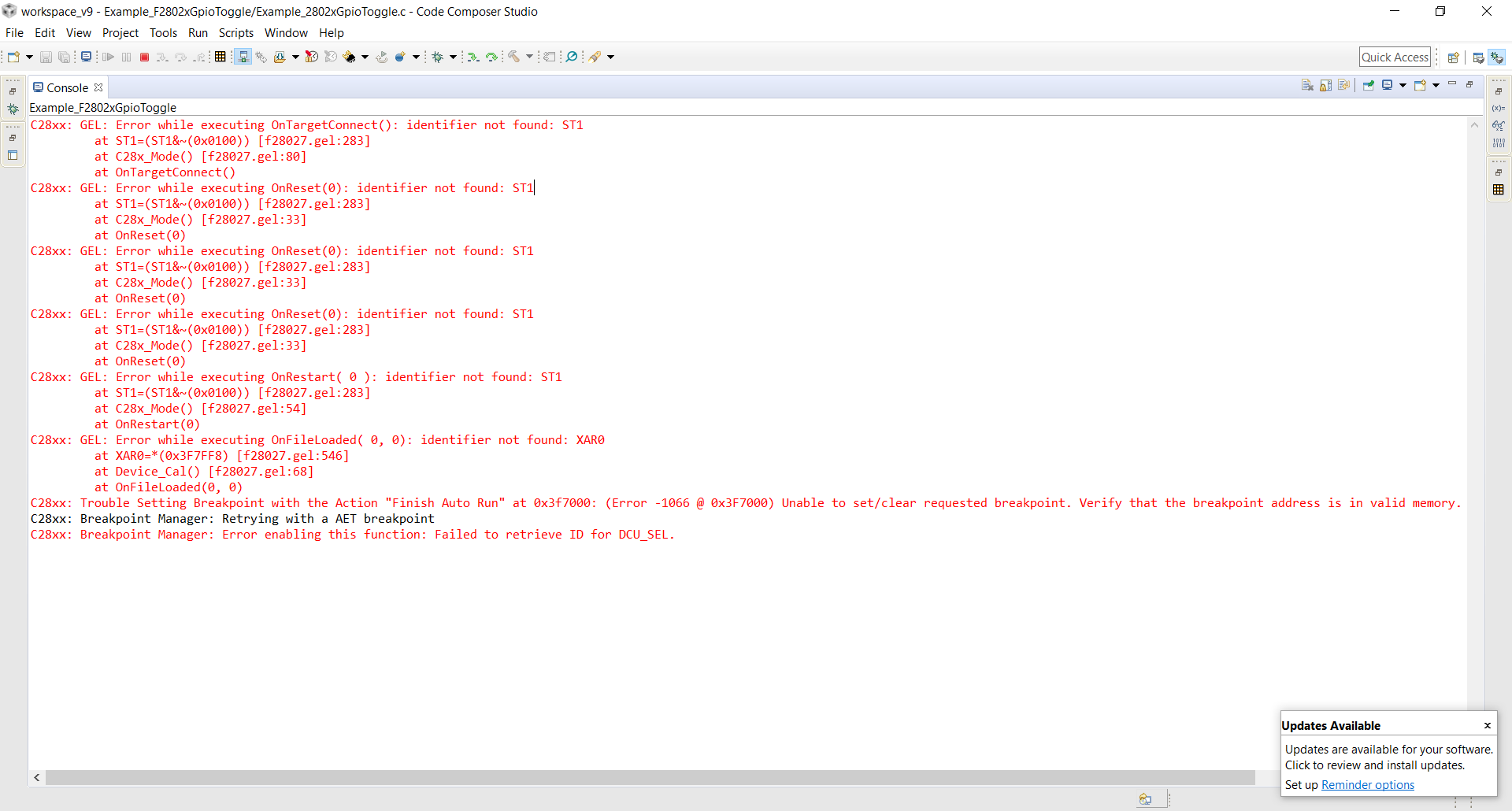
Previously, this board was stitched without problems. Now, after working with tms320f28069M, it stopped flashing and gives the following error (see picture). Trying to run the standard example c2000 GPIO_toggle.


sincerely, Alex

  • Previously, this board was stitched without problems.
     
    Sorry, I don’t understand what you mean by the above line.
     
    Now, after working with tms320f28069M, it stopped flashing and gives the following error (see picture). 
     
    You mean worked with a 28069 board for a while?
     
    Trying to run the standard example c2000 GPIO_toggle. 
     
    The title of your post says "Board is not flashing", but the address shown in your image pertains to RAM.
     
    Please explain clearly what your problem is. Are you unable to connect your board to CCS? or are you able to connect but unable to load your code in RAM?
  • If you are new to C2000 or CCS, please review the workshops at http://processors.wiki.ti.com/index.php/C2000_Archived_Workshops. Many questions can be answered by reviewing the workshop material for your specific device family or its closest equivalent. Excellent introductory videos about CCS are available at https://www.youtube.com/user/CodeComposerStudio

  • Hello , when I first started working with tms320f28027F, I could easily load the program into RAM and flash memory.


    At the moment I can not load the program either in RAM or in flash memory.


    Computer tms320f28027F sees (that is, it is displayed in the device manager).

    May I ask you about the algorithm for eliminating this error?

  • OK. It appears CCS is unable to connect to the board. Please download SPRACF0 and go through it. It has all the debugging tips you need.

  • ,

    Sorry, but the SPRACF0.pdf document did not help.

    I did everything that was written there, but the result did not change. (I attach a couple of steps in the figures).

  • What does the file F28027.gel contain? And how to declare the variable ST1 described in the error?

  • ST1 is not a "variable". It is a Status register and is a part of the CPU core registers.


    The gel files are present in C:\ti\ccsv8\ccs_base\emulation\gel. You can open the gel file with any editor. As to what they do, please refer to the workshop material or the CCS Youtube videos.


    Please install a fresh copy of CCS (may be on a different PC). If you have another debug probe (XDS100), you could try that to eliminate possible H/W issues with the current probe.

  • Hello ,

    The current version of CCS installed on my computer is 9.0.1.00004. Description of the GEL file found in the document spraa74a (only this did not help much). Reinstalled everything (after removing even the program location directory):

    • 1. MotorWare
    • 2. Instaspinuniversalgui_v105. (Not to be afraid of hieroglyphs)
    • 3. CCS 8.
    • 4. ControlSuite.
    • 5. C2000Ware

    Maybe in the GEL filer you need to specify the address of ST1? 

  • Hi,

    Thanks for sending the photographs and the details; the JTAG communications are properly working, given the process is failing only during the execution of a configuration script that runs AFTER the whole connection and communications processing is taking place, but BEFORE the code is loaded to the device's FLASH. 

    This tends to happen when the device is in an invalid boot mode or there is pre-loaded code that can influence the ability of the JTAG debugger from accessing the device's registers and/or memory. 

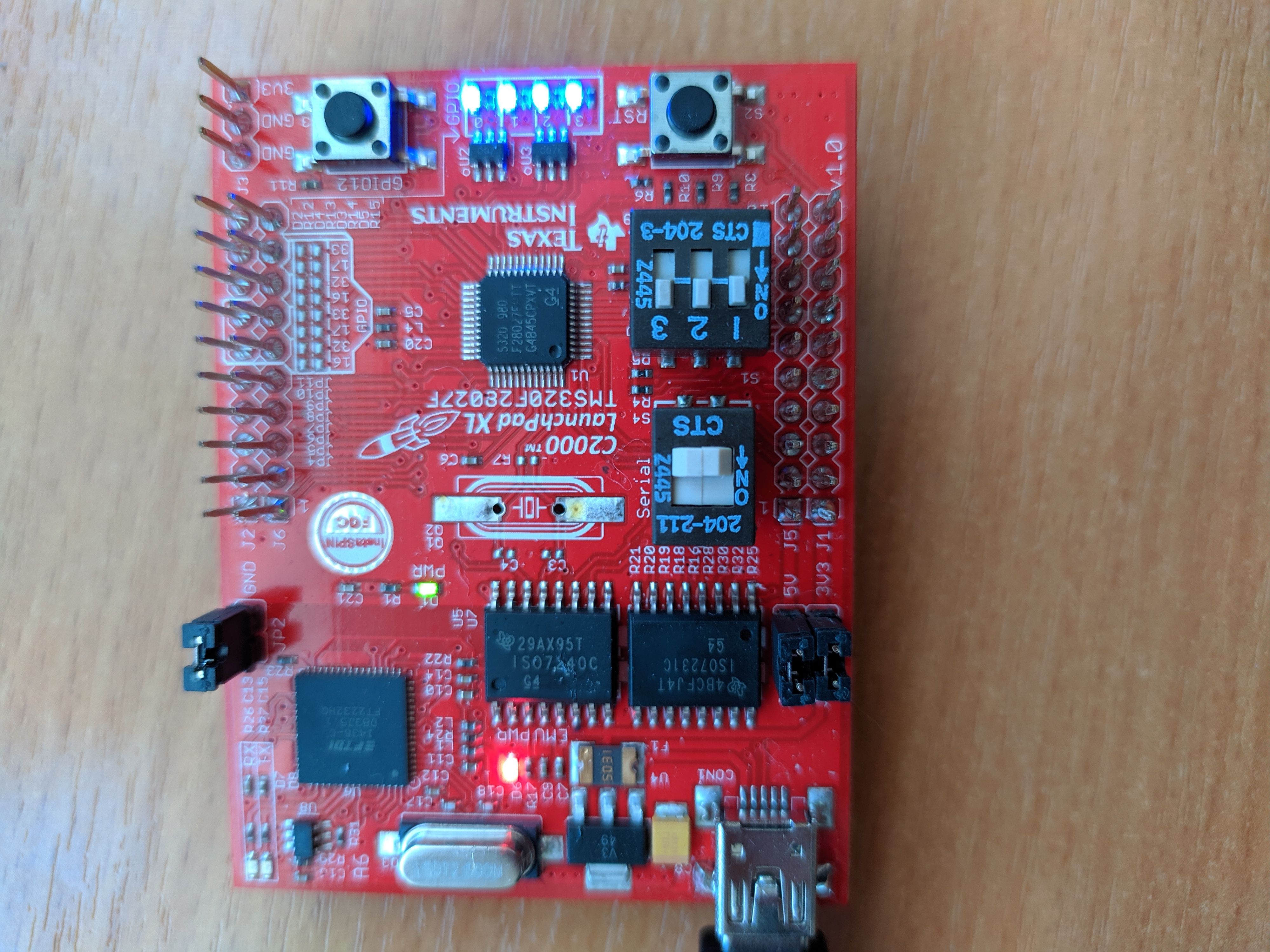
    In this case, can you double-check the documentation and set the S1-3 in the UP position? This is described in the section 4.3 of the LAUNCHXL-F28027F User's guide.  

    One additional detail: can you be absolutely sure you are loading the correct .out executable to the specific device? If code for a different device is loaded to the target, this may leave it in an unstable state. In this case,you can try to access the menu Tools --> OnChip Flash and erase the Flash entirely to be sure the device is absolutely blank. 

    I will try to think about additional scenarios that may be triggering this issue and report here if I find anything relevant.

    Hope this helps,

    Rafael

    P.S. A reference about the connection process is shown at:

    http://software-dl.ti.com/ccs/esd/documents/users_guide/ccs_debug-main.html 

  • Hello,

    I enclose a photograph of the board confirming that the jumpers S1 are set to UP-UP-UP.

    The downloadable project is located in the \ ti \ c2000 \ C2000Ware_2_00_00_02 \ device_support \ f2802x \ examples \ drivers \ gpio_toggle directory.
    It is assumed that the project is without errors (nothing has changed in the project).
    Memory cleared through UniFlash. Through the above is cleared with an error (see figure).

  • Hi,

    Sorry for missing your last reply. The error you are seeing is, in fact, in the script that initializes the device itself. 

    Given the register ST1 is a core register, it should be immediately accessible by the debugger and its scripts. Failure to do so indicates something may be unstable with the connection and/or the device itself. 

    Searching for similar scenarios I found the very thorough thread below. Despite it uses a different device, it discusses several options to troubleshooting and try to isolate this issue. 

    https://e2e.ti.com/support/tools/ccs/f/81/t/530661 

    In the meantime I will try to "break" my launchpad here and report back if I find anything relevant. 

    Hope this helps,

    Rafael

  • Hi,

    I believe that in the branch you described there is no solution to the problem, because firstly I take a clean, unchanged project (in this case, an example from c2000 or from motorware) secondly, on another machine (computer) everything works; thirdly, I don’t need to create an empty project (it seems to me that all the examples should work from the "box").

    thanks for the answer

  • Hi, 

    Unfortunately I couldn't find a way to "break" my launchpad and therefore I don't have many more ideas to try on this regard. I wonder if this is something intrinsid to the host in question and therefore it becomes a bit difficult to extend this to my setup here (I tried on both Windows 7 and 10 systems). Sorry.

    I will certainly be on the lookout for this issue and report back to this thread if I find anything relevant. 

    Regards,

    Rafael