This thread has been locked.

If you have a related question, please click the "Ask a related question" button in the top right corner. The newly created question will be automatically linked to this question.

CCS/TMS320F28377S: SCI Boot - LaunchPad TMS320F28377S

Part Number: TMS320F28377S
Other Parts Discussed in Thread: C2000WARE

Tool/software: Code Composer Studio

Hi all,

I would like to ask you about the SCI boot mode in the LaunchPad TMS320F28377S. I want to download a program and then use the integrated JTAG to communicate with the MCU via SCI-A. What would be the procedure to do it? Are the USB data input linked to the SCI-A port pins internally? Or the linkage of the I must perform externally?

Thank you

  • Hi Juan,

    You don't need to load or flash any additional code (via SCI or otherwise) in order to communicate with the device via JTAG; this will always work (unless the JTAG has been intentionally disabled per the security scheme).  If you just want to talk to the device via JTAG (to load and run code, debug, view the memories and registers, etc.) you can just connect to the device by correctly configuring your target configuration in CCS and connecting the USB cable to your LaunchPad.

    After that, if you want to use the SCI to talk to the PC via virtual serial port (via FTDI device indicated in your post), then check out the "SCI echoback" example in C2000ware.  You may need to modify the GPIO mux setting to use the right set of GPIOs for the virtual serial port.  I believe the correct ones are GPIO84 and GPIO85 (see the connections on the right side of the schematic you posted).  In this case, the FT2232H is the bridge between SCI and the USB.  

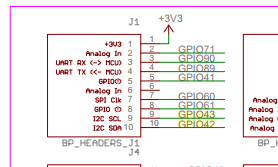
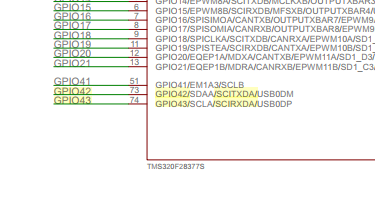
    If you want to talk to the PC via SCI in application code using the physical RS-232 port of the PC, the you can use the same software example, but you'll need to connect the SCI GPIOs to an external RS-232 transceiver IC.  You'll use different GPIOs in this case: maybe GPIO42 and GPIO43 as you have indicated.  

    You can also do boot from SCI (to load code via the SCI) without the JTAG connected.  Selecting SCI-Boot0 will use GPIO84 and GPIO85, which on this board are the virtual COM port via the FTDI chip.  Selecting SCI-Boot1 will use GPIO28 and GPIO29, in which case you'd need to hook-up an RS-232 (or other serial interface) transceiver to those GPIOs.