This thread has been locked.

If you have a related question, please click the "Ask a related question" button in the top right corner. The newly created question will be automatically linked to this question.

TMS320F28335: Debugger stopping in EQEP1_INT_ISR after pressing suspend while debugging code

Guru 20075 points

Part Number: TMS320F28335

Hello,

I am using an XDS100v2 debugger with Code Composer studio v9.0.1.00004 on Windows 7..

While debugging a program, the debugger sometimes stops  in EQEP1_INT_ISR after I pressed the suspend button in Code Composer.  This has happened several time and I think it started happening yesterday. 

My program is not using the EQEP peripheral. 

Below is the EQEP1_INT_ISR code and the state of the relevant registers immediately after the debugger stopped in EQEP1_INT_ISR.. 

As you can see, the PIEIFR5 is not enabled.

What could be causing this issue?

Stephen

interrupt void EQEP1_INT_ISR(void)    // EQEP-1
{
  // Insert ISR Code here

  // To receive more interrupts from this PIE group, acknowledge this interrupt
  // PieCtrlRegs.PIEACK.all = PIEACK_GROUP5;

  // Next two lines for debug only to halt the processor here
  // Remove after inserting ISR Code
  asm ("      ESTOP0");
  for(;;);
}

PIE	Peripheral Interrupt Expansion Registers	
	PIECTRL	0x0D81	PIE, Control Register [Memory Mapped]	
	PIEACK	0x0009	PIE, Acknowledge Register [Memory Mapped]	
	PIEIER1	0x0048	PIE, INT1 Group Enable Register [Memory Mapped]	
	PIEIFR1	0x0029	PIE, INT1 Group Flag Register [Memory Mapped]	
	PIEIER2	0x0000	PIE, INT2 Group Enable Register [Memory Mapped]	
	PIEIFR2	0x0000	PIE, INT2 Group Flag Register [Memory Mapped]	
	PIEIER3	0x0000	PIE, INT3 Group Enable Register [Memory Mapped]	
	PIEIFR3	0x0000	PIE, INT3 Group Flag Register [Memory Mapped]	
	PIEIER4	0x0003	PIE, INT4 Group Enable Register [Memory Mapped]	
	PIEIFR4	0x0003	PIE, INT4 Group Flag Register [Memory Mapped]	
	PIEIER5	0x0000	PIE, INT5 Group Enable Register [Memory Mapped]	
	PIEIFR5	0x0000	PIE, INT5 Group Flag Register [Memory Mapped]	
	PIEIER6	0x0000	PIE, INT6 Group Enable Register [Memory Mapped]	
	PIEIFR6	0x0000	PIE, INT6 Group Flag Register [Memory Mapped]	
	PIEIER7	0x0018	PIE, INT7 Group Enable Register [Memory Mapped]	
	PIEIFR7	0x0000	PIE, INT7 Group Flag Register [Memory Mapped]	
	PIEIER8	0x0003	PIE, INT8 Group Enable Register [Memory Mapped]	
	PIEIFR8	0x0000	PIE, INT8 Group Flag Register [Memory Mapped]	
	PIEIER9	0x000C	PIE, INT9 Group Enable Register [Memory Mapped]	
	PIEIFR9	0x0000	PIE, INT9 Group Flag Register [Memory Mapped]	
	PIEIER10	0x0001	PIE, INT10 Group Enable Register [Memory Mapped]	
	PIEIFR10	0x0000	PIE, INT10 Group Flag Register [Memory Mapped]	
	PIEIER11	0x0000	PIE, INT11 Group Enable Register [Memory Mapped]	
	PIEIFR11	0x0000	PIE, INT11 Group Flag Register [Memory Mapped]	
	PIEIER12	0x0000	PIE, INT12 Group Enable Register [Memory Mapped]	
	PIEIFR12	0x0000	PIE, INT12 Group Flag Register [Memory Mapped]	

eQEP2	eQEP2 Registers	
	QPOSCNT	0x00000000	eQEP Position Counter [Memory Mapped]	
	QPOSINIT	0x00000000	eQEP Initialization Position Count [Memory Mapped]	
	QPOSMAX	0x00000000	eQEP Maximum Position Count [Memory Mapped]	
	QPOSCMP	0x00000000	eQEP Position-compare [Memory Mapped]	
	QPOSILAT	0x00000000	eQEP Index Position Latch [Memory Mapped]	
	QPOSSLAT	0x00000000	eQEP Strobe Position Latch [Memory Mapped]	
	QPOSLAT	0x00000000	eQEP Position Latch [Memory Mapped]	
	QUTMR	0x00000000	eQEP Unit Timer [Memory Mapped]	
	QUPRD	0x00000000	eQEP Unit Period Register [Memory Mapped]	
	QWDTMR	0x0000	eQEP Watchdog Timer [Memory Mapped]	
	QWDPRD	0x0000	eQEP Watchdog Period Register [Memory Mapped]	
	QDECCTL	0x0000	eQEP Decoder Control Register [Memory Mapped]	
	QEPCTL	0x0000	eQEP Control Register [Memory Mapped]	
	QCAPCTL	0x0000	eQEP Capture Control Register [Memory Mapped]	
	QPOSCTL	0x0000	eQEP Position-compare Control Register [Memory Mapped]	
	QEINT	0x0000	eQEP Interrupt Enable Register [Memory Mapped]	
	QFLG	0x0000	eQEP Interrupt Flag Register [Memory Mapped]	
	QCLR	0x0000	eQEP Interrupt Clear Register [Memory Mapped]	
	QFRC	0x0000	eQEP Interrupt Force Register [Memory Mapped]	
	QEPSTS	0x0000	eQEP Status Register [Memory Mapped]	
	QCTMR	0x0000	eQEP Capture Timer [Memory Mapped]	
	QCPRD	0x0000	eQEP Capture Period Register [Memory Mapped]	
	QCTMRLAT	0x0000	eQEP Capture Timer Latch [Memory Mapped]	
	QCPRDLAT	0x0000	eQEP Capture Period Latch [Memory Mapped]	

SYSCTRL	System Control Registers	
	PLLSTS	0x0101	PLL Status Register [Memory Mapped]	
	HISPCP	0x0006	High-Speed Peripheral Clock Pre-Scaler Register [Memory Mapped]	
	LOSPCP	0x0004	Low-Speed Peripheral Clock Pre-Scaler Register [Memory Mapped]	
	PCLKCR0	0xC818	Peripheral Clock Control Register 0 [Memory Mapped]	
	PCLKCR1	0x0300	Peripheral Clock Control Register 1 [Memory Mapped]	
	LPMCR0	0x00FC	Low Power Mode Control Register 0 [Memory Mapped]	
	PCLKCR3	0x3F00	Peripheral Clock Control Register 3 [Memory Mapped]	
	PLLCR	0x000A	PLL Control Register [Memory Mapped]	
	SCSR	0x0005	System Control and Status Register [Memory Mapped]	
	WDCNTR	0x0000	Watchdog Counter Register [Memory Mapped]	
	WDKEY	0x00C0	Watchdog Reset Key Register [Memory Mapped]	
	WDCR	0x00C0	Watchdog Control Register [Memory Mapped]	
	MAPCNF	0x0000	ePWM/HRPWM Re-map Register [Memory Mapped]	
DEVEMU	Device Emulation Registers	
	DEVICECNF	0x080F006B	Device Configuration Register [Memory Mapped]	
	CLASSID	0x00EF	Class ID Register [Memory Mapped]	
	REVID	0x0001	Revision ID Register [Memory Mapped]	
	PROTSTART	0x0100	Block Protection Start Address Register [Memory Mapped]	
	PROTRANGE	0x00FF	Block Protection Range Address Register [Memory Mapped]	
	PARTID	0x00EF	Part ID Register [Memory Mapped]	
Core Registers	Core Registers	
	ACC	0xD800014F	Accumulator [Core]	
	P	0x0000014F	Product Register [Core]	
	XT	0x001500AD	Multiplicand Register [Core]	
	XAR0	0x00000000	Auxiliary Register 0 [Core]	
	XAR1	0x0000FFFF	Auxiliary Register 1 [Core]	
	XAR2	0x00000000	Auxiliary Register 2 [Core]	
	XAR3	0x00000000	Auxiliary Register 3 [Core]	
	XAR4	0x00006208	Auxiliary Register 4 [Core]	
	XAR5	0x00000066	Auxiliary Register 5 [Core]	
	XAR6	0x00000001	Auxiliary Register 6 [Core]	
	XAR7	0x0000CEC0	Auxiliary Register 7 [Core]	
	PC	0x3078E2	Program Counter [Core]	
	RPC	0x0063A8	Return Program Counter [Core]	
	ST0	0x00EC	Status Register 0 [Core]	
	ST1	0x8A1B	Status Register 1 [Core]	
	DP	0x033E	Data-Page Pointer [Core]	
	SP	0x0096	Stack Pointer [Core]	
	IER	0x0000	Interrupt Enable Register [Core]	
	IFR	0x0000	Interrupt Flag Register [Core]	
	DBGIER	0x0000	Debug Interrupt Enable Register [Core]	
	STF	0x00000628	Status Register for FPU [Memory Mapped]	
	R0L	0x00000000	Floating Point Unit R0L [Memory Mapped]	
	R0H	0xCB80014F	Floating Point Unit R0H [Memory Mapped]	
	R1L	0x00000000	Floating Point Unit R1L [Memory Mapped]	
	R1H	0x43350000	Floating Point Unit R1H [Memory Mapped]	
	R2L	0x00000000	Floating Point Unit R2L [Memory Mapped]	
	R2H	0x00000000	Floating Point Unit R2H [Memory Mapped]	
	R3L	0x00000000	Floating Point Unit R3L [Memory Mapped]	
	R3H	0x00000000	Floating Point Unit R3H [Memory Mapped]	
	R4L	0x00000000	Floating Point Unit R4L [Memory Mapped]	
	R4H	0x00000000	Floating Point Unit R4H [Memory Mapped]	
	R5L	0x00000000	Floating Point Unit R5L [Memory Mapped]	
	R5H	0x00000000	Floating Point Unit R5H [Memory Mapped]	
	R6L	0x00000000	Floating Point Unit R6L [Memory Mapped]	
	R6H	0x00000000	Floating Point Unit R6H [Memory Mapped]	
	R7L	0x00000000	Floating Point Unit R7L [Memory Mapped]	
	R7H	0x00000000	Floating Point Unit R7H [Memory Mapped]	
	RB	0x00000000	Repeat Block Register [Memory Mapped]	


  • Stephen,

    Your code is likely clearing the PIEIER register for that group outside of an ISR when interrupts are firing.   If PIEIER is cleared just after an interrupt is sent to the CPU, the PIE will be asked to respond to an interrupt when none are enabled.  In this case the PIE responds with the interrupt vector for the first interrupt from the group being serviced even if it is not enabled. 

    To avoid this, follow the instructions for modifying the PIEIER register described in the TMS320x2833x, 2823x System Control and Interrupts Reference Guide

    Regards

    Lori

  • The only place I clear the PIEIER for that group is when the PIEIER registers are all initialized to zero at startup.

    Maybe a watchdog timeout is occurring and that is causing the initialization routine to be called again.

  • stevenh said:
    The only place I clear the PIEIER for that group is when the PIEIER registers are all initialized to zero at startup.

    One thing I should clarify - It can be clearing individual bits in the PIEIER that can cause this.  It doesn't have to be all bits.  If an interrupt vector request goes to the PIE and an interrupt is not both flagged and enabled, the PIE will respond with interrupt 1 in that group.

    Can you double check for this case?  You can use a Code Composer Studio watchpoint for the PIEIER to see when it is being written to.

    Another debug help would be to set a breakpoint in the ISR and instead of looping let it return.  This will tell us where the CPU was before this happened and may shed some light.  I've seen cases where the CPU was in the weeds and somehow then ended up in an ISR. 

    stevenh said:
    Maybe a watchdog timeout is occurring and that is causing the initialization routine to be called again.

    The reset would impact everything so the interrupt would be reset as well.  I don't think this is the cause - however it is always a good debug practice to see if the WD is firing when not expected.  Monitoring the external reset line with a 'scope can help tell you if this is happening.

    Regards

    Lori

  • Hi Steven,

    I wanted to see if you have been able to resolve the issue. 

    If the answer provided resolved your issue, click the green  "this resolved my issue" button to let me know.

    If the answer provided did not resolve your issue, or if your question needs further attention, click the "This did NOT resolve my issue" button and reply to this thread with more information.

    Regards,

    Lori

  • It also goes into the Illegal instruction ISR sometimes when I press restart.  

    The Illegal instruction ISR returned to a RAM address (=00c342).  00c340 is start of a class object.

    00c32e:   9DFC        ADDB         AH, #-4
    00c32f:   63BB        SB           -69, GEQ
    00c330:   15CFFE5E    MPYA         P, *+XAR7[1], #-418
    00c332:   E7BE        .word        0xe7be
    00c333:   2E354B4C    LOOPNZ       @0x35, #0x4b4c
    00c335:   AF5D        OR           ACC, *-SP[29]
    00c336:   12C0        MPY          ACC, T, *+XAR0[0]
    00c337:   8FEFEB5E    BAR          -5282, AR5, AR7, NEQ
    00c339:   EBEF        SUBR         *+XAR7[5], AH
    00c33a:   D603        MOVB         AR6, #0x3
    00c33b:   85A7        MOV          ACC, @AR7
    00c33c:   3D71        MOVB         *-SP[49], AH.LSB
    00c33d:   99AE        OR           *BR0++, AH
    00c33e:   9BBD        MOVB         AH, #0xbd
    00c33f:   0000        ITRAP0       
    00c340:   0001        ABORTI       
    00c341:   0000        ITRAP0       
    00c342:   0019        INTR         INT10
    00c343:   001C        INTR         INT13
    00c344:   0000        ITRAP0       
    00c345:   0000        ITRAP0       
    00c346:   00520001    LB           0x120001
    00c348:   0014        INTR         INT5
    00c349:   0002        POP          IFR
    00c34a:   0000        ITRAP0       
    00c34b:   0000        ITRAP0       
    00c34c:   0000        ITRAP0      
    00c34d:   0000        ITRAP0       
    00c34e:   0001        ABORTI     

    I think this issue only come up in special situations (i.e. when I press the reset, restart or pause button in CCS,) and not all the time in those situations.

    This may be caused by some type of board issue or my test setup.  

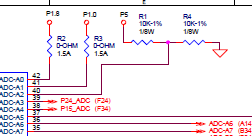
    Also, my code monitors various board voltages as shown in the schematic below.  They measure within range when the board is installed in the actual unit.  However, when I am testing the board at my desk, they measure way out of range, so I have to disable the monitor code when I am testing the board at my desk.  I measured all the voltages with a multi-meter and oscilloscope and they all look ok.  Also, I checked the continuity between all the grounds.

    My Test setup consist of the following:

    1. The board I am testing.

    2. A display board that communicates with (1.) through a CAN bus.

    3. Two power supplies (one for the display board and one for (1.)

    4. A NIDAQ that supplies AC and  DC signals to (1.)

    5. The NIDAQ ground connects to (1.) ground.

    6. An interface board that supplies a gain to the NIDAQ signal and then route them to ADCs (separate from the micro ADC) on (1.) 

    7. The power supply ground that supplies power to (1.) is connected to the interface board ground.

    8. The interface board ground is connected to (1.) ground..

  • It happened again when I pressed restart.  This time it stopped in the EQEP1_INT_ISR and returned to 00d007 (inside another class object).  The class object starts at 00d000.  the INTR INT5 instruction is probably what caused it to go to EQEP1_INT_ISR.

    00cffc:   9CBD        ADDB         AL, #-67
    00cffd:   6DDC        SB           -36, TC
    00cffe:   DF39        ADDB         XAR7, #57
    00cfff:   EC6D        SBF          109, EQ
    00d000:   0000        ITRAP0       
    00d001:   8922        AND          ACC, @0x22
    00d002:   025B        MOVB         ACC, #91
    00d003:   024B        MOVB         ACC, #75
    00d004:   849A0001    XMAC         P, *+XAR2[AR1], *(0x0001)
    00d006:   0014        INTR         INT5
    00d007:   0001        ABORTI       
    00d008:   0004        PUSH         RPC

  • Steven,

    It looks like the PC is ending up in a location it shouldn't be (data RAM).  This can happen if the stack overflows or gets overwritten.  Buffers being too large can also cause behavior like this. 

    Can you take a look at the stack pointer (SP) and see if it looks reasonable and that the data on the stack also looks reasonable when this happens?  You can also fill memory with a known value using CCS (Scripts->init memory map->fill with ESTOP0).  ESTOP0 is a breakpoint and will halt the processor.  You can also see how large the stack grew by looking at the memory and seeing where the ESTOP0s start in your stack area. 

    -Lori

  • The stack pointer was set to A2 after it stopped in the Illegal Instruction ISR.

    What is strange is that I previously allocated address range 0050 to 07B0 to the stack, but the memory map is showing the stack ends at 0350 (i.e. 

    0x00000350 _STACK_END).

    Maybe CCS has a different memory map setup.

    I was able to get it to happen again and the SP = 011A.  The return address was 0c342  (like in my last post).  011A is at the location of the second 8A48 shown below.

    0000    0000    0000	0000	0134	FFFF	8A48	033E	13C9	001F	C342	0000	B8BE	0030   0000
    0000	6008	0000	0628	0000	8A48	033E	13C9	001F	74A3	0030	0000    4335	0000   0000

  • It is not overwriting past the stack.  It is probably some piece of code writing into the stack area.

    Why would it only do it when I press restart?  However, it doesn't do every time I press restart.

  • stevenh said:
    Why would it only do it when I press restart?  However, it doesn't do every time I press restart.

    Steven,

    This is a good observation and may be the answer. 

    A "restart" does not reset the board/device. Code Composer only forces the PC to the defined entry point of your code. In the C2000 examples we provide this is set with the linker option "--entry_point=code_start".  This often works but in some cases may not.  Because the device was not reset, any peripheral/interrupt that is pre-configured from a previous run may get in the way of the regular code execution and disrupt the normal flow.   If the --entry_point has not been defined, then I believe main() is used as the default. 

    The safer option is to "reset" which will perform a debug reset of the device. The code will run through the boot ROM so you will need to set the boot mode pins appropriately to reach your application.   You could also do a "reset" followed by "restart" but I feel that doing both gets old quickly.

    Note that there are some debugger options which will change the behavior.  Under Tools->debugger options -> "Auto run and launch options" you can define if the code runs to main() automatically after a load, reset, or restart.  You can uncheck these to see what is happening more clearly.

    If you perform a reset instead of restart does the problem go away?

    Regards

    Lori

  • stevenh said:

    What is strange is that I previously allocated address range 0050 to 07B0 to the stack, but the memory map is showing the stack ends at 0350 (i.e. 

    0x00000350 _STACK_END).

    This shouldn't be the case. The map file is generated by the compiler (specifically the linker) and only knows what you tell it in the .cmd file. 

  • Ok, I found out what the issue was.  I had set the stack section to be a length of 0x7B0, but I didn't set the stack size in the project properties to the same size.  In another project I had worked on, I had set them to the same size.

  • I think the incorrect stack size was probably causing the issue.  I have been running the program for a short with the new stack size (0x7B0) and 0x388-0x50 of the stack is already used up. 

    The reset symbol is grayed out when the program is running, so I am not able to reset the program while it is running.