This thread has been locked.

If you have a related question, please click the "Ask a related question" button in the top right corner. The newly created question will be automatically linked to this question.

CCS/LAUNCHXL-F28069M: EEPROM EMULATION ISSUE WITH THE FLASH API

Part Number: LAUNCHXL-F28069M
Other Parts Discussed in Thread: CONTROLSUITE, TMS320F28069M, C2000WARE

Tool/software: Code Composer Studio

Hi everyone

This is Mike!

I have followed this procedure http://www.ti.com/lit/an/sprab69/sprab69.pdf to use the EEPROM Emulation, but unfortunately I have not run it yet cause some situations:

1.- The EEPROM example, at sprab69.pdf,  is compiled in the Code Composer 3.3 or so, I did the legacy import and  it get stucked in this code line (178) from this file (F280xx_EEPROM.c). The Code Composer sends me a message  "F28X_Prog.c is not found".

		// Program Bank Status to current bank
		Status = Flash_Program(Bank_Pointer,Bank_Status,Length,&ProgStatus);

2.- ThenI realized that in the Example_2806xFlashProgramming, from ControlSuite, there is a file. (2806x_BootROM_API_TABLE_Symbols .lib) and it is different, or I think it could be, than the file in spra69 (Flash2806_API_V302.lib)

So I linked the Flash2806x_API_Config.h, the Flash2806x_API_Library.h and the 2806x_BootROM_API_TABLE_Symbols.lib in the spra69 project replacing the old ones and modifying the F280xx_EEPROM.h.

3.It run but now Code Composer sends this message (No source available for "0x3ff4fa")  in the same line code (178) in the same file (F280xx_EEPROM.c)

So right now I'm stucked and I think you can please help to run this EEPROM Emulation F28069 to use it in my application

Regards!

Mike

  • Hi Mike,

    You are using the F2806x (f28069M). This appnote and corresponding collateral is not meant for this device, i.e. F2806 is different than F2806x.

    I'm not familiar with the software, but there's likely a good amount of porting that needs to be done to have it work on the F2806x.

    Best,

    Kevin

  • Thanks Kevin

    In fact the whole package that sprab69.pdf says, is marked as F2806x_EEPROM so I thought it could work for the F28069M.

    If you know about some TIers there that can help with this I'll be very glad!

    Mike

  • Is anybody out there?

  • Maybe my issue is so basic so I have to solve it by myself.

    If it Is the case please tell me.

    Thanks!

  • Hi Mike,

    As I mentioned this software and documentation is not meant for this device. A decent amount of porting will have to be done by you to get it to work.

    I will take a look at your modified F280xx_EEPROM.c and .h files if you attach them here.

    Best,

    Kevin

  • Hi Kevin

    Sorry for Late reply, I took my hollidays.

    Here are the F280xx_EEPROM.c and the F280xx_EEPROM.h, The code lines I modified are marked.

    Thanks. Hoping we can get running this thing together.

    Regards

    Mike

    8865.F280xx_EEPROM.h

    //############################################################################
    //
    // FILE:   F280xx_EEPROM.c
    //
    // TITLE:  EEPROM Read, Write, and Erase Functions
    //
    //############################################################################
    // Authors: Tim Love / Pradeep Shinde
    // Release Date: Sep 2009
    //############################################################################
    
    
    #include "F280xx_EEPROM.h"						// EEPROM Include File
    
    // Global Variables
    Uint16 Read_Buffer[64];
    Uint16 Write_Buffer[64];	
    Uint16 Bank_Counter = 0;
    Uint16 Page_Counter = 0;
    Uint16 Bank_Status[1] = {0};
    Uint16 Page_Status[1] = {0};
    Uint16 *Bank_Pointer;		
    Uint16 *Page_Pointer;
    Uint16 *Sector_End;
    
    FLASH_ST FlashStatus;
    FLASH_ST ProgStatus;
    
    // All Flash API functions need to be ran from internal RAM. Place all functions
    // that contain Flash API calls in ramfuncs to allow copy from Flash to RAM.
    #pragma CODE_SECTION(EEPROM_Erase,"ramfuncs");
    #pragma CODE_SECTION(EEPROM_Write,"ramfuncs");
    #pragma CODE_SECTION(EEPROM_UpdateBankStatus,"ramfuncs");
    #pragma CODE_SECTION(EEPROM_UpdatePageStatus,"ramfuncs");
    #pragma CODE_SECTION(EEPROM_ProgramSingleByte,"ramfuncs");
    
    
    //######################### EEPROM_GET_VALID_BANK ############################
    void EEPROM_GetValidBank()
    {
    //Each page holds 64 data words
    //Page size = Page_status word + 64W = 65W
    //Bank Size = Bank_status word + 8 * Page size = 1 + 8*65 = 521W
    
    	Uint16 i;
    
       	RESET_BANK_POINTER;		// Reset Bank Pointer to enable search for current Bank
       	RESET_PAGE_POINTER;		// Reset Page Pointer to enable search for current Page
    
    	// Find Current Bank 
    	for(i=0;i<8;i++)
    	{
    		Bank_Status[0] = *(Bank_Pointer);		// Read contents of Bank Pointer			
    		
    		if(Bank_Status[0] == EMPTY_BANK)		// Check for Unused Bank  
    		{
    			Bank_Counter = i;					// Set Bank Counter to number of current page								 	
    			return;								// If Bank is Unused, return as EEPROM is empty
    		}
    	
    		if(Bank_Status[0] == CURRENT_BANK)		// Check for In Use Bank 
    		{
    			Bank_Counter = i;					// Set Bank Counter to number of current bank
    			Page_Pointer = Bank_Pointer + 1;	// Set Page Pointer to first page in current bank
    			break;								// Break from loop as current bank has been found
    		}
    
    		if(Bank_Status[0] == USED_BANK)   		// Check for Used Bank											
    			Bank_Pointer += 521; 				// If Bank has been used, set pointer to next bank		
    	}
    
    	// Find Current Page
    	for(i=0;i<8;i++)
    	{
    		Page_Status[0] = *(Page_Pointer);		// Read contents of Page Pointer
    		
    		// Check for Blank Page or Current Page	
    		if(Page_Status[0] == BLANK_PAGE || Page_Status[0] == CURRENT_PAGE)
    		{
    			Page_Counter = i;					// Set Page Counter to number of current page		
    			break;								// Break from loop as current page has been found
    		}
    
    		if(Page_Status[0] == USED_PAGE)			// Check for Used Page
    			Page_Pointer += 65;					// If page has been used, set pointer to next page
    	}
    
    	if (Bank_Counter==7 && Page_Counter==7)		// Check for full EEPROM
    	{
    		EEPROM_Erase();							// Erase flash sector being used as EEPROM
      		RESET_BANK_POINTER; 					// Reset Bank Pointer as EEPROM is empty
       		RESET_PAGE_POINTER;						// Reset Pank Pointer as EEPROM is empty
    		asm(" ESTOP0");
    	}
    }
    //######################### EEPROM_GET_VALID_BANK ############################
    
    
    //############################# EEPROM_ERASE #################################
    void EEPROM_Erase()
    {
    	Uint16  Status;
    
    	#ifdef F2809						// If F2809 is being used erase Sector H
    	Status = Flash_Erase((SECTORH),&FlashStatus);
    	#else								// Otherwise erase Sector D for other devices
    	Status = Flash_Erase((SECTORD),&FlashStatus);
    	#endif
    
       	if(Status != STATUS_SUCCESS) 		// If Erase fails halt program or handle error
       	{
          	asm(" ESTOP0");
       	} 
    }
    //############################# EEPROM_ERASE #################################
    
    
    //############################# EEPROM_READ ##################################
    void EEPROM_Read()
    {
    	Uint16 i;
    
    	EEPROM_GetValidBank();					// Find In Use Bank and Current Page
    
    	// Transfer contents of Current Page to Read Buffer
    	for(i=0;i<64;i++)
    		Read_Buffer[i] = *(++Page_Pointer); 	
    }
    //############################# EEPROM_READ ##################################
    
    
    //############################ EEPROM_WRITE ##################################
    void EEPROM_Write()
    {
    	// Variables need for Flash API Functions
    	Uint16 Status;
    	Uint32 Length;
    	FLASH_ST ProgStatus;
    
    	EEPROM_GetValidBank();					// Find In Use Bank and Current Page
    
        EEPROM_UpdatePageStatus();				// Update Page Status of previous page 
    	EEPROM_UpdateBankStatus();				// Updage Bank Status of current and previous bank
    
    	// Program data located in Write_Buffer to current page
    	Length = 64;							// Set Length for programming
    	Status = Flash_Program(Page_Pointer+1,Write_Buffer,Length,&ProgStatus);
    	
    	// Modify Page Status from Blank Page to Current Page if flash programming was successful
    	if (Status == STATUS_SUCCESS)   				 
    	{
    		Page_Status[0] = CURRENT_PAGE;  	// Set Page Status to Current Page
    		Length = 1;							// Set Length for programming status
    		Status = Flash_Program(Page_Pointer,Page_Status,Length,&ProgStatus);
    	}
    }
    //############################ EEPROM_WRITE ##################################
    
    
    //###################### EEPROM_UPDATE_BANK_STATUS ###########################
    void EEPROM_UpdateBankStatus()
    {
    	// Variables needed for Flash API Functions
    	Uint16 Status;
    	Uint32 Length;
    
    	Length = 1;								// Set Length for programming
    
    	Bank_Status[0] = *(Bank_Pointer);		// Read Bank Status from Bank Pointer
    	Page_Status[0] = *(Page_Pointer);		// Read Page Status from Page Pointer
    
    	// Program Bank Status for Empty EEPROM
    	if (Bank_Status[0] == EMPTY_BANK)		
    	{	
    		Bank_Status[0] = CURRENT_BANK;  	// Set Bank Status to In Use Bank
    		
    		// Program Bank Status to current bank
    		Status = Flash_Program(Bank_Pointer,Bank_Status,Length,&ProgStatus);
    		Page_Counter =0;
    		Page_Pointer = Bank_Pointer + 1;	// Set Page Pointer to first page of current bank
    	}	
    
    	// Program Bank Status of full bank and following bank
    	if (Bank_Status[0] == CURRENT_BANK && Page_Counter == 7)	
    	{	
    		Bank_Status[0] = USED_BANK;			// Set Bank Status to Used Bank
    		
    		// Program Bank Status to full bank			
    		Status = Flash_Program(Bank_Pointer,Bank_Status,Length,&ProgStatus);
    		
    		Bank_Pointer +=521;					// Increment Bank Pointer to next bank
    	
    		Bank_Status[0] = CURRENT_BANK;		// Set Bank Status to In Use Bank
    	
    		// Program Bank Status to current bank		
    		Status = Flash_Program(Bank_Pointer,Bank_Status,Length,&ProgStatus);
    
    		Page_Counter =0;
    		Page_Pointer = Bank_Pointer +1;		// Set Page Pointer to first page of current bank
    	}
    }
    //###################### EEPROM_UPDATE_BANK_STATUS ###########################
    
    
    //###################### EEPROM_UPDATE_PAGE_STATUS ###########################
    void EEPROM_UpdatePageStatus()
    {
    	// Variables needed for Flash API Functions
    	Uint16 Status;
    	Uint32 Length;
    
    	Bank_Status[0] = *(Bank_Pointer);		// Read Bank Status from Bank Pointer			
    	Page_Status[0] = *(Page_Pointer);		// Read Page Status from Page Pointer
    
    	// Check if Page Status is blank. If so return to EEPROM_WRITE.
    	if(Page_Status[0] == BLANK_PAGE)
    		return;
    	
    	// Program previous page's status to Used Page
    	else
    	{			
    		Page_Status[0] = USED_PAGE; 		// Set Page Status to Used Page 	
    		Length = 1;							// Set Length for programming 
    		Status = Flash_Program(Page_Pointer,Page_Status,Length,&ProgStatus);		 
    		Page_Pointer +=65;					// Increment Page Pointer to next page
    	}
    }
    //###################### EEPROM_UPDATE_PAGE_STATUS ###########################
    
    
    //###################### EEPROM_GET_SINGLE_POINTER ###########################
    void EEPROM_GetSinglePointer(Uint16 First_Call)
    {
    	Uint16 *End_Address;
    
    	End_Address = (Uint16 *)END_OF_SECTOR;	// Set End_Address for sector
    
    	if(First_Call == 1)						// If this is first call to function, find valid pointer
    	{	
    		RESET_BANK_POINTER;					// Reset Bank Pointer to beginning of sector
    		while(*(Bank_Pointer) != 0xFFFF)	// Test each location for data
    			Bank_Pointer++;					// Increment to next location
    	}
    		
    	if(Bank_Pointer >= End_Address)			// Test if sector is full 
    	{    
    		EEPROM_Erase();						// Erase flash sector being used as EEPROM
      		RESET_BANK_POINTER; 				// Reset Bank Pointer as EEPROM is empty
       		asm(" ESTOP0");
    	}
    	
    }
    //###################### EEPROM_GET_SINGLE_POINTER ###########################
    
    
    //##################### EEPROM_PROGRAM_SINGLE_BYTE ###########################
    void EEPROM_ProgramSingleByte(Uint16 data)
    {
    	// Variables needed for Flash API Functions
    	Uint16 Status;
    	Uint32 Length;
    
    	Write_Buffer[0] = data;					// Prepare data to be programmed
    		
    	Length = 1;								// Set Length for programming
    	Status = Flash_Program(Bank_Pointer++,Write_Buffer,Length,&ProgStatus);
    	EEPROM_GetSinglePointer(0);				// Test for full sector	
    }
    //##################### EEPROM_PROGRAM_SINGLE_BYTE ###########################


  • The lib file that is in ControlSuite (2806x_BootROM_API_TABLE_Symbols.lib)  it's already installed in the same root of the F28XX_EEPROM libs. I mean, I replace the old lib file for this new one.

    Also the Flash2806x_API_Config.h, Flash2806x_API_Library.h were installed to reaplce the old ones.

    Hoping to use this EEPROM emulation in TMS320F28069M or LAUNCLXL-F28069M!

    Regards

    Mike

  • Hi

    Is somebody there?

    Regards

    Mike

  • Hi Mike,

    You'll need to add a section similar to the below, but for the F2806x (at the least):

    #ifdef F2808
    #define RESET_BANK_POINTER Bank_Pointer = (Uint16 *)0x3E8000	// Sector D		
    #define RESET_PAGE_POINTER Page_Pointer = (Uint16 *)0x3E8001
    #define END_OF_SECTOR 0x3EBFFF;
    #endif

    Not certain why sector D is used for the above, maybe the document will tell. For F2806x sector D is the same addresses as the F2808 device. So you're code will have the below with F2806x defined somewhere:

    #ifdef F2806x
    #define RESET_BANK_POINTER Bank_Pointer = (Uint16 *)0x3E8000	// Sector D		
    #define RESET_PAGE_POINTER Page_Pointer = (Uint16 *)0x3E8001
    #define END_OF_SECTOR 0x3EBFFF;
    #endif

    Can you share the F280xx_EEPROM_Example.c file you're using as well?

    Best,

    Kevin

  • Hi Mike,

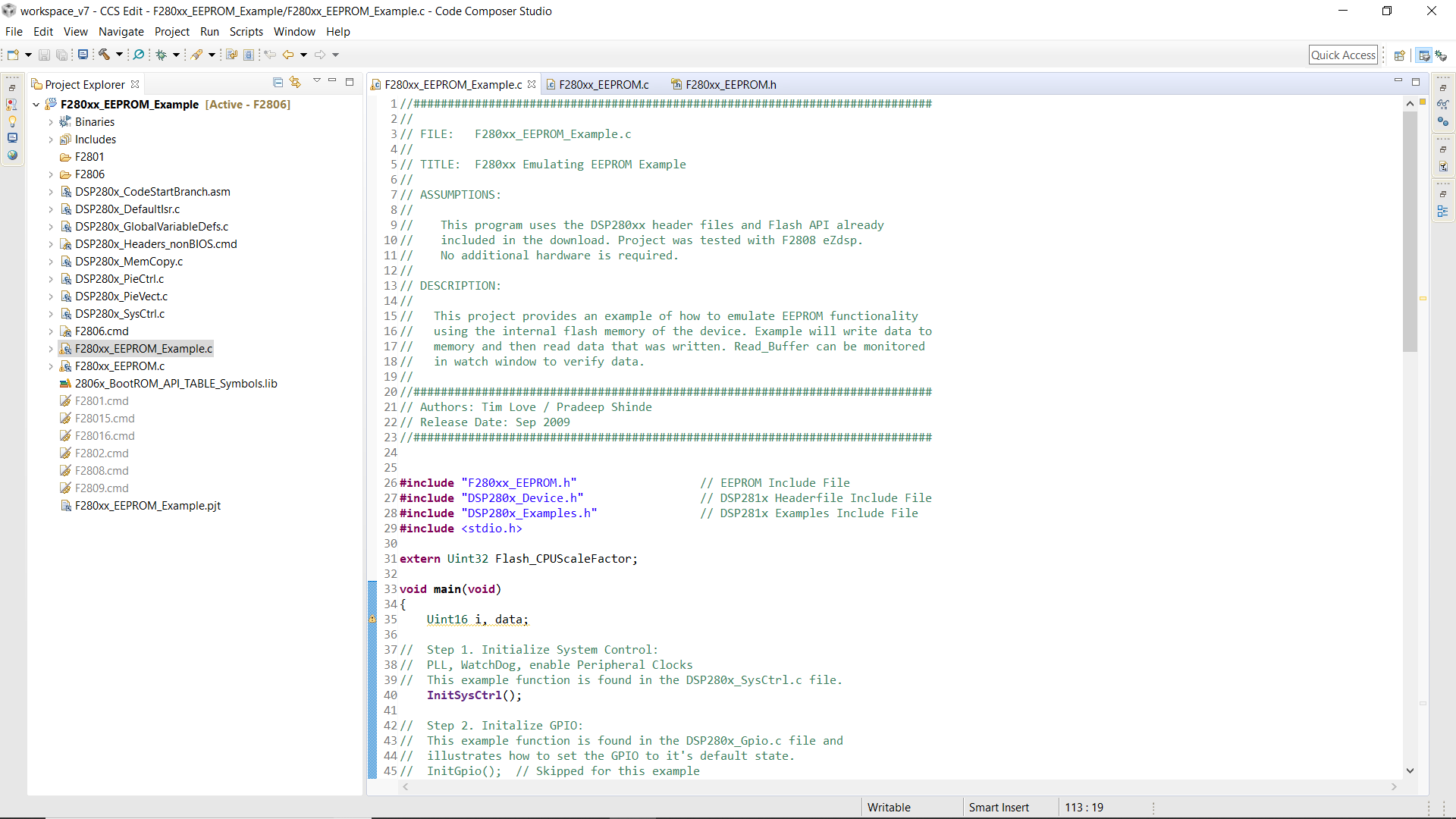
    Please provide a screenshot of the project workspace in CCS as well. With the includes folder expanded and fully visible so I can see all files being used.

    Best,

    Kevin

  • Kevin 

    Attached you will find the .c file and here it is the screenshoot.

    //############################################################################
    //
    // FILE:   F280xx_EEPROM_Example.c
    //
    // TITLE:  F280xx Emulating EEPROM Example 
    //
    // ASSUMPTIONS:
    //
    //    This program uses the DSP280xx header files and Flash API already  
    // 	  included in the download. Project was tested with F2808 eZdsp. 
    //	  No additional hardware is required. 
    //
    // DESCRIPTION:
    //	 
    //	 This project provides an example of how to emulate EEPROM functionality  
    //	 using the internal flash memory of the device. Example will write data to 
    //	 memory and then read data that was written. Read_Buffer can be monitored  
    //	 in watch window to verify data.
    // 
    //############################################################################		
    // Authors: Tim Love / Pradeep Shinde
    // Release Date: Sep 2009
    //############################################################################
    
    
    #include "F280xx_EEPROM.h"					// EEPROM Include File
    #include "DSP280x_Device.h"     			// DSP281x Headerfile Include File
    #include "DSP280x_Examples.h"   			// DSP281x Examples Include File
    #include <stdio.h>
    
    extern Uint32 Flash_CPUScaleFactor;
    
    void main(void)
    {
    	Uint16 i, data;
    
    // 	Step 1. Initialize System Control:
    // 	PLL, WatchDog, enable Peripheral Clocks
    // 	This example function is found in the DSP280x_SysCtrl.c file.
       	InitSysCtrl();
     
    // 	Step 2. Initalize GPIO: 
    // 	This example function is found in the DSP280x_Gpio.c file and
    // 	illustrates how to set the GPIO to it's default state.
    // 	InitGpio();  // Skipped for this example
     
    // 	For this example use the following configuration:
    //  Gpio_select();	  
    
    // 	Step 3. Clear all interrupts and initialize PIE vector table:
    // 	Disable CPU interrupts 
       	DINT;
    
    // 	Initialize PIE control registers to their default state.
    // 	The default state is all PIE interrupts disabled and flags
    // 	are cleared.  
    // 	This function is found in the DSP280x_PieCtrl.c file.
       	InitPieCtrl();
    
    // 	Disable CPU interrupts and clear all CPU interrupt flags:
       	IER = 0x0000;
       	IFR = 0x0000;
    
    // 	Initialize the PIE vector table with pointers to the shell Interrupt 
    // 	Service Routines (ISR).  
    // 	This will populate the entire table, even if the interrupt
    // 	is not used in this example.  This is useful for debug purposes.
    // 	The shell ISR routines are found in DSP280x_DefaultIsr.c.
    // 	This function is found in DSP280x_PieVect.c.
       	InitPieVectTable();
    
       	MemCopy(&RamfuncsLoadStart, &RamfuncsLoadEnd, &RamfuncsRunStart);
    	InitFlash();
    
    	
    // 	Step 4. Initialize all the Device Peripherals:
    // 	This function is found in DSP280x_InitPeripherals.c
    // 	InitPeripherals(); // Not required for this example
    	
    // 	Step 5. User specific code:
    
    	// Copy the Flash API functions to SARAM
        //MemCopy(&Flash28_API_LoadStart, &Flash28_API_LoadEnd, &Flash28_API_RunStart);
    
    	// Set Factor and Callback for Flash API
    	Flash_CPUScaleFactor = SCALE_FACTOR;
    	Flash_CallbackPtr = NULL;
    
    	// If programming single byte, find correct pointer and set test data	
    	#ifdef SINGLE_BYTE	
    	EEPROM_GetSinglePointer(1);
    	data = 1;
    	
    	// If programming multiple bytes, set example data in Write_Buffer
    	#else
    	for(i=0;i<64;i++)
    		Write_Buffer[i] = 0xABCD;
    	#endif
    
    	while(1)
    	{
    		for(i=0;i<65;i++)
    		{
    
    			// If programming single byte, call single byte function
    			#ifdef SINGLE_BYTE
    			EEPROM_ProgramSingleByte(data);
    
    			// If programming multiple bytes, call write function 
    			#else
    			EEPROM_Write();
    			EEPROM_Read();
    			#endif
    		}
    		
      	asm(" ESTOP0"); 
    	}
    }	


  • Hi Kevin

    Hoping you can make a little space to check this issue.

    Thanks

    Mike

  • Hi Mike,

    Sorry for the delay. I'll look at what you provided and get back to you tomorrow.

    Best,

    Kevin

  • Hi Mike,

    Looking at your project workspace you have a lot of files that are not for the F2806x device. You will need to go through and replace these with the correct files that match your device. Most, if not all, of these files can be found within C2000ware.

    For example, 'DSP280x_GlobalVariableDefs.c' should be replaced with 'F2806x_GlobalVariableDefs.c' which is at the below directory in C2000ware:

    C:\ti\c2000\C2000Ware_2_00_00_02\device_support\f2806x\headers\source

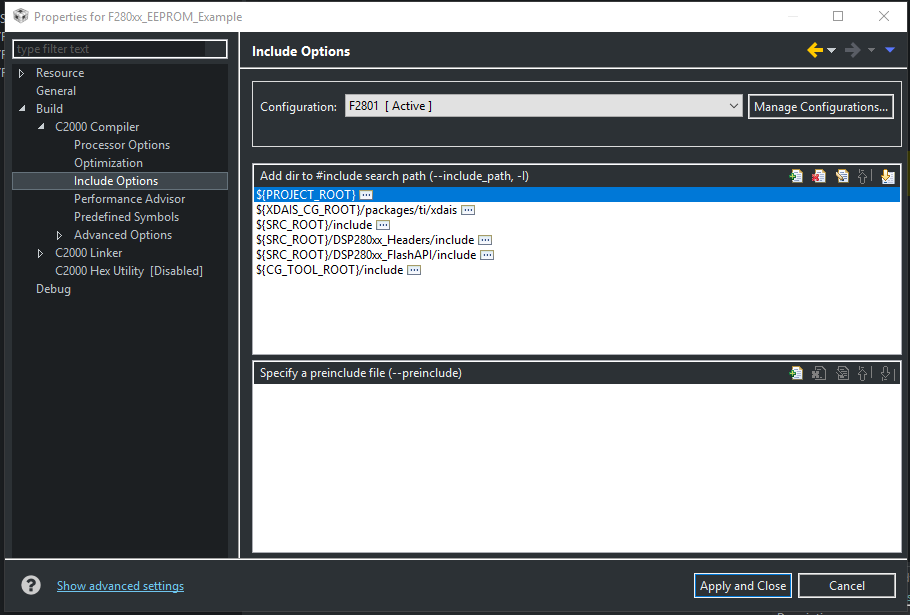
    You will need to update the 'Include Options' of your project to the F2806x files in c2000ware.

    For example changing '${SRC_ROOT}/DSP280xx_Headers/include' to the C2000ware directory 'C:\ti\c2000\C2000Ware_2_00_00_02\device_support\f2806x\headers\include'

    Do that for all includes listed.

    You will also need to update the includes (shown below) at the top of your 'F280xx_EEPROM_Example.c' file to match these newly included files:

    #include "F280xx_EEPROM.h"					// EEPROM Include File
    #include "DSP280x_Device.h"     			// DSP281x Headerfile Include File
    #include "DSP280x_Examples.h"   			// DSP281x Examples Include File
    

    Best,

    Kevin

  • Hi Kevin

    I got some problems doing what you said, I think I' missing something

    Here it is the screenshoot

    Thanks

  • Mike,

    You can usually double click the error to find the line of code that is causing the issue. Where are these Uint64 types being defined and what for?

    Think the below typedef can be used if 64-bit unsigned ints are really necessary:

    typedef unsigned long long   Uint64;

    Best,

    Kevin