This thread has been locked.

If you have a related question, please click the "Ask a related question" button in the top right corner. The newly created question will be automatically linked to this question.

TMS320F28069F: USB Host Mass Storage Application issues

Part Number: TMS320F28069F


I am attempting to implement a USB Host Mass Storage application on an F28069FPZT device.

On my custom board I have a fixed VBUS with just DP and PM attached to the socket, with a flash drive in the socket.

I have compiled the example usb_host_msc.c file, and the code seems to run ok.

All registers show initialized, and the serial interface behaves as expected.

The flash drive led lights when the board is powered.

However, I am never able to connect to the drive.

The serial interface prompt continuously shows NODEV,

All attempts to connect to the devices through the serial UI  return FR_NOT_READY.

g_eState has the value STATE_NO_DEVICE.

I can see no data on the DP and DM lines.

Can anyone confirm that the F28069FPZT device has the USB peripheral?

The tables show that "F" devices have the USB module on board.

Thanks!

  • Hi,

    Is your mass storage device a FAT FS?

    How is it formatted?

    sal

  • Sal,

    Thanks for the response.

    It is formatted as NTFS at the moment. I can format it as FAT.

    I would have thought though, that I would have at least seen some data being transferred, at least for enumeration. I see no data on the D+ and D- at all.

    This is an upgrade of an inverter system that we have had out for some time. We wanted to add the ability of downloading data to a flash drive.

    Thanks!

    John

  • The example works with FAT FS.

    You should see some enumeration regardless. Perhaps you are not using the right USB connector which is tied to the USB PHY.

    What board are you using?

    sal

  • Sal,

    The board is our own design. It is an upgrade of a mature traction inverter product that has been in the field for some time.

    We are attempting to add the ability to dump data to a flash drive.

    I am using a TYCO 1734366-1 for the connector:

    Pin 1 is connected to the VBUS supply. It is uncontrolled.

    Pin 2 is connected to GPIO27/USB0BM through a 24 ohm resistor and  TDK TCE0806G-900-2P-T common mode choke.

    Pin 3 is connected to GPIO26/USB0BP through a 24 ohm resistor and a TDK TCE0806G-900-2P-T common mode choke.

    Pin4 is connected to VBUS common.

    I have verified the traces from GPIO27 and GPIO26 through to pins 2 and 3.

    Thanks!

    John

  • Can you get any USB examples working with your board?

    Can you run the usb_dev_derial or any of the other host mode examples working?

    If you cannot get it to even begin enumerating then I imagine this has something to do with your board and not the software.

    sal

  • Sal,

    This is how we are connected:

  • Sal

    Looks like the image did not come through. Can I post images?

    John

  • Sal,

    "Can you get any USB examples working with your board?

    Can you run the usb_dev_derial or any of the other host mode examples working?"

    The hardware is not set up for a device. Maybe I could try the host mouse application. Looks very similar.

    John

  • Sal,

    I compiled and ran the usb_host_mouse project, and got exactly the same results.

    So decided to verify the hardware connections between the GPIO pins and the USB connector pins.

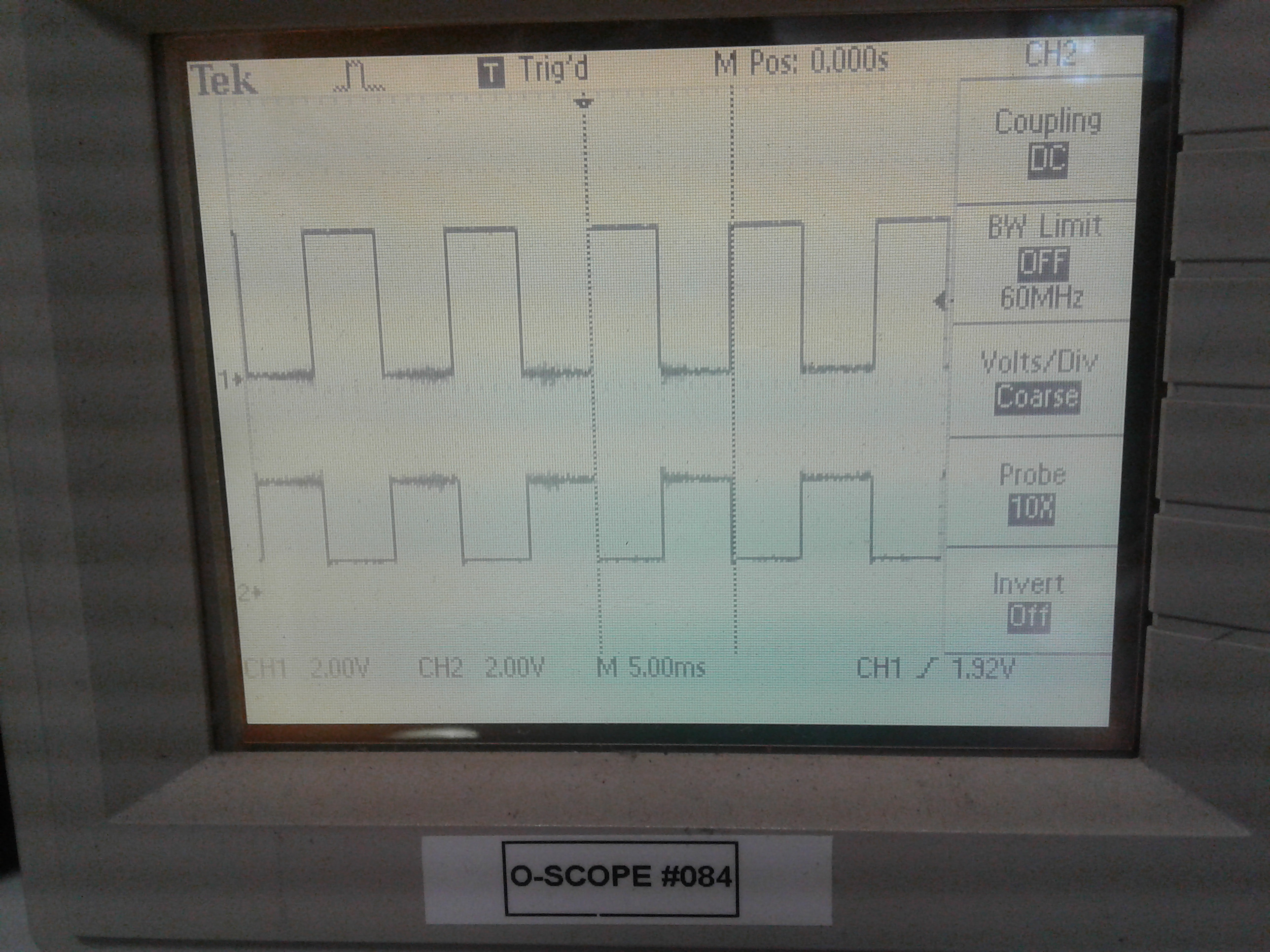
    I wrote a small program to simply toggle the GPIO pins in the opposite direction of each other.

    Code snippets:

    // defines

    #define GP26_TOGGLE()              (GpioDataRegs.GPATOGGLE.bit.GPIO26  = 1)
    #define GP27_TOGGLE()              (GpioDataRegs.GPATOGGLE.bit.GPIO27  = 1)

    // initialization:

       GpioCtrlRegs.GPAMUX2.bit.GPIO26 = 0;
       GpioCtrlRegs.GPADIR.bit.GPIO26  = 1;
       GpioDataRegs.GPASET.bit.GPIO26  = 1;

       GpioCtrlRegs.GPAMUX2.bit.GPIO27 = 0;
       GpioCtrlRegs.GPADIR.bit.GPIO27  = 1;
       GpioDataRegs.GPASET.bit.GPIO27  = 0;

    // in main():

            if(T2_5ms_Flag)
            {
                GP26_TOGGLE();
                GP27_TOGGLE();
                T2_5ms_Flag = 0;
            }

    The resulting waveforms can be seen in the picture below, with channel 1 attached to pin 3 of the connector and channel 2 attached to Pin 2 of the connector. So the GPIO pins are connected correctly through to the USB connector.

    Are we sure that the TMS32028069FPZT has the USB peripheral?

    Thanks!

    John

  • Sal,

    Any thoughts?

    Are we sure that the TMS32028069FPZT has the USB peripheral?

    John

  • Hi,

    I apologize for the late response. I was out of the office last week.

    I believe it should have the peripheral since it is 069 part number. But, you can confirm in the data sheet.

    sal