Part Number: SM320F28335-EP
How i could know what is the deadtime with 12 bit . how could i know SYSclockout which one to follow in these? how could i know that i m running at 100 MHZ 150 or something else? 
This thread has been locked.
If you have a related question, please click the "Ask a related question" button in the top right corner. The newly created question will be automatically linked to this question.
Part Number: SM320F28335-EP
How i could know what is the deadtime with 12 bit . how could i know SYSclockout which one to follow in these? how could i know that i m running at 100 MHZ 150 or something else? 
Mohammad,
Mohammad Tauquir iqbal said:how could i know that i m running at 100 MHZ 150 or something else?
You can determine your clock frequency if you know the input clock frequency as well as the PLL's multiplier and divider settings. for more info look at section 5.2 of the System Control and Interrupt Reference Guide. If you would like to verify your clock configuration please enable XCLKOUT, for more information on this please look at section 5.2.3 "XCLKOUT Generation" of the same document.
Mohammad Tauquir iqbal said:how could i know SYSclockout which one to follow in these?
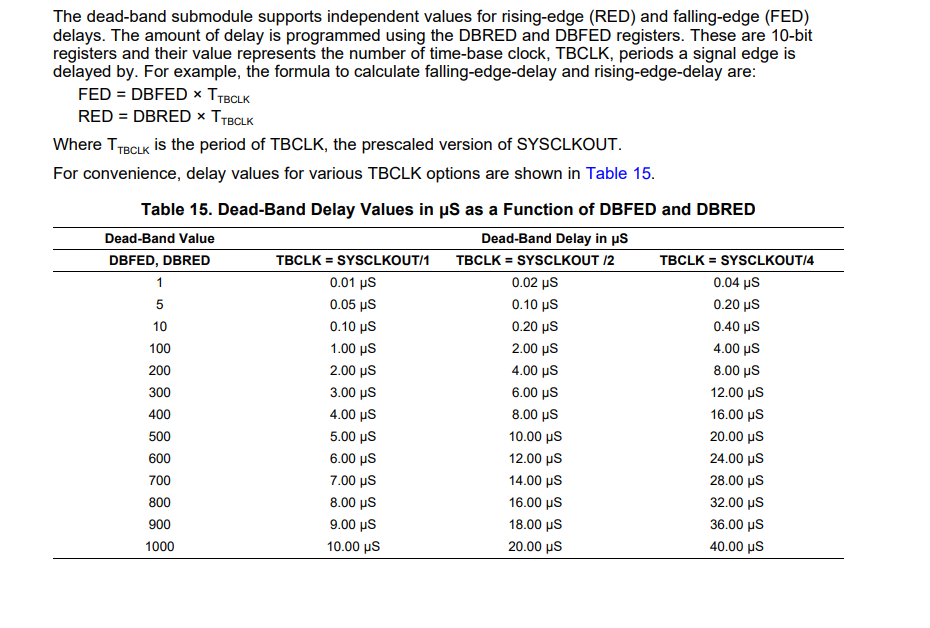
It's a little unclear what you mean by this. SYSCLKOUT is the main clock source to the CPU. TBCLK is created from SYSCLKOUT after a simple divider has been applied. Each column in this table represents a different TBCLK speed assuming you use different clock divider. Please note that the table you have shown assumes your are running the device at 100MHz while the device can run upto 150MHz.
Mohammad Tauquir iqbal said:How i could know what is the deadtime with 12 bit .
I don't know what you mean by "12 bit" however you can easily calculate the Dead-Band's time by multiplying the TBCLK period by the DBRED or DBFED value.
I hope this helps.
Regards,
Cody