This thread has been locked.

If you have a related question, please click the "Ask a related question" button in the top right corner. The newly created question will be automatically linked to this question.

TMS320F28335: Unable to Configure GPIO pins in lash memory

Part Number: TMS320F28335
Other Parts Discussed in Thread: TMDSDOCK28335, C2000WARE

I have made a code in CCS v8.0 in which GPIO 34 is configured to ON the LED to test the Flash code. The code was able to switch ON the LED  when run from RAM but same code when run from flash the LED is not ON. Though the process of error, loading and verification is completed successfully. I have even tried the Example_28335 flash code also , in that code also PWM is not generating. Is there any problem with hardware jumpers or something to be done with the code?

  • Avichal,

    Yes, the device has boot modes. Depending on what voltage is applied to special "Boot-mode pins" determines which mode of operation the device boots into. Details for this can be found in the documentation.

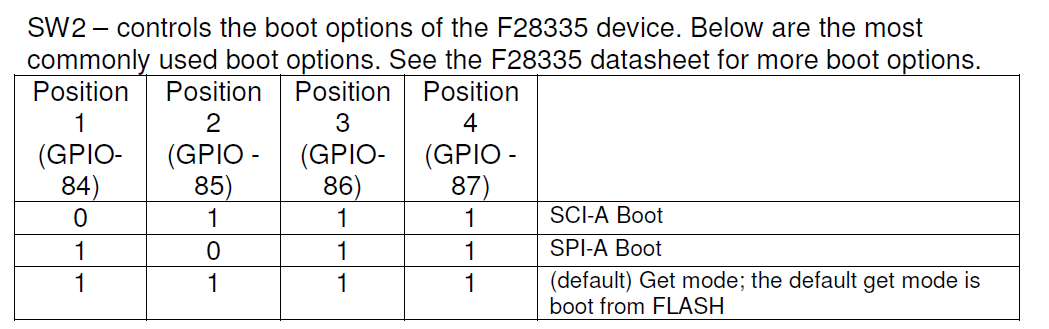
    If you wish to boot from flash then you will need to configure your hardware to do so. What hardware are you using? For example the F28335 controlCARD uses SW2 to configure this, please see the excerpt from the controlCARD's User's Guide.

    Regards,
    Cody 

  • I am using TMDSDOCK28335 board with TMS320F28335 control card.I have tried with the external connection for boot to flash i.e. connecting Pin 84,85,86,87 to 1 but the situation remains the same. I am attaching the code i used for it Kindly comment if any error is there in the code                                                   

    // Included Files
    //
    #include "DSP28x_Project.h"     // Device Headerfile and Examples Include File
    #include <string.h>

    //
    // Defines that configure which ePWM timer interrupts are enabled at
    // the PIE level: 1 = enabled,  0 = disabled
    //
    #define PWM1_INT_ENABLE  1
    #define PWM2_INT_ENABLE  1
    #define PWM3_INT_ENABLE  1

    //
    // Defines for the period for each timer
    //
    #define PWM1_TIMER_TBPRD   0x1FFF
    #define PWM2_TIMER_TBPRD   0x1FFF
    #define PWM3_TIMER_TBPRD   0x1FFF

    //
    // Make this long enough so that we can see an LED toggle
    //
    #define DELAY 1000000L

    //
    // Functions that will be run from RAM need to be assigned to
    // a different section.  This section will then be mapped using
    // the linker cmd file.
    //
    #pragma CODE_SECTION(epwm1_timer_isr, "ramfuncs");
    #pragma CODE_SECTION(epwm2_timer_isr, "ramfuncs");

    //
    // Function Prototypes
    //
    __interrupt void epwm1_timer_isr(void);
    __interrupt void epwm2_timer_isr(void);
    __interrupt void epwm3_timer_isr(void);
    void InitEPwmTimer(void);

    //
    // Globals
    //
    Uint32  EPwm1TimerIntCount;
    Uint32  EPwm2TimerIntCount;
    Uint32  EPwm3TimerIntCount;
    Uint32  LoopCount;

    //
    // These are defined by the linker (see F28335.cmd)
    //
    extern Uint16 RamfuncsLoadStart;
    extern Uint16 RamfuncsLoadEnd;
    extern Uint16 RamfuncsRunStart;
    extern Uint16 RamfuncsLoadSize;

    //
    // Main
    //
    void main(void)
    {
        //
        // Step 1. Initialize System Control:
        // PLL, WatchDog, enable Peripheral Clocks
        // This example function is found in the DSP2833x_SysCtrl.c file.
        //
        InitSysCtrl();

        //
        // Step 2. Initialize GPIO:
        // This example function is found in the DSP2833x_Gpio.c file and
        // illustrates how to set the GPIO to it's default state.
        //
        //InitGpio();  // Skipped for this example

        //
        // Step 3. Clear all interrupts and initialize PIE vector table:
        // Disable CPU interrupts
        //
        DINT;

        //
        // Initialize the PIE control registers to their default state.
        // The default state is all PIE interrupts disabled and flags
        // are cleared.
        // This function is found in the DSP2833x_PieCtrl.c file.
        //
        InitPieCtrl();

        //
        // Disable CPU interrupts and clear all CPU interrupt flags
        //
        IER = 0x0000;
        IFR = 0x0000;

        //
        // Initialize the PIE vector table with pointers to the shell Interrupt
        // Service Routines (ISR).
        // This will populate the entire table, even if the interrupt
        // is not used in this example.  This is useful for debug purposes.
        // The shell ISR routines are found in DSP2833x_DefaultIsr.c.
        // This function is found in DSP2833x_PieVect.c.
        //
        InitPieVectTable();

        //
        // Interrupts that are used in this example are re-mapped to
        // ISR functions found within this file.
        //
        EALLOW;          // This is needed to write to EALLOW protected registers
        PieVectTable.EPWM1_INT = &epwm1_timer_isr;
        PieVectTable.EPWM2_INT = &epwm2_timer_isr;
        PieVectTable.EPWM3_INT = &epwm3_timer_isr;
        EDIS;    // This is needed to disable write to EALLOW protected registers

        //
        // Step 4. Initialize all the Device Peripherals:
        // This function is found in DSP2833x_InitPeripherals.c
        //
        //InitPeripherals();  // Not required for this example
        InitEPwmTimer();    // For this example, only initialize the ePWM Timers

        //
        // Step 5. User specific code, enable interrupts
                  EALLOW;
                  GpioCtrlRegs.GPBMUX1.bit.GPIO34 = 0;
                  GpioCtrlRegs.GPAMUX2.bit.GPIO31 = 0;
                  GpioCtrlRegs.GPBDIR.bit.GPIO34 = 1;
                  GpioCtrlRegs.GPADIR.bit.GPIO31 = 1;
                  EDIS;
        //
        // Copy time critical code and Flash setup code to RAM
        // This includes the following ISR functions: epwm1_timer_isr(),
        // epwm2_timer_isr(), epwm3_timer_isr and and InitFlash();
        // The  RamfuncsLoadStart, RamfuncsLoadEnd, and RamfuncsRunStart
        // symbols are created by the linker. Refer to the F28335.cmd file.
        //
        memcpy(&RamfuncsRunStart, &RamfuncsLoadStart, (Uint32)&RamfuncsLoadSize);

        //
        // Call Flash Initialization to setup flash waitstates
        // This function must reside in RAM
        //
        InitFlash();

        //
        // Initialize counters
        //
        EPwm1TimerIntCount = 0;
        EPwm2TimerIntCount = 0;
        EPwm3TimerIntCount = 0;
        LoopCount = 0;

        //
        // Enable CPU INT3 which is connected to EPWM1-3 INT
        //
        IER |= M_INT3;

        //
        // Enable EPWM INTn in the PIE: Group 3 interrupt 1-3
        //
       PieCtrlRegs.PIEIER3.bit.INTx1 = PWM1_INT_ENABLE;
        PieCtrlRegs.PIEIER3.bit.INTx2 = PWM2_INT_ENABLE;
        PieCtrlRegs.PIEIER3.bit.INTx3 = PWM3_INT_ENABLE;

        //
        // Enable global Interrupts and higher priority real-time debug events
        //
        EINT;   // Enable Global interrupt INTM
        ERTM;   // Enable Global realtime interrupt DBGM
        GpioDataRegs.GPBSET.bit.GPIO34 = 1;
          //
        // Step 6. IDLE loop. Just sit and loop forever (optional)
        //
    }

    //
    // InitEPwmTimer -
    //
    void
    InitEPwmTimer(void)
    {
        EALLOW;
        SysCtrlRegs.PCLKCR0.bit.TBCLKSYNC = 0;      // Stop all the TB clocks
        EDIS;

        //
        // Setup Sync
        //
        EPwm1Regs.TBCTL.bit.SYNCOSEL = TB_SYNC_IN;  // Pass through
        EPwm2Regs.TBCTL.bit.SYNCOSEL = TB_SYNC_IN;  // Pass through
        EPwm3Regs.TBCTL.bit.SYNCOSEL = TB_SYNC_IN;  // Pass through

        //
        // Allow each timer to be sync'ed
        //
        EPwm1Regs.TBCTL.bit.PHSEN = TB_ENABLE;
        EPwm2Regs.TBCTL.bit.PHSEN = TB_ENABLE;
        EPwm3Regs.TBCTL.bit.PHSEN = TB_ENABLE;

        EPwm1Regs.TBPHS.half.TBPHS = 100;
        EPwm2Regs.TBPHS.half.TBPHS = 200;
        EPwm3Regs.TBPHS.half.TBPHS = 300;

        EPwm1Regs.TBPRD = PWM1_TIMER_TBPRD;
        EPwm1Regs.TBCTL.bit.CTRMODE = TB_COUNT_UP;    // Count up
        EPwm1Regs.ETSEL.bit.INTSEL = ET_CTR_ZERO;     // Select INT on Zero event
        EPwm1Regs.ETSEL.bit.INTEN = PWM1_INT_ENABLE;  // Enable INT
        EPwm1Regs.ETPS.bit.INTPRD = ET_1ST;           // Generate INT on 1st event


        EPwm2Regs.TBPRD = PWM2_TIMER_TBPRD;
        EPwm2Regs.TBCTL.bit.CTRMODE = TB_COUNT_UP;     // Count up
        EPwm2Regs.ETSEL.bit.INTSEL = ET_CTR_ZERO;      // Enable INT on Zero event
        EPwm2Regs.ETSEL.bit.INTEN = PWM2_INT_ENABLE;   // Enable INT
        EPwm2Regs.ETPS.bit.INTPRD = ET_2ND;            // Generate INT on 2nd event


        EPwm3Regs.TBPRD = PWM3_TIMER_TBPRD;
        EPwm3Regs.TBCTL.bit.CTRMODE = TB_COUNT_UP;    // Count up
        EPwm3Regs.ETSEL.bit.INTSEL = ET_CTR_ZERO;     // Enable INT on Zero event
        EPwm3Regs.ETSEL.bit.INTEN = PWM3_INT_ENABLE;  // Enable INT
        EPwm3Regs.ETPS.bit.INTPRD = ET_3RD;          // Generate INT on 3rd event

        EALLOW;
        SysCtrlRegs.PCLKCR0.bit.TBCLKSYNC = 1;       // Start all the timers synced
        EDIS;
        GpioDataRegs.GPBSET.bit.GPIO34 = 1;

    }
    //
    // epwm1_timer_isr -This ISR MUST be executed from RAM as it will put the Flash
    // into Sleep Interrupt routines uses in this example
    //
    __interrupt void
    epwm1_timer_isr(void)
    {
        //
        // Put the Flash to sleep
        //
        EALLOW;
        FlashRegs.FPWR.bit.PWR = FLASH_SLEEP;
        EDIS;
        EPwm1TimerIntCount++;


        GpioDataRegs.GPBSET.bit.GPIO34 = 1;

        //
        // Clear INT flag for this timer
        //
        EPwm1Regs.ETCLR.bit.INT = 1;

        //
        // Acknowledge this interrupt to receive more interrupts from group 3
        //
        PieCtrlRegs.PIEACK.all = PIEACK_GROUP3;
    }

    //
    // epwm2_timer_isr - This ISR MUST be executed from RAM as it will put the
    // Flash into Standby
    //
    __interrupt void
    epwm2_timer_isr(void)
    {
        EPwm2TimerIntCount++;

        //
        // Put the Flash into standby
        //
        EALLOW;
        FlashRegs.FPWR.bit.PWR = FLASH_STANDBY;
        EDIS;
        GpioDataRegs.GPBSET.bit.GPIO34 = 1;
        //
        // Clear INT flag for this timer
        //
        EPwm2Regs.ETCLR.bit.INT = 1;

        //
        // Acknowledge this interrupt to receive more interrupts from group 3
        //
        PieCtrlRegs.PIEACK.all = PIEACK_GROUP3;
    }

    //
    // epwm3_timer_isr -
    //
    __interrupt void
    epwm3_timer_isr(void)
    {
        Uint16 i;

        EPwm3TimerIntCount++;

        //
        // Short Delay to simulate some ISR Code
        //
        for(i = 1; i < 0x01FF; i++)
        {
            
        }


                  GpioDataRegs.GPBSET.bit.GPIO34 = 1;

        //
        // Clear INT flag for this timer
        //
        EPwm3Regs.ETCLR.bit.INT = 1;

        //
        // Acknowledge this interrupt to receive more interrupts from group 3
        //
        PieCtrlRegs.PIEACK.all = PIEACK_GROUP3;
    }

    //
    // End of File
    //

  • Avichal,

    Start from an example, understand what its doing, and then try to do the same with your code or merge your code into the example.

    A good example is in C2000Ware. Look in: C:\ti\c2000\C2000Ware_2_00_00_02\device_support\f2833x\examples\flash_f28335

    You should also look at Section 10 of the F2833x Microcontroller Workshop https://training.ti.com/c2000-f2833x-microcontroller-workshop?cu=1137791. It describes how to move a RAM example into Flash.

    Regards,
    Cody 

  • I have tried with the code example you have suggested

    C2000Ware. Look in: C:\ti\c2000\C2000Ware_2_00_00_02\device_support\f2833x\examples\flash_f28335

    But as I said before that the code is getting flashed to the device successfully and with the pins 84-87 connected to 1. Still there is no generation of PWM from any GPIO pins. Later I have added code for GPIO 34(LED PIn) as output to 1 but the LED is not glowing. after flashing the code to device. 

    I have gone through the section 10 of workshop code but there is no change i observed in the flash code implementation as I did. Kindly help with what else should I look into to make it work.

    Regards,

    Avichal

  • Avichal,

    no PWMs are setup to output in that example. If you wish for that to happen you will need to configure the GPIO.

    This example should toggle GPIO32 though, and you should be able to see that toggle if the code is correctly operating from flash. Can you confirm is GPIO32 is toggling?

    Regards,
    Cody 

  • No, GPIO32 is not toggling.

  • there is an observation that when the Header_nonbios.cmd file is used for building the code, the led is blinking but when F28335.cmd file is used, the LED is not blinking. So should I proceed with the  Header_nonbios.cmd file?

    Regards,

    Avichal

  • Avichal,

    there are several things you need to configure in your cmd file to make a program loaded into flash work.

    Take a look at section 10 in the following workshop. That should help you through any issues you have.

    Regards,
    Cody