This thread has been locked.

If you have a related question, please click the "Ask a related question" button in the top right corner. The newly created question will be automatically linked to this question.

CCS/LAUNCHXL-F280049C: I can't connect to my Launchpad anymore

Part Number: LAUNCHXL-F280049C
Other Parts Discussed in Thread: CCSTUDIO

Tool/software: Code Composer Studio

I was testing the serial over USB connection of the F280049C LaunchPad when I started facing a problem where I can't connect to the board anymore.

  • When I try to connect from CCS, I get the following error message:

Error connecting to the target:


(Error -2131 @ 0x0)
Unable to access device register. Reset the device, and retry the operation. If error persists, confirm configuration, power-cycle the board, and/or try more reliable JTAG settings (e.g. lower TCLK).
(Emulation package 8.2.0.00004)

  • When I run the "test connection" in the CCS target configuration I get the following error:

-----[An error has occurred and this utility has aborted]--------------------
 This error is generated by TI's USCIF driver or utilities.
 The value is '-233' (0xffffff17).
The title is 'SC_ERR_PATH_BROKEN'.
  • When I try to load via MATLAB/Simulink using the debug server I get the following error:
SEVERE: IcePick_C_0: Error connecting to the target: (Error -2131 @ 0x0) Unable to access device register. Reset the device, and retry the operation. If error persists, confirm configuration, power-cycle the board, and/or try more reliable JTAG settings (e.g. lower TCLK). (Emulation package 7.0.48.0) SEVERE: emulation failure occurred SEVERE: Error connecting to the target: emulation failure occurred SEVERE: Cannot perform operation, target is not connected. SEVERE: Error reseting target: Cannot perform operation, target is not connected. org.mozilla.javascript.WrappedException: Wrapped com.ti.ccstudio.scripting.environment.ScriptingException: Error reseting target: Cannot perform operation, target is not connected. (C:\PROGRA~3\MATLAB\SUPPOR~1\R2019a\toolbox\target\SUPPOR~1\tic2000/CCS_CO~1/RUNPRO~2.JS#93) at org.mozilla.javascript.Context.throwAsScriptRuntimeEx(Context.java:1693) at org.mozilla.javascript.MemberBox.invoke(MemberBox.java:160) at org.mozilla.javascript.NativeJavaMethod.call(NativeJavaMethod.java:204) at org.mozilla.javascript.optimizer.OptRuntime.callProp0(OptRuntime.java:119) at org.mozilla.javascript.gen.c1._c0(C:\PROGRA~3\MATLAB\SUPPOR~1\R2019a\toolbox\target\SUPPOR~1\tic2000/CCS_CO~1/RUNPRO~2.JS:93) at org.mozilla.javascript.gen.c1.call(C:\PROGRA~3\MATLAB\SUPPOR~1\R2019a\toolbox\target\SUPPOR~1\tic2000/CCS_CO~1/RUNPRO~2.JS) at org.mozilla.javascript.ContextFactory.doTopCall(ContextFactory.java:340) at org.mozilla.javascript.ScriptRuntime.doTopCall(ScriptRuntime.java:2758) at org.mozilla.javascript.gen.c1.call(C:\PROGRA~3\MATLAB\SUPPOR~1\R2019a\toolbox\target\SUPPOR~1\tic2000/CCS_CO~1/RUNPRO~2.JS) at org.mozilla.javascript.gen.c1.exec(C:\PROGRA~3\MATLAB\SUPPOR~1\R2019a\toolbox\target\SUPPOR~1\tic2000/CCS_CO~1/RUNPRO~2.JS) at org.mozilla.javascript.tools.shell.Main.evaluateScript(Main.java:503) at org.mozilla.javascript.tools.shell.Main.processFileSecure(Main.java:425) at org.mozilla.javascript.tools.shell.Main.processFile(Main.java:391) at org.mozilla.javascript.tools.shell.Main.processSource(Main.java:382) at org.mozilla.javascript.tools.shell.Main.processFiles(Main.java:179) at org.mozilla.javascript.tools.shell.Main$IProxy.run(Main.java:100) at org.mozilla.javascript.Context.call(Context.java:528) at org.mozilla.javascript.ContextFactory.call(ContextFactory.java:450) at org.mozilla.javascript.tools.shell.Main.exec(Main.java:162) at com.ti.ccstudio.apps.internal.scripting.RunScript$1.run(RunScript.java:88) Caused by: com.ti.ccstudio.scripting.environment.ScriptingException: Error reseting target: Cannot perform operation, target is not connected. at com.ti.debug.engine.scripting.Target.reset(Target.java:622) at sun.reflect.NativeMethodAccessorImpl.invoke0(Native Method) at sun.reflect.NativeMethodAccessorImpl.invoke(NativeMethodAccessorImpl.java:62) at sun.reflect.DelegatingMethodAccessorImpl.invoke(DelegatingMethodAccessorImpl.java:43) at java.lang.reflect.Method.invoke(Method.java:498) at org.mozilla.javascript.MemberBox.invoke(MemberBox.java:145) ... 18 more
  • I face the same problem with 2 F280049C Launchpads, I can't connect to any of them.
  • These launchpads work perfectly on my colleagues' machines. We tried 2 different machines, and they can connect, flash, debug, etc.
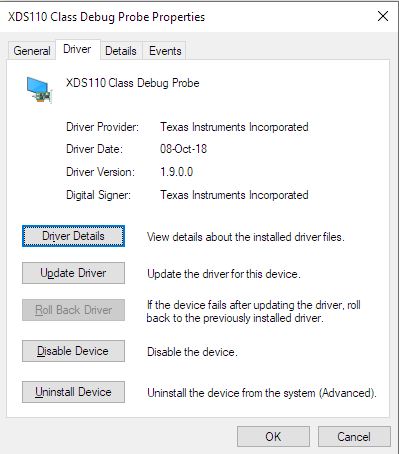
  • My drivers look up to date, version 1.9.0.0 from Oct 8th 2018. No flags in the Windows device manager, the boards were working fine and this problem started happening abruptly.
  • I asked my colleague to flash code that loops back SCI_A on the LaunchPad. I can exchange serial data using a hyperterminal on my machine, that works. To be precise, the board is flashed on my colleague's machine, then plugged to my machine, and the serial test works, I can see data in my hyperterminal.
  • I rebooted my machine several times
  • I uninstalled and resinstalled the drivers in the device manager
  • The update of the firmware of the xds110 works on my machine, it performs it automatically when switching the emulation package (I have 7.0.48.0 and 8.2.0.00004).
  • My other LaunchPads (F28379D) are working fine, but they all use xds100.

I'm under the impression that my serial tests have messed up with the windows drivers or maybe installed another conflicting driver on my computer. It happened to me in the past where sending serial data, especially right from the boot of the board sometimes triggers the installation of a new mouse on windows.

I'm stuck right now, I'm not sure what to try anymore. The boards look fine since the 2 I have work on other machines, they are responsive, it looks like my machine got somehow corrupted, one colleague tells me that they had to reimage a test computer recently because of the same problem, it would be great is there was a softer solution. Please let me know if you have a clue of what could be wrong.

Thanks,

Antonin.

 
-----[An error has occurred and this utility has aborted]--------------------
 
This error is generated by TI's USCIF driver or utilities.
 
The value is '-233' (0xffffff17).
The title is 'SC_ERR_PATH_BROKEN'.
  • Antonin,

    Take a look at the FAQ here https://e2e.ti.com/support/microcontrollers/c2000/f/171/t/753823, can you run the XDSDFU utility to see what the loca XDS110 version is?

    The issue described in the FAQ was resolved in the 8.1.0.00005 from March, looks like you have the latest 8.2.0.00004 from June.  To my knowledge there shouldn't have been any changes to effect the 110 for F28004x(famous last words).

    I'll make sure I'm running the latest EMU pack as well and note if the LP works for me.  

    In the meantime, you can follow the instruction in the FAQ, and roll back the driver to 8.0.803.0 and see if that gets a temporary soln so you can connect.

    Best,

    Matthew

  • Antonin,

    Checking back in to see if the above resolved your issue.  I'm going to mark as TI thinks resolved, but if you reply back it will re-open and alert me.

    Best,
    Matthew