This thread has been locked.

If you have a related question, please click the "Ask a related question" button in the top right corner. The newly created question will be automatically linked to this question.

TMDSHVMTRINSPIN: Error retrieving COM ports

Part Number: TMDSHVMTRINSPIN
Other Parts Discussed in Thread: TMS320F28027F, TMDSCNCD28035

Dear TI Experts:

Today I first tried TMDSHVMTRINSPIN kit. I use AC110V and 15VDC (aux power) with [M3]-J5 populated and [Main]-J9 removed (F28069M controlCARD is used). Also, a banana line from BS1 to BS5, and J2, J3, J4, J5, J7, and J8 all follows the instructions in the document.

For the F28069M controlCARD, I set

SW1: UP-UP

SW2: DOWN-DOWN

SW3: UP-UP

Finally, I connect F28069M controlCARD with my computer, and run the related GUI program, and get the following error message.
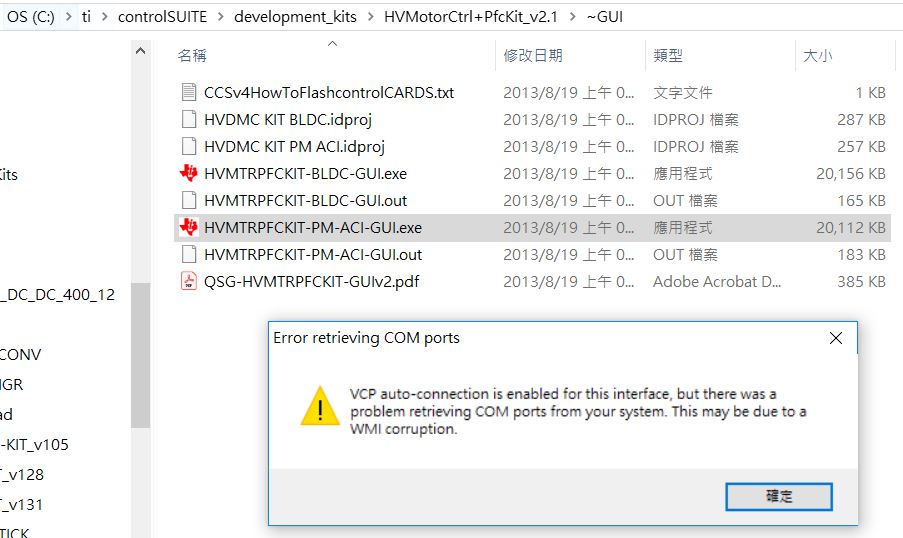
In fact, in the beginning I set SW3: DOWN-DOWN by reading a Boot Modes table.  But it shows the same result.  I entered the GUI system, used its connection wizard, and the connection still failed! 

Finally, I changed the card as the Piccolo TMS320F28027F non-isolated controlCARD with [M3]-J5 removed and [Main]-J9 populated.  Then I run another GUI program, and connection still fail, as shown below.

I have tried many times. I really hope the experienced experts can guide me to continue it.  Mant thanks!

Best Wishes,

Tang Han.


  • With the Universal GUI, the problem is that it can't find the .out file. Please read the readme and follow the instructions regarding appProgram.out.

    Regarding the COM port issue, can you check to see that the COM port shows up in your Windows Device Manager when you plug in the board?

    Whitney

  • Dear Expert Whitney:

    Thanks for your instant and professional reply.

    I finally use TMDSHVMTRINSPIN with control card TMDSCNCD28035 (www.ti.com/.../TMDSCNCD28035) to run the GUI well.
    According to the "Quick Start GUI", we can set the switches on the control card as follows. 
    SW1 on controlcard: OFF
    SW2 on controlcard: ON-ON
    SW3 on controlcard: OFF-OFF
    Now I hope to run CCS with these projects provided bt TI.  The related document is "Sensorless Field Oriented Control of 3-Phase Permanent Magnet Synchronous Motors"(Sensorless FOC of PMSM.pdf).
    In this manner, could you kindly show me how to set the switches on the control card TMDSCNCD28035?
    Is it the same as the settings shown above?
    SW1 on controlcard: OFF
    SW2 on controlcard: ON-ON
    SW3 on controlcard: OFF-OFF
    Look forward to hearing from you~
    Wish you the best!
    Tang Han
  • Are you asking which settings you need to use to run your program while connected to CCS? The previous settings should probably work as well, but if they aren't working, see if changing SW2 to Wait mode (OFF-ON--look at the infosheet for the controlCARD for more details).

    Whitney

  • Thanks for Expert Whitney's professional and kind reply ~

    Tang Han