Part Number: TMS320F28335
Tool/software: Code Composer Studio
Hi,
I am trying to sample two ADC channels (A0 and B0) simultaneously. I plan to perform FFT in the future to measure frequencies, so I need to know my exact sampling frequency. I toggle GPIO37 and monitor it on an oscilloscope whenever the sequence interrupt flag is set.
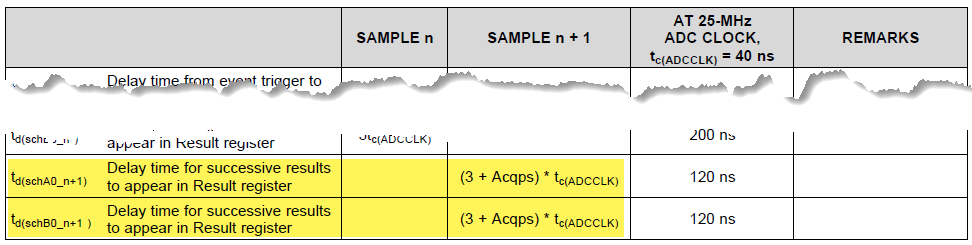
According to my understanding, I should observe the GPIO toggle after every 10.2 ms. However, the oscilloscope shows that the GPIO is toggling after every ~15 ms. Is there something that I am missing in my calculations?
The code is listed below:
#include "DSP28x_Project.h"     // Device Headerfile and Examples Include File

//
// Defines for ADC start parameters
//
#if (CPU_FRQ_150MHZ)     // Default - 150 MHz SYSCLKOUT
    //
    // HSPCLK = SYSCLKOUT/2*ADC_MODCLK2 = 150/(2*3)   = 25.0 MHz
    //
    #define ADC_MODCLK 0x3
#endif
#if (CPU_FRQ_100MHZ)
    //
    // HSPCLK = SYSCLKOUT/2*ADC_MODCLK2 = 100/(2*2)   = 25.0 MHz
    //
    #define ADC_MODCLK 0x2
#endif


//
// ADC module clock = HSPCLK/2*ADC_CKPS   = 25.0MHz/(2*15) = 833.333 kHz
//
#define ADC_CKPS   0xf

#define ADC_SHCLK  0xa   // S/H width in ADC module periods: 0xa = 11 ADC clocks + 1 ADC clocks
#define AVG        1000  // Average sample limit
#define ZOFFSET    0x00  // Average Zero offset
#define BUF_SIZE   2048  // Sample buffer size

//
// Globals
//
Uint16 SampleTable[BUF_SIZE];

//
// Main
//
void main(void)
{
    Uint16 i;

    //
    // Step 1. Initialize System Control:
    // PLL, WatchDog, enable Peripheral Clocks
    // This example function is found in the DSP2833x_SysCtrl.c file.
    //
    InitSysCtrl();

    //
    // Specific clock setting for this example
    //
    EALLOW;
    SysCtrlRegs.HISPCP.all = ADC_MODCLK;    // HSPCLK = SYSCLKOUT/ADC_MODCLK
    EDIS;

    EALLOW;
    GpioCtrlRegs.GPBMUX1.bit.GPIO37 = 0;
    GpioCtrlRegs.GPBDIR.bit.GPIO37 = 1;
    EDIS;


    //
    // Step 3. Clear all interrupts and initialize PIE vector table:
    // Disable CPU interrupts
    //
    DINT;

    //
    // Initialize the PIE control registers to their default state.
    // The default state is all PIE interrupts disabled and flags
    // are cleared.
    // This function is found in the DSP2833x_PieCtrl.c file.
    //
    InitPieCtrl();

    //
    // Disable CPU interrupts and clear all CPU interrupt flags
    //
    IER = 0x0000;
    IFR = 0x0000;

    //
    // Initialize the PIE vector table with pointers to the shell Interrupt
    // Service Routines (ISR).
    // This will populate the entire table, even if the interrupt
    // is not used in this example.  This is useful for debug purposes.
    // The shell ISR routines are found in DSP2833x_DefaultIsr.c.
    // This function is found in DSP2833x_PieVect.c.
    //
    InitPieVectTable();


    InitAdc();  // For this example, init the ADC

    //
    // Specific ADC setup for this example:
    //
    AdcRegs.ADCTRL1.bit.ACQ_PS = ADC_SHCLK;         // load sample and hold delay value
    AdcRegs.ADCTRL3.bit.ADCCLKPS = ADC_CKPS;        // load ADC clock divider value
    AdcRegs.ADCTRL3.bit.SMODE_SEL = 0x1;            // Setup simultaneous sampling mode
    AdcRegs.ADCTRL1.bit.SEQ_CASC = 1;               // 1 = Cascaded mode
    AdcRegs.ADCCHSELSEQ1.bit.CONV00 = 0x0;          // Setup conversion from ADCINA0 & ADCINB0
    AdcRegs.ADCTRL1.bit.CONT_RUN = 1;               // Setup continuous run


    //
    // Clear SampleTable
    //
    for (i=0; i<BUF_SIZE; i++)
    {
        SampleTable[i] = 0;
    }

    //
    // Start SEQ1
    //
    AdcRegs.ADCTRL2.all = 0x2000;

    //
    // Take ADC data and log the in SampleTable array
    //
    for(;;)
    {
        for (i=0; i<AVG; i+2)       // increase counter by 2 since we are logging channels A0 and B0
        {
            //
            // Wait for interrupt. The data for both channels will be available after duration of S/H
            // clocks and five additional clocks. Picking up data directly from 0x0B00 and 0x0B01 may
            // speed up the process and remove the requirement for right-shifting of data.
            //
            while (AdcRegs.ADCST.bit.INT_SEQ1== 0)
            {

            }
            AdcRegs.ADCST.bit.INT_SEQ1_CLR = 1;             // clear sequence 1 interrupt flag
            GpioDataRegs.GPBTOGGLE.bit.GPIO37 = 1;          // toggle GPIO37. (at the current settings toggle may occur: every 12+5 ADC clocks or ~10.2 ms)
            SampleTable[i] =((AdcRegs.ADCRESULT0>>4) );     // move result from channel A0 into odd field of array
            SampleTable[i+1] =((AdcRegs.ADCRESULT1>>4) );   // move result from channel B0 into even field of array
        }
    }
}