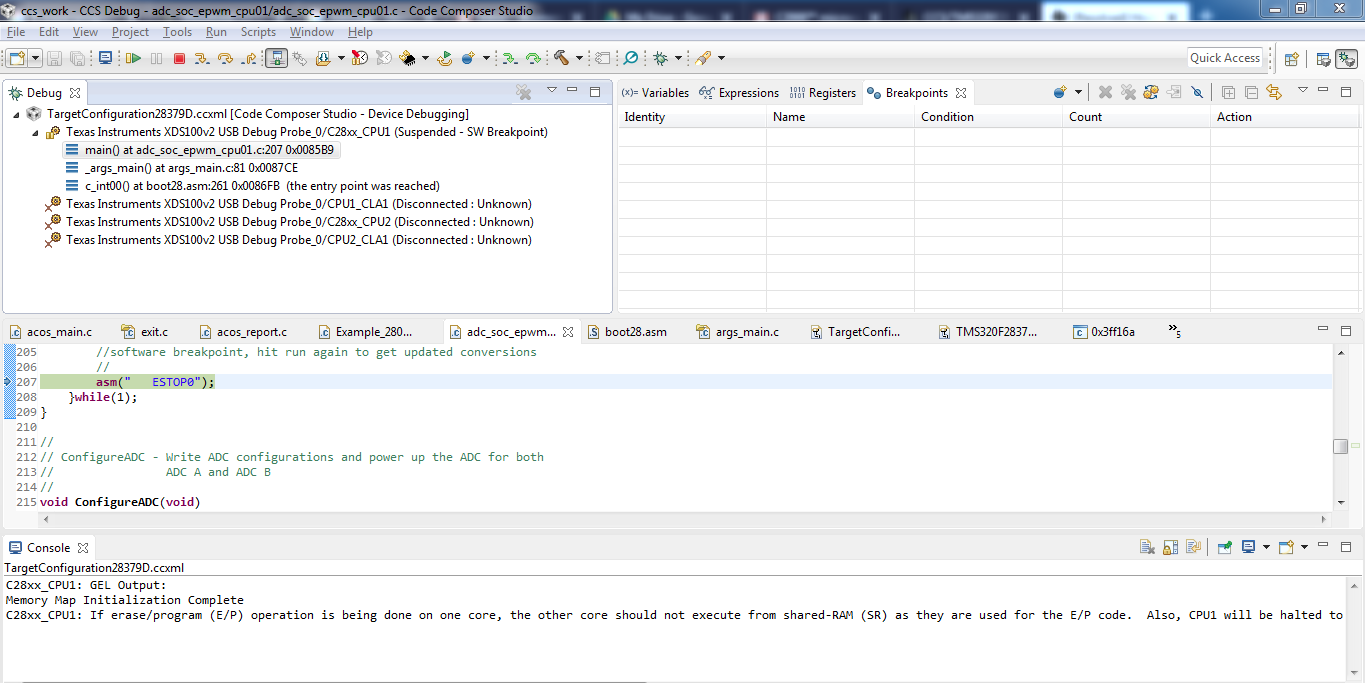
Other Parts Discussed in Thread: C2000WARE
Tool/software: Code Composer Studio
I am trying to debug the examples (adc) given in c2000ware.
I have tried both way of debugging :
1. default target configuration given with the examples.
2. Manually connect to the processor using user defined target configuration, then load the program to the cpu1.
But both method results into "SW-Breakpoint" and it leads to "CPU1-Suspended". And the following message will appear in the console:
Memory Map Initialization Complete
C28xx_CPU2: If erase/program (E/P) operation is being done on one core, the other core should not execute from shared-RAM (SR) as they are used for the E/P code. Also, CPU1 will be halted to determine SR ownership for the CPU which will run the Flash Plugin code, after which CPU1 will be set to run its application. User code execution from SR could commence after both flash banks are programmed.
Every time I click Resume(Green Play Button), Each time the above mentioned message repeats.