This thread has been locked.

If you have a related question, please click the "Ask a related question" button in the top right corner. The newly created question will be automatically linked to this question.

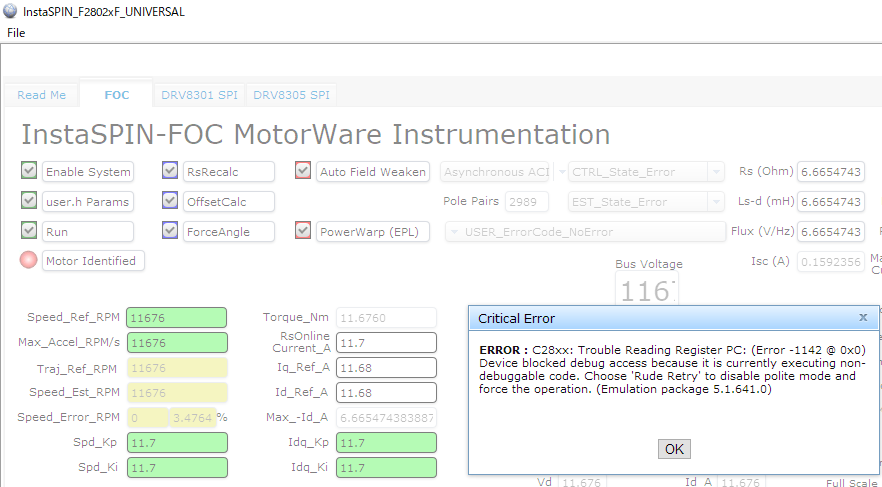
INSTASPINFOCMOTORWAREGUI: Universal GUI tool detects Error

Part Number: INSTASPINFOCMOTORWAREGUI
Other Parts Discussed in Thread: LAUNCHXL-F28027F, MOTORWARE, DRV8305, DRV8323

Hello Team,

Our customer is trying to evaluate BOOSTXL8323RS with LAUNCHXL-F28027F, during referring to InstaSPIN Quick Start Guide(https://www.ti.com/lit/ug/slvubd3a/slvubd3a.pdf). However, Universal-GUI tool seems to detect the following failure (Error 1142 @ 0x0). It seems resister access seems to fai。

For Power supply (VM: DC24V_3.75A) on BOOSTXL8323RS,Customer confirmed there is not any problem for power supply. I means, four blue-LEDs was lighting on LAUNCHXL-F28027F

Can we have your Expert’s advice/comments on this issue, please?
best regards,

Miyazaki

  • Which one of the InstaSPIN labs are they trying to use with the GUI? Or are they using their own application? Is it running from flash or RAM? If they switch from one to the other does it make a difference?

    Do they have any trouble running the same application through CCS?

    You mentioned the Quick Start Guide  for the LaunchPad, but are they also referring to the GUI Quick Start Guide (qsg_gui_universal.pdf in MotorWare)?

    Whitney

  • Whitney

    Customer is trying to use “proj_lab02b” with LAUNCHXL-F28027F/ BOOSTXL8323RS. Customer’s procedure is as follows

    1. Remove Jumper 1, 2, and 3 and set S1(OFF-ON-ON) and S4(OFF)
    2. Put 0.1uF on C9, C10, C11
    3. Download “boostxldrv8323_package_mw.zip” from “https://e2e.ti.com/support/microcontrollers/c2000/f/171/t/635499
    4. And replace some files during referring  “InstaSPIN Quick Start Guide”
    5. Run CCS and Export proj_lab02b
    6. Remove e drv8305.c and add drv8323.c
    7. Remove hal.c and add hal.c of DRV8323RS
    8. Build proj_lab02b and burn-in this object on CCS
    9. Click the “Terminate” bottom and close CCS
    10. Remove USB-cable and insert USB cable again
    11. Copy proj_lab02.out in the following directory   C:\ti\guicomposer\webapps\InstaSPIN_F2802xF_UNIVERSAL
    12. Rename proj_lab02.out to appProgram.out
    13. Run “Universal GUI”

    Customer confirmed there was not any compile-error. Also, GUI composer seems to detect XDS100v2 correctly. I tried to check ERROR -1142 @ 0x0), I was not able to find it. Regarding qsg_gui_universal.pdf, I already request our customer to refer it, however, this issue is not resolved yet.

    Can we have your advice for this, please?


    Best regards,

    Miyazaki

  • Thanks for the additional information.

    I was able to reproduce this issue, but realized it was caused by my running the code on an F28027 LaunchPad instead of an F28027F LaunchPad. Once I switched boards, I had no issues loading proj_lab02b in the GUI. Can the customer confirm that the board they are using does have an InstaSPIN enabled part on it?

    And if it is the right board, see if they can load the application through CCS.

    Whitney

  • Whitney,

    Thanks for your clarification. Customer seems to use F28027-LaunchPad. I really appreciate your kind help.

    Best regards, Miyazaki