This thread has been locked.

If you have a related question, please click the "Ask a related question" button in the top right corner. The newly created question will be automatically linked to this question.

TMS320F280049C: FSI test issue

Part Number: TMS320F280049C


Hi expert:

My customer wants to use FSI to communicate between two C2000 Board. I suggest them begin with: http://www.ti.com/lit/an/spracm3/spracm3.pdf

Firstly, they use two launchpads, download the code into Flash, but nothing happened, both GPIO16 are low. And there is no signal in CLK and data0.

Then, they try 1 control card and 1 Launchpad. I add _LAUNCHXL_F280049C to pre-define symbol to change the GPIO. Connect both boards with CCS, emulation mode. RAM code. This time, both GPIO16 are high. However, The lead code is stuck at ESTOP0(fsi_ex16_daisy_handshake_lead.c); since this is Error.

while(1)  {

    #if FSI_DMA_ENABLE==0

        // Now, start transmitting data frames
		
		// Fill TX array with new data
        prepareTxBufData();

        // Write data into Tx buffer
        // Start the first transfer
        FSI_writeTxBuffer(FSITXA_BASE, txBufData, nWords, 0U);
        FSI_startTxTransmit(FSITXA_BASE);

        //
        // Wait for TX frame done event
        //
        while(fsiTxInt1Received != 1U);

		// Set FSI TX circular buffer pointer back to beginning
        FSI_setTxBufferPtr(FSITXA_BASE, 0U);

        //
        // Wait for RX data frame received event
        //
        while(fsiRxInt1Received != 1U);

		// Set FSI RX circular buffer pointer back to beginning
        FSI_setRxBufferPtr(FSIRXA_BASE, 0U);

        if(error == 0)
        {
            fsiTxInt1Received = 0U;
            fsiRxInt1Received = 0U;
        }

        else
        {
            // Error occurred during communications
            ESTOP0;
        }

I also change lower CLK, but nothing changed.

#define PRESCALER_VAL   FSI_PRESCALE_10MHZ

#define PRESCALER_VAL   FSI_PRESCALE_5MHZ

Except that, I did not change the code. 

Could you kindly tell me where I did wrong?

BR 

Emma

  • Hi Emma,

    What do you have FSI_DMA_ENABLE set to in each project, lead/node? They should be the same for both projects.

    GPIO 16 will only toggle when using DMA control, i.e. FSI_DMA_ENABLE set to 1 in both the node and lead projects. GPIO 16 should then go HIGH when a FSI TX transmission starts and go LOW when a full FSI data frame is received.

    You're seeing the lead device stop at line 40 in the above code snippet? If so then the handshake sequence should have succeeded, but you're having either a frame type/tag, User_Data, or data error during the data frame packet portion.

            else
            {
                // Error occurred during communications
                ESTOP0;
            }

    When you hit this ESTOP can you compare the FSI TX and RX registers/buffers for the below. They should ideally be equivalent, i.e. information transmitted should equal information received. You can check these using CCS registers window or memory browser.

    • FRAME_INFO
    • FRAME_TAG_UDATA
    • BUF_BASE

    Best,

    Kevin

  • Hi Kevin,

    thanks for your suggestioon.

    Firstly, FSI_DMA_ENABLE set to 0 in both node and lead.

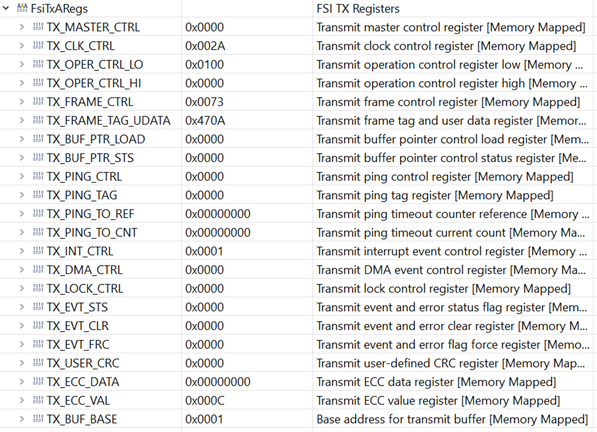
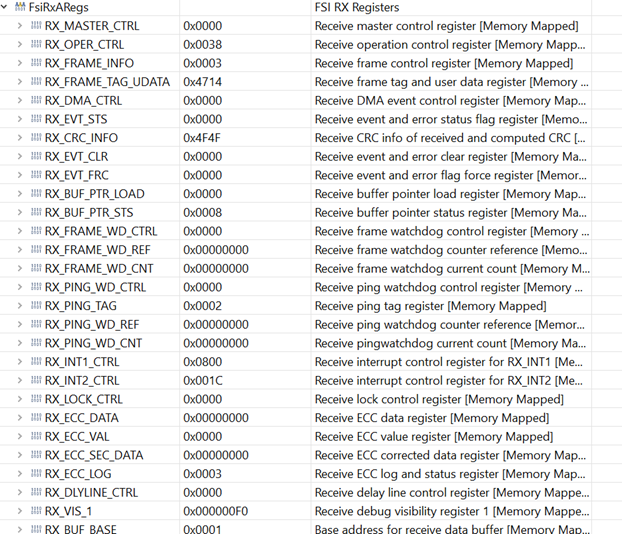
    Secondly, here is the TX/RX register information for the lead and node,I think they are equivalent.

    For the lead,

    For the node,

    Could you kindly point out some errors for me?

    BR

    Emma

  • Hi Emma,

    Sorry for the delay. I'm going to spend some more time looking at this tomorrow.

    Looking at the registers you provided briefly, it looks like there may have been a CRC error. The RX_CRC_INFO register of the lead device doesn't match that of the slave. A CRC error is generated when there's some form of data error.

    This should flag the RX_EVT_STS.CRC_ERR register bit, but it may have gotten cleared by the software before hitting the ESTOP.

    Best,

    Kevin

  • Hi Emma,

    Have you made any progress in solving this issue on your side?

    To check if there was a data error during the communication you could check the contents of the TX buffer (0x6640) and RX buffer (0x66C0) of each device using the memory browser in CCS. You can check if one of the received words doesn't match what was transmitted.

    Let me know if you need any additional support on this.

    Best,

    Kevin