Part Number: TMS320F28379D
Tool/software: Code Composer Studio
Hello,
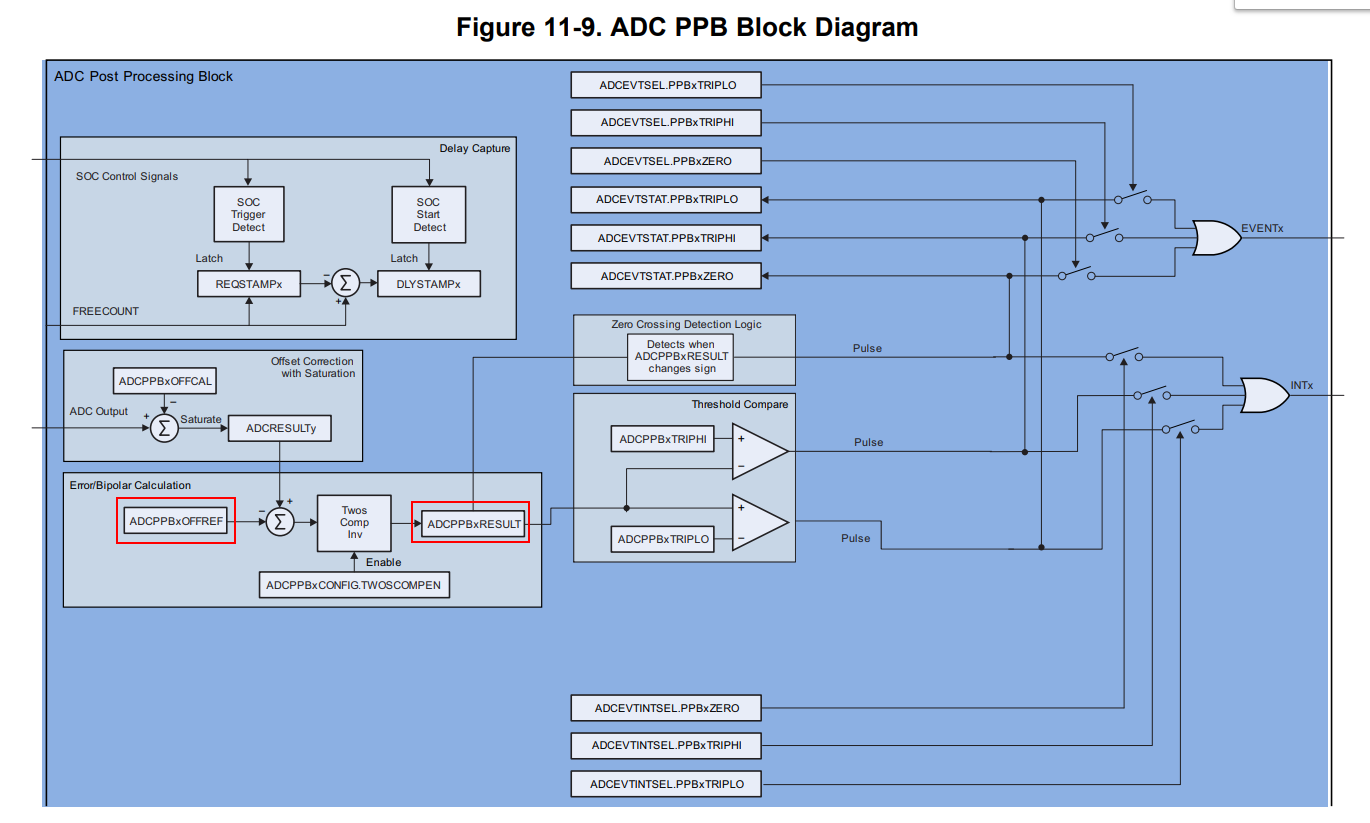
I was trying to learn zero crossing detection using ADC PPB . i have used the code of ADC_PPB_LIMITS for reference. By doing some changes in the code, i was trying to observe whether my ISR is getting called after zero crossing or not . So in my code i have configured respective register to set adc zero crossing detection flag . however despite of correct adc conversion (as i could see in expression window) after giving sinusoidal signal from function generator with value 0 to 1 volt, zero crossing is not happening. In my code, i have set an variable named as toggle_count in adc_ppb_isr which is suppose to count on every zero crossing but it is not happening . please suggest. I am attaching modified code for your reference.
//###########################################################################
//
// FILE:   adc_ppb_limits_cpu01.c
//
// TITLE:  ADC limits check using post-processing block for F2837xD.
//
//! \addtogroup cpu01_example_list
//! <h1> ADC PPB Limits (adc_ppb_limits)</h1>
//!
//! This example sets up the ePWM to periodically trigger the ADC. If the
//! results are outside of the defined range, the post-processing block
//! will generate an interrupt.
//!
//! The default limits are 1000LSBs and 3000LSBs.  With VREFHI set to 3.3V, the
//! PPB will generate an interrupt if the input voltage goes above about
//! 2.4V or below about 0.8V.
//!
//
//###########################################################################
// $TI Release: F2837xD Support Library v3.08.00.00 $
// $Release Date: Mon Dec 23 17:32:30 IST 2019 $
// $Copyright:
// Copyright (C) 2013-2019 Texas Instruments Incorporated - http://www.ti.com/
//
// Redistribution and use in source and binary forms, with or without
// modification, are permitted provided that the following conditions
// are met:
//
//   Redistributions of source code must retain the above copyright
//   notice, this list of conditions and the following disclaimer.
//
//   Redistributions in binary form must reproduce the above copyright
//   notice, this list of conditions and the following disclaimer in the
//   documentation and/or other materials provided with the
//   distribution.
//
//   Neither the name of Texas Instruments Incorporated nor the names of
//   its contributors may be used to endorse or promote products derived
//   from this software without specific prior written permission.
//
// THIS SOFTWARE IS PROVIDED BY THE COPYRIGHT HOLDERS AND CONTRIBUTORS
// "AS IS" AND ANY EXPRESS OR IMPLIED WARRANTIES, INCLUDING, BUT NOT
// LIMITED TO, THE IMPLIED WARRANTIES OF MERCHANTABILITY AND FITNESS FOR
// A PARTICULAR PURPOSE ARE DISCLAIMED. IN NO EVENT SHALL THE COPYRIGHT
// OWNER OR CONTRIBUTORS BE LIABLE FOR ANY DIRECT, INDIRECT, INCIDENTAL,
// SPECIAL, EXEMPLARY, OR CONSEQUENTIAL DAMAGES (INCLUDING, BUT NOT
// LIMITED TO, PROCUREMENT OF SUBSTITUTE GOODS OR SERVICES; LOSS OF USE,
// DATA, OR PROFITS; OR BUSINESS INTERRUPTION) HOWEVER CAUSED AND ON ANY
// THEORY OF LIABILITY, WHETHER IN CONTRACT, STRICT LIABILITY, OR TORT
// (INCLUDING NEGLIGENCE OR OTHERWISE) ARISING IN ANY WAY OUT OF THE USE
// OF THIS SOFTWARE, EVEN IF ADVISED OF THE POSSIBILITY OF SUCH DAMAGE.
// $
//###########################################################################

//
// Included Files
//
#include "F28x_Project.h"

//
// Functional Prototypes
//
void ConfigureADC(void);
void ConfigureEPWM(void);
void ConfigurePPB1Zcd(Uint16 soc);
void SetupADCEpwm(Uint16 channel);
interrupt void adca_ppb_isr(void);


Uint16  Toggle_count = 0;

void main(void)
{
//
// Step 1. Initialize System Control:
// PLL, WatchDog, enable Peripheral Clocks
// This example function is found in the F2837xD_SysCtrl.c file.
//
    InitSysCtrl();

//
// Step 2. Initialize GPIO:
// This example function is found in the F2837xD_Gpio.c file and
// illustrates how to set the GPIO to it's default state.
//
    InitGpio(); // Skipped for this example

//
// Step 3. Clear all interrupts and initialize PIE vector table:
// Disable CPU interrupts
//
    DINT;

//
// Initialize the PIE control registers to their default state.
// The default state is all PIE interrupts disabled and flags
// are cleared.
// This function is found in the F2837xD_PieCtrl.c file.
//
    InitPieCtrl();

//
// Disable CPU interrupts and clear all CPU interrupt flags:
//
    IER = 0x0000;
    IFR = 0x0000;

//
// Initialize the PIE vector table with pointers to the shell Interrupt
// Service Routines (ISR).
// This will populate the entire table, even if the interrupt
// is not used in this example.  This is useful for debug purposes.
// The shell ISR routines are found in F2837xD_DefaultIsr.c.
// This function is found in F2837xD_PieVect.c.
//
    InitPieVectTable();

//
// Map ISR functions
//
    EALLOW;
    PieVectTable.ADCA_EVT_INT = &adca_ppb_isr; //function for ADCA PPB
    EDIS;

//
// Configure the ADC and power it up
//
    ConfigureADC();

//
// Configure the ePWM
//
    ConfigureEPWM();

//
// Setup the ADC for ePWM triggered conversions on channel 0
//
    SetupADCEpwm(0);

//
// Configure ADC post-processing limits
// SOC0 will generate an interrupt if conversion is above or below limits
//
    ConfigurePPB1Zcd(0);

//
// Enable global Interrupts and higher priority real-time debug events:
//
    IER |= M_INT10; //Enable group 10 interrupts
    EINT;  // Enable Global interrupt INTM
    ERTM;  // Enable Global realtime interrupt DBGM

//
// enable PIE interrupt
//
    PieCtrlRegs.PIEIER10.bit.INTx1 = 1;

//
// Start ePWM
//
    EALLOW;
    CpuSysRegs.PCLKCR0.bit.TBCLKSYNC = 1;
    EPwm1Regs.ETSEL.bit.SOCAEN = 1; //enable SOCA
    EPwm1Regs.TBCTL.bit.CTRMODE = 0; //unfreeze, and enter up count mode

//
//take conversions indefinitely in loop
//
    do
    {
        //
        //wait while ePWM causes ADC conversions
        //if the ADC conversions exceed the PPB limits, then an interrupt
        //will be generated
        //
    }while(1);
}

//
// ConfigureADC - Write ADC configurations and power up the ADC for both
//                ADC A and ADC B
//
void ConfigureADC(void)
{
    EALLOW;

    //
    //write configurations
    //
    AdcaRegs.ADCCTL2.bit.PRESCALE = 6; //set ADCCLK divider to /4
    AdcSetMode(ADC_ADCA, ADC_RESOLUTION_12BIT, ADC_SIGNALMODE_SINGLE);

    //
    //Set pulse positions to late
    //
    AdcaRegs.ADCCTL1.bit.INTPULSEPOS = 1;

    //
    //power up the ADC
    //
    AdcaRegs.ADCCTL1.bit.ADCPWDNZ = 1;

    //
    //delay for 1ms to allow ADC time to power up
    //
    DELAY_US(1000);

    EDIS;
}

//
// ConfigureEPWM - Setup SOC and compare values for EPWM
//
void ConfigureEPWM(void)
{
    EALLOW;
    //
    // Assumes ePWM clock is already enabled
    //
    EPwm1Regs.ETSEL.bit.SOCAEN    = 0;     // Disable SOC on A group
    EPwm1Regs.ETSEL.bit.SOCASEL    = 4;    // Select SOC on up-count
    EPwm1Regs.ETPS.bit.SOCAPRD = 1;        // Generate pulse on 1st event
    EPwm1Regs.CMPA.bit.CMPA = 0x0800;      // Set compare A value to 2048 counts
    EPwm1Regs.TBPRD = 0x1000;              // Set period to 4096 counts
    EPwm1Regs.TBCTL.bit.CTRMODE = 3;       // freeze counter
    EDIS;
}

//
// ConfigurePPB1Limits - Configure high and low limits for ADCPPB
//
void ConfigurePPB1Zcd(Uint16 soc)
{
    EALLOW;

    AdcaRegs.ADCPPB1CONFIG.bit.CONFIG = soc;  //PPB1 is associated with soc

    //
    //set high and low limits
    //


    //
    //enable high and low limit events to generate interrupt
    //
    AdcaRegs.ADCEVTINTSEL.bit.PPB1ZERO = 1;


    EDIS;
}

//
// SetupADCEpwm - Setup ADC EPWM channel and trigger settings
//
void SetupADCEpwm(Uint16 channel)
{
    Uint16 acqps;

    //
    // Determine minimum acquisition window (in SYSCLKS) based on resolution
    //
    if(ADC_RESOLUTION_12BIT == AdcaRegs.ADCCTL2.bit.RESOLUTION)
    {
        acqps = 14; //75ns
    }
    else //resolution is 16-bit
    {
        acqps = 63; //320ns
    }

    //
    //Select the channels to convert and setup end of conversion flag
    //ADCA
    //
    EALLOW;
    AdcaRegs.ADCSOC0CTL.bit.CHSEL = channel;  //SOC0 will convert pin A0
    AdcaRegs.ADCSOC0CTL.bit.ACQPS = acqps; //sample window is 100 SYSCLK cycles
    AdcaRegs.ADCSOC0CTL.bit.TRIGSEL = 5; //trigger on ePWM1 SOCA/C
    AdcaRegs.ADCINTSEL1N2.bit.INT1SEL = 0; //end of SOC0 will set INT1 flag
    AdcaRegs.ADCINTSEL1N2.bit.INT1E = 1;   //enable INT1 flag
    AdcaRegs.ADCINTFLGCLR.bit.ADCINT1 = 1; //make sure INT1 flag is cleared
    EDIS;
}

//
// adca_ppb_isr - ISR for ADCA PPB
//
interrupt void adca_ppb_isr(void)
{
    //
    //warning, you are outside of PPB limits
    //

    if(AdcaRegs.ADCEVTSTAT.bit.PPB1ZERO)
    {
        //
        //voltage exceeded high limit
        //

       asm("   ESTOP0");
        Toggle_count++;

        //
        //clear the trip flag and continue
        //
       AdcaRegs.ADCEVTCLR.bit.PPB1ZERO = 1;
    }


    PieCtrlRegs.PIEACK.all = PIEACK_GROUP10;
}

//
// End of file
//