This thread has been locked.

If you have a related question, please click the "Ask a related question" button in the top right corner. The newly created question will be automatically linked to this question.

CCS/MOTORWARE: Debugging Problem

Part Number: MOTORWARE


Tool/software: Code Composer Studio

Dear TI team, 

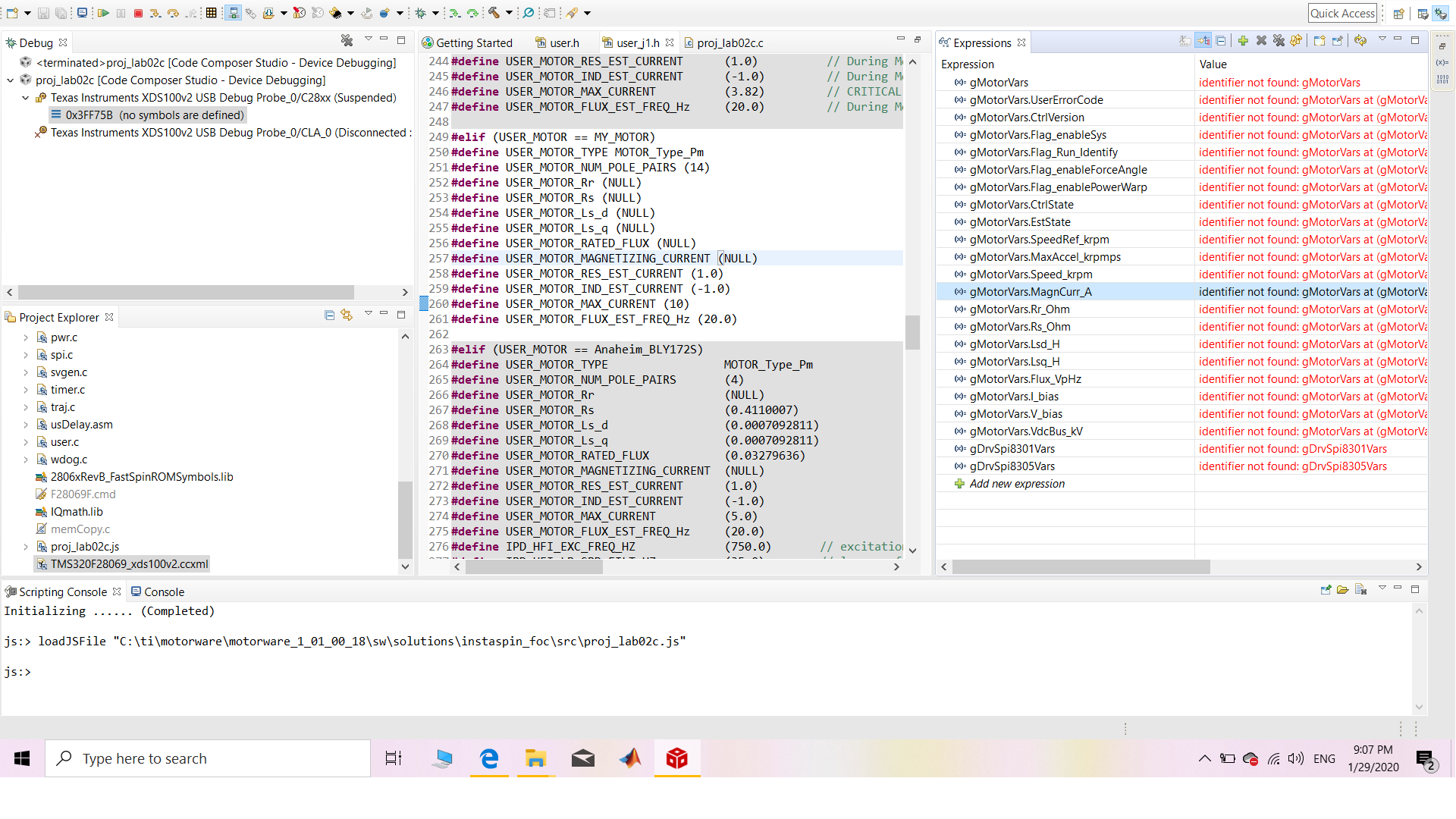
I was working with the ccs, and everything was fine, when repeating the lab, and debugging again, Debugging stopped working or I dont know  ! When I press debug nothing changes or appear in the expressions, as if it is taking forever to debug, here is a screenshot after pressing debug, I tested the connection and its working, so what could cause this sudden error ? 

I read about changing the optimization level in the Project properties to off but this didnt change anything. Hope someone could solve this problem. 

Regards, 

  • Hello Jinan,

    It looks like the debugger did not autoconnect to the debugger when trying to debug the project. I've seen other people run into the same issue.

    Go to 'Run -> Debug Configurations" and then select your project in the list in the left and browse to the option shown in the screenshot below. Make sure the "Connect to the target on debugger startup" is selected. Then Apply the changes and try to start a debug session for the project again.

    Thanks

    ki

  • Hi Ki, 

    Thank you for your quick reply. Ok so doing what you said made debugging takes place, but in the expressions 'Identifier not found for all the gVariables', this wasn't happening before . Note that connection is set correctly. 

    Regards,

  • Jinan said:
    but in the expressions 'Identifier not found for all the gVariables', this wasn't happening before

    Likely the variables are not in scope, hence the error. i see that the target is halted at an address (0x3ff75B) with no symbols associated it. Does that look correct? 

  • yes, but why ? I mean what does that mean, and what should I do to fix that. 

    Regards, 

  • I'm not sure regarding your last question. Are you asking how to have the variables in scope? Or why it is halted at 0x3ff75B? I can't help about the last question (best to ask in the C2000 forum) but regarding the variable is scope, the target must be halted at a location where gMotorVars is in scope in the code.

  • Dear Kevin,

    I am asking how to solve this issue, How can I have the variables in scope in the code,  I am working with lab2c, and I have been working since a period of time, and this problem suddenly appeared without a clue. 

    Sorry for the inconvenience. 

    Regards, 

  • I will move this thread to the C2000 forum. The experts there will be familiar with the Motorware examples to guide your further.

    Thanks

    ki

  • Did the application load after the device was connected? What happens if you explicitly load it by going to Run->Load->Load Program and finding the lab2 .out?

    After you load it, does it end up back at 0x3FF75B or can you see it going to main()? If you hit the Refresh and Restart buttons, does it go to main() then?

    Whitney

  • Dear Whitney, 

    In this time I uninstalled and reinstalled the motorware, and the problem was fixed, still didnt know what happened, will do the steps you asked and post what happens when this problem appears again.

    Regards,