This thread has been locked.

If you have a related question, please click the "Ask a related question" button in the top right corner. The newly created question will be automatically linked to this question.

TMS320F28379D: USB programming and Boot on Flash

Part Number: TMS320F28379D
Other Parts Discussed in Thread: TMDSCNCD28379D, C2000WARE

Hi,

I'm currently using TMDSCNCD28379D an USB cable to program my chip.

But after switching off / on power supply, I want to run program which is in the Flash.
Because if I change switch on A:SW to boot on Flash, I can't use xds100v2 emulator anymore?

How can I proceed?

Regards

  • Hi,

    The xds100v2 emulation logic is not connected to the MCU when the switch A SW1 is in OFF state. Hence you won;t be able to use xds100v2 emulator.

    https://www.ti.com/lit/ug/sprui76a/sprui76a.pdf

    How are you programming the code right now? Is it using the JTAG via xds100v2 emulator?

    Why do you need to connect to xds100v2 emulator after booting from Flash?

    Best Regards

    Siddharth

  • Hi Siddharth,

    Currently, I'm programming with the USB cable.

    I don't need to connect the xds100v2 emulator after booting from Flash, I just want to :

    - Program with the USB cable
    - Switch off / on the the power supply
    - Booting on Flash

    Is there a standard procedure to follow?(when must have I to disconnect usb cable? change the switch position?)

    Thank you.

    Regards

  • Hi,

    You can follow the following sequence

    - Program with the USB cable
    - Switch off the the power supply
    - Disconnect the USB cable
    - Change the switch position
    - Switch on the power supply
    - Booting on Flash

    Best Regards

    Siddharth

  • Hi Siddharth,

    I've follow your sequence, it doesn't work.

    What are all the points to verify?

    Hardware :
    A:SW1 : Position 1 : ON to program, OFF before reboot, position 2 : OFF
    SW1 : Mode 3 (GPIO-72 & 84 = 1) : Get Mode (Flash by default)

    Software (Code Composer):
    What are the points to verify or to set?

    When I switch the power supply after programming, booting on Flash doesn't works.

    Thanks for your help.

    Regards,

  • Hi,

    Maybe you have an example with a program which boot on Flash?

    Regards

  • Hi,

    What is the address of the entry point of the program that is programmed using USB?

    You can connect to the device after programming using CCS and xds1000v2 emulator and verify if the program has been correctly programmed?

    You can refer to the "Boot Status information" section in the TRM  to http://www.ti.com/lit/ug/spruhm8i/spruhm8i.pdf to check the boot status

    Best Regards

    Siddharth

  • Hi,

    In the project properties, entry point was not specified, so I try with code_start, but nothing changes. 

    First question, is there a guide that explains all the options of CCS 8 (example, all the project properties), and which ones to use?

    You can connect to the device after programming using CCS and xds1000v2 emulator and verify if the program has been correctly programmed?

    I don't know if I've understood ; I can program the device with the USB cable, and doing debug.
    If I unplug the USB cable, the program is running because it's written in the Flash.
    But if I switch off the power supply then switch on, program is not running, even if I change A:S1 switch position (to Get Mode (Flash by default)).

    My question is very simple : which parameters have I to change in CCS or in my program in order to have my program running standalone after a switch off - on of the power supply?

    Regards,

  • Hi ,

    For CCS , you can refer to the "Getting Started" guide under the "Help" menu in CCS.

    Can you describe how are you programming the code using USB? Are you connecting to the device using CCS and xds1000v2 emulator while programming?

    You can connect to the device after programming using CCS and xds1000v2 emulator and check in the memory window if the code that you have written is visible. 

    You can also refer the "Example_Projects_Quickstart_Guide.pdf" for f2837xd included in C2000Ware to see how to import and run an example from Flash.

    Best Regards

    Siddharth

  • Hi,

    How am I programming? It's very simple, I connect the target with the USB cable, then Run -> Debug, then Run- > Resume
    A led is blinking in my program, so I know when it's running.

    I'm verifying in Memory Browser that the Flash is well programmed.

    After programming, I'm disconnecting the target (Run -> Disconnect Target), then reconnecting (Run -> Connect Target) ; I need to click on Resume to launch the program because I have this windows and the led is not blinking.

    After launching the target (Resume), it's working. In Memory Browser, the Flash is programmed.

    But if I'm switching off then switching on the power supply and trying to reconnect to the device, it doesn't work, even if I'm launching the target (Resume).
    Some data in the Flash have changing in the Memory Browser.It seems that I can't restart my program.

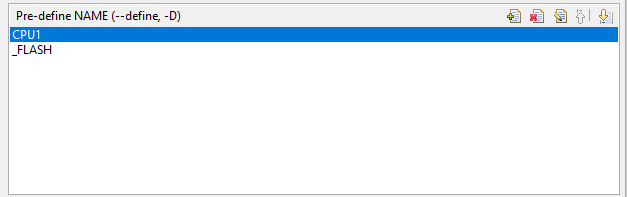
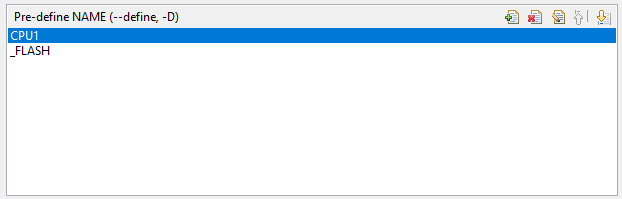
    In the project properties, I'm writing int the Flash :

    So my questions are :

    - Which settings have I to modify in Code Composer to boot on Flash?
    - Why can't I reconnect to the target after switching off power supply?
    - Do you have a very simple program which boot on Flash?
    - Is it possible only with the mini USB cable?

    Regards,

  • Hi,

    I would suggest you to try out the "led_ex1_blinky" CCS project included in C2000Ware. This project has two build configurations "CPU1_RAM" and "CPU1_Flash".

    Set the "CPU1_Flash" configuration as Active and compile the project.Refer the attached snapshot.

    You can load the binary file generated as you are doing currently. The code should run from Flash.

    - Which settings have I to modify in Code Composer to boot on Flash? - > Make sure that the code is written to Flash after you have programmed.
    - Why can't I reconnect to the target after switching off power supply? - > If you change the switch position , the emulation logic is not connected , hence you won't be able to connect via CCS.
    - Do you have a very simple program which boot on Flash? - > Try the "led_ex1_blinky" example in Flash configuration
    - Is it possible only with the mini USB cable? - > USB cable is used to connect to the target using the xds100v2 emulator.

    Best Regards

    Siddharth

  • Hi Siddharth,

    I've tried the example, after switching off - switching on the power supply, it's still blinking.
    Position of the A:SW switch changes nothing, why?

    Do I need to include driverlib.lib in my project?
    Specify the program entry point for the output module to "code-start"?
    Do I need to include "${COM_TI_C2000WARE_SOFTWARE_PACKAGE_LIBRARIES}"? What is it?

    Thank you very much for your support.

    Regards

  • Hi,

    If the LED is blinking after switching off and on the power supply, it indicates that the code is running from Flash.

    Position of A:SW1 switch is used for enabling the JTAG/UART communication.

    SW1 (Boot mode switch) the default boot mode is to boot from Flash.

    driverlib.lib should be included since it provides the API's for all peripherals and provides access to almost all functionality. In this example , the GPIO API's are included in the driverlib.lib

    Specify the program entry point for the output module to "code-start"? -> Yes, this is already configured in the project.
    Do I need to include "${COM_TI_C2000WARE_SOFTWARE_PACKAGE_LIBRARIES}"? What is it? -> This is a system environment variable. You don't have to change/update it.

    Best Regards

    Siddharth

  • Hi,

    I'm currently comparing my program with led_blinking. 
    In F2837xD_SysCtrl.c, some functions are in grey, that means they are not executed? Maybe issue can from here?

    Regards,

  • Hi,

    I really don't understand ; I have reducing my program to have same instructions than led_blinking program, but it still doesn't work.

    I don't use driverlib.lib, but I think I don't need it. 

    //
    // Included Files
    //
    #include "F28x_Project.h"
    
    #include "Init_Gpio.h"
    
    //
    // Function Prototypes
    //
    
    #pragma CODE_SECTION(InitFlash, ".TI.ramfunc");
    
    //
    // Main
    //
    void main(void)
    {
    
        InitSysCtrl();
    
        Init_Gpio();    // Initialize GPIO
    
        // Clear all interrupts and initialize PIE vector table
    
        DINT;
    
        // Initialize the PIE control registers to their default state.
        // The default state is all PIE interrupts disabled and flags are cleared.
        // This function is found in the F2837xD_PieCtrl.c file.
    
        InitPieCtrl();
    
        // Disable CPU interrupts and clear all CPU interrupt flags:
    
        IER = 0x0000;
        IFR = 0x0000;
    
        // Initialize the PIE vector table with pointers to the shell Interrupt Service Routines (ISR).
    
        InitPieVectTable();
    
        while(1)
        {
            GpioDataRegs.GPBTOGGLE.bit.GPIO34 = 1;      // Toogle LED
            DELAY_US(500000);
        }
    }

    I think project properties are ok. I really don't know why it doesn't work.

    Regards

  • Hi,

    Were you able to get it working? If not, request you to share your code and CCS project. I will take a look and see if anything is missing.

    Also, were you able to get the existing "led_ex1_blinky" example to work?

    Best Regards

    Siddharth

  • Hi,

    Yes,  "led_ex1_blinky" works.

    Issue is on my software. I've deleted all my .c and .h files to have a "clean project". My led blinking after a restart.

    Then I add .c files one by one.
    I've found issue with some .c file : if I add them to the project, I cannot restart after a power supply switch off. 

    What's the problem? A memory issue? Other thing? I'm a little confused because I really don't know where's the problem comes from.
    I can build my project, run it but it doesn't restart.

    Regards,

  • Hi,

    You can try to debug the code by stepping into it using CCS. Are you able to load and run using CCS before switching off the power supply?

    Best Regards

    Siddharth

  • Hi,

    Yes of course. If I don't switch off the power supply, my program run, I can debug it, no problem.

    But I don't know where the problem comes from because my program run without problem before switching off power supply.

    That's why I ask you.

    Regards,

  • Hi,

    Do you have any ideas to help me to solve my issue?

    Thank you.

    Regards,

  • Hi,

    Any ideas to help me to solve my issue?

    Thank you.

    Regards,

  • Hi,

    Can you make sure that the program is loaded to Flash and not RAM? From your description, looks like the program is loaded to RAM and hence it may not be run after power recycling of the board.

    Best Regards

    Siddharth

  • Hi Siddharth, 

    I don't know how it could happen, because if I remove some .c and .h files in my program, Flash writing worked, as I explain previously.
    How can I debug to fix the issue?

    Regards,