This thread has been locked.

If you have a related question, please click the "Ask a related question" button in the top right corner. The newly created question will be automatically linked to this question.

TMS320F280049C: Simulink CMPSS

Part Number: TMS320F280049C
Other Parts Discussed in Thread: LAUNCHXL-F280049C

Dear C2000 Simulink Team


About the block CMPSS of F280049C of simulink
How do I set it to operate like an analog comparator like the F28035 comparator?
Thank you.


Thank you.

  • Hi Hayaoki,

    Checking with MathWorks expert on this. We should hear soon from MathWorks.

  • Hi,

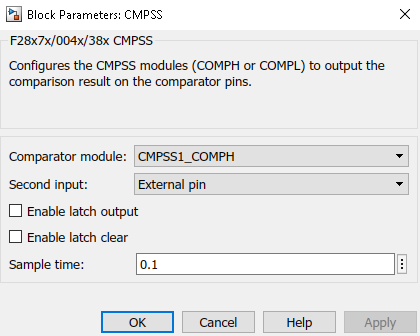
    The settings for the CMPSS module are available at 2 places. One in the block Mask where you can select the Comparator Module like COMPH or COMPL followed by settings for input source on second input. This can be 'external input' which is same as to COMPxB setting in F28035 or 'internal DAC'.

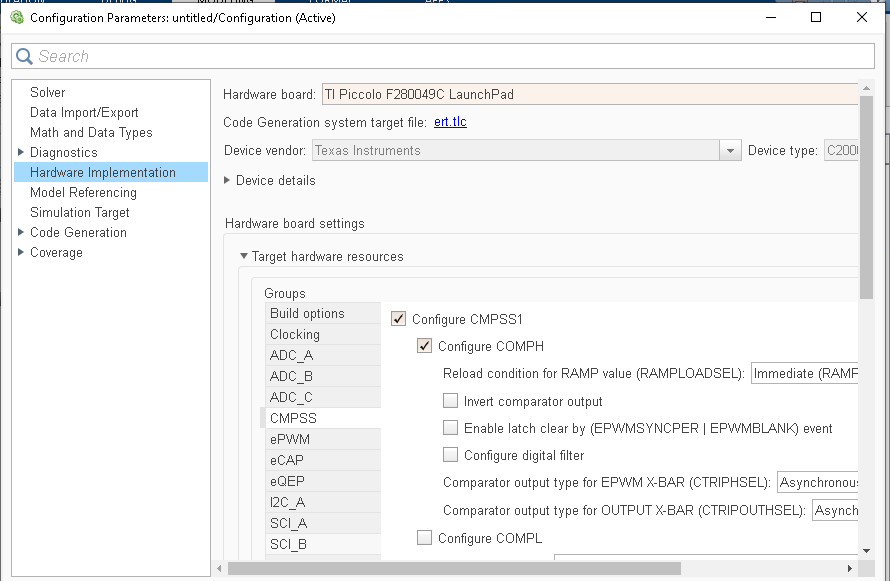
    Further in the hardware configuration pane you have options for configuring the digital filter and other settings like Invert comparator output.


    Please let me know for any specific settings you are looking for. 

  • Dear Sirs

    thank you for your answer.

    It turns out that you can specify a comparator for CMPSS1.
    Which port is set for the comparator function?
    ① Input In +
    ② Internal DAC
    ③ Output pin

    Thank you.

  • Hi,

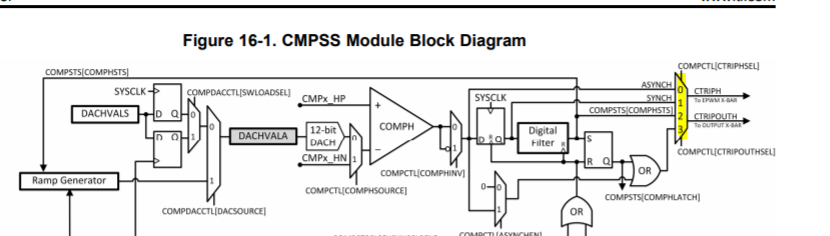
    + ve input comes from external source. So it is by default mapped to a device pin. Check out pin layout for your controller.

    The second input can be external source or internal DAC. Again the internal DAC can be from RAMP module or DAC module. And the value can be specified from input port or via dialog.

    Output pin is basically routed to e-PWM X-BAR or OUTPUT X-BAR.

    You can see a 1:1 Mapping between device settings and the configuration we provided.

    It should be easy to identify the various configurations settings if we keep the CMPSS block diagram and then run through the configuration.

    HTH,

  • Dear Sir

    thank you for your answer.

    Confirmed the technical document and block diagram of CMPSS.
    Very difficult.
    V +:
      For input, there are four CMPSS1.HP, 0, 1, 2, 3, and 4.
      There are four ports to input, and I don't know which one is used.
    V-:
      There is only one DAC, so OK
    OUT:
      Output?
      Where to set OUTOUT XBAR

    For example, in the case of the setting image sent at 10:12, which pin of the target is assigned the comparator?

    Thank you.

  • Hi,

    Considering the fact that we are talking about F280049c device

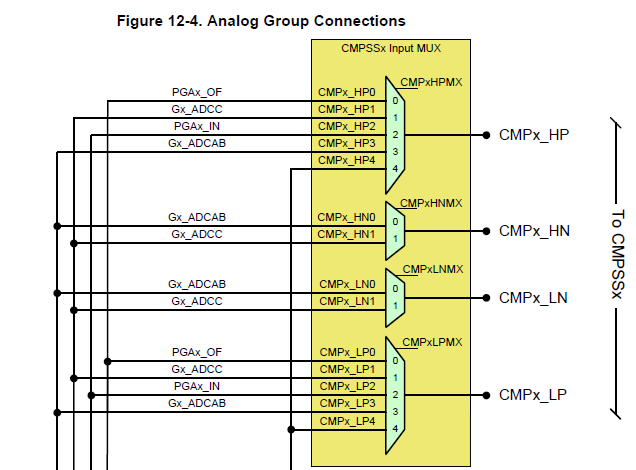
    For +ve input we need to configure the Mux which selects 1 of 5 possible inputs, similarly, if the negative input is configured for external input, then we have 2 possible options for inputs as shown in the below figure:


    And the registers which need to be programmed for configuring the Mux values are part of the Analog Subsystem:

    An Example is below:

    These settings you need to do via custom code blocks found under Simulink coder using the system initialize block.

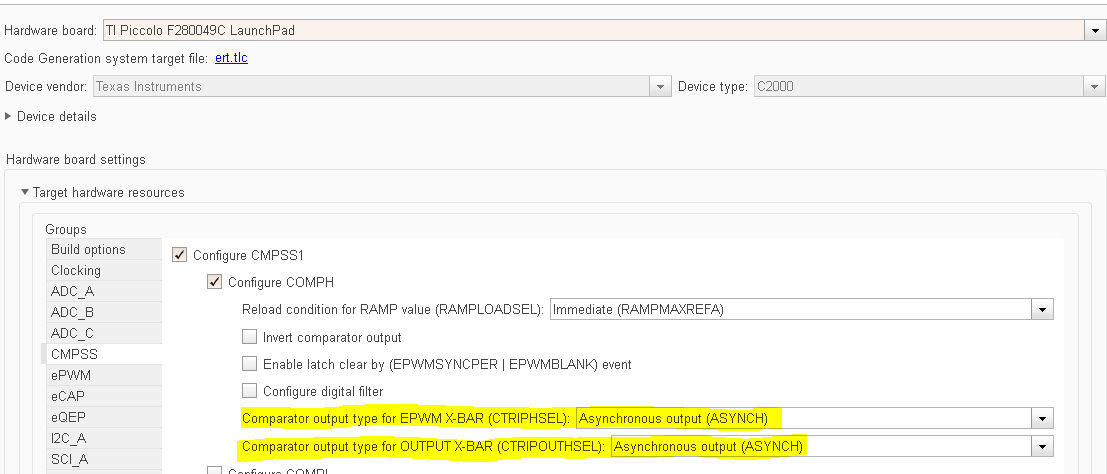
    Now coming to outputs, the CMPSS module has Mux configuration to select which COMP output is routed to OUTPUT XBAR. We can also configure the same to route the COMP output to EPWM XBAR. We support this configuration as shown below:

     i.e these configurations are true for the Mux as shown below:

    Now coming to OUTXBAR configuration itself, Please refer the XBAR section in the controller and as described use custom code to configure the XBAR.

    HTH,

  • Dear Sirs

    Thank you for the details.
    Since the comparator block of F280049C of the current specification of R2020A cannot set XBAR, setting the input / output port of the target cannot be done unless I create a custom block.
    Do you understand?

    If so, do you have a plan for XBAR?

    If you make a mistake, you also have LaunchXL-F280049C. I want to try on the target.
    Sorry to trouble you,
    Could you prepare a model that can check the comparator operation?

    Thank you.

  • Hi,

    I dont have a board right now. Once I'm back to office after the Covid-19 situation, I can work on this model.

  • Dea Sirs

    When you can return to the office, please.
    Thank you for your support during hard times.

    Thnak you

  • Still waiting for Venkat to come to office.

  • Dear sirs,
    Please be careful about your health.
    You can use the sample model when you return to the office.
    Thnak you
  • Venkatesh,

    Any idea when you will have time to work on this?

  • Dear Sir
    Checking the Xbar settings to set the comparator to an external GPIO
    Best regards

  • Hi,

    i am using F28388D and my application is to detect sector of 400Hz 3 Phase. Do you have any example donw with CMPSS? I am more intrested in digital filter configuration to reject noise. And will this comparator work fine at high sampling frequency of around 100kHz?

    Regards

    Bilal

  • Bilal,

    Please create a new thread. It is better tracked that way. Closing this thread.