This thread has been locked.

If you have a related question, please click the "Ask a related question" button in the top right corner. The newly created question will be automatically linked to this question.

CCS/TMS320F28379D: Setup CCS to load program without erasinf specific sector

Part Number: TMS320F28379D


Tool/software: Code Composer Studio

Hello,

I'd like to debug my program without erasing specific flash sector,

all attempts to configure it failed:
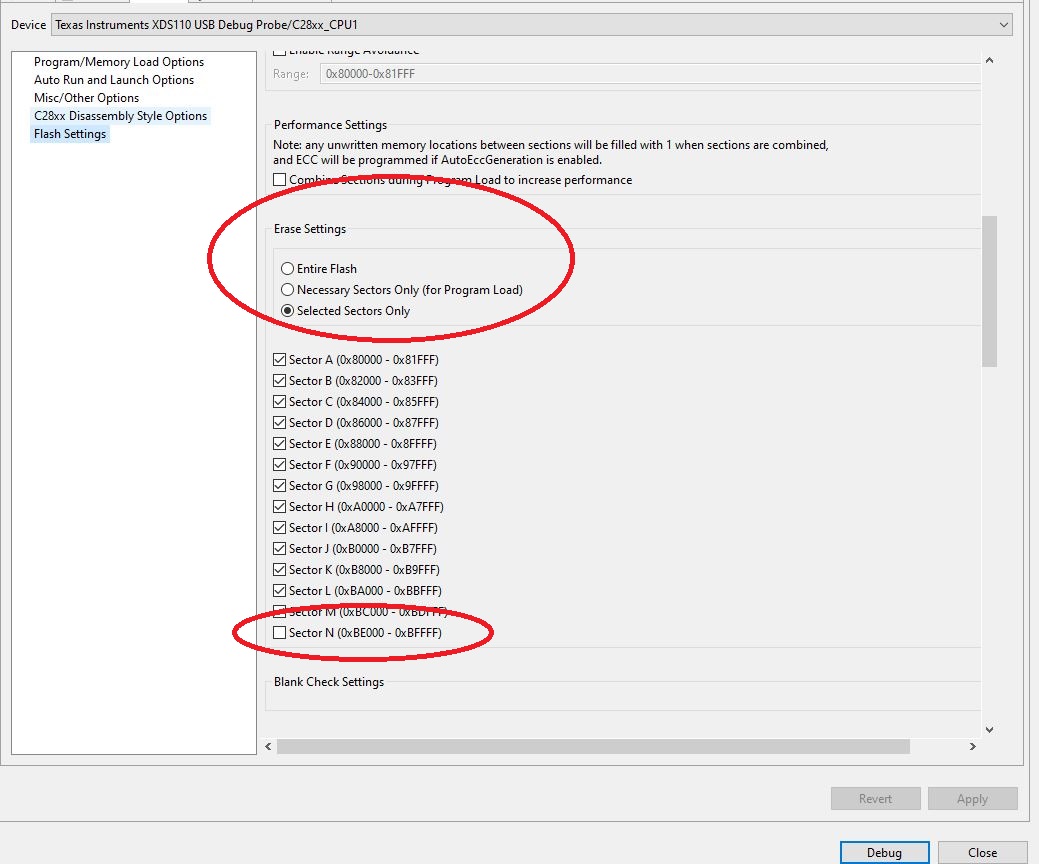
  • Hi,

    Just so I understand your requirement: Are you looking for a program-only option without doing erase of any sector?  If yes, there is a program-only option that you can choose (scroll a little above the erase settings and you will find it).

    If you want to select specific sectors to erase, then choose those sectors in the snap that you sent.  

    Thanks and regards,

    Vamsi

  • Hello,

    My program write some information to the internal flash, but after I connect with debugger this information is erased.

    I've tried to use Program only and also to unselect my sector in the erase list - still this sector shows all data 0xFFFF  after connecting debugger.

    Thanks

  • Hi,

    Just connecting debugger should not erase Flash.

    Did you check to make sure you are not erasing the Flash in your application after programming it?  I saw a few doing that by mistake.  Please check.

    If you have program-only option selected, CCS Flash Plugin should not erase the Flash.

    Thanks and regards,
    Vamsi

  • Hi,

    I've checked again my code I do not erase after programming:

    •  After I program the flash sector I am able to read the data in runtime
    •  I've selected the Program-Only option and still my sector shows all 0xFFFF

    This programs runs on Core2 Core1 is reserved for future development and for now configures PLL and boots Core2.

    Any ideas will be welcomed 

    Thanks

  • Hi,

    Thank you for checking.

    Which sector are you programming in your CPU2 application?

    When you say you connected the debugger, do you mean you tried to reload another application in CPU2 Flash and that's when you noticed this issue?  

    Are you configuring the CCS On-chip Flash Plugin GUI at CCS Debug view -> Tools -> On-Chip Flash? Or somewhere else?

    Thanks and regards,
    Vamsi

    1. I'm programming sector N (0x0BE000 - 0xBFFFF)
    2. Yes, I'm trying to reload another program, which by the way the same one I've loaded before
    3. I had several ccxml files (Target configuration) in my project - and I think it produced this problem 
    4. Now I am able to load my program and not erase sector N

    Thank you for your help

  • Hi,

    Glad it worked now.

    Instead of CCXML settings, it is better to configure the Flash Plugin at CCS On-chip Flash Plugin GUI at CCS Debug view -> Tools -> On-Chip Flash.

    Maybe this fixed in your case.

    Thanks and regards,

    Vamsi