This thread has been locked.

If you have a related question, please click the "Ask a related question" button in the top right corner. The newly created question will be automatically linked to this question.

CCS/TMS320F280049: CCS Debug Server Scripting - Connect to running device

Part Number: TMS320F280049


Tool/software: Code Composer Studio

I have a big modular converter with 180 Piccolo F280049. For programming and debugging I have 18 XDS110. Each XDS110 is connected via JTAG chain to 10 microcontrollers. All the controllers use the same software. So I use java script in the Code Composer Debug Server Scripting (Scripting Console) to load the programms.

At the beginning I used the following java script:

debugSession1 = debugServer.openSession( "RK_111_Probe", "C28xx_CPU1_1" );
debugSession1.target.connect();
debugSession1.memory.loadProgram( programToLoad );
debugSession1.target.runAsynch();

This worked for 10, 20 or 30 devices without a problem. But I noticed that the becomes slower and slower, when I increase the number of devices.

So I added 2 lines:

debugSession1.target.disconnect();
debugSession1.terminate();

Now it takes approximately 10 minutes to programm 90 devices. Thats totally okay.

The problem is now, that I can't see any informations of my converters any more. So my first question is: How can I load symbols and connect to a running device via Debug Server Scripting?

I found something like:

debugSession1.Symbol.load( programToLoad );

But that wasn't working.

By the side there is a second question: How can I output text out of my java script to the console window in CCS?

I tried:

var script = ScriptingEnvironment.instance();
// "traceWrite"
script.traceSetConsoleLevel(TraceLevel.ALL)
script.traceWrite("TEST traceWrite!")
// "println"
System.out.println( "TEST println!" );

But nothing was working.

  • I forgot to attache a full example file. In the example I programm 30 devices. The original name of the file is LoadProgram_ti.js but the ending js is not supported by this forum, so I used "jsl".

    LoadProgram_ti.jsl

    By the way. To generate this java script and the big target configuration I´m using python scripts. 

    PS: Way it is not possible to attache files using firefox?

  • Hello Ludwig,

    Ludwig Schlegel said:

    So my first question is: How can I load symbols and connect to a running device via Debug Server Scripting?

    I found something like:

    1
    debugSession1.Symbol.load( programToLoad );

    But that wasn't working.

    That should work. The above line would load just the symbols to the debugger. Then you should be able to call target.connect afterwards. Did you get some failure message? If not, generate a verbose DSS log to see if the API call was successful.

    Ludwig Schlegel said:
    By the side there is a second question: How can I output text out of my java script to the console window in CCS?

    DSS traceWrite, the javascript print, and java println would print messages to the CCS Scripting Console. Those do not go to the CCS debug console (and cannot be redirected as such). Just debugger messages, C/IO, GEL would print there.

    Thanks

    ki

  • Regarding "Load symbols":

    I get the following error:

    TypeError: Cannot call method "load" of undefined (... connect_111_mod.js#54)

    Line 54 is the line with:

    debugSession1.Symbol.load( programToLoad );

    With:

    var programToLoad = "... F280049/CPU1_RAM/Basis_F280049.out";

    The same variable "programToLoad" I use to load the programm with an other script:

    debugSession1.memory.loadProgram( programToLoad );

    Regarding printing text:

    It would be no problem to see the messages only in the Scripting Console, but I don´t see any messages. And there are no errors.

  • Ludwig Schlegel said:

    I forgot to attache a full example file. In the example I programm 30 devices. The original name of the file is LoadProgram_ti.js but the ending js is not supported by this forum, so I used "jsl".

    LoadProgram_ti.jsl

    The link for this file is broken. Can you repost? Try using a *.txt extension

  • // Konfiguration erstellt mit "F280049_loadProgram_gen.py" am: 13.05.2020 (07:34:01)
    // To run this script open the "Scripting Console" under the "View" tab in CCS
    // use the "loadJSFile <path to file>" command to load and run this script
    // For more documentation on scipting have a look at:
    // file:///C:/ti/ccs920/ccs/ccs_base/scripting/docs/GettingStarted.htm oder
    // http://software-dl.ti.com/ccs/esd/documents/users_guide/sdto_dss_handbook.html 
    
    // Import the DSS packages into our namespace to save on typing
    importPackage(Packages.com.ti.debug.engine.scripting)
    importPackage(Packages.com.ti.ccstudio.scripting.environment)
    importPackage(Packages.java.lang)
    
    // Configurable Parameters
    var deviceCCXMLFile = "C:/SVN_ASCO/Software/F280049/targetConfigs/TMS320F280049_converter1_all.ccxml";
    var programToLoad = "C:/SVN_ASCO/Software/F280049/CPU1_RAM/Basis_F280049.out";
    
    // Create our scripting environment object - which is the main entry point into any script and
    // the factory for creating other Scriptable ervers and Sessions
    var script = ScriptingEnvironment.instance();
    
    // Create a debug server
    var debugServer = script.getServer( "DebugServer.1" );
    
    // Set the device ccxml 
    debugServer.setConfig( deviceCCXMLFile );
    
    // Open a debug session
    debugSession1 = debugServer.openSession( "RK_111_Probe", "C28xx_CPU1_1" );
    debugSession2 = debugServer.openSession( "RK_111_Probe", "C28xx_CPU1_2" );
    debugSession3 = debugServer.openSession( "RK_111_Probe", "C28xx_CPU1_3" );
    debugSession4 = debugServer.openSession( "RK_111_Probe", "C28xx_CPU1_4" );
    debugSession5 = debugServer.openSession( "RK_111_Probe", "C28xx_CPU1_5" );
    debugSession6 = debugServer.openSession( "RK_111_Probe", "C28xx_CPU1_6" );
    debugSession7 = debugServer.openSession( "RK_111_Probe", "C28xx_CPU1_7" );
    debugSession8 = debugServer.openSession( "RK_111_Probe", "C28xx_CPU1_8" );
    debugSession9 = debugServer.openSession( "RK_111_Probe", "C28xx_CPU1_9" );
    debugSession10 = debugServer.openSession( "RK_111_Probe", "C28xx_CPU1_10" );
    
    // Connect to the target
    debugSession1.target.connect();
    debugSession2.target.connect();
    debugSession3.target.connect();
    debugSession4.target.connect();
    debugSession5.target.connect();
    debugSession6.target.connect();
    debugSession7.target.connect();
    debugSession8.target.connect();
    debugSession9.target.connect();
    debugSession10.target.connect();
    
    // Load the program
    debugSession1.memory.loadProgram( programToLoad );
    debugSession2.memory.loadProgram( programToLoad );
    debugSession3.memory.loadProgram( programToLoad );
    debugSession4.memory.loadProgram( programToLoad );
    debugSession5.memory.loadProgram( programToLoad );
    debugSession6.memory.loadProgram( programToLoad );
    debugSession7.memory.loadProgram( programToLoad );
    debugSession8.memory.loadProgram( programToLoad );
    debugSession9.memory.loadProgram( programToLoad );
    debugSession10.memory.loadProgram( programToLoad );
    
    // Run the program
    debugSession1.target.runAsynch();
    debugSession2.target.runAsynch();
    debugSession3.target.runAsynch();
    debugSession4.target.runAsynch();
    debugSession5.target.runAsynch();
    debugSession6.target.runAsynch();
    debugSession7.target.runAsynch();
    debugSession8.target.runAsynch();
    debugSession9.target.runAsynch();
    debugSession10.target.runAsynch();
    
    // Disconnect from the target
    debugSession1.target.disconnect();
    debugSession1.terminate();
    debugSession2.target.disconnect();
    debugSession2.terminate();
    debugSession3.target.disconnect();
    debugSession3.terminate();
    debugSession4.target.disconnect();
    debugSession4.terminate();
    debugSession5.target.disconnect();
    debugSession5.terminate();
    debugSession6.target.disconnect();
    debugSession6.terminate();
    debugSession7.target.disconnect();
    debugSession7.terminate();
    debugSession8.target.disconnect();
    debugSession8.terminate();
    debugSession9.target.disconnect();
    debugSession9.terminate();
    debugSession10.target.disconnect();
    debugSession10.terminate();
    
    // Open a debug session
    debugSession11 = debugServer.openSession( "RK_121_Probe", "C28xx_CPU1_1" );
    debugSession12 = debugServer.openSession( "RK_121_Probe", "C28xx_CPU1_2" );
    debugSession13 = debugServer.openSession( "RK_121_Probe", "C28xx_CPU1_3" );
    debugSession14 = debugServer.openSession( "RK_121_Probe", "C28xx_CPU1_4" );
    debugSession15 = debugServer.openSession( "RK_121_Probe", "C28xx_CPU1_5" );
    debugSession16 = debugServer.openSession( "RK_121_Probe", "C28xx_CPU1_6" );
    debugSession17 = debugServer.openSession( "RK_121_Probe", "C28xx_CPU1_7" );
    debugSession18 = debugServer.openSession( "RK_121_Probe", "C28xx_CPU1_8" );
    debugSession19 = debugServer.openSession( "RK_121_Probe", "C28xx_CPU1_9" );
    debugSession20 = debugServer.openSession( "RK_121_Probe", "C28xx_CPU1_10" );
    
    // Connect to the target
    debugSession11.target.connect();
    debugSession12.target.connect();
    debugSession13.target.connect();
    debugSession14.target.connect();
    debugSession15.target.connect();
    debugSession16.target.connect();
    debugSession17.target.connect();
    debugSession18.target.connect();
    debugSession19.target.connect();
    debugSession20.target.connect();
    
    // Load the program 
    debugSession11.memory.loadProgram( programToLoad );
    debugSession12.memory.loadProgram( programToLoad );
    debugSession13.memory.loadProgram( programToLoad );
    debugSession14.memory.loadProgram( programToLoad );
    debugSession15.memory.loadProgram( programToLoad );
    debugSession16.memory.loadProgram( programToLoad );
    debugSession17.memory.loadProgram( programToLoad );
    debugSession18.memory.loadProgram( programToLoad );
    debugSession19.memory.loadProgram( programToLoad );
    debugSession20.memory.loadProgram( programToLoad );
    
    // Run the program
    debugSession11.target.runAsynch();
    debugSession12.target.runAsynch();
    debugSession13.target.runAsynch();
    debugSession14.target.runAsynch();
    debugSession15.target.runAsynch();
    debugSession16.target.runAsynch();
    debugSession17.target.runAsynch();
    debugSession18.target.runAsynch();
    debugSession19.target.runAsynch();
    debugSession20.target.runAsynch();
    
    // Disconnect from the target
    debugSession11.target.disconnect();
    debugSession11.terminate();
    debugSession12.target.disconnect();
    debugSession12.terminate();
    debugSession13.target.disconnect();
    debugSession13.terminate();
    debugSession14.target.disconnect();
    debugSession14.terminate();
    debugSession15.target.disconnect();
    debugSession15.terminate();
    debugSession16.target.disconnect();
    debugSession16.terminate();
    debugSession17.target.disconnect();
    debugSession17.terminate();
    debugSession18.target.disconnect();
    debugSession18.terminate();
    debugSession19.target.disconnect();
    debugSession19.terminate();
    debugSession20.target.disconnect();
    debugSession20.terminate();
    
    // Open a debug session
    debugSession21 = debugServer.openSession( "RK_131_Probe", "C28xx_CPU1_1" );
    debugSession22 = debugServer.openSession( "RK_131_Probe", "C28xx_CPU1_2" );
    debugSession23 = debugServer.openSession( "RK_131_Probe", "C28xx_CPU1_3" );
    debugSession24 = debugServer.openSession( "RK_131_Probe", "C28xx_CPU1_4" );
    debugSession25 = debugServer.openSession( "RK_131_Probe", "C28xx_CPU1_5" );
    debugSession26 = debugServer.openSession( "RK_131_Probe", "C28xx_CPU1_6" );
    debugSession27 = debugServer.openSession( "RK_131_Probe", "C28xx_CPU1_7" );
    debugSession28 = debugServer.openSession( "RK_131_Probe", "C28xx_CPU1_8" );
    debugSession29 = debugServer.openSession( "RK_131_Probe", "C28xx_CPU1_9" );
    debugSession30 = debugServer.openSession( "RK_131_Probe", "C28xx_CPU1_10" );
    
    // Connect to the target
    debugSession21.target.connect();
    debugSession22.target.connect();
    debugSession23.target.connect();
    debugSession24.target.connect();
    debugSession25.target.connect();
    debugSession26.target.connect();
    debugSession27.target.connect();
    debugSession28.target.connect();
    debugSession29.target.connect();
    debugSession30.target.connect();
    
    // Load the program 
    debugSession21.memory.loadProgram( programToLoad );
    debugSession22.memory.loadProgram( programToLoad );
    debugSession23.memory.loadProgram( programToLoad );
    debugSession24.memory.loadProgram( programToLoad );
    debugSession25.memory.loadProgram( programToLoad );
    debugSession26.memory.loadProgram( programToLoad );
    debugSession27.memory.loadProgram( programToLoad );
    debugSession28.memory.loadProgram( programToLoad );
    debugSession29.memory.loadProgram( programToLoad );
    debugSession30.memory.loadProgram( programToLoad );
    
    // Run the program
    debugSession21.target.runAsynch();
    debugSession22.target.runAsynch();
    debugSession23.target.runAsynch();
    debugSession24.target.runAsynch();
    debugSession25.target.runAsynch();
    debugSession26.target.runAsynch();
    debugSession27.target.runAsynch();
    debugSession28.target.runAsynch();
    debugSession29.target.runAsynch();
    debugSession30.target.runAsynch();
    
    // Disconnect from the target
    debugSession21.target.disconnect();
    debugSession21.terminate();
    debugSession22.target.disconnect();
    debugSession22.terminate();
    debugSession23.target.disconnect();
    debugSession23.terminate();
    debugSession24.target.disconnect();
    debugSession24.terminate();
    debugSession25.target.disconnect();
    debugSession25.terminate();
    debugSession26.target.disconnect();
    debugSession26.terminate();
    debugSession27.target.disconnect();
    debugSession27.terminate();
    debugSession28.target.disconnect();
    debugSession28.terminate();
    debugSession29.target.disconnect();
    debugSession29.terminate();
    debugSession30.target.disconnect();
    debugSession30.terminate();
    
    
    // debugServer.stop();

  • Ludwig Schlegel said:

    I get the following error:

    TypeError: Cannot call method "load" of undefined (... connect_111_mod.js#54)

    Line 54 is the line with:

    debugSession1.Symbol.load( programToLoad );

    The "s" in Symbol should be lowercase:

    debugSession1.symbol.load( programToLoad );

    Ludwig Schlegel said:

    Regarding printing text:

    It would be no problem to see the messages only in the Scripting Console, but I don´t see any messages. And there are no errors.

    Use the javascript "print" call

    print("string to print");

    Thanks

    ki

  • Hello,

    the "print"-command is working. Thanks allot!!

    If I use the "s" in Symbol with lowercase, than I don't get an error, but the debug session is not working. In the debug window in ccs I can see that there is an open connection to the controller. But there is not the green triangel, that shows that the controller is running. There is only a text "0x3FB02A (no symbols are defined)".

    My script for one controller:

    // Import the DSS packages into our namespace to save on typing
    importPackage(Packages.com.ti.debug.engine.scripting)
    importPackage(Packages.com.ti.ccstudio.scripting.environment)
    importPackage(Packages.java.lang)
    
    // Configurable Parameters
    var deviceCCXMLFile = "C:/SVN/Software/F280049/targetConfigs/TMS320F280049_converter1_all.ccxml";
    var programToLoad = "C:/SVN/Software/F280049/CPU1_RAM/Basis_F280049.out";
    
    // Create our scripting environment object - which is the main entry point into any script and
    // the factory for creating other Scriptable ervers and Sessions
    var script = ScriptingEnvironment.instance();
    
    // Create a debug server
    var debugServer = script.getServer( "DebugServer.1" );
    
    // Set the device ccxml 
    debugServer.setConfig( deviceCCXMLFile );
    
    // Open a debug session
    debugSession1 = debugServer.openSession( "RK_111_Probe", "C28xx_CPU1_1" );
    
    // Connect to the target
    debugSession1.target.connect();
    
    // Load symbols only
    debugSession1.symbol.load( programToLoad );
    
    // Run the program
    debugSession1.target.runAsynch();

    If I press F8 to get the controller runnig, the message disappeares for 1 second and than is rised again.

    Maybe "debugSession1.target.runAsynch();" is wrong. The interessting thing is, that the behavior doesn't change, when I delet this line.

  • Ludwig Schlegel said:
    but the debug session is not working. In the debug window in ccs I can see that there is an open connection to the controller. But there is not the green triangel, that shows that the controller is running. There is only a text "0x3FB02A (no symbols are defined)".

    Can you post a screenshot of this?

  • After Connection:

    After pressing the green "play"/"run" button:

  • What instruction is at the address after you try to run? It looks like it hit an exception. If you open the Modules view, do you see the symbols successfully loaded?

  • The symbols are loaded successfully. I can find main() and so on in the Moules View. But unfortunately I can't find anything at this adresses.

    By the way: If I load the programm and run run it with the script I posted at 29th May 2020, than there opens up a new window in editor view. With the following text.

    Break at address "0x3fc7a5" with no debug information available, or outside of program code.

    This is the so called "Source Not Found Editor".

  • Ludwig Schlegel said:
    Break at address "0x3fc7a5" with no debug information available, or outside of program code.

    That address is somewhere in the ROM. See Devin's post below:

    https://e2e.ti.com/support/microcontrollers/c2000/f/171/t/766445?CCS-LAUNCHXL-F280049C-Break-at-address-0x3fc7a5-with-no-debug-information-available

    He provides step-by-step instructions on starting a manual debug launch and manually loading the code. I'm not sure if that will help in your case. But the key thing is that the program hit some exception. I can't explain why and some debug will be required. But it is beyond my expertise. 

    I suggest starting a new thread in the C2000 forum. The experts there can help best.

    Thanks

    ki

  • The question about how to print text in scripting console was just a incidental. I just marked your replay as "resoulved" to mark an important step.

    The main purpose of this post was, to connect to a runnig device. And this is not solved yet. Can you maby forward this thread to an expert in this field to get this running?

    Devin's post has not so mutch to do with the thinks I do. There somebody has generell questions to get the debugging running.

  • Ludwig Schlegel said:
    The main purpose of this post was, to connect to a runnig device. And this is not solved yet. Can you maby forward this thread to an expert in this field to get this running?

    What is the main issue with this? Do you want to non-intrusively connect to the target (and leave it running)? Or is the issue that when you connect and the target halts, it is halted at the above unexpected location?

  • Hi,

    I want to non-intrusively connect to the target and leave it running. But when I try this as shown above, I don´t get a running debug connection. In the state, shown in the screenshots, the device is still runnig. But I don´t get debug informations. I need to know the values of some variables, but I don´t see them.

    How I get a fully running debug connection?

    By the way. I just noticed that the register values are updated. I have a toggeling pin at the controller. And I can see how "GpioDataRegs.GPADAT.bit.GPIO8" is toggeling. But all the variables are just zero and are not updated.

    Ludwig

  • Ludwig Schlegel said:
    I want to non-intrusively connect to the target and leave it running

    By default, CCS will halt the target on connection. Also note that there may be some GEL actions in the GEL startup file that will halt the target on connection. To make sure it is a non-intrusive connection, do the below:

    1) modify the default debugger behavior to disable auto-halt on connect:

    How to do this from DSS? See: https://software-dl.ti.com/ccs/esd/documents/users_guide/sdto_dss_handbook.html#debugger-properties

    2) remove the GEL file from the target connection: https://software-dl.ti.com/ccs/esd/documents/users_guide/gel/targetconfig.html

    Thanks

    ki

  • Hi,

    thank you for your reply.

    Regarding your first point:

    I tried one or combinations of the following options:

    debugSession.options.setBoolean("HaltOnConnect",false)
    debugSession.options.setBoolean("ClearBreakpointsOnLoad",true);
    debugSession.options.setBoolean("AutoRunToLabelOnRestart",false);
    debugSession.options.setBoolean("AutoRunToLabelOnReset",false);
    debugSession.options.setString("AutoRunToLabelName","");

    But nothing helped me.

    Regarding your second point:

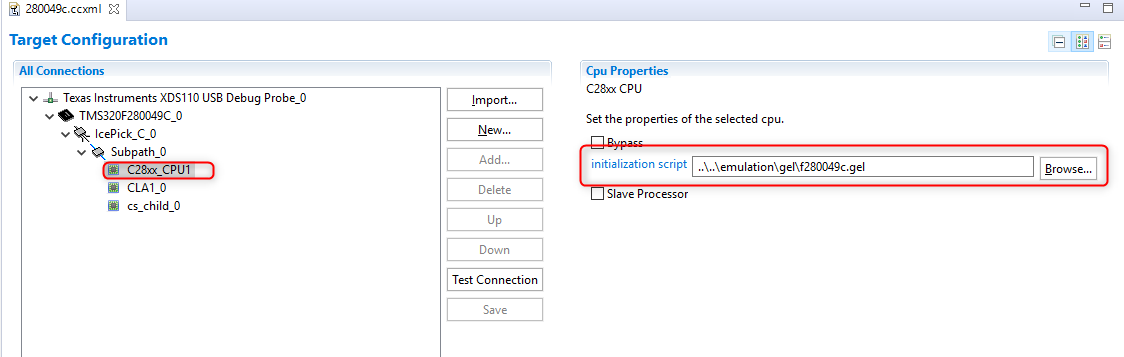
    I can´t remove the gel file. Becaus there is no gel file in the traget configuration file. This information is placed in f280049.xml. This file you can find in C:\ti\ccs920\ccs\ccs_base\common\targetdb\devices.

    You told: "I suggest starting a new thread in the C2000 forum. The experts there can help best."

    I did that. => https://e2e.ti.com/support/microcontrollers/c2000/f/171/p/913519/3375704

    Ludwig

  • Ludwig Schlegel said:
    I can´t remove the gel file. Becaus there is no gel file in the traget configuration file. This information is placed in f280049.xml. This file you can find in C:\ti\ccs920\ccs\ccs_base\common\targetdb\devices.

    When you open the ccxml file in CCS, is the initialization script field blank?

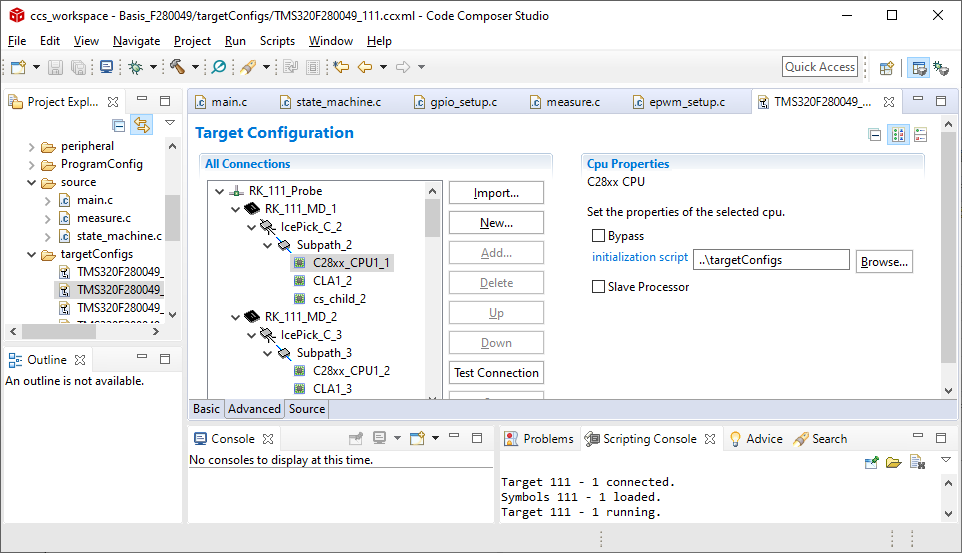
  • When I delet the "initialization script"/"gel file" from this CPU and then save the configuration then I get the following:

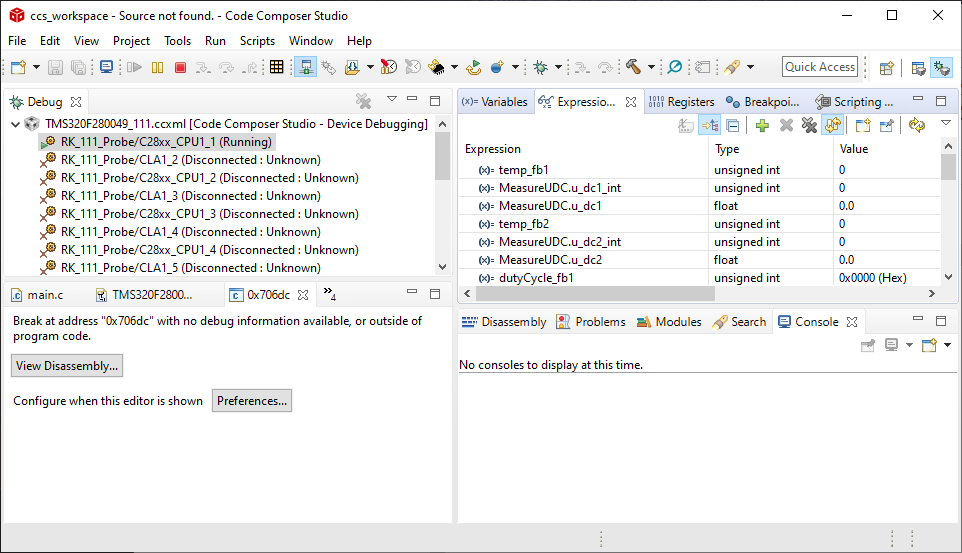
    So somehow automatically "..\targetConfigs" is added there. Anyway I tried to connect to this device. I was really surprised, that now the device is running. Like you can see in the following screen shot:

    Unfortunately the values of the variables are still not updated. :-(

    So it looks like the problem is somehow connected to the gel file. But simply removing it is not the right solution.

  • Yes deleting the GEL file would help since the GEL file can be doing all sorts of target actions that would require a halted targetd.

    See my reply in the other thread for an example script and a video.

    Thansk

    ki

  • Okay, then maybe we shift all the conversation to the new thread: https://e2e.ti.com/support/microcontrollers/c2000/f/171/p/913519/3382908

    It´s easier for me and others reading this...