This thread has been locked.

If you have a related question, please click the "Ask a related question" button in the top right corner. The newly created question will be automatically linked to this question.

TMS320F280049C: TMS320F280049C:Live Firmware Update of Application example project queries

Part Number: TMS320F280049C
Other Parts Discussed in Thread: C2000WARE

Hi,

I am trying to implement Live Firmware Update for TMS320F280049C and have referred below pdf for the steps to be followed:

https://www.ti.com/lit/ug/spruiu9/spruiu9.pdf?ts=1593410690862&ref_url=https%253A%252F%252Fwww.ti.com%252Fproduct%252FTMS320F280041

However, i have below query related to application running. As per section 6.3 of the document we have "After programming the static contents, disconnect the debugger and set the boot mode switches to flash boot mode" what does switching from boot mode to flash mode means? Can you please shed some light on the same?

When i flash the code as per steps mentioned in section 6.2 control is stopping at main function of flashapi_ex2_sci_kernel.c. It is not switching to application on either bank 0 or bank 1? Can you please tell me what is the issue?

Thanks and Regards,

Suhail.B

  • Suhail,

    This just means that the device should be setup to boot from Flash. This should already be the case, unless you changed the boot switch settings to SCI Boot etc. 

    Did you follow all the steps in 6.2, and did all of them work as shown in the document? Did you verify Flash memory locations for the Kernel as well as App as well as FW version etc. on both Banks?

    Thanks,

    Sira

  • Thanks for the reply. 

    When you say "device should be setup to boot from Flash" how it has been setup and configured in the example code given? do we have to make any changes?

    Can you please give a detail description on the boot switch settings?

    Yes i followed all the steps in section 6.2 and it worked as shown in the document. Yes flash memory locations also i have verified on both the banks. What could be the issue?

    Thanks and Regards,

    Suhail.B
  • What hardware are you using? If you are using a F28004x Launchpad, it will have a Boot switch (SW1 on the Launchpad) that will control Boot modes. If you are using custom hardware, you will have to look at the boot mode table in the F28004x TRM, and set the associated GPIOs accordingly to achieve the Boot mode you desire.

    After programming the kernel on Bank 0, you should program the application on Bank 1. Then program the kernel on Bank 1, followed by the application on Bank 0. Then reset the board. The application should run on Bank 0 (most recently updated/programmed App).

    When you program the kernel on Bank 0 using CCS, it will not stop at main(), it will be waiting for autoBaud lock, so you can send the SCI command from your windows command prompt to download the application to Bank 1. Then reset the device. Then reconnect - program the kernel on Bank 1 using CCS. Now it WILL stop at main(), continue running, and then it will be waiting for autobaud lock, so again you can send the SCI command to download the application to Bank 0. Then reset the board.

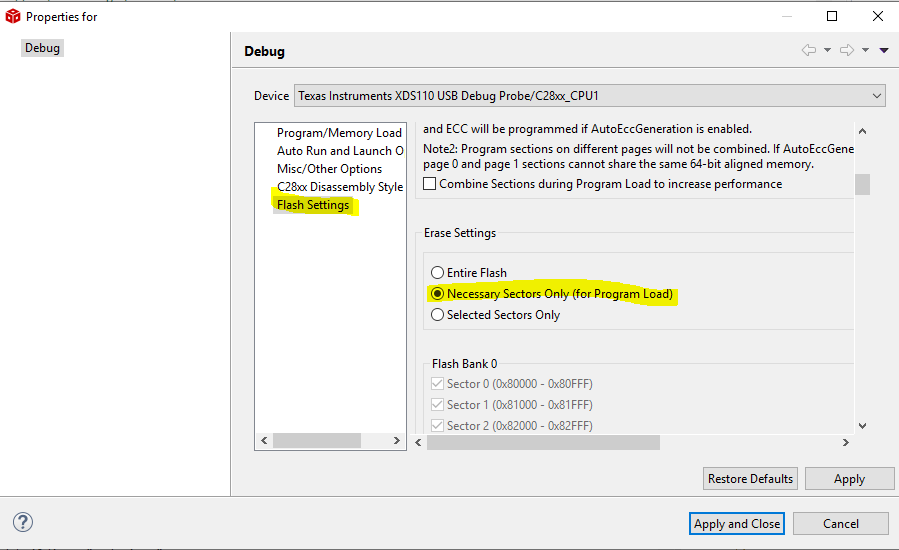
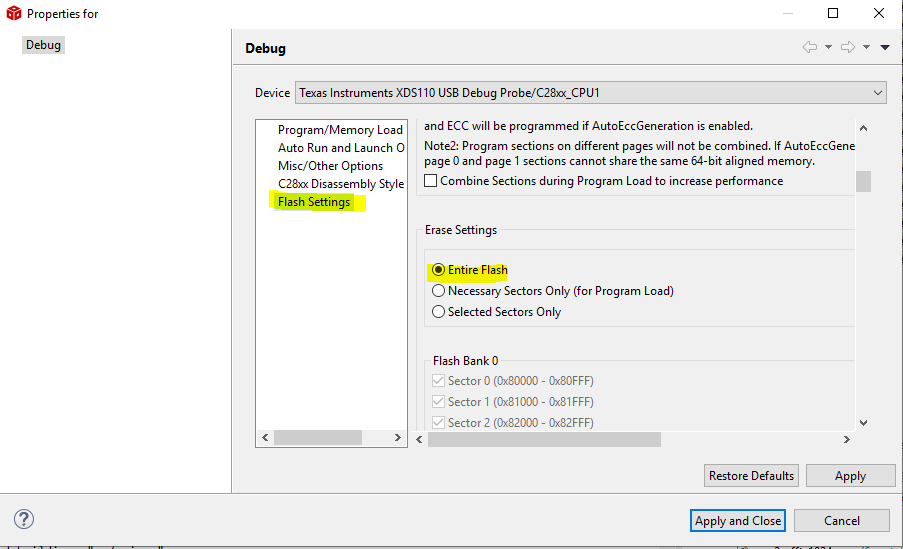
    I would advise you to repeat the steps. Also, another piece of advice - when programming the kernel on Bank0, use a target configuration file that Erases all sectors of Flash. When programming the kernel on Bank 1, use a target configuration file that Erases only necessary sectors. Otherwise you will wipe out the previously written parts. See images .

    Which version of C2000Ware are you using?

    Thanks,

    Sira

  • Suhail,

    Also, I'm curious to know what your end application for live firmware update is/ will be?

    Thanks,

    Sira

  • I am using F28004x Launchpad for TMS320F280049C. Do you mean we have to toggle boot mode switch before flashing kernel? Can you please let me know which switch on launchpad using a picture of the same?

    I am using C2000Ware_3_02_00_00 version

    I followed all steps as mentioned and i could able to observe things as mentioned. Application started on Bank 0 after i reset the board. However i have below queries:

    1. After application starting on Bank 0 i tried to programmed Bank0 with below command

    serial_flash_programmer_appln.exe -d f28004x -k f28004x_fw_upgrade_example\flashapi_ex2_sci_kernel.txt -a flashapi_ex5_lfu_no_resetBANK0FLASH.txt -b 9600 -p COM6 but unable to flash as it is getting struck? Is it always necessary to falsh alternate banks? What if the user forgets application is running on which bank and try to falsh the same bank? How to overcome such issue?

    2. We also tried to program kernel in bank 0 and application in bank 1 it is working with application running on bank 1. We dint use kernel 1 and bank 0 application. We had one observation while falshing the application in bank 1 after first iteration, if by chance in between communication is lost and tried to flash again after establishing communication application is getting programmed. After reseting the board application is not running.. Can we use only kernel from bank 0 and flash application in bank 1? what could be the possible issue?

    Our end application is to control brushless DC motor for compressor control

    Thanks and Regards,

    Suhail.B

  • Sire,

    Our end application is to control brushless DC motor for compressor control product

    Thanks,

    Suhail.B

  • Suhail,

    Please refer to 2.1.6 of SPRUII7. You'll understand.

    1. Yes you can't overwrite the same bank you're running the application out of! (Unless you do some fancy things like run from RAM etc.) But this example doesn't illustrate that. Yes, the user needs to be aware which Bank is currently active - that's one of the assumptions here.

    2. You flashed kernel on Bank 0 and app on Bank 1, it is running. Yes, you can use this. It would not be full utilization of available Flash. The LFU example allows you to use both Flash banks. If you don't have the Kernel on Bank 1, then the Kernel on Bank 0 will always transfer control to the App on Bank 1 on startup. Then you will not be able to re-write App on Bank 1 using LFU. You will need to use JTAG. So I am not sure how exactly you executed your communication-loss scenario.

    Thanks,

    Sira

  • Sira,

    Thank you for the explanation. It Really helped me in understanding things.

    So as per example code and  referring to 2.1.6 of SPRUII7 we don't have to do anything. Since when we reset the board the boot happens through flash. Is my understanding correct?

    1. So how do end user keep track of which bank the application is running? is there a work around through which we can identify? so that we don't end up messing up things.

    2.  So we cannot again and again re-write App on Bank1 using LFU through kernel on bank0? while programming the application we had interrupted the flashing pressing ctrl+c in command prompt where we run serial flash programmer.exe. After resetting the board, we again tried to re-write App on Bank1 using LFU through kernel on bank0 it was able to flash but application is not running.

    Thanks and Regards,

    Suhail.B

  • Correct.

    You can implement a small routine to readback the firmware versions of Bank 0 and Bank 1, and determine which is the latest (lower number in our current implementation).

    If you have ONLY Kernel on Bank 0 and App on Bank 1, then on startup, App on Bank 1 will begin running. Now if you want to run LFU, you need to send a command from the host. The App will receive the command, and try to branch to Kernel on Bank 1 (which does not exist).

    This goes back to my earlier point about not being to use LFU to repetitively program the same Bank's App.

    Now on the other hand, assume everything is in place - Kernels and Apps on both Banks. Now assume you are doing LFU on Bank 1 App and the process is interrupted, thus corrupting App on Bank 1. Our example does not handle that scenario. You would have to probably add additional logic to ensure that execution reverts to the App on Bank 0. Perhaps a timeout after which an interrupt is generated to the CPU to resume execution at a specific address (just a thought).

    Thanks,

    Sira

  • Suhail,

    I should clarify – when I say “interrupt the LFU process”, it could refer to while the image is still being downloaded from the host to the target, or when the application is being written to Flash. The former case is easy to test, and in our example, I believe it should still work. The latter case is where I expect we cannot recover from (in our current example).

    Thanks,

    Sira

  • Sira,

    As per my understanding about reading firmware versions , assume first we flashed App on bank 1 first so its version becomes 0xFFFF FFFE and bank 0 revision will be 0xFFFF FFFF. In the next iteration if we flash app on Bank 0 then its revision becomes 0xFFFF FFFE and Bank 1 also will have version as 0xFFFF FFFE in this case how do we determine latest versions?

    What we have done is we made a little bit modification in application to always jump to kernel of Bank 0 i.e address 0x81000. So when we get a command from host it should jump to  kernel of bank 0. So as per my understanding after kernel of Bank 0 flashes the application into Bank 1 .Upon reset application in bank 1 should start running. Only issue what we are facing here is once LFU process is interrupted while flashing application and after that if we try to  program the application into Bank 1 it is getting flashed but we are unable to run the application. I am not sure what could be the possible issue.?

    I think assuming everything is in place - Kernels and Apps on both Banks and then when LFU process in interrupted in between flashing we may have to think of handling this exception using some logic.

    Thanks and Regards,

    Suhail.B

  • Sira,

    I could not get the scenario which case will work when LFU process is interrupted. Can you please tell me i would like to test it?

    Thanks and regards,

    Suhail.B

  • Suhail,

    If the versions are equal, it will pick Bank0. See the logic in bankSelect().

    Ignore my previous comments. I did rethinking on this topic and came up with the following analysis (this is with Kernels and Apps on both banks)

    • Consider the sequence of events

    –        At the beginning of LFU process, START field is written

    –        then the host transfers data to the device block by block (multiple bytes), which is stored in a buffer, a checksum is returned to the host

    –        then the device erases the corresponding Flash sector (if not already erased)

    –        then the device programs the block into Flash at the correct address with ECC enabled

    –        then the device verifies that the block and ECC were correctly programmed

    –        after the entire image has been programmed, the KEY field is written and the VERSION field is updated

    • Now assume that the LFU process is interrupted due to a Power or Communication loss

    –        Another LFU command cannot be initiated until a device reset is performed.

    –        The Flash bank that was being written to is partially programmed

    –        However, since the Version is not updated, on the next device reset, the Kernel will branch to the existing application in Flash and full services are resumed, with the ability to again perform LFU

    Let me try out your single bank interruption scenario and get back to you.

    Thanks,

    Sira

  • Suhail,

    Here is what my analysis - if you have Kernel on Bank 0, and App only on Bank1, on startup things should function normally. The App on Bank 1 runs. Now on a LFU command, the App will jump to Kernel on Bank 0 (not Bank 1, corresponding to the change you made). Now it tries to update the image on Bank 1, which is also the running application. Forget the LFU interruption part, but this goes back to our previous scenario where you are trying to update an image that is also running. How is this going to work?

    Thanks,

    Sira

  • Sira,

    I will do a analysis and come back on the scenario in a day or two.

    Thanks and Regards,

    Suhail.B