This thread has been locked.

If you have a related question, please click the "Ask a related question" button in the top right corner. The newly created question will be automatically linked to this question.

TMS320F280049: How to use Standalone Boot with a XDS110 debugger connected?

Part Number: TMS320F280049

Hi everyone,

I have several XDS110 debuggers. Each debugger is connected to a chain of ten F280049. Programming the RAM works well and I can use the CCS debugging view to check some of the controller parameters. So far so good. Now I want to flash the devices because programming the RAM takes a considerable amount of time and I need to redo this every time I disconnect the supply. The modules with the F280049 and the XDS are installed in a cabinet so that it is not reasonable to connect and disconnect the XDS every time I need to access the microcontrollers. Consequently, I want to keep them connected.

After flashing the devices I start them via the CCS debugger but they immediately switch from "running" back to "suspended - SW breakpoint". It seems like I am stuck in the "Wait Boot" of the "Emulation Boot Mode". The technical reference for the F28004x says on page 601 to use the EMU_BOOTPIN_CONFIG to adjust the behaviour. This is also mentioned here:
e2e.ti.com/.../918882

1. How can I edit this register? I cannot find it.

2. If I need the debugger to do it, can I somehow make this config the default? The MC should use the standalone boot from flash after reconnecting the supply or rebooting the PC with the USB connection to the XDS110.

Thank you in advance and best regards,
Robin

  • Hi,

    Our expert is currently out of office. We will mostly get back to you on this by Monday.

  • After programming the flash if you are remove and connect the power supply CCS will get disconnected. In this case the device will execute standalone boot only.

    Debug hint: If you want to debug the flow of standalone execution you need to remove the gel file in ccxml file and relaunch it.

  • Baskaran Chidambaram said:

    After programming the flash if you are remove and connect the power supply CCS will get disconnected. In this case the device will execute standalone boot only.

    This doesn't seem to work. The program on the device is not starting, while the debugger is connected.


    Baskaran Chidambaram said:

    Debug hint: If you want to debug the flow of standalone execution you need to remove the gel file in ccxml file and relaunch it.

    What do you mean by relaunch? When I remove the gel file and start the debug option in CCS, it tries to erase and reprogram the flash. This is not working without the gel. Is there a way to just connect without reprogramming.
    Best case would be with a .js script since I have a lot of MC to connect to.

  • Hi Robin,

    After you are connected to CCS, please write 0xA5FFFFFF at address 0xD00/D01 via CCS memory watch window and then issue a debug reset. Now when you run, it will run as standalone mode.

    Hope this helps.

    Regards,

    Vivek Singh

  • i mean relaunch the target configuration. Dont press the debug icon it will try to load your program to flash again.

    with gel file the debugger reset will be issued to device and you wont be able to debug the standalone flow.

  • Thank you for the clarification. The Connect is possible but symbols don't get loaded so variables are unknown. "Resume" leads to Suspended - SW Breakpoint. So this doesn't solve my issue, unfortunately.

    But it was very helpful for an other issue mentioned in this post.

    Thank you.

  • once you connect you can load the symbols - in CCS : go to menu Run -> load -> load symbols -> point to the .out file.

  • Hi Vivek,
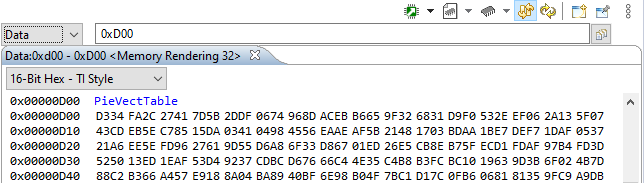
    Thank you for your advice. When I open the memory with CCS, I get the following output before editing anything:
    0x00000D00 PieVectTable
    0x00000D00 CE11 489F 5208 3FF3 CB0C 88B2 8C92 0000 8C92 0000 8C92 0000 8C92 0000 8C92 0000
    It looks strange, since the f280049.gel has the following entry. So I would expect something different in the memory.

    /********************************************************************/
    /* EMU Boot Mode - Set Boot Mode During Debug                       */
    /********************************************************************/
    menuitem "EMU Boot Mode Select"
    hotmenu EMU_BOOT_RAM()
    {
        *(unsigned long *)0xD00 = 0x5AFFFFFF;
        *0xD04 = 0x0005;
    }
    hotmenu EMU_BOOT_FLASH()
    {
        *(unsigned long *)0xD00 = 0x5AFFFFFF;
        *0xD04 = 0x0003;
    }

    For testing, I changed the entry to your suggestion (0xA5FFFFFF ). Still Suspended - SW Breakpoint. And very different values in the memory.

    Can you explain this behaviour? Why has changing the .gel file no impact on the memory?

    Best regards,

    Robin

  • Hi Robin,

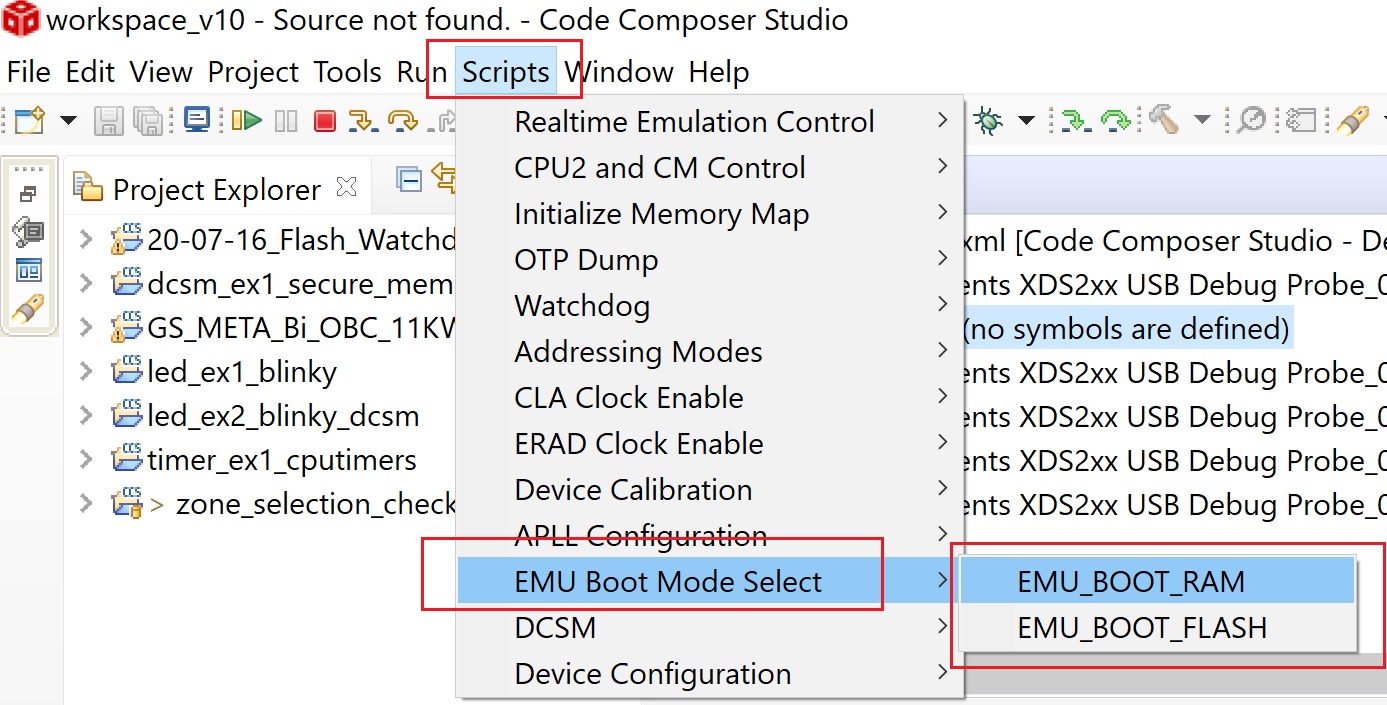
    Those function in Gel file are not called in any pre-defined Gel function which are used automatically. These are functions which user can call if needed. You can call these function from CCS Scripts menu like below -

    Hope this helps.

    Regards,

    Vivek Singh

  • Hi everyone,

    I tried the different steps you proposed. They all helped to understand the issue.

    The solution in my case was to define _FLASH, which is then used in f28004x_syscrtl.c. This was missing in my predefined symbols.
    I hope this might help someone.

    Best regards,
    Robin