This thread has been locked.

If you have a related question, please click the "Ask a related question" button in the top right corner. The newly created question will be automatically linked to this question.

CCS/LAUNCHXL-F28379D: endat22 library on a c2000ware project

Part Number: LAUNCHXL-F28379D
Other Parts Discussed in Thread: CONTROLSUITE, C2000WARE

Tool/software: Code Composer Studio

Hi i want to use the endat22 library with the position manager on my project developed with c2000ware but it causes some problems with the libraries because the endat22 library is from controlSuite.

I tried to use the compatibility library in c2000ware but when i try to build i get an error with the function IDLE in F2837xD_GlobalPrototypes.h.

Is there a way to solve the conflict?

Kind regards 

Ludovico

  • Ludovico Bonan said:
    Hi i want to use the endat22 library with the position manager on my project developed with c2000ware but it causes some problems with the libraries because the endat22 library is from controlSuite.

    Please see if this thread applies:

    https://e2e.ti.com/support/microcontrollers/c2000/f/171/p/885488/3275550?tisearch=e2e-sitesearch&keymatch=ar2000#3275550

    Regards

    Lori

  • Hello Lori, the thread you linked was helpful, however i don't know how to use the archive tool (the assembly manual isn't very clear) and what to do exactly to resolve the issue. Would you be so kind to provide more precise istruction? I think im having problem with the F2837xD_GlobalPrototypes.h file. Thankyou in advance.
  • I suspect it is the GlobalVariableDefs that is causing the issue. You can remove that object file from the ControlSuite library using the archiver. Refer to the Assembly Tool User's Guide (http://www.ti.com/lit/spru513)  for the archiver options on page 170Removal of a file is option -d.    The archiver, ar2000.exe, will be in the CCS/codegen bin directory where your CCS + compiler is installed.

    Best regards

    Lori

    edit: to correct the option from -x to -d.

  • One correction from my above post.  -d deletes the file from the archive.  (-x extracts it but does not delete it).

  • Thanks for the fast reply Lori.

    I don't find a GlobalVariableDefs library or file object in the ControlSUITE directory.

    The closest thing is a F2837xD_GlobalVariableDefs.c file.

    I tried to enter "ar2000.exe -x C:\ti\controlSUITE\device_support\F2837xD\v210\F2837xD_headers\source\F2837xD_GlobalVariableDefs.c" but i get the "is not an archive" error.

    Regards

    Ludovico

  • ar2000[-]command [options] libname [filename1... filenamen]

    Hello,

    The command is shown above.  Your libname will be the endat library.  The filename will be the file you want to extract (remove) from the archive (i.e. library) since it is causing a conflict.  Use the option -d to delete the file. 

    Best Regards

    Lori

  • Hi I tried the command ar2000 -d PM_endat22_lib.lib F2837xD_GlobalVariableDefs.obj and i get this result: ar2000 -d C:\ti\controlSUITE\libs\app_libs\position_manager\v01_02_00_00\endat22\Float\lib\PM_endat22_lib.lib F2837xD_GlobalVariableDefs.obj ==> building archive 'C:\ti\controlSUITE\libs\app_libs\position_manager\v01_02_00_00\endat22\Float\lib\PM_endat22_lib.lib' but if i try to build the project nothing changed, i still get the same errors. I also tried to with -x, without specifying a filename and with F2837xD_GlobalVariableDefs.c and .pp, and all possible combination of the above, but with no results. Kind regards Ludovico
  • Ludovico Bonan said:
    but if i try to build the project nothing changed, i still get the same errors.

    Please post the errors (screenshot will work).

    Thank you

    Lori

  • Hi here you can find some screenshot of the error f the error

    best regards 

    Ludovico

  • Ludovico,

    Is the utils.c file one you created or one from TI software?  I've not been able to find it in our SW yet. 

    Regards

    Lori

  • Hi Lori,

    I created the utils.c file and utils.h as well, it contains some functions for our project.

    Regards

    Ludovico

  • In your utils.c file are you #including device header files from both C2000Ware and controlSUITE?  I suggest using the copy that is in C2000Ware.  

  • Hi Lori this is the utils.h header

    #ifndef UTILS_H_
    #define UTILS_H_
    
    //includes
    #include "epwm_management.h"
    #include "math.h"
    //#include "F28x_Project.h"     // Device Headerfile and Examples Include File
    #include "endat.h"
    #include "device.h"
    #include "driverlib.h"
    
    
    //defines
    #define M_PI 3.14159265358979323846         //pi 
    
    //prototypes
    void fakeRef(double theta_me, float *U_alfa, float *U_beta);
    
    void spaceVectorMod(float U_alfa,float U_beta, float Vdc, float fsw, int * cmp);
    
    #endif

    I tried to comment the #include F28x_Project.h and #include the header file from C2000Ware (driverlib.h and device.h) but i still get those same errors.

    kind regards

    Ludovico

  • Ludovico,

    I'm not able to reproduce the problem.  I took one of our driverlib examples from c2000Ware. 

    Added the includes you show except epwm_management.h

    (I assumed math.h is the standard library one)

    //
    // Included Files
    //
    #include <math.h>
    #include "endat.h"
    #include "device.h"
    #include "driverlib.h"

    Modified PM_endat22_Include.h to use "device.h" and "driverlib.h":

    //Library of EnDat functions
    #include <stdint.h>
    //#include "F28x_Project.h"
    #include "device.h"
    #include "driverlib.h"
    
    #define ENDAT22	1
    #define ENDAT21	0

    What is in the ePWM management .h file?

    Regards

    Lori

  • Hi Lori we have corrected the errors by removing #include "F28x_Project.h" from all parts of the project and modifing PM_endat22_Include.h to use "device.h" and "driverlib.h".

    Now we have another issue: most instructions in endat.c are obsolete and we don't know how to replace them.

    If we try to build we get these errors

    Thank you for your support 

    Regards

    Ludovico

  • Hello,

    These are defined in F2837xD_GlobalVariableDefs.c located here: C:\ti\c2000\C2000Ware<version>\device_support\f2837xd\headers\source.  Make sure this file is part of your project.

    Regards

    Lori

  • Hi Lori I tried to add F2837xD_GlobalVariableDefs.c to the project and i replaced #include F2837xD_Device.h with #include device.h (because it couldn't open the former) and if i try to build i get over 100 errors 

    I exported the project in a zip file available at this link https://we.tl/t-mW5W7JRaxJ (expires in a week). If you could take a look at it to find out how to resolve our issue that would be great.
    Thanks in advance

    best regards

    Ludovico

  • Ludovico,

    The TI network won't allow me to access the files.  I suggest starting with the following project - it includes all of the setup for both driverlib and the bit-field structures.  

    C:\ti\c2000\C2000Ware_<version>\device_support\f2837xd\examples\cpu1\empty_bitfield_driverlib

    Regards

    Lori

  • Hi Lori your suggestion was very helpful, i was able to add the endat22 files to the empty project and build it without errors!

    However, there is still one issue: after i tried to add the main code as well i get this error while building

    After trying to troubleshot this i notice that the error is caused by the functions in endat.c and endat_commands.c.

    This is my main.c file, it's basically identical to the PM_endat22-Main.c in original project.

    //#############################################################################
    //
    // FILE:   empty_bitfield_driverlib_main.c
    //
    // TITLE:  Empty Example
    //
    // Empty Bit-Field & Driverlib Example
    //
    // This example is an empty project setup for Bit-Field and Driverlib 
    // development.
    //
    //#############################################################################
    // $TI Release: F2837xD Support Library v3.10.00.00 $
    // $Release Date: Tue May 26 17:13:46 IST 2020 $
    // $Copyright:
    // Copyright (C) 2013-2020 Texas Instruments Incorporated - http://www.ti.com/
    //
    // Redistribution and use in source and binary forms, with or without 
    // modification, are permitted provided that the following conditions 
    // are met:
    // 
    //   Redistributions of source code must retain the above copyright 
    //   notice, this list of conditions and the following disclaimer.
    // 
    //   Redistributions in binary form must reproduce the above copyright
    //   notice, this list of conditions and the following disclaimer in the 
    //   documentation and/or other materials provided with the   
    //   distribution.
    // 
    //   Neither the name of Texas Instruments Incorporated nor the names of
    //   its contributors may be used to endorse or promote products derived
    //   from this software without specific prior written permission.
    // 
    // THIS SOFTWARE IS PROVIDED BY THE COPYRIGHT HOLDERS AND CONTRIBUTORS 
    // "AS IS" AND ANY EXPRESS OR IMPLIED WARRANTIES, INCLUDING, BUT NOT 
    // LIMITED TO, THE IMPLIED WARRANTIES OF MERCHANTABILITY AND FITNESS FOR
    // A PARTICULAR PURPOSE ARE DISCLAIMED. IN NO EVENT SHALL THE COPYRIGHT 
    // OWNER OR CONTRIBUTORS BE LIABLE FOR ANY DIRECT, INDIRECT, INCIDENTAL, 
    // SPECIAL, EXEMPLARY, OR CONSEQUENTIAL DAMAGES (INCLUDING, BUT NOT 
    // LIMITED TO, PROCUREMENT OF SUBSTITUTE GOODS OR SERVICES; LOSS OF USE,
    // DATA, OR PROFITS; OR BUSINESS INTERRUPTION) HOWEVER CAUSED AND ON ANY
    // THEORY OF LIABILITY, WHETHER IN CONTRACT, STRICT LIABILITY, OR TORT 
    // (INCLUDING NEGLIGENCE OR OTHERWISE) ARISING IN ANY WAY OUT OF THE USE 
    // OF THIS SOFTWARE, EVEN IF ADVISED OF THE POSSIBILITY OF SUCH DAMAGE.
    // $
    //#############################################################################
    
    //
    // Included Files
    //
    #include "main.h"
    
    //
    // Main
    //
    void main(void)
    {
        // Initialize System Control:
        // PLL, WatchDog, enable Peripheral Clocks
        // This example function is found in the F2837xD_SysCtrl.c file.
            InitSysCtrl();
        // Step 3. Clear all interrupts and initialize PIE vector table:
        // Disable CPU interrupts
            DINT;
    
        // Initialize the PIE control registers to their default state.
        // The default state is all PIE interrupts disabled and flags
        // are cleared.
        // This function is found in the F2837xD_PieCtrl.c file.
            InitPieCtrl();
    
        // Disable CPU interrupts and clear all CPU interrupt flags:
            IER = 0x0000;
            IFR = 0x0000;
    
        // Initialize the PIE vector table with pointers to the shell Interrupt
        // Service Routines (ISR).
        // This will populate the entire table, even if the interrupt
        // is not used in this example.  This is useful for debug purposes.
        // The shell ISR routines are found in F2837xD_DefaultIsr.c.
        // This function is found in F2837xD_PieVect.c.
            InitPieVectTable();
    
        //Initialization routine for endat operation - defined in endat.c
        //Configures the peripherals and enables clocks for required modules
        //Configures GPIO and XBar as needed for EnDat operation
        //Sets up the SPI peripheral in endat data structure and enables interrupt
            EnDat_Init();
    
        //A template for running all the EnDat21 commands
        //This is optional in real applications.
        //Function defined in endat_commands.c
            endat21_runCommandSet();
    
            if (ENCODER_TYPE == 22)
            {
        //A template for running all the EnDat22 commands
        //This is optional in real applications.
        //Function defined in endat_commands.c
    
                endat22_runCommandSet();
            }
    
        //Enables 2 additional datas in endat22 operation
        //This is also optional in real applications. Function defined in endat.c
    
            endat22_setupAddlData();
    
        //Peforms cable propagation delay calculation.
        //This is required for long cable lengths and higher EnDat Clock frequencies
        //Function defined in endat.c
    
            EnDat_initDelayComp();
    
        //Switch to high frequency - 8.3MHz (=200/4*ENDAT_RUNTIME_FREQ_DIVIDER)
            PM_endat22_setFreq(ENDAT_RUNTIME_FREQ_DIVIDER);
            DELAY_US(800L);     //Delay 800us
    
            while(1)
            {
                if (ENCODER_TYPE == 22)
                {
        //Read position data in EnDat22 mode with 2 additional data enabled
        //earlier by endat22_setupAddlData function call.
        //Function defined in endat.c
                    endat22_readPositionWithAddlData();
                }
                else
                {
        //Read position data in EnDat21 mode. Function defined in endat.c
                    endat21_readPosition();
                }
            }
    }


    //
    // End of File
    //
    

    Kind regards

    Ludovico

  • The unresolved symbol is in the VCU library located in C:\ti\c2000\C2000Ware<version>\libraries\dsp\VCU  This library needs to be added to your project. 

    Regards

    Lori

  • Hi Lori i tried to add the library using the linker options but that didn't resolve neither the "unresolved symbol" error, nor the "program will not fit into available memory" error.

    I dont know what to do at this point, could you perhaps take a look at the linker map and tell me if there is something wrong?

    I get the error "line 62: error #10099-D: program will not fit into available memory, or the section contains a call site that requires a trampoline that can't be generated for this section. placement with alignment/blocking fails for section ".text" size 0x279apage 0.  Available memory ranges:" at line 62.

    MEMORY
    {
    PAGE 0 :
       /* BEGIN is used for the "boot to SARAM" bootloader mode   */
    
       BEGIN            : origin = 0x000000, length = 0x000002
       RAMM0            : origin = 0x000123, length = 0x0002DD
       RAMD0            : origin = 0x00B000, length = 0x000800
       RAMLS0           : origin = 0x008000, length = 0x000800
       RAMLS1           : origin = 0x008800, length = 0x000800
       RAMLS2           : origin = 0x009000, length = 0x000800
       RAMLS3           : origin = 0x009800, length = 0x000800
       RAMLS4           : origin = 0x00A000, length = 0x000800
       RESET            : origin = 0x3FFFC0, length = 0x000002
    
    PAGE 1 :
    
       BOOT_RSVD       : origin = 0x000002, length = 0x000121     /* Part of M0, BOOT rom will use this for stack */
       RAMM1           : origin = 0x000400, length = 0x0003F8     /* on-chip RAM block M1 */
    //   RAMM1_RSVD      : origin = 0x0007F8, length = 0x000008     /* Reserve and do not use for code as per the errata advisory "Memory: Prefetching Beyond Valid Memory" */
       RAMD1           : origin = 0x00B800, length = 0x000800
    
       RAMLS5      : origin = 0x00A800, length = 0x000800
    
       RAMGS0      : origin = 0x00C000, length = 0x001000
       RAMGS1      : origin = 0x00D000, length = 0x001000
       RAMGS2      : origin = 0x00E000, length = 0x001000
       RAMGS3      : origin = 0x00F000, length = 0x001000
       RAMGS4      : origin = 0x010000, length = 0x001000
       RAMGS5      : origin = 0x011000, length = 0x001000
       RAMGS6      : origin = 0x012000, length = 0x001000
       RAMGS7      : origin = 0x013000, length = 0x001000
       RAMGS8      : origin = 0x014000, length = 0x001000
       RAMGS9      : origin = 0x015000, length = 0x001000
       RAMGS10     : origin = 0x016000, length = 0x001000
    
    //   RAMGS11     : origin = 0x017000, length = 0x000FF8   /* Uncomment for F28374D, F28376D devices */
    
    //   RAMGS11_RSVD : origin = 0x017FF8, length = 0x000008    /* Reserve and do not use for code as per the errata advisory "Memory: Prefetching Beyond Valid Memory" */
    
       RAMGS11     : origin = 0x017000, length = 0x001000     /* Only Available on F28379D, F28377D, F28375D devices. Remove line on other devices. */
       RAMGS12     : origin = 0x018000, length = 0x001000     /* Only Available on F28379D, F28377D, F28375D devices. Remove line on other devices. */
       RAMGS13     : origin = 0x019000, length = 0x001000     /* Only Available on F28379D, F28377D, F28375D devices. Remove line on other devices. */
       RAMGS14     : origin = 0x01A000, length = 0x001000     /* Only Available on F28379D, F28377D, F28375D devices. Remove line on other devices. */
       RAMGS15     : origin = 0x01B000, length = 0x000FF8     /* Only Available on F28379D, F28377D, F28375D devices. Remove line on other devices. */
       
       RAMGS15_RSVD : origin = 0x01BFF8, length = 0x000008    /* Reserve and do not use for code as per the errata advisory "Memory: Prefetching Beyond Valid Memory" */
                                                                /* Only on F28379D, F28377D, F28375D devices. Remove line on other devices. */
    
       CPU2TOCPU1RAM   : origin = 0x03F800, length = 0x000400
       CPU1TOCPU2RAM   : origin = 0x03FC00, length = 0x000400
    
       CANA_MSG_RAM     : origin = 0x049000, length = 0x000800
       CANB_MSG_RAM     : origin = 0x04B000, length = 0x000800
    }
    
    
    SECTIONS
    {
       codestart        : > BEGIN,     PAGE = 0
       .text            : >> RAMM0 | RAMD0 |  RAMLS0 | RAMLS1 | RAMLS2 | RAMLS3 | RAMLS4,   PAGE = 0
       .cinit           : > RAMM0,     PAGE = 0
       .switch          : > RAMM0,     PAGE = 0
       .reset           : > RESET,     PAGE = 0, TYPE = DSECT /* not used, */
       .stack           : > RAMM1,     PAGE = 1
    
    #if defined(__TI_EABI__)
       .bss             : > RAMLS5,    PAGE = 1
       .bss:output      : > RAMLS3,    PAGE = 0
       .init_array      : > RAMM0,     PAGE = 0
       .const           : > RAMLS5,    PAGE = 1
       .data            : > RAMLS5,    PAGE = 1
       .sysmem          : > RAMLS5,    PAGE = 1
    #else
       .pinit           : > RAMM0,     PAGE = 0
       .ebss            : > RAMLS5,    PAGE = 1
       .econst          : > RAMLS5,    PAGE = 1
       .esysmem         : > RAMLS5,    PAGE = 1
    #endif
    
       Filter_RegsFile  : > RAMGS0,    PAGE = 1
    
    
       ramgs0           : > RAMGS0,    PAGE = 1
       ramgs1           : > RAMGS1,    PAGE = 1
    
    #ifdef __TI_COMPILER_VERSION__
       #if __TI_COMPILER_VERSION__ >= 15009000
        .TI.ramfunc : {} > RAMM0,      PAGE = 0
       #else
        ramfuncs    : > RAMM0      PAGE = 0   
       #endif
    #endif
    
       /* The following section definitions are required when using the IPC API Drivers */
        GROUP : > CPU1TOCPU2RAM, PAGE = 1
        {
            PUTBUFFER
            PUTWRITEIDX
            GETREADIDX
        }
    
        GROUP : > CPU2TOCPU1RAM, PAGE = 1
        {
            GETBUFFER :    TYPE = DSECT
            GETWRITEIDX :  TYPE = DSECT
            PUTREADIDX :   TYPE = DSECT
        }
    
        /* The following section definition are for SDFM examples */
       Filter1_RegsFile : > RAMGS1, PAGE = 1, fill=0x1111
       Filter2_RegsFile : > RAMGS2, PAGE = 1, fill=0x2222
       Filter3_RegsFile : > RAMGS3, PAGE = 1, fill=0x3333
       Filter4_RegsFile : > RAMGS4, PAGE = 1, fill=0x4444
       Difference_RegsFile : >RAMGS5,   PAGE = 1, fill=0x3333
    }
    
    /*
    //===========================================================================
    // End of file.
    //===========================================================================
    */
    

    also here is the project .zip files, if it's of any help.

    endat22_encoder_project_empty_bitfield.zip

    Kind regards 

    Ludovico

  • 1)  Add these two linker .cmd files from the original controlSUITE project.

    • PM_endat22_2837xD_RAM_lnk_cpu1.cmd 
    • F2837xD_Headers_clb_cpu1.cmd

    2) Remove, or exclude from the build, 2837xD_RAM_lnk_cpu1.cmd

    3) Link the VCU0 library: c28x_vcu0_library_fpu32.lib  (instead of the vcrc library)

    The linker will likely complain about .TI.ramfunc section missing. 

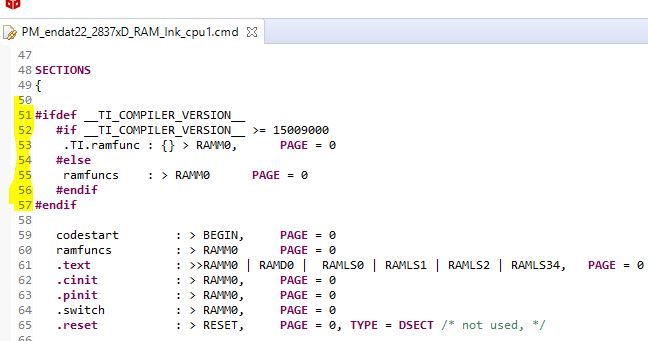
    4) Add the lines highlighted to the PM_endat22...... cpu1.cmd file 

  • Hello Lori
    Your answer was extremely helpful and we successfully resolved our issue.
    Thank you for your patience and your support.
    Best wishes

    Ludovico