This thread has been locked.

If you have a related question, please click the "Ask a related question" button in the top right corner. The newly created question will be automatically linked to this question.

CCS/TMDSCNCD28388D: TMDSCNCD28388D F28388D

Part Number: TMDSCNCD28388D
Other Parts Discussed in Thread: TMS320F28388D

Tool/software: Code Composer Studio

Dear Sir/Madam,

I am very new to EtherCAT. I just bought TMDSCNCD28388D F28388D and I haven't known how to import and run examples on the board.
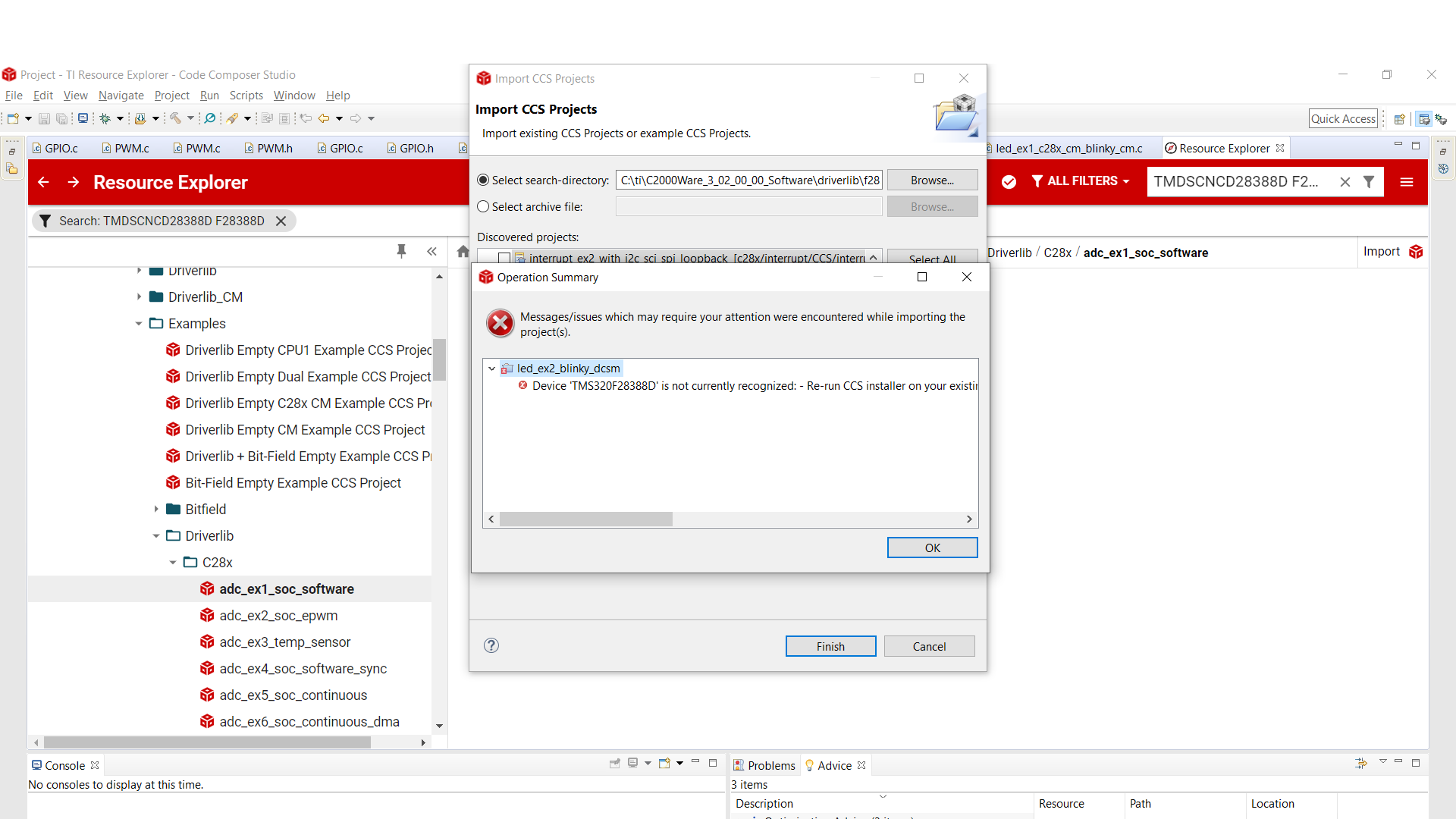
Could you please help me with this problem?

Best regards. 

  • I have done the following:

    1. Verified in my Window's Device Manager "XDS100 Class USB Serial Port (COM4)"

    2. Used two different USB cables. One is on J17, the other is on J1A. D2:A is ON and D5 is also ON. 

    3. I ensured that S1:A on the control card has both Position 1 and Position 2 set to ON.

    4. I ensured that S2 has Position 1: OFF and Position 2:ON.

  • Hello

    Your error means you are missing some C2000 device files that are installed within CCS.

    When installing CCS, did you select the "C2000" option on the custom install page of the installer? If not, you'll want to reinstall CCS with that option selected.

    If you did do that, go in CCS to the "Help" tab at the top and go to "Check for Updates". Install latest item listed regarding "C2000 device support".

    Best regards

    Chris

  • Dear Chris,

    Thanks for your quick responses!

    I am not sure that I did or not select the "C2000" option on the custom install page. Yesterday I did try to install "C2000 device support"  and a new error was showed "No TI C2000 compilers, supporting device 'TMS320F28388D', are currently installed!". So, I will reinstall CCS again and tell you the result later.

    Best regards,

    Tri

  • Dear Chris,

    Finally, I am able to import and run examples on the board. However, if I turn off the board and then turn on it, the code is not kept. For instance, I ran 'led_ex1_blinky', the led blinked well, when i turned off and then turned on the board, it did not blink anymore, it meant that the code was not kept. How can I make the board keep the code after I turn off?

    Best regards,

    Tri.

  • Tri

    Great!

    You'll want to use the flash project build configuration for code retention in memory. The default build configuration is RAM.

    Best regards

    Chris

  • Dear Chris,

    Thanks to your support, I did it. Thank you so much.

    Best regards,

    Tri.