This thread has been locked.

If you have a related question, please click the "Ask a related question" button in the top right corner. The newly created question will be automatically linked to this question.

TMDSCNCD28388D: Connect Controller

Part Number: TMDSCNCD28388D
Other Parts Discussed in Thread: C2000WARE

Dear sir and madam,

I am using TMDSCNCD28388D F28388D controlCARD. I have a problem of connecting controller.

The popup shows that my controller did connect to TwinCAT 3 because 'Ethernet - TwinCAT-Intel PCI Ethernet Adapter (Gigabit)' is in 'Installed and ready to use devices(realtime capable)'. However, when I scaned, there was no 'Device 1 (EtherCAT)' to sellect, it only had 'Device 1 (EtherCAT Automation Protocol)', that is why the icon is blue not red. Moreover, you can see that Adapter in 'Device 1 (EtherCAT Automation Protocoll)' connected correctly to the controller because the IP adress was 169.254.212.254, but there was no 'Box'. I did try to right click on 'Device 1 (EtherCAT Automation Protocol)' and then scaned but there was also no 'Box'.
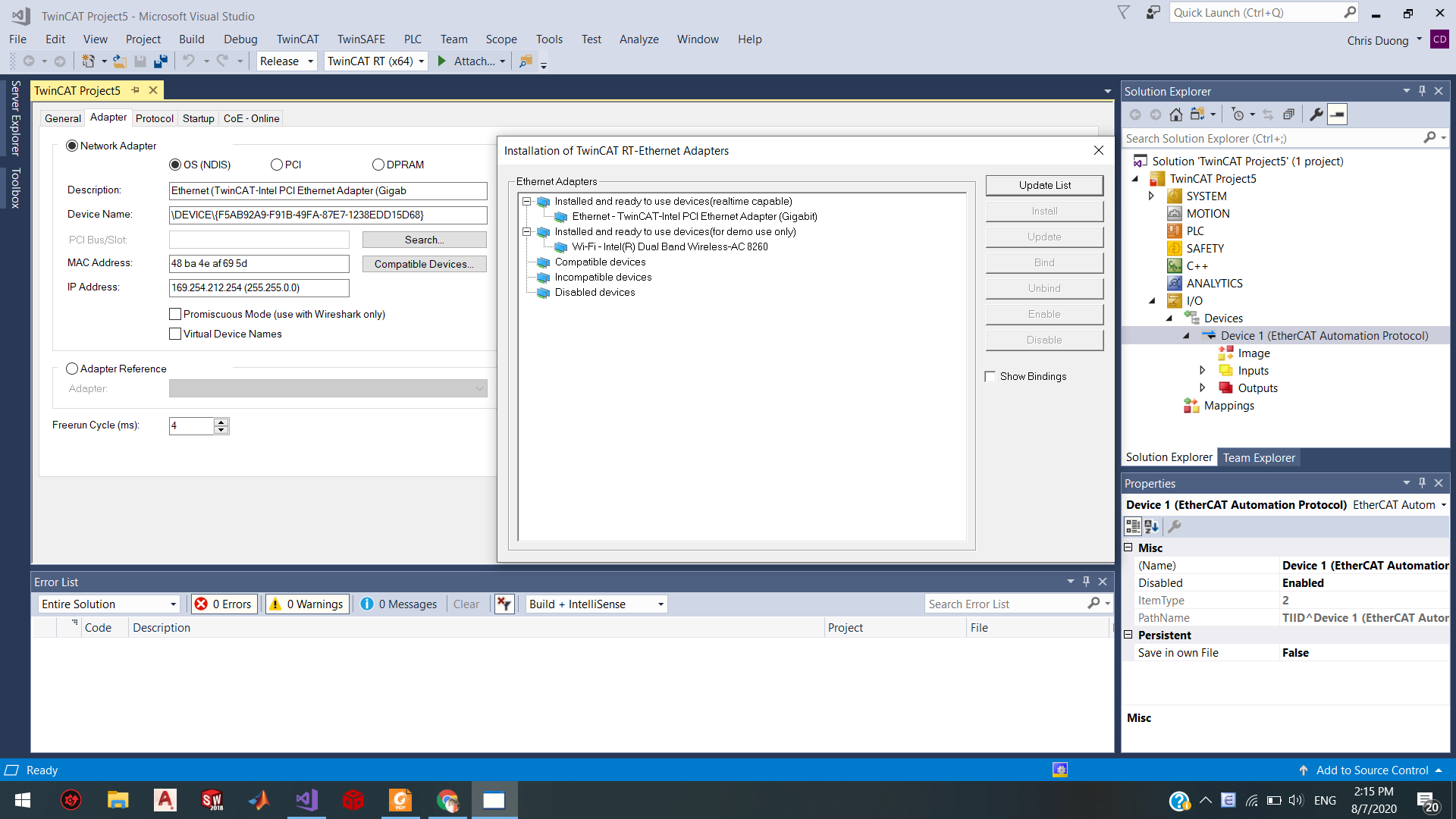
The main problem is no 'Box'. How could I make it have 'Box' in Device? 

Best regards.

  • Hello

    If the EtherCAT slave is successfully located, it will be "Device 2". F28388D needs to be running the EtherCAT example for it to be discovered. Please refer to the EtherCAT Software user guide in C2000Ware for steps on running an EtherCAT example.

    Best regards

    Chris 

  • Hi Chris,

    I followed the instruction and I ran 'CPU1 PDI HAL Test example'. However, there are some errors showed on Visual Studio when I scaned. How could I fix those errors?

    I tried to change 'Current State' and 'Request State' into 'Op', but it turned back to 'INIT'. This is normal, right?

    I still have a question about 'CM PDI HAL Test Example'. I followed exactly the instruction, I ran 'CPU1 Allocate ECAT to CM Example' first, this example was loaded and run successfully and then I ran 'PDI HAL Test example'. While the example was loaded, there was an error which is showed on the bellow photo. How could I fix this problem?

    I am looking to hear from you.

    Best regards,

    Tri.

  • Tri

    The PDI HAL examples don't contain the EtherCAT slave stack, so it will stay only in INIT state. These are to demonstrate using the HAL APIs as well as provide an example that be loaded where you can easily connect via TwinCAT and program the EEPROM. You'll need to load the echo back examples to get to OP mode.

    For loading the CM ECAT examples, first load the CPU1 (don't run), then load the CM app, then run CPU1 and run CM.

    Best regards

    Chris