This thread has been locked.

If you have a related question, please click the "Ask a related question" button in the top right corner. The newly created question will be automatically linked to this question.

TMS320F28388D: Led Example with ECC and without ECC

Part Number: TMS320F28388D


Hi,

I was experimenting with the Led blinky example. I have below observation, which I was not able to understand. Any guidance is appreciated.

The Application is compiled with the option to load in FLASH.

1.  Loaded with ECC enabled

- After power cycle, the led is blinking.

2. Loaded with ECC disabled

- After power cycle, the led is not blinking.

  • Mohan,

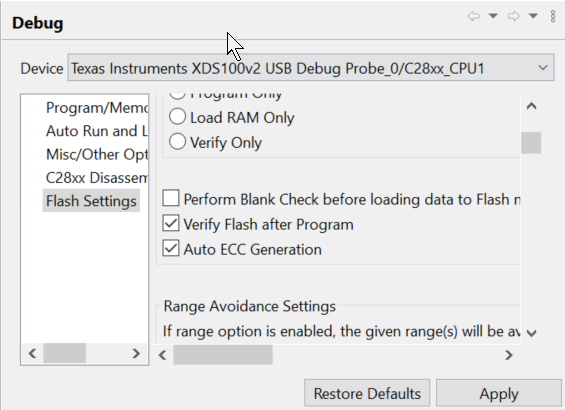
    Are you saying that you loaded with and without programming ECC (AutoEccGeneration enabled and disabled in CCS On-Chip flash Plugin GUI)?

    If ECC is not programmed, ECC errors will occur, leading to NMIs/reset.  Hence, application won't run successfully.

    Thanks and regards,

    Vamsi

  • Yes Vamsi, Then is there a way in this controller I can do without ECC? or ECC is mandatory to use in this controller?

  • Mohan,

    ECC is enabled by default on this device.  Hence, ECC needs to be programmed to avoid resets.  Once the bootROM execution is completed, control will go to your application and you can disable ECC there.  However, if you don't program ECC for the application, ECC errors will occur even before the application reaches the statement to disable ECC.

    Please note that you don't need to do anything specific to program ECC for your image. You can simply enable the AutoEccGeneration (which is enabled by default in CCS Flash Plugin).

    Thanks and regards,

    Vamsi