This thread has been locked.

If you have a related question, please click the "Ask a related question" button in the top right corner. The newly created question will be automatically linked to this question.

TMS320F28388D: Ethernet lwip examle issue

Other Parts Discussed in Thread: C2000WARE

Hi Champion,

I am helping customer to test ethernet function of F28388D.

and I am testing lwip, located at

C:\ti\c2000\C2000Ware_3_02_00_00\libraries\communications\Ethernet\third_party\lwip

I follow the instruction in the txt.

load cm_common_config_c28x to CPU1 core.

Load lwip to CM core.

and I also make sure the ethernet interface is lighted after I insert a net wire.

after run the two app, I input 192.168.0.4, there is not such a web page.

I don't know where I did wrong.

could you kindly point out?

BR

Emma

  • Hi,

    Emma Wang said:
    load cm_common_config_c28x to CPU1 core.

    Can you please confirm you are running the ethernet_c28x_config project imported from the Ethernet examples folder of C2000Ware? 

    Regards,

    Sudharsanan

  • Sudharsanan,

    just the example under this folder"C:\ti\c2000\C2000Ware_3_02_00_00\driverlib\f2838x\examples\c28x"

    BR

    Emma

  • Emma,

    Please import the project spec from :

    C:\ti\c2000\C2000Ware_3_02_00_00\driverlib\f2838x\examples\cm\ethernet\CCS\ethernet_c28x_config and run that example

    Emma Wang said:
    "C:\ti\c2000\C2000Ware_3_02_00_00\driverlib\f2838x\examples\c28x"

    The ethernet_c28x_config project spec invokes the common c28x example with right defines needed for Ethernet to setup the GPIO Pinmuxing properly for Ethernet. Hence use that instead of this project and let me know, if there is progress. 

    Regards,

    Sudharsanan

  • Sudharsanan,

    thanks for your guidance, i tried the new code for C28 core.

    however, it does not work,either.

    192.168.0.4 is also unknown.

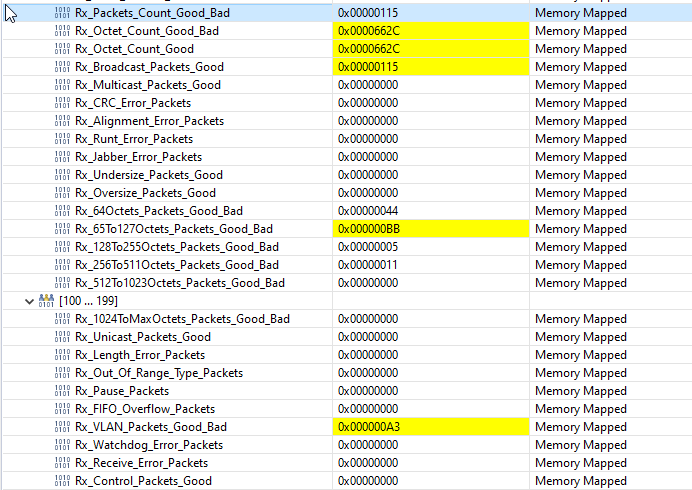
    when I suspend the CM CORE, I record the varibles.

    does anything I did wrong?

    BR

    EMMA

  • Hi Emma,

    Is the Ping going through sometime or never? 

    Emma Wang said:
    192.168.0.4 is also unknown.

    It sounds like it never got to communicate, but earlier you mentioned it worked sometimes. Is the behavior now different? please clarify on that. 

    The key variables to look for are Ethernet_rxInterruptCount, Ethernet_txInterruptCount and the Etherent statistics registers at address 0x400c0780 in CM side memory map(Section 43.6.3 of TRM Rx_Packets_Count_Good_Bad registers and further Rx statistics) can you observe them and post here, to help you further?

    Regards,

    Sudharsanan


  • Sudharsanan,

    it always does not work.

    Sudharsanan said:
    Is the Ping going through sometime or never? 

    how to figure this?

    For key register,

    Ethernet_rxInterruptCount is always increasing.

    BR

    EMMA

  • Hi Emma,

    I hope you are following the sequence in F2838x side and the Windows PC configured with the settings as explained in 

    C2000Ware_3_02_00_00\libraries\communications\Ethernet\third_party\lwip\examples\enet_lwip\cm\Readme.txt

    What is the Ethernet port of F2838x connected to on other side? 

    Hope you are doing a ping from the command prompt from the other side as explained in Readme.txt?

    Regards,

    Sudharsanan

  • Sudharsanan

    maybe I did not get the meaning of the guide.

    do you mention this part?

    For ping example:
    a. Ping the f2838x device which can be typically done with standard 'ping' command
    on most devices.
    ping 192.168.0.4
    b. The sender device should be able to see ping replies from the f2838x device's
    IP address.

    Sudharsanan said:
    What is the Ethernet port of F2838x connected to on other side? 

    just the ethernet port on the wall. and I also try to connect to my labtop directly. but all failed, could you kindly point out my mistakes?

    BR

    EMMA

  • Hi Emma,

    In your laptop (Assuming running windows 10) 

    please follow the steps as in 

    https://stevessmarthomeguide.com/setting-up-static-ip-address-windows-10/

    to a static IP address programmed to 192.168.0.x (x can be anything other than 4). 

    Then you can 

      1. do the ping to 192.168.0.4 or 

       2.  Open web browser and open webserver at 192.168.0.4 

    Regards,

    Sudharsanan

  • Many thanks,Sudharsanan.

    It can work now.

  • Hi Emma,

    Thanks for the confirmation.

    Regards,

    Sudharsanan