This thread has been locked.

If you have a related question, please click the "Ask a related question" button in the top right corner. The newly created question will be automatically linked to this question.

CCS/TMS320F28379D: Reset /power off cycle code is not works ,in EEPROM Emulation Implementation.

Part Number: TMS320F28379D
Other Parts Discussed in Thread: C2000WARE, UNIFLASH

Tool/software: Code Composer Studio

Hi,

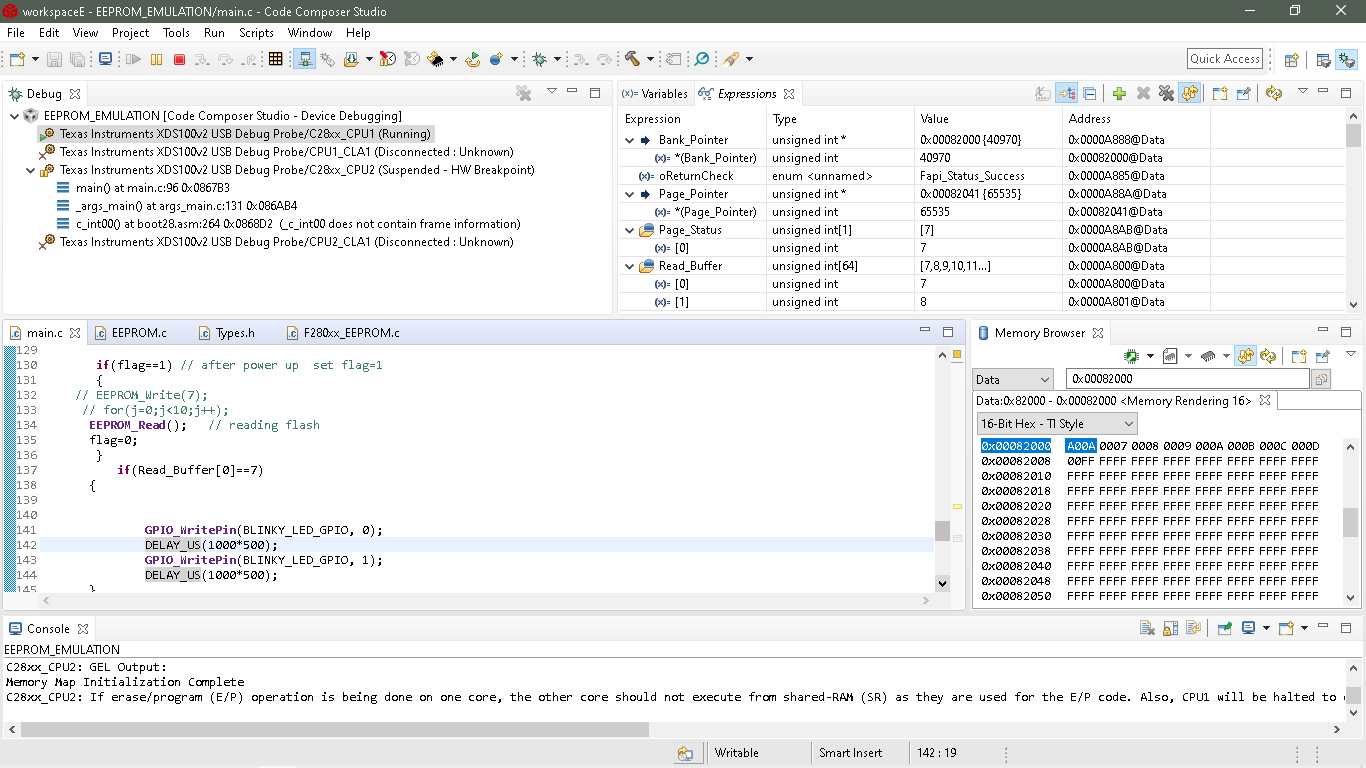
    I have done the EEPROM Emulation of Flash Sector B .I can able to write /read now but code runs on Debug mode . When i am reset /power off the launch pad its not works..

Done blinky code for confirm the data retention on memory ... In Debug mode works fine ... RESET, POWER OFF /ON , RUN->LOAD methods its not works ...

Run---->Load  not works ..

Debug-->Debug as Works
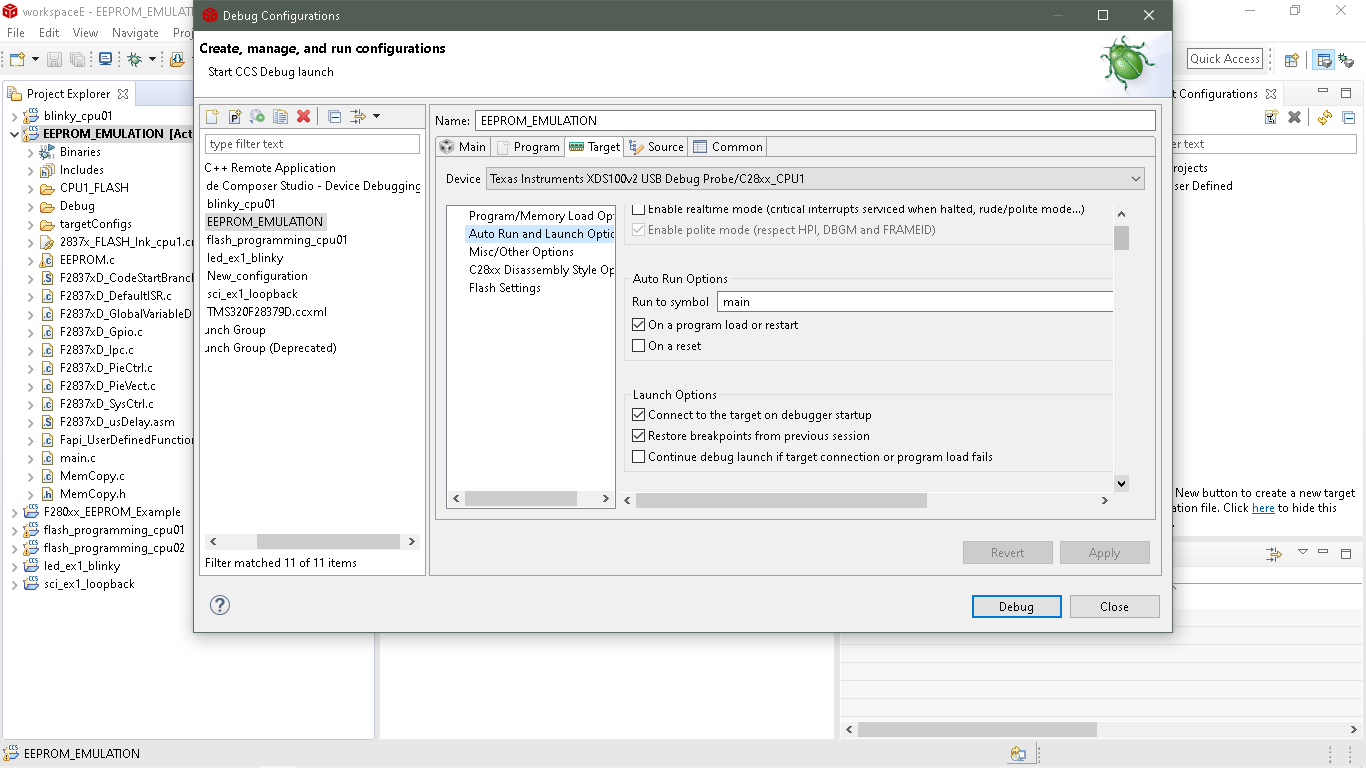
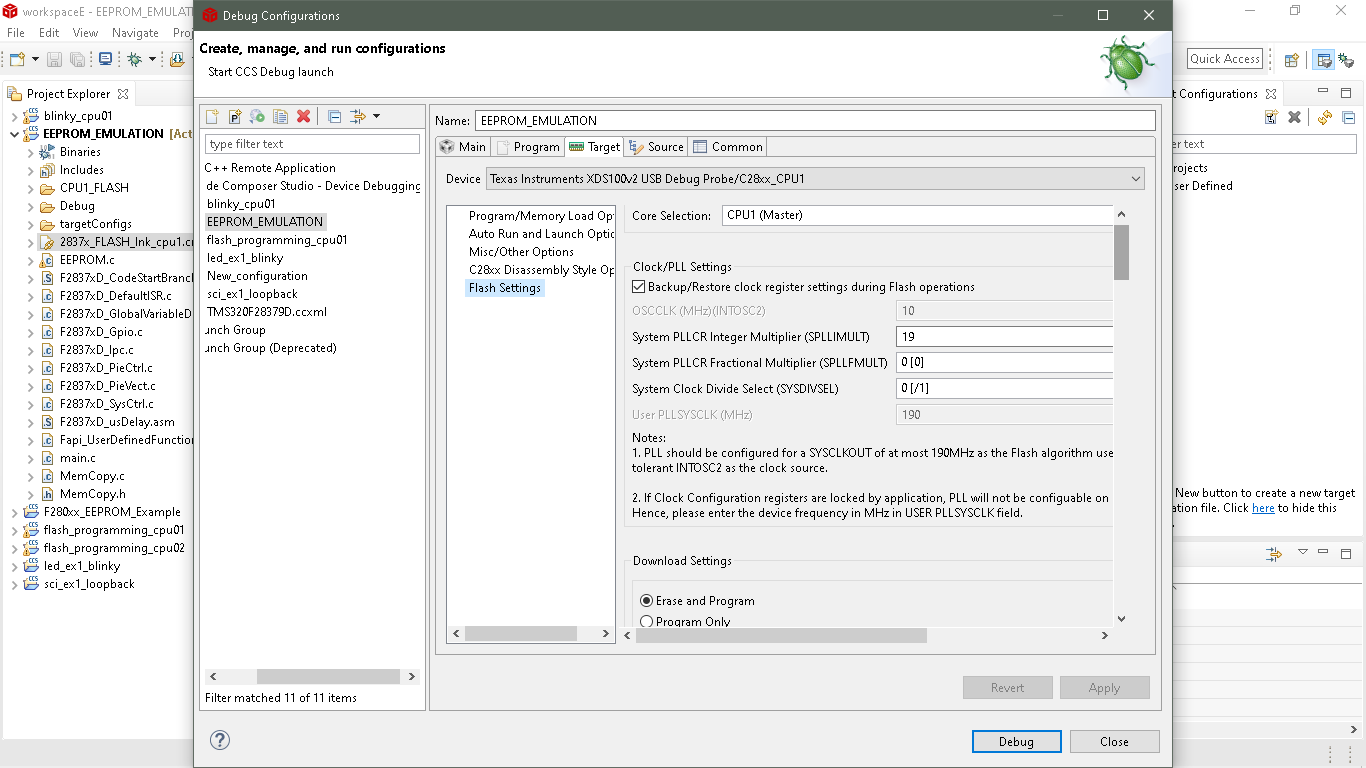
My Debug Configuration setting
Flash Setting


CODE:


//###########################################################################
//
// Included Files
//

#include "F28x_Project.h"
#include <string.h>
#include "flash_programming_c28.h" // Flash API example header file
#include "F021_F2837xD_C28x.h"
#include"EEPROM.h"
#include"MemCopy.h"
#include"stdio.h"

//
// Defines
//
#define  WORDS_IN_FLASH_BUFFER    0xFF  // Programming data buffer, words

#ifdef __TI_COMPILER_VERSION__
    #if __TI_COMPILER_VERSION__ >= 15009000
        #define ramFuncSection ".TI.ramfunc"
    #else
        #define ramFuncSection "ramfuncs"
    #endif
#endif
//
// Pragma
//
 #pragma CODE_SECTION(EEPROM_Erase,"ramfuncs");
 #pragma CODE_SECTION(EEPROM_Write,"ramfuncs");
 #pragma CODE_SECTION(EEPROM_UpdateBankStatus,"ramfuncs");
 #pragma CODE_SECTION(EEPROM_UpdatePageStatus,"ramfuncs");
 #pragma CODE_SECTION(EEPROM_ProgramSingleByte,"ramfuncs");
 #pragma DATA_SECTION(Read_Buffer,"BufferDataSection");

//
// LED
//
  #define BLINKY_LED_GPIO    31

//
// Globals
//

uint16_t data;
bool flag;
int Read_Buffer[64]={0};


//
// Function Prototype
//
void Example_Error(Fapi_StatusType status);
void Example_Done(void);
//
// Main
//
void main(void)
   {

    InitSysCtrl();
    InitGpio();  // Skipped for this example
    GPIO_SetupPinMux(BLINKY_LED_GPIO, GPIO_MUX_CPU1, 0);
    GPIO_SetupPinOptions(BLINKY_LED_GPIO, GPIO_OUTPUT, GPIO_PUSHPULL);

    InitPieCtrl();
    IER = 0x0000;
    IFR = 0x0000;
    InitPieVectTable();
   //memcpy(&RamfuncsRunStart, &RamfuncsLoadStart, (size_t)&RamfuncsLoadSize);
    MemCopy(&RamfuncsLoadStart, &RamfuncsLoadEnd, &RamfuncsRunStart);
    initeeprom();
    //  Step 5. User specific code:

    // Copy the Flash API functions to SARAM

    MemCopy(&Flash28_API_LoadStart, &Flash28_API_LoadEnd, &Flash28_API_RunStart);
    SeizeFlashPump();


//
// Jump to RAM and call the Flash API functions
//
      int j=0;
   // EEPROM_GetSinglePointer(1);
       data = 1;
       RESET_BANK_POINTER;     // Reset Bank Pointer to enable search for current Bank
       RESET_PAGE_POINTER;     // Reset Page Pointer to enable search for current Page
          //   EEPROM_ProgramSingleByte(data);
       flag=1;

    while(1)
    {


        if(flag==1&& (*Bank_Pointer)==0xFFFF) // after power up  set flag=1
        {
        EEPROM_Write(7);
        for(j=0;j<10;j++);
        }
        if(flag==1)
        {
        Read_Buffer[0]=EEPROM_Read();   // reading flash
       flag=0;
       ReleaseFlashPump();
        }
           if(Read_Buffer[0]==7)
       {


               GPIO_WritePin(BLINKY_LED_GPIO, 0);
               DELAY_US(1000*500);
               GPIO_WritePin(BLINKY_LED_GPIO, 1);
               DELAY_US(1000*500);
       }


    }


}


//
// Example_Done - For this example, once we are done just stop here
//
#pragma CODE_SECTION(Example_Done,ramFuncSection);
void Example_Done(void)
{
    __asm("    ESTOP0");
}

//
// End of file
//

COMMAND file  Has  Flash as boot mode:


MEMORY
{
PAGE 0:    /* Program Memory */
           /* Memory (RAM/FLASH/OTP) blocks can be moved to PAGE1 for data allocation */
     /* Locally shared memory -- can be used by the local CPU and its CLA */
        /* BEGIN is used for the "boot to SARAM" bootloader mode   */

   BEGIN               : origin = 0x080000, length = 0x000002
   RAMM0               : origin = 0x000080, length = 0x000380
   RAMD0               : origin = 0x00B000, length = 0x000800
   RAMLS03          : origin = 0x008000, length = 0x002000
/*    RAMLS1          : origin = 0x008800, length = 0x000800
    RAMLS2          : origin = 0x009000, length = 0x000800
    RAMLS3          : origin = 0x009800, length = 0x000800 */
   RAMLS4              : origin = 0x00A000, length = 0x000800
   RAMGS14          : origin = 0x01A000, length = 0x001000     /* Only Available on F28379D/_, F28377D/F28377S, F28375D/F28375S devices. Remove line on other devices. */
   RAMGS15          : origin = 0x01B000, length = 0x000FF8     /* Only Available on F28379D/_, F28377D/F28377S, F28375D/F28375S devices. Remove line on other devices. */

//   RAMGS15_RSVD     : origin = 0x01BFF8, length = 0x000008    /* Reserve and do not use for code as per the errata advisory "Memory: Prefetching Beyond Valid Memory" */

   RESET               : origin = 0x3FFFC0, length = 0x000002

    /* Flash sectors */
   FLASHA           : origin = 0x080002, length = 0x001FFE    /* on-chip Flash */
   FLASHB           : origin = 0x082000, length = 0x002000    /* on-chip Flash */
   FLASHC           : origin = 0x084000, length = 0x002000    /* on-chip Flash */
   FLASHD           : origin = 0x086000, length = 0x002000    /* on-chip Flash */
   FLASHE           : origin = 0x088000, length = 0x008000    /* on-chip Flash */
   FLASHF           : origin = 0x090000, length = 0x008000    /* on-chip Flash */
   FLASHG           : origin = 0x098000, length = 0x008000    /* on-chip Flash */
   FLASHH           : origin = 0x0A0000, length = 0x008000    /* on-chip Flash */
   FLASHI           : origin = 0x0A8000, length = 0x008000    /* on-chip Flash */
   FLASHJ           : origin = 0x0B0000, length = 0x008000    /* on-chip Flash */
   FLASHK           : origin = 0x0B8000, length = 0x002000    /* on-chip Flash */
   FLASHL           : origin = 0x0BA000, length = 0x002000    /* on-chip Flash */
   FLASHM           : origin = 0x0BC000, length = 0x002000    /* on-chip Flash */
   FLASHN           : origin = 0x0BE000, length = 0x001FF0    /* on-chip Flash */

//   FLASHN_RSVD     : origin = 0x0BFFF0, length = 0x000010    /* Reserve and do not use for code as per the errata advisory "Memory: Prefetching Beyond Valid Memory" */


PAGE 1 :

   BOOT_RSVD       : origin = 0x000002, length = 0x00007E     /* Part of M0, BOOT rom will use this for stack */
   RAMM1           : origin = 0x000400, length = 0x0003F8     /* on-chip RAM block M1 */
//   RAMM1_RSVD      : origin = 0x0007F8, length = 0x000008     /* Reserve and do not use for code as per the errata advisory "Memory: Prefetching Beyond Valid Memory" */
   RAMD1           : origin = 0x00B800, length = 0x000800


   RAMLS5          : origin = 0x00A800, length = 0x000800

   RAMGS0          : origin = 0x00C000, length = 0x001000
   RAMGS1          : origin = 0x00D000, length = 0x001000
   CPU2TOCPU1RAM   : origin = 0x03F800, length = 0x000400
   CPU1TOCPU2RAM   : origin = 0x03FC00, length = 0x000400

}


SECTIONS
{

   /* Allocate program areas: */
   .cinit              : > FLASHD      PAGE = 0
   .pinit              : > FLASHD,     PAGE = 0
   .text               : >> FLASHD | FLASHE      PAGE = 0
   codestart           : > BEGIN    PAGE = 0

#ifdef __TI_COMPILER_VERSION__
    #if __TI_COMPILER_VERSION__ >= 15009000
        GROUP
        {


            .TI.ramfunc
            {
            -l F021_API_F2837xD_FPU32.lib}

             }
        LOAD = FLASHD,
          RUN  = RAMLS03,
          LOAD_START(_RamfuncsLoadStart),
          LOAD_SIZE(_RamfuncsLoadSize),
          LOAD_END(_RamfuncsLoadEnd),
          RUN_START(_RamfuncsRunStart),
          RUN_SIZE(_RamfuncsRunSize),
          RUN_END(_RamfuncsRunEnd),
          PAGE = 0


           Flash28_API:
                      LOAD = FLASHD,
                       RUN = RAMLS03,
                       LOAD_START(_Flash28_API_LoadStart),
                       LOAD_END(_Flash28_API_LoadEnd),
                       RUN_START(_Flash28_API_RunStart),
                       PAGE = 0
    #else
        GROUP
        {
            ramfuncs
            { -l F021_API_F2837xD_FPU32.lib}

        } LOAD = FLASHD,
          RUN  = RAMLS03,
          LOAD_START(_RamfuncsLoadStart),
          LOAD_SIZE(_RamfuncsLoadSize),
          LOAD_END(_RamfuncsLoadEnd),
          RUN_START(_RamfuncsRunStart),
          RUN_SIZE(_RamfuncsRunSize),
          RUN_END(_RamfuncsRunEnd),
          PAGE = 0


          Flash28_API:
                      LOAD = FLASHD,
                       RUN = RAMLS03,
                       LOAD_START(_Flash28_API_LoadStart),
                       LOAD_END(_Flash28_API_LoadEnd),
                       RUN_START(_Flash28_API_RunStart),
                       PAGE = 0
    #endif
#endif


   /* Allocate uninitalized data sections: */
   .stack              : > RAMM1       PAGE = 1
   .ebss               : > RAMLS5       PAGE = 1
   .esysmem            : > RAMLS5       PAGE = 1

   /* Initalized sections go in Flash */
   .econst             : >> FLASHF | FLASHG       PAGE = 0
   .switch             : > FLASHD      PAGE = 0

   .reset           : > RESET,     PAGE = 0, TYPE = DSECT /* not used, */

   SHARERAMGS0        : > RAMGS0,        PAGE = 1
   SHARERAMGS1        : > RAMGS1,        PAGE = 1

   /* Flash Programming Buffer */
   BufferDataSection : > RAMD1, PAGE = 1, ALIGN(8)
   
   /* The following section definitions are required when using the IPC API Drivers */
    GROUP : > CPU2TOCPU1RAM, PAGE = 1
    {
        PUTBUFFER
        PUTWRITEIDX
        GETREADIDX
    }

    GROUP : > CPU1TOCPU2RAM, PAGE = 1
    {
        GETBUFFER :    TYPE = DSECT
        GETWRITEIDX :  TYPE = DSECT
        PUTREADIDX :   TYPE = DSECT
    }  

}

/*
//===========================================================================
// End of file.
//===========================================================================
*/

Done the steps to work standalone:

Disabled the watchdog timer in .asm file

Added code_start as entry point in symbol management

Help me to find the solution , why code doesnt works on reset/ power off/ run modes and all...

After RESET/power cycle/Run-->Load  blue LED on Launchpad glows always.


Thanks &regards,

Rani

  • Rani,

    You included F2837xD API library as below (which is good): 

            .TI.ramfunc
                {
                -l F021_API_F2837xD_FPU32.lib}

                }

    Why do you have below again?  It is not needed.

               Flash28_API:
                          LOAD = FLASHD,
                           RUN = RAMLS03,
                           LOAD_START(_Flash28_API_LoadStart),
                           LOAD_END(_Flash28_API_LoadEnd),
                           RUN_START(_Flash28_API_RunStart),
                           PAGE = 0


    Also, please replace memory ranges as below (taken from C2000Ware_3_03_00_00\device_support\f2837xd\common\cmd): 

       RAMM0            : origin = 0x000123, length = 0x0002DD

       BOOT_RSVD       : origin = 0x000002, length = 0x000121     /* Part of M0, BOOT rom will use this for stack */


    Thanks and regards,

    Vamsi

  • Rani,

    InitSysCtrl() already calls memcpy().  Why are you calling it again?  Do you have _FLASH defined in your predefined symbols?

    Below code snippet from InitSysCtrl():

    #ifdef _FLASH
    //
    // Copy time critical code and Flash setup code to RAM. This includes the
    // following functions: InitFlash()
    //
    // The RamfuncsLoadStart, RamfuncsLoadSize, and RamfuncsRunStart
    // symbols are created by the linker. Refer to the device .cmd file.
    //
    memcpy(&RamfuncsRunStart, &RamfuncsLoadStart, (size_t)&RamfuncsLoadSize);

    //
    // Call Flash Initialization to setup flash waitstates. This function must
    // reside in RAM.
    //
    InitFlash();
    #endif


    Thanks and regards,
    Vamsi

  • Vamsi,

       Thanks a lot . After followed your guidance now one of my fault is rectified , given Run--->Load condition its works fine ... For Reset and Power cycle its not works.

    New .CMD file :

    MEMORY
    {
    PAGE 0:    /* Program Memory */
               /* Memory (RAM/FLASH/OTP) blocks can be moved to PAGE1 for data allocation */
         /* Locally shared memory -- can be used by the local CPU and its CLA */
            /* BEGIN is used for the "boot to SARAM" bootloader mode   */

       BEGIN               : origin = 0x080000, length = 0x000002
       RAMM0            : origin = 0x000123, length = 0x0002DD
      // RAMM0               : origin = 0x000080, length = 0x000380
       RAMD0               : origin = 0x00B000, length = 0x000800
       RAMLS03          : origin = 0x008000, length = 0x002000
    /*    RAMLS1          : origin = 0x008800, length = 0x000800
        RAMLS2          : origin = 0x009000, length = 0x000800
        RAMLS3          : origin = 0x009800, length = 0x000800 */
       RAMLS4              : origin = 0x00A000, length = 0x000800
       RAMGS14          : origin = 0x01A000, length = 0x001000     /* Only Available on F28379D/_, F28377D/F28377S, F28375D/F28375S devices. Remove line on other devices. */
       RAMGS15          : origin = 0x01B000, length = 0x000FF8     /* Only Available on F28379D/_, F28377D/F28377S, F28375D/F28375S devices. Remove line on other devices. */

    //   RAMGS15_RSVD     : origin = 0x01BFF8, length = 0x000008    /* Reserve and do not use for code as per the errata advisory "Memory: Prefetching Beyond Valid Memory" */

       RESET               : origin = 0x3FFFC0, length = 0x000002

        /* Flash sectors */
       FLASHA           : origin = 0x080002, length = 0x001FFE    /* on-chip Flash */
       FLASHB           : origin = 0x082000, length = 0x002000    /* on-chip Flash */
       FLASHC           : origin = 0x084000, length = 0x002000    /* on-chip Flash */
       FLASHD           : origin = 0x086000, length = 0x002000    /* on-chip Flash */
       FLASHE           : origin = 0x088000, length = 0x008000    /* on-chip Flash */
       FLASHF           : origin = 0x090000, length = 0x008000    /* on-chip Flash */
       FLASHG           : origin = 0x098000, length = 0x008000    /* on-chip Flash */
       FLASHH           : origin = 0x0A0000, length = 0x008000    /* on-chip Flash */
       FLASHI           : origin = 0x0A8000, length = 0x008000    /* on-chip Flash */
       FLASHJ           : origin = 0x0B0000, length = 0x008000    /* on-chip Flash */
       FLASHK           : origin = 0x0B8000, length = 0x002000    /* on-chip Flash */
       FLASHL           : origin = 0x0BA000, length = 0x002000    /* on-chip Flash */
       FLASHM           : origin = 0x0BC000, length = 0x002000    /* on-chip Flash */
       FLASHN           : origin = 0x0BE000, length = 0x001FF0    /* on-chip Flash */

    //   FLASHN_RSVD     : origin = 0x0BFFF0, length = 0x000010    /* Reserve and do not use for code as per the errata advisory "Memory: Prefetching Beyond Valid Memory" */


    PAGE 1 :

      // BOOT_RSVD       : origin = 0x000002, length = 0x00007E     /* Part of M0, BOOT rom will use this for stack */
       BOOT_RSVD       : origin = 0x000002, length = 0x000121
       RAMM1           : origin = 0x000400, length = 0x0003F8     /* on-chip RAM block M1 */
    //   RAMM1_RSVD      : origin = 0x0007F8, length = 0x000008     /* Reserve and do not use for code as per the errata advisory "Memory: Prefetching Beyond Valid Memory" */
       RAMD1           : origin = 0x00B800, length = 0x000800


       RAMLS5          : origin = 0x00A800, length = 0x000800

       RAMGS0          : origin = 0x00C000, length = 0x001000
       RAMGS1          : origin = 0x00D000, length = 0x001000
       CPU2TOCPU1RAM   : origin = 0x03F800, length = 0x000400
       CPU1TOCPU2RAM   : origin = 0x03FC00, length = 0x000400

    }


    SECTIONS
    {

       /* Allocate program areas: */
       .cinit              : > FLASHD      PAGE = 0
       .pinit              : > FLASHD,     PAGE = 0
       .text               : >> FLASHD | FLASHE      PAGE = 0
       codestart           : > BEGIN    PAGE = 0

    #ifdef __TI_COMPILER_VERSION__
        #if __TI_COMPILER_VERSION__ >= 15009000
            GROUP
            {


                .TI.ramfunc
                {
                -l F021_API_F2837xD_FPU32.lib}

                 }
            LOAD = FLASHD,
              RUN  = RAMLS03,
              LOAD_START(_RamfuncsLoadStart),
              LOAD_SIZE(_RamfuncsLoadSize),
              LOAD_END(_RamfuncsLoadEnd),
              RUN_START(_RamfuncsRunStart),
              RUN_SIZE(_RamfuncsRunSize),
              RUN_END(_RamfuncsRunEnd),
              PAGE = 0

        #else
            GROUP
            {
                ramfuncs
                { -l F021_API_F2837xD_FPU32.lib}

            } LOAD = FLASHD,
              RUN  = RAMLS03,
              LOAD_START(_RamfuncsLoadStart),
              LOAD_SIZE(_RamfuncsLoadSize),
              LOAD_END(_RamfuncsLoadEnd),
              RUN_START(_RamfuncsRunStart),
              RUN_SIZE(_RamfuncsRunSize),
              RUN_END(_RamfuncsRunEnd),
              PAGE = 0


        #endif
    #endif


       /* Allocate uninitalized data sections: */
       .stack              : > RAMM1       PAGE = 1
       .ebss               : > RAMLS5       PAGE = 1
       .esysmem            : > RAMLS5       PAGE = 1

       /* Initalized sections go in Flash */
       .econst             : >> FLASHF | FLASHG       PAGE = 0
       .switch             : > FLASHD      PAGE = 0

       .reset           : > RESET,     PAGE = 0, TYPE = DSECT /* not used, */

       SHARERAMGS0        : > RAMGS0,        PAGE = 1
       SHARERAMGS1        : > RAMGS1,        PAGE = 1

       /* Flash Programming Buffer */
       BufferDataSection : > RAMD1, PAGE = 1, ALIGN(8)
       
       /* The following section definitions are required when using the IPC API Drivers */
        GROUP : > CPU2TOCPU1RAM, PAGE = 1
        {
            PUTBUFFER
            PUTWRITEIDX
            GETREADIDX
        }

        GROUP : > CPU1TOCPU2RAM, PAGE = 1
        {
            GETBUFFER :    TYPE = DSECT
            GETWRITEIDX :  TYPE = DSECT
            PUTREADIDX :   TYPE = DSECT
        }  

    }

    /*
    //===========================================================================
    // End of file.
    //===========================================================================
    */


    After RESET/POWER CYCLE checked the Emulator is connected or not ...

    Now problem in Press the reset switch and plug out usb cable ,its not works .

    Thanks & Regards,

    Rani

  • Rani,

    Glad it helped to fix the issue running with the debugger.

    In standalone case, do you see a toggle on XRSn?

    Thanks and regards,
    Vamsi

  • Vamsi,

     In standalone case, do you see a toggle on XRSn?

         XRSn pin is not toggling , its always as high(3.19V).

       When i am not calling the Flash Read/ Write(EEPROM_Write(), EEPROM_Read()) functions its works in standalone mode(RESET, POWERCYCLE, RUN--->LOAD )

    Watchdog Timer checked :

     Disabled watch dog timer and Checked  , Reset and Power cycle its not works .

     S1 Boot:

          TRST  pin is high (3.19V)

         GPIO64 & GPIO72 has 2.36V in each pin .

    My Question :

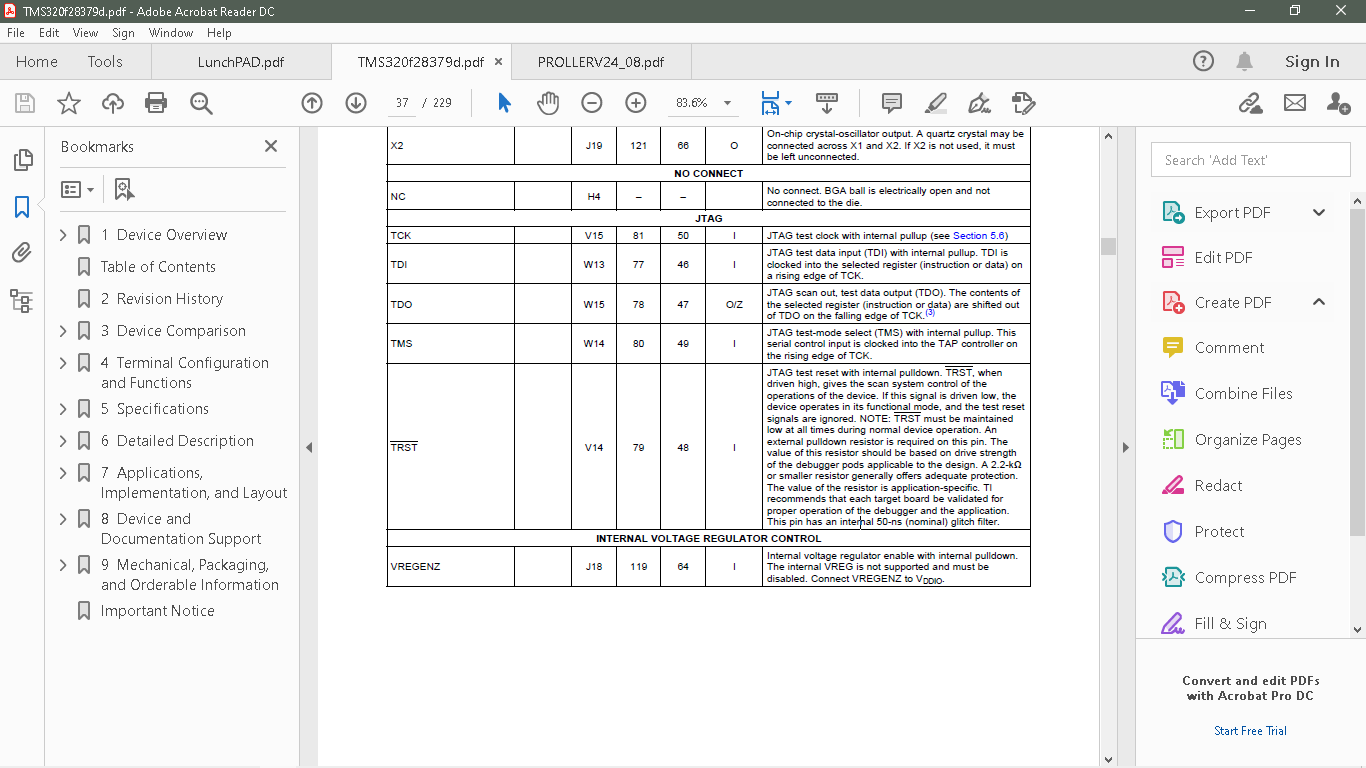
       When TRST pin is High (3.14v )- We can put our system into emulation mode is this correct( Scan system control of the operation of the device ) what it     means ? .

       When TRST pin is LOW - Functional mode (What it means)? We can put system into other boot modes is this correct(SCI,CAN,etc)?

    Thanks & Regards,

    Rani

  • Rani,

    Yes, TRSTn pin high for emulation mode (JTAG connected case).

    TRSTn low - Standalone case (no JTAG connected).  Other boot modes can be used if you want to communicate with the device.             

    In your EEPROM write functions, are you programming ECC using AutoEcc? Or are you programming only data?

    Thanks and regards,

    Vamsi

  • Rani,

    You mentioned you looked at pins "GPIO64 & GPIO72", do you mean GPIO84 and GPIO72? 84 and 72 are the default boot mode select pins.

    For easier debug, I suggest using the emulation standalone boot mode which enables you to follow the standalone boot flow without removing JTAG. You can see this boot flow diagram in the boot TRM chapter.

    Essentially, what you need to do is load up your application via CCS, reset via CCS ( you are now at the start of boot), Open up the CCS memory window and edit memory address 0xD00 to be "0xFF5A", then run.

    Best regards

    Chris

  •  

    Vamsi,

       Using the" FapiDataonly."

    When i am use "Fapi_AutoEccGeneration" , couldn't write continuously ..... its write on first byte only ...

    Referred the post and done same configurations:

    https://e2e.ti.com/support/microcontrollers/c2000/f/171/t/697843?CCS-TMS320F28379D-Fapi-issueProgrammingCommand-function-useing-Fapi-AutoEccGeneration-mode-can-t-generate-ecc-code-in-flash

    Link 2:

    https://e2e.ti.com/support/microcontrollers/c2000/f/171/t/566655?TMS320F28377D-C-Sample-codes-for-Fapi-calculateEcc-and-addr32-read-uint16-

    Refrred the link and done fapi_calculateecc();

    Getting the Eccvalue as 16 , but nothing is writing on memory.

    Code:

    //###########################################################################

    //
    // Included Files
    //

    #include "F28x_Project.h"
    #include <string.h>
    #include "flash_programming_c28.h" // Flash API example header file
    #include "F021_F2837xD_C28x.h"
    #include"EEPROM.h"
    #include"MemCopy.h"
    #include"stdio.h"

    //
    // Defines
    //
    #define  WORDS_IN_FLASH_BUFFER    0xFF  // Programming data buffer, words

    #ifdef __TI_COMPILER_VERSION__
        #if __TI_COMPILER_VERSION__ >= 15009000
            #define ramFuncSection ".TI.ramfunc"
        #else
            #define ramFuncSection "ramfuncs"
        #endif
    #endif


     #pragma CODE_SECTION(EEPROM_Erase,"ramfuncs");
     #pragma CODE_SECTION(EEPROM_Write,"ramfuncs");
     #pragma CODE_SECTION(EEPROM_UpdateBankStatus,"ramfuncs");
     #pragma CODE_SECTION(EEPROM_UpdatePageStatus,"ramfuncs");
     #pragma CODE_SECTION(EEPROM_ProgramSingleByte,"ramfuncs");


    //
    // Globals
    //


    uint32 mainAddress=0x00082000;
    uint64 mainData=7;
    uint16 eccValue;


    uint16_t data;
    bool flag;
    int c=0;
    #define BLINKY_LED_GPIO    31
    //
    // Function Prototypes
    //

    Uint16 test=0;
    void Example_Error(Fapi_StatusType status);
    void Example_Done(void);
    void Compare_ECC(void);
    //
    // Main
    //
    void main(void)
        {
        InitSysCtrl();
        InitGpio();  // Skipped for this example
        GPIO_SetupPinMux(BLINKY_LED_GPIO, GPIO_MUX_CPU1, 0);
        GPIO_SetupPinOptions(BLINKY_LED_GPIO, GPIO_OUTPUT, GPIO_PUSHPULL);

        InitPieCtrl();
        IER = 0x0000;
        IFR = 0x0000;
        InitPieVectTable();
        initeeprom();
        //  Step 5. User specific code:

        // Copy the Flash API functions to SARAM
       SeizeFlashPump();


    //
    // Jump to RAM and call the Flash API functions
    //


        while(1)
        {

            Compare_ECC();


        }
    }


    //  Example_CallFlashAPI - This function will interface to the flash API.
    //                         Flash API functions used in this function are
    //                         executed from RAM
    //


    //
    // Example_Done - For this example, once we are done just stop here
    //


    void Compare_ECC(void)

    {
    EALLOW;


        eccValue = Fapi_calculateEcc((mainAddress<<1), mainData);


     EDIS;

       // return Fapi_Status_Success;

    }


    #pragma CODE_SECTION(Example_Done,ramFuncSection);
    void Example_Done(void)
    {
        __asm("    ESTOP0");
    }

    //
    // End of file
    //

    How to write data on flash with calculating ECC value?

    Thanks & Regards,

    Rani

  • Thank you Chris ...

  • Rani,

    What is the compiler version that you are using?  If it is >= than 15.9, you should use .TI.ramfunc section instead of ramfuncs for below in your code:

     #pragma CODE_SECTION(EEPROM_Erase,"ramfuncs");
     #pragma CODE_SECTION(EEPROM_Write,"ramfuncs");
     #pragma CODE_SECTION(EEPROM_UpdateBankStatus,"ramfuncs");
     #pragma CODE_SECTION(EEPROM_UpdatePageStatus,"ramfuncs");
     #pragma CODE_SECTION(EEPROM_ProgramSingleByte,"ramfuncs");

    Regarding ECC: If you don't program ECC correctly, you will get ECC errors and double bit errors cause NMI.  If you don't plan to insert any intentional ECC errors, you don't have to use Fapi_CalculateEcc().  You can simply use Fapi_AutoEccGeneration mode during programming.  Maybe you are not passing the parameters correctly when using the Fapi_AutoEccGeneration mode.  Note that the max number of 16-bit words that can be programmed in any programming mode at once is 8.  But in your code, I see you pass the data buffer length as 'a'?  It should be 8 or less. 

    Please read through below FAQs:

    Thanks and regards,
    Vamsi

  • Vamsi,


    Vamsi Gudivada said:
    What is the compiler version that you are using?  If it is >= than 15.9, you should use .TI.ramfunc section instead of ramfuncs for below in your code:

    Using 18.9 version so changed one now.

    Vamsi Gudivada said:
    But in your code, I see you pass the data buffer length as 'a'?  It should be 8 or less

     less than 8 , passed as '7'


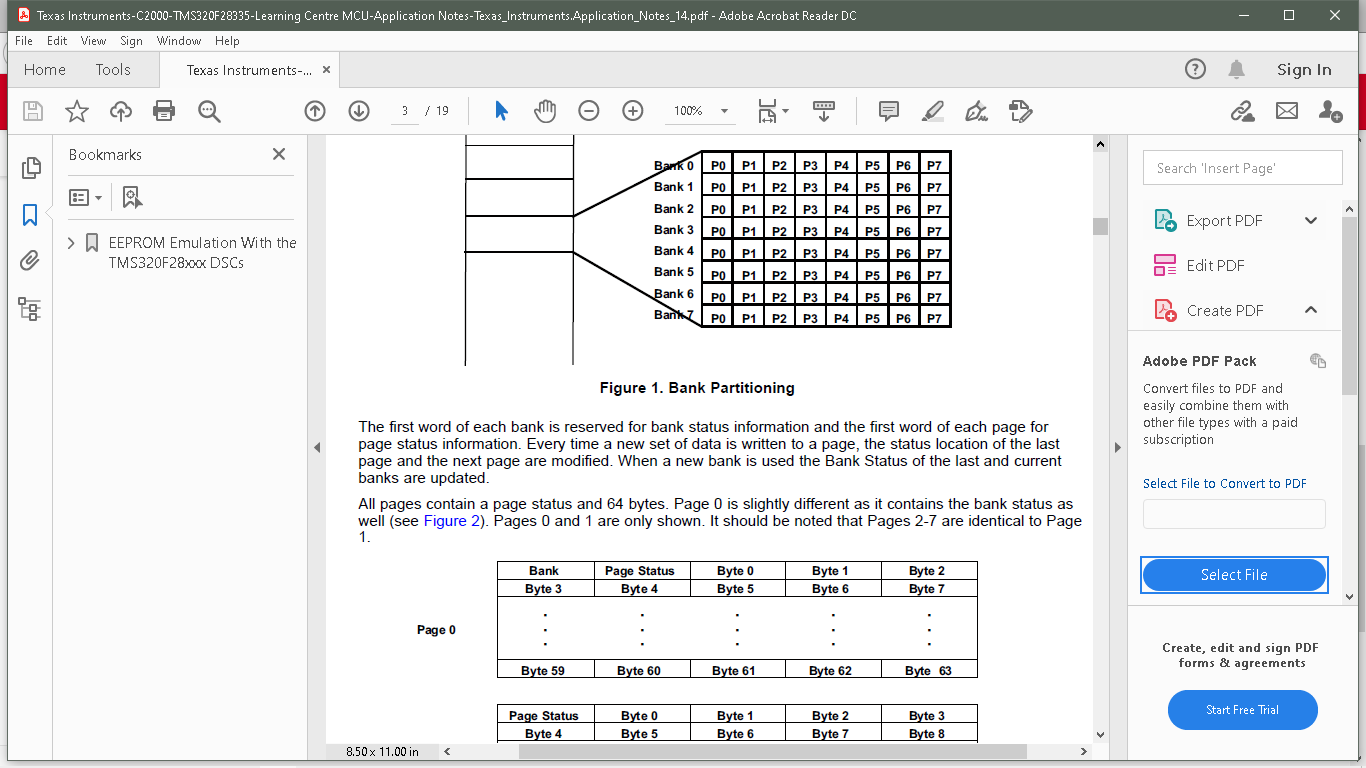
    I have follow the SPRAB69 for implement the EEPROM EMULATION Method ,So considering my first location as Bank Status , second location as Page Status then consecutively writing my data on memory  by using "Fapi_AutoEccGeneration" mode... 

     first two location are writing properly but my data are not written ....

    To write bank Status code:

    To Write Page status

    To write data on memory

    Passing data buffer length

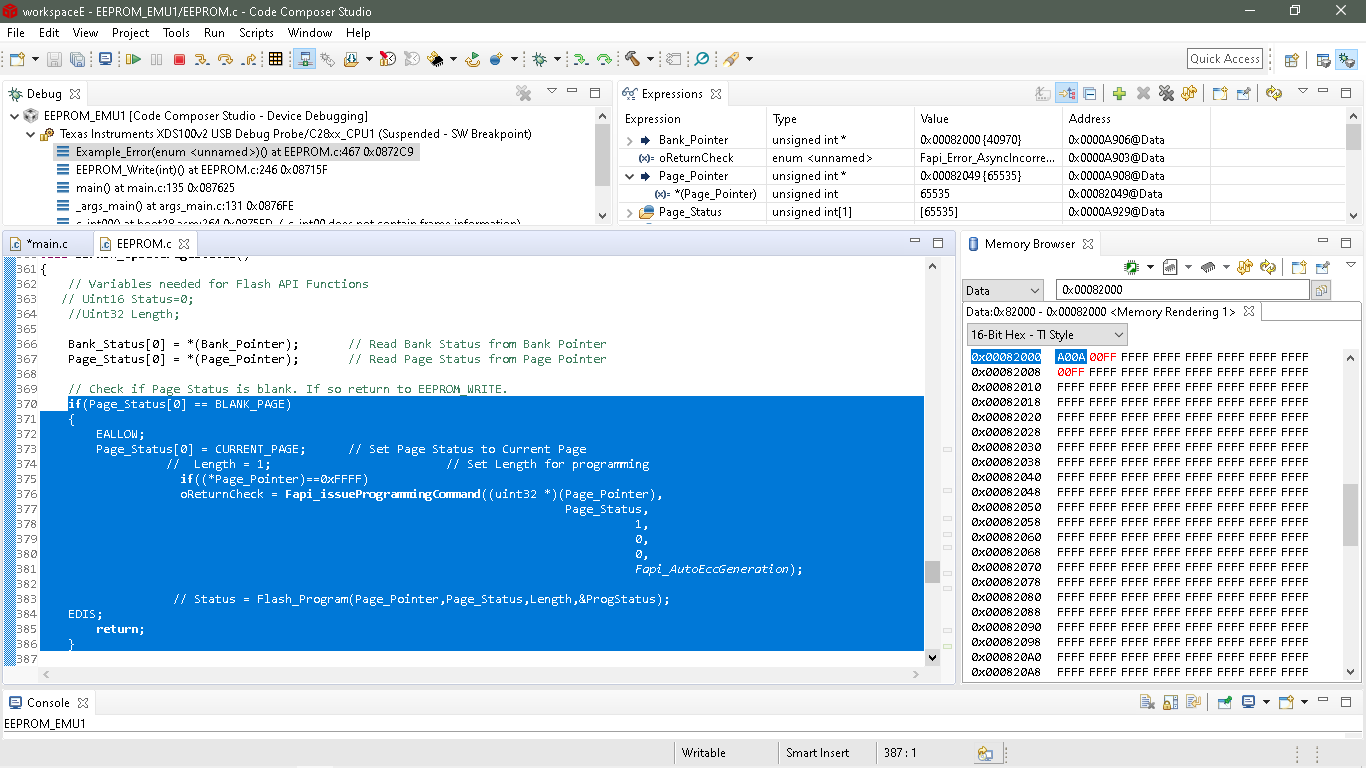
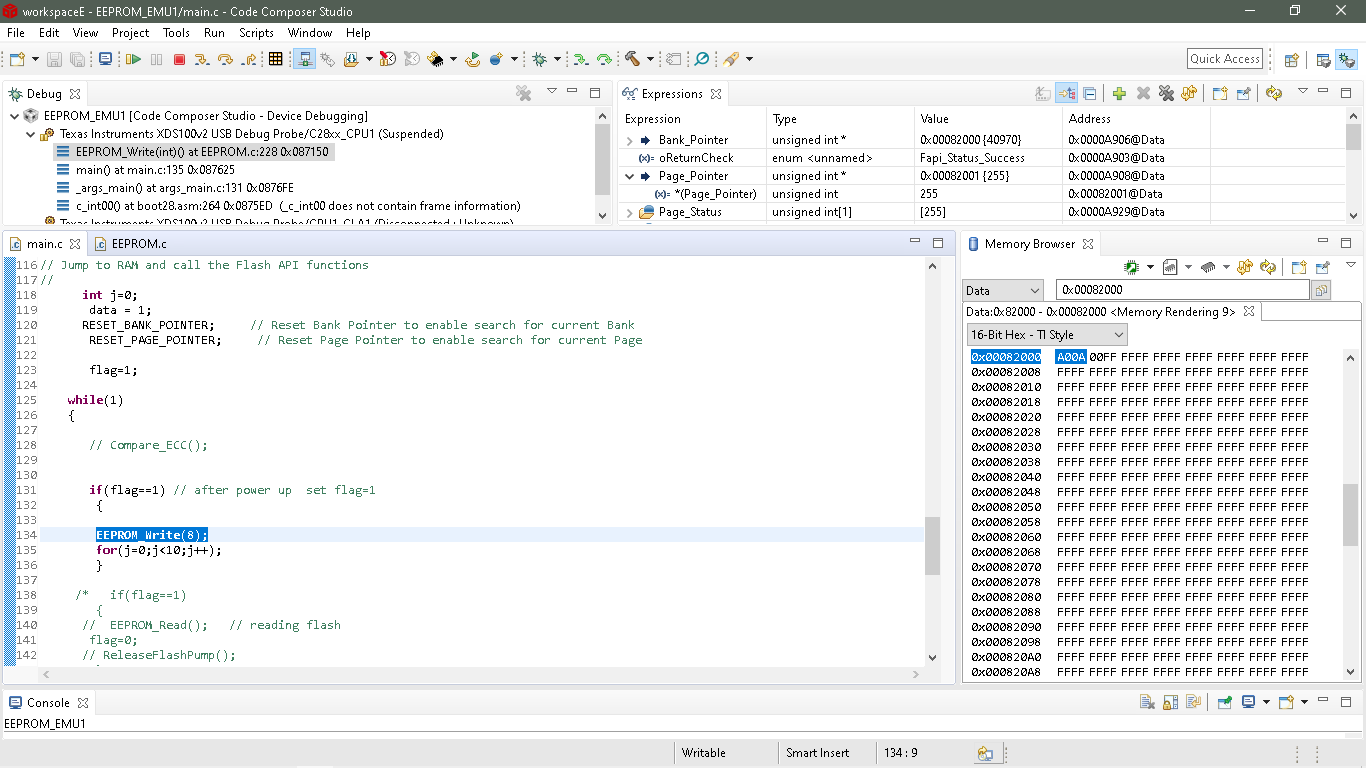
    After writing function execution returns status as  "Fapi_Status_Success" but data are not written on memory.

    Go with Single byte write method used "Fapi_DataOnly" data are written on memory correctly .. but reset mode not works ...

     When i am use "Fapi_AutoEccGeneration" mode ...Datas are not written properly ..

    Help me to solve this problem.. how to pass Databuffer length  if i want write 100 data s are  into memory  means ...

    Thanks & Regards,

    Rani

  • Rani,

    In your EEPROM.c file, line # 222, you are passing a data buffer length of "a" and in line 448, you are passing a length of 1 for Fapi_AutoEccGeneration mode.  Fapi_AutoEccGeneration mode requires either 4 or 8 as the data buffer length.  

    As I mentioned to you in other posts earlier: Flash on this device has associated ECC.  Hence, you must program ECC and you can use Fapi_AutoEccGeneration for it - if you skip programming ECC, you will get ECC errors (which cause NMI/reset).  Since an 8-bit ECC is calculated for every 64-bits of main array data (aligned on 64-bit boundary), you need to allocate a minimum of 64-bits for a variable even if it is 16-bits in size.  EEPROM guide does not say this since the devices discussed in the guide do not have ECC for flash and allow programming 16-bits as well.  Please don't use the guide as is; instead, modify your EEPROM driver design to consider the ECC requirement.

    Please kindly read the entire section 3.2.3 Fapi_issueProgrammingCommand() in flash API guide at https://www.ti.com/lit/ug/spnu629/spnu629.pdf.

    I would suggest you to read the entire flash API guide, the FAQs that I pointed in my previous replies and also step through the flash API example provided in C2000Ware at C2000Ware_3_03_00_00\device_support\f2837xd\examples\dual\flash_programming.

    Regarding your question "how to pass Databuffer length  if i want write 100 data s are  into memory  means":    In the flash API guide, in section 3.2.3, we mentioned that "this function can program only a max of 128-bits (given the address provided is 128-bit aligned) at a time. If the user wants to program more than that, this function should be called in a loop to program 128-bits (or 64-bits as needed by application) at a time.".

    Regarding your question "After writing function execution returns status as  "Fapi_Status_Success" but data are not written on memory.":   Please search for "Does Fapi_issueProgrammingCommand() function call return after completing the program operation?" in the flash API FAQ at 

    Thanks and regards,

    Vamsi

  • Rani,

    A quick question:  Do you plan to disable ECC for your entire application? If yes, you can do it before your application reads any flash locations that you program without ECC (ECC check is enabled by default as mentioned in the TRM).  If this is the case, you can skip programming ECC for your EEPROM data and program using Fapi_DataOnly mode - This way you can design your EEPROM driver as mentioned in the EEPROM guide.

    Is this what you plan to do?  

    Reason I brought up about the ECC is:  You said everything is working fine in debugger connected case but not in standalone mode.  Hence, I brought up the ECC issue since this is one of the reasons why the application would fail in standalone mode.  ECC is disabled in the gel file and hence ECC errors may not show up in debugger connected case (unless you enable it in your application).

    Thanks and regards,
    Vamsi

  • vamsi ,

     I want to implement the EEPROM DRIVER , which one is good enabling ECC or Disabling ECC. If i disable it causes any problem in my application code?.. it doesnt affect normal operation  means i will disable it.... please suggest me which is better  disabling or enabling...

    Suppose if i disable it .... which file i have to modify it ?

    Thanks & Regards,

    Rani

  • Rani,

    ECC is a safety feature (Single Error Correction, Double Error Detection) which can detect bit flips in memory - You can read about it in TRM.

    If you think that your application does not need such feature, you can disable it (InitFlash() - In this function, you will notice that ECC is enabled.  You can edit it to disable).  

    However, please note that ECC check is enabled by default - hence you need to program ECC for your application (enabling AutoEccGeneration feature in CCS flash Plugin programs ECC for your application) to avoid ECC errors that will occur until your application disables ECC in its initialization routines. 

    You can disable ECC in the flash initialization routine so that ECC errors do not occur for the EEPROM data reads (if you decide to not program ECC for your EEPROM data).  

    Thanks and regards,
    Vamsi

  • Vamsi,

    Vamsi Gudivada said:
    If you think that your application does not need such feature, you can disable it (InitFlash() - In this function, you will notice that ECC is enabled.  You can edit it to disable).  

    Done disable at uniflash file .... Same its not works at RESET condition..

    Done all above but now work for Reset condition...

    Thanks & Regards,

    Rani

  • Rani,

    You can disable it in InitFlash() function.  But you should not disable it in the CCS Flash settings GUI (AutoEccGeneration should be enabled).

    If it still fails with AutoEccGeneration enabled, then you need to check below:

    1. In your application flow, before disabling ECC in the InitFlash(), are there any reads to flash locations that you program using API?  If yes, since you programmed them using Fapi_DataOnly (and not ECC), ECC errors occur.  If this is the case, you need to move those reads to post InitFlash() execution.

    2. Not sure whether we already discussed or not (since we discussed multiple posts up to now): 

    (a) Do you service the watchdog in your application or is it disabled?

    (b) Is the application booting to flash correctly?  Do you have any indication (like a GPIO toggle etc.) that the application did boot to flash? 

    Thanks and regards,
    Vamsi


  • Vamsi ,

    Vamsi Gudivada said:
    1. In your application flow, before disabling ECC in the InitFlash(), are there any reads to flash locations that you program using API?  If yes, since you programmed them using Fapi_DataOnly (and not ECC), ECC errors occur.  If this is the case, you need to move those reads to post InitFlash() execution.

    I am reading data from memory location .

    (a)Do you service the watchdog in your application or is it disabled?

         I have tried in both condition enable and disable. it doesnt work.

    (b) Is the application booting to flash correctly?  Do you have any indication (like a GPIO toggle etc.) that the application did boot to flash?

       Yes , i have Blue LED blinky in my application after boot. It doesn't work with reset condition . Debugging ,Loading process works .

    If this is the case, you need to move those reads to post InitFlash() execution.[/quote]

    Do you mean before calling the InitFlash() would have called  EEPROM READ()... isn't correct?

    Thanks & Regards,

    Rani


  • Rani,

    Yes, you should not call your EEPROM READ() function before executing InitFlash() where you disabled ECC. Maybe this is why your application is not working.  Please check.

    Thanks and regards,
    Vamsi

  • Vamsi,

        I have initialized InitFlash() before EEPROM READ() function only.  InitFlash() is called from InitSysCtrl() function itself .

    Thanks & Regards,

    Rani

  • Vamsi,

       Thanks to support me in all the way . Now working my application in RESET/Power Cycle condition too.

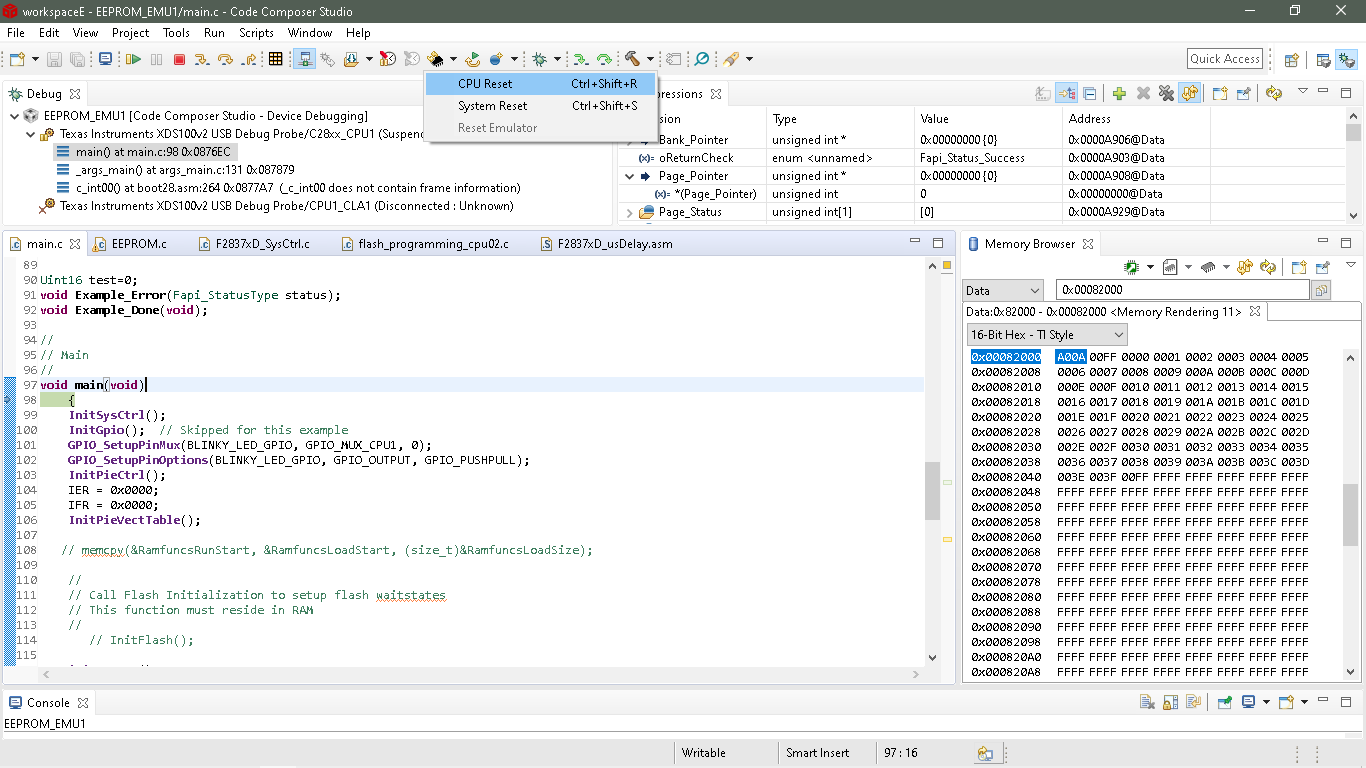
         After Loading did RESET in CPU RESET in CCS Menu.

    Thank you so much Vamsi.

    Thanks & Regards,

    Rani

  • Vamsi,

        Thanks to lot support me in all the way. Now i can run my code after power cycle/ Reset condition also . 

    After loading code given CPU RESET .Now its works fine .

    Thanks & Regards,

    Rani

  • Rani,

    Glad I could help.  I am closing this post.  

    Thanks and regards,
    Vamsi