This thread has been locked.

If you have a related question, please click the "Ask a related question" button in the top right corner. The newly created question will be automatically linked to this question.

TMS320F28377D: F2837x USB Problem

Part Number: TMS320F28377D
Other Parts Discussed in Thread: C2000WARE

Hello.
I am running usb_ex4_dev_bulk from C2000Ware_3_02_00_00 F2837x on controlCARD rev 1.3 from FLASH
I didn't change anything except commented out setting gpio 46,47,120,121 in USBGPIOEnable() 
As far as I understand, they are optional. Accordingly, I disconnected the jumpers J4-J7 from the USB circuit. Also added setup and blink gpio in while(1) loop.
There is nothing else connected to the controlCARD, powered by USB.
The example works great.

Now we have our board, in which MCU power and periphery schematic is different from controlCARD, but the clock input circuit is the same - an external 20 MHz crystal.
The USB circuit contains nothing but two 22 ohm resistors on DP and DM.
The board is working and the other peripherals (I2C, SCI) are working fine.
When I upload the same example code (only gpio numbers changed for blink) to our board
device detection does not occur. Windows identifies it as an unknown device (descriptor read error).
The same is repeated on our other board, which includes the ADUM3160 USB decoupling.
The situation is repeated also with example usb_ex1_dev_serial.

Now we have our board, in which MCU power and periphery schematic is different from controlCARD, but the clock input circuit is the same - an external 20 MHz crystal.
The USB circuit contains nothing but two 22 ohm resistors on DP and DM.
The board is working and the other peripherals (I2C, SCI) are working fine.
When I upload the same example code (only gpio numbers changed for blink) to our board
device detection does not occur. Windows identifies it as an unknown device (descriptor read error).
The same is repeated on our other board, which includes the ADUM3160 USB decoupling.
The situation is repeated also with example usb_ex1_dev_serial.

I'm at a loss where to look for the cause - in the hardware or in the software.

controlCARD CPU is : TMS320F28379DZWTT YFC-7BAC5PW
our boardCPU is :        TMS320F28377DZWTT YFC-66AFG6W


The board routing was done without strict adherence to impedance requirements,
but I don't think that this could be the reason, since the length of the tracks is no more than 7 cm. Or is it likely?
Could we mess up USB physics with ESD?
How would you advise to identify what is this: software or hardware problem? Or mayby is silicon deffect?
Is there a way to test this?
What is it more like from your point of view?

Best regards

  • Vladimir,

    Given the short length of the USB traces and the low speed that USB runs at on this device, I don't think your custom PCB is a problem.  Can you confirm you are using the external oscillator in your software and not one of the IntOsc sources?  Given USB's asynchronous nature, it's possible this could be timing related, but not likely.  Have you verified your crystal is oscillating correctly?

    I would guess this is likely a software issue.  Double check your clock configuration, make sure the interrupt handler is registered and enabled in the PIE and CPU, and ensure the USB peripheral's registers are being configured the same as they were previously.  Let us know what you find and we can suggest some next steps after this.

    Best,

    Trey

  • Vladimir,

    The impedance requirements likely aren't a factor, as long as you're close I would expect it to work under most conditions. Of course you would want to have it right in a final design, but being close should be fine for a prototype. Is your impedance VERY far off?

    Shorter traces are better, but they are also often driven across a cable too. I would recommend looking to see if the signal integrity is still good after the signals reach the from the C2000 to the secondary device and vice-versa.

    I don't suspect this is your issue, but there is a 5th "ID" pin which tells the host how to act. This is often taken care of in the cabling, but perhaps if you have your design all on one PCB maybe you have forgotten this. Look into this pin, like I said I don't think its your issue, but who knows.

    Outside of those things I would suspect a SW issue.

    Regards,
    Cody 

  • Trey, thanks for your answer

    My clock configuration is the same as in the original example usb_ex4_dev_bulk from C2000Ware_3_02_00_00


    #define DEVICE_SETCLOCK_CFG (SYSCTL_OSCSRC_XTAL | SYSCTL_IMULT(20) | \
    SYSCTL_FMULT_NONE | SYSCTL_SYSDIV(2) | \
    SYSCTL_PLL_ENABLE)

    //
    // Set up PLL control and clock dividers
    //
    SysCtl_setClock(DEVICE_SETCLOCK_CFG);


    #define DEVICE_SETCLOCK_CFG (SYSCTL_OSCSRC_XTAL | SYSCTL_IMULT(20) | \
    SYSCTL_FMULT_NONE | SYSCTL_SYSDIV(2) | \
    SYSCTL_PLL_ENABLE)


    And

    #define DEVICE_AUXSETCLOCK_CFG_USB (SYSCTL_OSCSRC_XTAL | SYSCTL_PLL_ENABLE |\
    SYSCTL_IMULT(12) | SYSCTL_SYSDIV(4))

    //
    // Set the clocking to run from the PLL at 60MHz
    //
    SysCtl_setAuxClock(DEVICE_AUXSETCLOCK_CFG_USB);


    My external clock is 20MHz crystall. This is the same as in controlCARD. I watched the crystal oscillate. I didn't see any difference in frequency fluctuation compared to the controlCARD.

    Also interrupt cunfiguration is original function from driverlib and usb_ex4_dev_bulk

    //
    // Initialize PIE and clear PIE registers. Disables CPU interrupts.
    //
    Interrupt_initModule();

    //
    // Initialize the PIE vector table with pointers to the shell Interrupt
    // Service Routines (ISR).
    //
    Interrupt_initVectorTable();

    ...

    //
    // Register the interrupt handler for USB Interrupts.
    //
    Interrupt_register(INT_USBA, f28x_USB0DeviceIntHandler);

    ...

    //
    // Enable global interrupts
    //
    Interrupt_enableMaster();


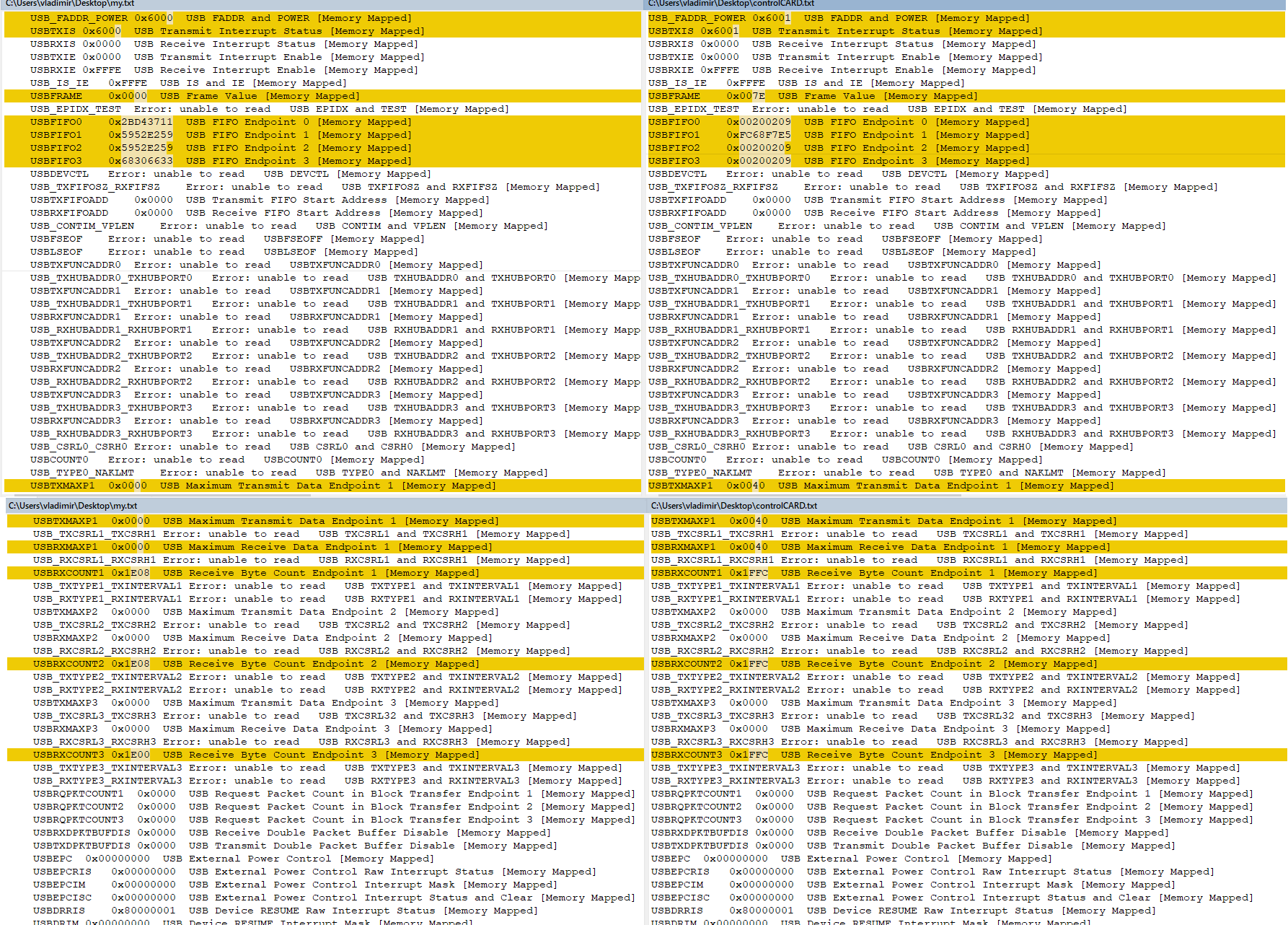
    The peripheral USB registers that I was able to read after starting both options are different as shown in the screenshot.(left - my board, on right - controlCARD)

    Again, I didn’t make any changes in the code compared to the original, except led blink for control that cpu is work. When I change boards I just change define LED1 LED2. Thats is all differences in code. Then I switch targetConfig from XDS100v2 for controlCARD to XDS110 for my board and load to flash.


    //
    //User code
    //

    GPIO_setMasterCore(LED1, GPIO_CORE_CPU1);
    GPIO_setDirectionMode(LED1, GPIO_DIR_MODE_OUT);
    GPIO_writePin(LED1, 1);

    GPIO_setMasterCore(LED2, GPIO_CORE_CPU1);
    GPIO_setDirectionMode(LED2, GPIO_DIR_MODE_OUT);
    GPIO_writePin(LED2, 0);

    //
    // Main application loop.
    //


    while(1)
    {
    //
    // Nothing to do...everything happens in the interrupt context.
    //

    //
    //User code
    //
    //
    // Turn LED
    //
    GPIO_togglePin(LED1);
    GPIO_togglePin(LED2);
    //
    // Delay for a bit.
    //
    DEVICE_DELAY_US(60000);
    DEVICE_DELAY_US(60000);
    }
    }


    However, I changed the build configuration to flash.
    Also I changed EABI to COFF becouse EABI did not work with FLASH configuration.
    This is alarming. But this is done identically on both boards.
    On controlCARD COFF is working great.

    I attach an archive with the project for my board in the message.

    /cfs-file/__key/communityserver-discussions-components-files/171/usb_5F00_ex4_5F00_dev_5F00_bulk_5F00_my.zip

  • Vladimir,

    Thanks for posting that information.  I don't see anything in the register configuration that has any problems.  Can I ask how you created this new project?  I am not an expert on COFF vs. EABI, but if you simply copy a C2000ware project and modify it I think both formats should work.

    It looks to me like we are not getting the first interrupt that sets the USB stack in motion.  Is it possible you have swapped the D+ and D- lines at the connector such that they are connected to the wrong pins on the C2000 device?  This would cause the behavior you're seeing.

    Best,

    Trey

  • Vladimir,

    as Trey indicated you should verify that the connections you've made in hardware are correct.

    Configuring XCLKOUT would be a good way to verify that you clock is working as expected and that your PLL and divider settings are correct.

    I'm not an expert, but there are a few small changes you need to make when going from COFF to EABI, perhaps some of the code enabled by the flash build configuration has one of the issues found here: https://software-dl.ti.com/ccs/esd/documents/C2000_c28x_migration_from_coff_to_eabi.html  

    Nevertheless if the COFF code works on the controlCARD but not on your hardware it would seem to suggest some sort of hardware difference or issue on your board.

    Regards,
    Cody 

    Ps. Good to hear from you Trey.

  • I was confused by a bad site showing the wrong colors of the USB wires. The first image for "usb colors" in Google is not correct! There green is "D -" but in fact it is "D +"
    This is a very stupid mistake and I am sorry.


  • It's not urgent for me now, COFF works well. If we need it, then I will watch at this information.

    Trey was right about polarity of the wires.

    Thanks everyone.