This thread has been locked.

If you have a related question, please click the "Ask a related question" button in the top right corner. The newly created question will be automatically linked to this question.

CCS/TMDSCNCD28379D: SCI Communication Interface with UI

Part Number: TMDSCNCD28379D
Other Parts Discussed in Thread: C2000WARE, CONTROLSUITE, TMDXIDDK379D

Tool/software: Code Composer Studio

Hello, I recently purchased Industrial Drive Kit - IDDK{R2.2.1] with TMDSCNCD28379D controller (Motor as well). Is it possible to develop an Interface using C# to establish communication between TMDSCNCD28379D and PC. If yes please help me out with an example. I want to develop interface to control the motor using interface but not with the CCS.

Please help and thankyou

  • Hi Prasad,

    You can use any serial monitor to send commands through USB and use these commands for further decision making and processing in your system.

    You can go through the example sci_ex3_echoback to understand how to send and receive data. It is at location C2000Ware_3_03_00_00\driverlib\f2837xd\examples\cpu1\sci in C2000Ware.

    Thanks,

    Yashwant  

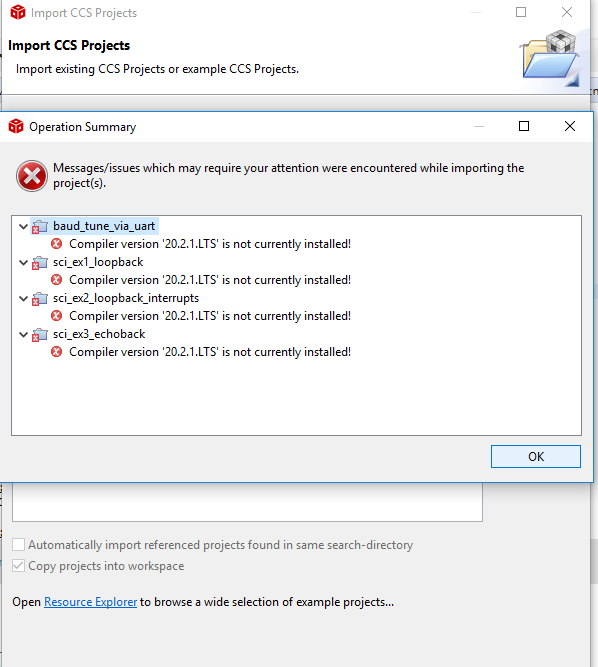
  • I got the following error. Please help me to over come this issue. I downloaded and installed new compiler version and tried building the project. I got 98 warnings and when downloaded the code, the kit is not responding to ENABLEFLAG = 1.

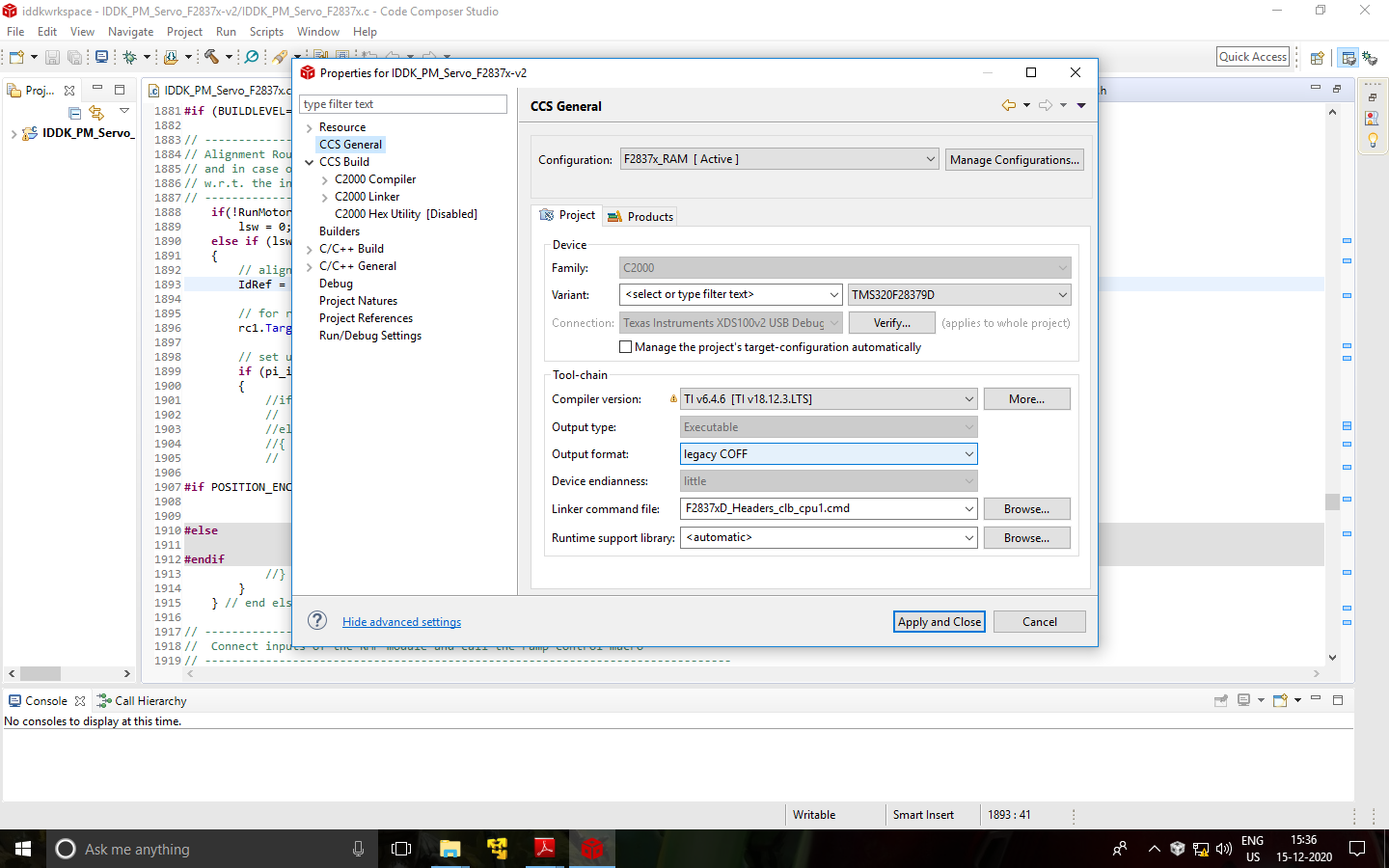
    Initially Compiler settings were like the image below: ( The kit was responding with ENABLEFLAG=1 and tested all the 4 build levels)

    The below was the new compiler version setting. With this ISTTICKER is not increasing with EnableFlag =1.

  • Please install the latest version of the compiler. For reference

    https://software-dl.ti.com/ccs/esd/documents/ccs_compiler-installation-selection.html#within-ccs

    Regards,

    Yashwant 

  • Thanks a lot for the reply but with new compiler version, the kit is not responding to EnableFlag = 1. Please help me to solve this problem. Please check the above post for the new problem I'm facing ( images of compiler version)

  • Can you be more precise on what is not responding? Is the sci_echoback example working? Note that by default for the sci_echoback example the output format is ELF. 

    You have different driverlib files for coff and elf format at location C2000Ware_3_03_00_00\driverlib\f2837xd\driverlib\ccs\Debug

    Regards,

    Yashwant 

  • Dear Yashwant,

        Thanks a lot for the reply. I was referring to IDDK_PM_Servo project. Initially with older compiler version, system was working fine but with new compiler, IDDK_PM_servo is not responding to ENABLEFLAG = 1 command. ISRTICKER is not increasing automatically even after continuous refresh option.

      Also with sci_echoback example:

     I downloaded putty.exe and tried connecting with the development kit. The following was the observation:

    Hello World!\0";
    You will enter a character, and the DSP will echo it back!


    after this output, neither putty.exe is taking any character and controller is not echoeing back. Im still trying out with this code. Please help me with the IDDK_PM_servo project with new compiler version

    Thank you

  • When you click the suspend button in the IDDK_PM_Servo project, is it stuck in a particular function or address? When you reset and restart the application does it go to the start of main()? If so, can you step through the code and try to determine if it's making it to the EnableFlag loop at all?

    For the echoback example, you may want to check the switches on your board. I think if switch 2 on A:SW1 is in the wrong position, it can cause the behavior.

    Whitney

  • Dear Whitney,

       Thanks a lot for the information. On Control card, there are 3 SW's (SW1, SW2, SW3). As per your suggestion,I changed the position of SW2's switch - 1 (initally the positions were at A, B respectively). So switch -1 of SW2 is now at new location and switch 2 is towards B. Im still facing the problem. I got the greeting message from the controller (on putty.exe console) and when I send any character, blue LED is blinking(A:D3) when pressed enter but there is no echo .

    Please help me out to solve this issues.

    Regarding the IDDK_PM_Servo project, Ill update you v shortly. Thank you

  • Dear Whitney,

       Regarding IDDK_PM_Servo Project, the following was the observation:

    When I make EnableFlag = 1, ISRTIcker was not incrementing automatically. So as per your suggestion, I suspended the session and the cursor got stuck in F2837xD_SysCtrl.c file ...

    while(ClkCfgRegs.SYSPLLSTS.bit.LOCKS != 1)
            {
                // Uncomment to service the watchdog
                // ServiceDog();
            }

    Please help me to sort this issue as well

  • I'm not sure we're talking about the same switch. See the one that's labeled "A:SW1" in the controlCARD UG: https://www.ti.com/lit/SPRUI76

    Okay, so the IDDK_PM_Servo project isn't even making it to the part of the code where it checks enableFlag. It's stuck waiting for the PLL to lock. You don't have that problem with the SCI project though? I think this version of the IDDK_PM_Servo project uses a pretty old version of F2837xD_SysCtrl.c. Try switching it to the v210 version which has some pretty significant updates to the SYSCLK configuration.

    Or if you're able to, switch to the C2000Ware Motor Control SDK which has new projects for the IDDK and the latest versions of the device support files.

    Whitney

  • Dear Whitney,

       Thanks a lot for your reply. Problem related to SCI has been sorted out with the modifications you suggested.

    For IDDK_PM_SERVO project, I have IDDK_PM_Servo_F2837x-v2 project and I tried compiling it with new version of the compiler. As you know I'm having issues.

    I downloaded C2000Ware_Motor_Control_SDK and tried to access the examples. There are no examples related to IDDK_PM_Servo_F2837x-v2 project.

    I checked all the folders to find out the new version FOC control of PM motor. Regarding F2837xD_SysCtrl.c, can you please help me how to update this file in my existing project. The file which I'm having is v170 but the new version which I recently downloaded is v3.10.

    Or else can you please send me the new version of PM motor control project.

    Is there a GUI for controlling the motor using this kit? IF yes please help me with the GUI. Thank you

  • Dear Whiteney,

    I wish you a very Happy and Prosperous  New Year.

    I'm still facing the same issue with the IDDK_PM_SERVO project with new compiler version. ISR ticker is not automatically incrementing after making enableflag = 1.

    Please help me out and Thank you

  • Happy New Year! Thanks for your patience while I was out of the office.

    I think the easiest way to pull in the new SysCtrl files would be to make a back up of the existing ones in the v170 folder and replace them with the newer version. You'll need to do it for both F2837xD_common\source\F2837xD_SysCtrl.c and F2837xD_headers\include\F2837xD_sysctrl.h. I don't have the hardware with me to test it fully, but this change did allow me to get the ISR ticker to increment.

    Alternatively you could open the project properties and edit the path variables to change F2837x_INSTALL_ROOT from v170 to v210 (or whatever version you decide to try) which will replace all the device support files with the newest, but there will be some build errors you'll need to resolve.

    Whitney

  • Thanks a lot for the help. As per the suggestion, I changed F2837x_INSTALL_ROOT from v170 to v210. i GOT BUILD ERRORS as given in the attachment. Please help me to rectify these errors. Thank you

  • As I noted in my previous response, the build errors were expected which is why I suggested replacing the SysCtrl files only instead of the entire set of device support files to keep it simpler.

    Those DBFED/DBRED errors shouldn't be too hard to fix though. You probably just need to add a .all to the line it's complaining about--like change "(*ePWM[n]).DBFED = db;" to "(*ePWM[n]).DBFED.all = db;"

    Whitney

  • Thanks a lot for the input. I replaced F2837xD_common\source\F2837xD_SysCtrl.c and F2837xD_headers\include\F2837xD_sysctrl.h these files with F2837xD_common\source\F2837xD_SysCtrl.c and F2837xD_headers\include\F2837xD_sysctrl.h of v210. I still have this issue. ISRTICKER is not updating automatically.

  • Is it still the same issue where you're getting stuck waiting for the PLL to lock or is it stuck somewhere else now?

    Whitney

  • Yes...I'm facing the same issue...

  • Can you try running the following project from the MotorControl SDK. I think it is very similar to the controlSUITE project you're having trouble with.

    C:\ti\c2000\C2000Ware_MotorControl_SDK_3_01_00_00\solutions\tmdxiddk379d\f2837x

    I'm hoping the latest SYSCLK configuration code that the above project uses will work without PLL issues since you've had success with it when you tried the sci_ex3_echoback example, correct?

    Whitney

  • Thanks a lot for the reply. I just checked the folder in my PC. There is no .exe file to execute. Can you please tell me where can I find this particular sdk?

    Yes, I didnt have any issues with sci_ex3_echoback example after changing the compiler version.

  • There is no executable in the folder. It is a project that you can import into CCS like you did for sci_ex3_echoback. Once you build it, you'll have a .out to load to your device and run with the CCS debugger.

    The documentation for the project is here: www.ti.com/.../spracl1

    Whitney

  • I tried this project with new compiler. ISRTicker is incrementing with new compiler version but motor is in locked condition and not moving. I tried with different modes but the motor is not moving. Im still trying out....

  • I changed the settings in settings file as per my motor and executed the project. The motor is vibrating.Am i missing any thing.

    plz suggest

  • If you selected BUILDLEVEL1, it will generate 3 phase sine wave at a certain voltage and frequency. In the next build level, it will do the same besides sensing the phase currents through ADC. The motor may be vibrating because VdTesting and VqTesting values could be low OR the frequency may be too off for the voltages Vd and Vq. Read the user guide and spend some time to figure out the example.