This thread has been locked.

If you have a related question, please click the "Ask a related question" button in the top right corner. The newly created question will be automatically linked to this question.

CCS/LAUNCHXL-F280049C: How to debug boot from flash not working

Part Number: LAUNCHXL-F280049C
Other Parts Discussed in Thread: C2000WARE

Tool/software: Code Composer Studio

Hi,

I'm trying to get my code running stand alone from flash.

I select the Flash_Lib configuration, load the flash and set the boot switches on LAUNCHXL as GPIO24=ON (ie zero) GPIO 34=OFF (ie one) which I think is boot from flash.

Power cycle and get nothing.

Attaching debugger I can see that the PC is at 0x3FC7A5, so presumably somewhere in boot rom but not at any wait point AFAICS.

In can run and debug my code (with the boot switches set for boot from flash and Flash_LIB configuration ) successfully, but not standalone.

How do I debug what is the problem?

From some forum posts I see that it should be possible to step through the boot process, but how?

I also see that one should be able to load the rom symbol, but how?

I find the rom symbol lib files here:

ti/c2000/C2000Ware_MotorControl_SDK_3_00_01_00/c2000ware/libraries/boot_rom/f28004x/revB/rom_symbol_libs/ROM_API/F28004xbootROM_Symbols.lib 

But there are so many I don't know which to load and how to find out which silicon rev I'm running?

And CCS does not load those files, it needs .out files, right?

So do I need to link those .lib files to my project or what?

wbr Kusti

  • Hi,

     I select the Flash_Lib configuration, load the flash and set the boot switches on LAUNCHXL as GPIO24=ON (ie zero) GPIO 34=OFF (ie one) which I think is boot from flash.

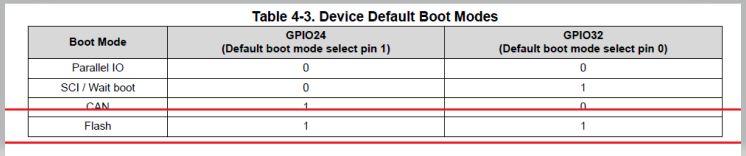
    You need to drive both BOOTMODE pins ((GPIO24 and GPIO32) high to select the flash boot. See the below table from TRM -


    Regards,

    Vivek Singh

  • Hi, thanks for answering.

    My bad, I miswrote, I did mean and tried the hi,hi  combo (all the other seven combos you can create with two bits ;) .

    So that as such is not the problem. The question really is how to debug this?

    wbr Kusti

  • Kusti,

    Please take a look at this FAQ: 

    Let me know if it does not help.

    Thanks and regards,

    Vamsi

  • Thanks, it is late here 23:00 hours, so I will concentrate on this tomorrow. From a cursory look I do have most of the stuff correct but I will double check with fresh brain in the morning and with the real development setup. 

    Thanks, I'll be back to report fail or success.

    wbr Kusti

  • Kusti,

    Sure, let us know whenever you can.

    Thanks and regards,
    Vamsi

  • Hi, 

    I went through the list and did no spot anything.

    So I went back to basics and thought I'd try something ready made that should run out-of-the-box.

    I imported 

    ti/c2000/C2000Ware_MotorControl_SDK_3_00_01_00/c2000ware/device_support/f28004x/examples/led/CCS/led_ex1_blinky.projectspec

    and apart from the fact that CCS selects wrong launch configuration it runs under debugger no problem and blinks the led.

    However I can NOT make it to run standalone. 

    Below some screen shots.

    This must be something totally trivial and I will feel silly when it is solved. 

    Regardless, thanks for the great support and have a Happy and Properous New Year 2021.

  • Update:

    I read the GPIO 24 and 32 via software and they showed up as 0 and 1 respectively, regardless of the DIP switch settings.

    This lead to the realisation that

    GPIO 24 == SPIB MOSI == GUI SPI

    and we have SPI B in use! Removing the SPI peripheral allows the led_ex1_blinky to be run from flash.

    Ok, so went back to my project and that did not appear to work, until I realised that it was just blinking 25 times too slow.

    As a first guess this was because my blink code was very basic without any initialisation so clocks and flash waits probably just hw defaults.

    Moving my blink code further in the executation order after initialisation now show consistent blink times both under debugger and standalone.

    Now we are left with the question what to do about the boot pins. I see that they can be changed by programming Z1-BOOTPINCONFIG. Not looking forward to programming OTP, but hey, that is what I get paid for ;)

    One question lingers, I could not find answer to in the documentation:

    What is Z2OTP_BOOTPIN_CONFIG?

    I see this in the f28004x_dcsm_z2otp.asm but the TRM only speaks about Z1_BOOTPIN_CONFIG.

    Is there a second boot pin register or what?

    Anyway it seem that the original problem is now solved.

    I think it would not hurt if there was a note int LAUNCHXL-280049C User Guide that the SPI-B interferes with the boot mode dip switches. I realise that this is because of necessity as you cannot deliver the board with the OTP programmed to avoid this but a note (or this post!) might save a few hours for some little sod like me. :) 

    Happy New Year!

    wbr Kusti

  • Hi,


    What is Z2OTP_BOOTPIN_CONFIG?

    I see this in the f28004x_dcsm_z2otp.asm but the TRM only speaks about Z1_BOOTPIN_CONFIG.

    Is there a second boot pin register or what?

    We have Z2OTP_BOOTPIN_CONFIG location in OTP but BOOTROM code on this device does not use that so technically we have only Z1_BOOTPIN_CONFIG for BOOT configuration on this device.

     I think it would not hurt if there was a note int LAUNCHXL-280049C User Guide that the SPI-B interferes with the boot mode dip switches. I realise that this is because of necessity as you cannot deliver the board with the OTP programmed to avoid this but a note (or this post!) might save a few hours for some little sod like me. :) 

    Thank you for your feedback. I'll provide this to our hardware team.

    Regards,

    Vivek Singh

  • All clear for now Thank you very much for your help and great support here, as always.

    wbr Kusti