This thread has been locked.

If you have a related question, please click the "Ask a related question" button in the top right corner. The newly created question will be automatically linked to this question.

CCS/TMS320F280049: Frequency input read using eCAP

Part Number: TMS320F280049
Other Parts Discussed in Thread: TMS320F28379D, LAUNCHXL-F28379D

Tool/software: Simulink

Hi,

I'm struggling to read a PWM input using eCAP and would like to request some help.

I'm using Simulink to design my application and all I did so far was using an eCAP block as APWM to generate a PWM output and then connect that same output to the eCAP input to read it.

Unfortunately due to COVID I do not have all the equipment I could use but I can see my PWM is working by simply measuring it with a voltmeter.

My eCAP input is not working though.

My model is very simple:
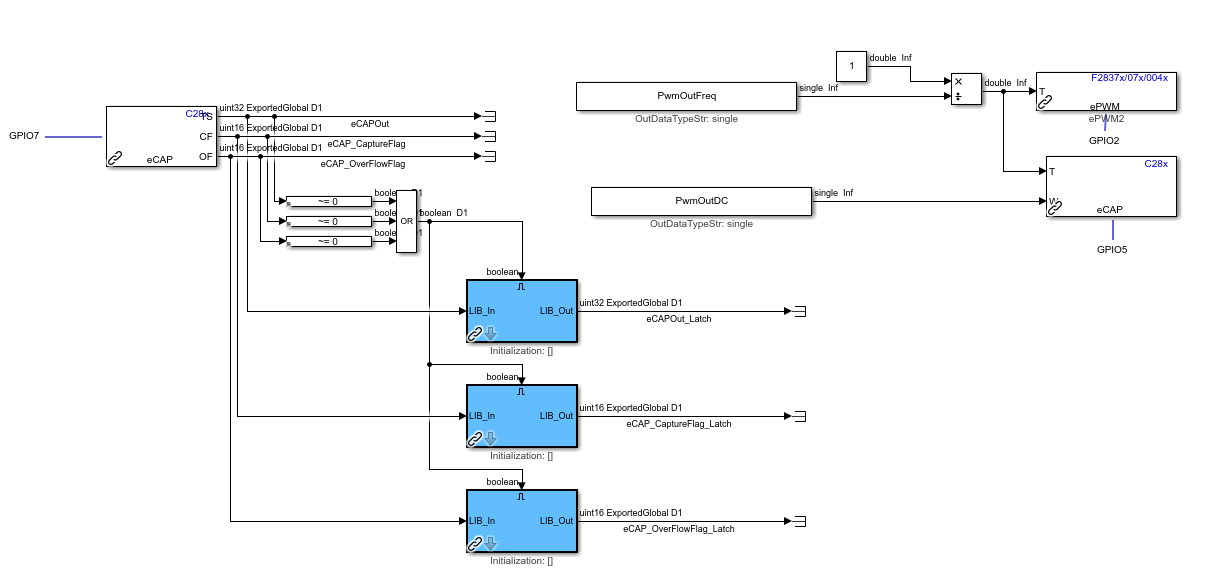
I'm using CCP to monitor those variables and none changes, I can see the overflow flag latching but apart from that, the period is not returned:

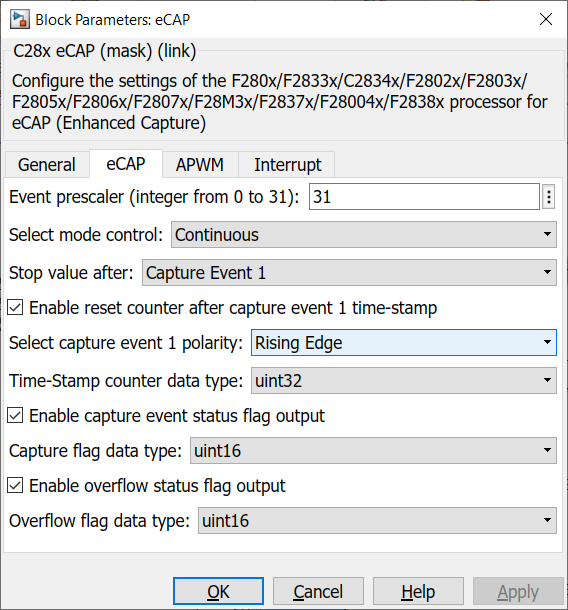
I'm not sure what to select in the configuration dialogue for the eCAP block (I tried multiple combinations but none work):
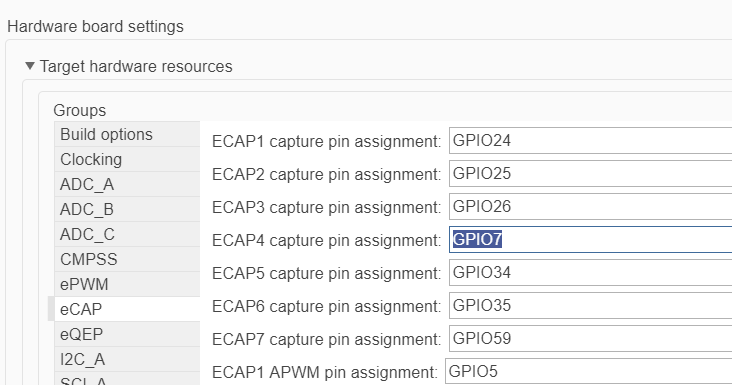
I'm using eCAP4 (random choice of eCAP) and I've set it to GPIO7:
Do I need to configure anything else? Is this capable of reading a 13V pulsing signal or does it need to be 5V? I have my block sampling at 100us.

The documentation is extensive and I can imagine it would make sense to a lot of people, unfortunately I do not have that much in depth knowledge to understand everything that is written there and am struggling with what should be a quite basic operation. In any other platform I've worked with, usually we have a block which we select the pin and it outputs a frequency reading, as simple as that.

I appreciate any help you can provide and apologies if this has been asked before but I couldn't find any information which would apply to the Simulink setup. I know the Simulink blockset is Mathworks area but the parameters/procedure that need to be selected/followed are common and hopefully you can help me with those.

PS: Not sure why the development tool shows CCS but I believe this is due to the fact I started this thread through "Ask a related question". Apologies for misleading you.

Thank you all in advance.

Celso

  • Celso,

    Thanks for reaching out to the E2E with your question.

    I see you have GPIO5 configured as the eCAP1 APWM and GPIO7 configured as eCAP4.  I'm going to assume that eCAP4(since it is highlighted) is the pin you want to capture the APWM signal on.  

    Have you verified that you see GPIO5 toggle, i.e that the APWM function is getting to the pin.  For basic function you could poll the GPIO5 dat register(either manually on continuous read) to verify this.

    Once this has been verified, I'd compare your eCAP settings to this example in C2000Ware to see if there is anything different.

    We can debug further once you've had a chance to do the above.

    Best,

    Matthew

  • Hi,

    Your assumptions are correct. I believe I found my issue, although I cannot prove it but basically I'm just not able to connect to the GPIO I want in the board I have as they are configured to go through a HSD as outputs so I can't just change it to read an input.

    Out of curiosity, to poll the dat register, would this be in CCS? I'm actually not using CCS at all, I build in Matlab and monitor through CANape.

    I can see my PWM working with a multimeter, the voltage level changes according to the duty cycle.

    My next issue will be with regards to memory space, it seems that I cannot build my application for this chip by quite a lot:

    "program will not fit into available memory. placement with alignment/blocking fails for section ".econst" size 0x96e35 page 0. Available memory ranges: FLASH_BANK0_SEC size: 0x1cff2 unused: 0x1cff2 max hole: 0x1cff2 error: errors encountered during linking;"

    If you can point me to the right post which discusses external flash memory increase it would be much appreciated.

    Kind Regards

    Celso

  • Celso,

    Thanks for the reply, if you've verified using a DMM that is fine as well.  There should be a GPIO block in Simulink, called GPIO_DI that you could call to read the IO state for any pin.  Even if the pin is being used with a peripheral the input buffer should still detect the pin state.

    In terms of external memory, on this device you'll need to look at serial type flashes, SPI or UART(there's an I2C, but I'm not sure there is flash to support this).  I noticed that the linker is flagging your .econst section; so this is not code per se but some constants you've defined.  There are quite a few math tables that are built into the F28004x ROM, just curious if you know what constants need this amount of space?  Keep in mind this is in addition to your main code which is in the .text section.

    Best,

    Matthew

  • Hi Matthew,

    Indeed I have been removing constants from my .sldd data dictionaries and replacing them with hardcoded values trying to reduce the memory usage, although this is not making any difference. My code is quite heavy and I really can't cut it down much more, these constants are necessary I think I'll have to look into a different chip with more memory and start over. I'm not sure my knowledge extends to being able to use an external flash in an acceptable time period.

    Thanks for the GPIO input hint, I'll try that as well.

  • Celso,

    For what its worth, you could look at the TMS320F28379D.  This has substantially more built in memory, but perhaps more critically for you supports a standard parallel memory bus(EMIF).

    The LAUNCHXL-F28379D is a great starting point for ~$30 and the peripheral sets are pretty much the same or better than the F28004x device.

    Best regards,

    Matthew