This thread has been locked.

If you have a related question, please click the "Ask a related question" button in the top right corner. The newly created question will be automatically linked to this question.

TMS320F2808: TMS320F2808

Part Number: TMS320F2808


this is continue for below case, please help me ASAP. Thanks

Number: CS0382601
Contact: Lee Yang
First name: Lee
Last name: Yang
Short description: How to program 2 files to 2 different sector.
Email: lee.yang@flir.com
Company: flir system inc.
Company phone:
Language: English
State: Open
Provide case details or comments: (1) I have CCS studio 10.
(2) When I program to TMS320F2808.
(2) The default sector are
sector A (0X3F4000 - 0x3F7FFF)
sector B (0x3F0000 - 0x3F3FFF)
sector C (0x3EC000 - 0x3EFFFF)
sector D (0x3E8000 - 0x3EBFFF)

(3) I would like try to program 2 files to 2 different sector
One file, bootload.out (file size 271 KB) file program to
0x3D7800 - 0x3d7bff (length 0x3ff)

One file, application.out (file size 395 KB) file program to
0x3e8000- 0x3f7fff(length 0xffff)

(4) How do I do this?

  • Hi:

     Matthew:

     (1) I am a user and not developer. 

    (2) Can you let me know how to do

    One file, bootload.out (file size 271 KB) file program to
    0x3D7800 - 0x3d7bff (length 0x3ff)

    One file, application.out (file size 395 KB) file program to
    0x3e8000- 0x3f7fff(length 0xffff)

    in CCS studio 10?

    (3) Can you let me know how can I save the memory into .out file from CCS studio 10?

    (1)   I  try tool -> save memory, Is this the right way?

    Since the file name will be .dat file. Not .out file.

    (4) can I email you some attached file ? What is your email address? 

  • Lee,

    I understand your point #1.  This thread mentions an alternate method to do what you have described, i.e. taking the loaded values(post the load of the two different sections) and exporting them to a coff file.  Once you have the coff file you can load that from CCS directly.

    Best,

    Matthew  

  • Hi:

     How to

     exporting them to a coff file

    Thanks


  • Lee,

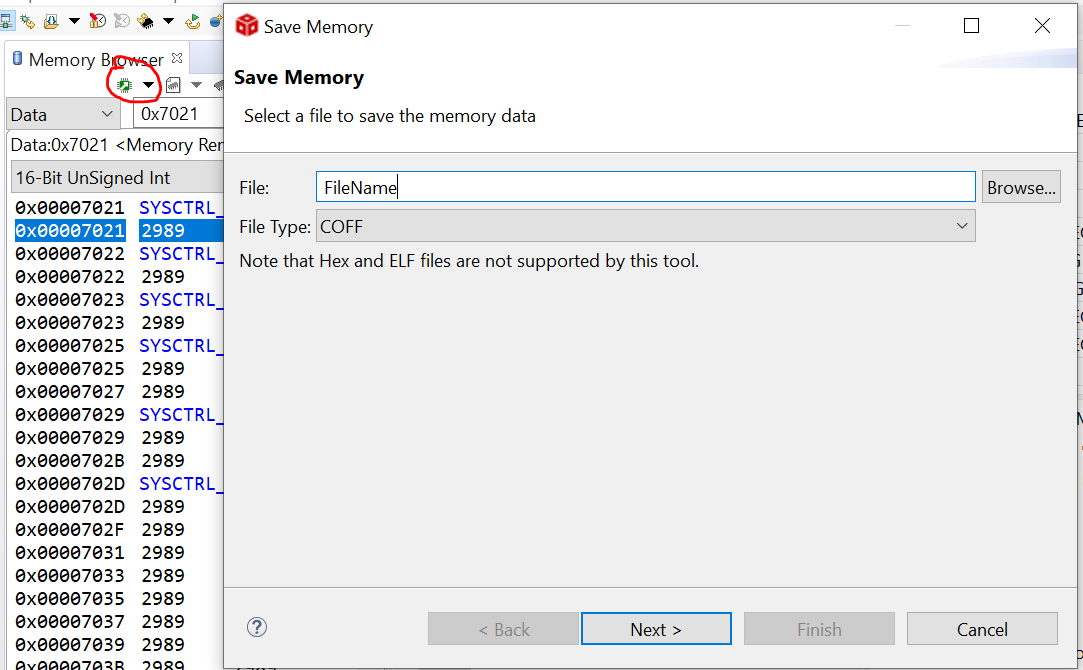
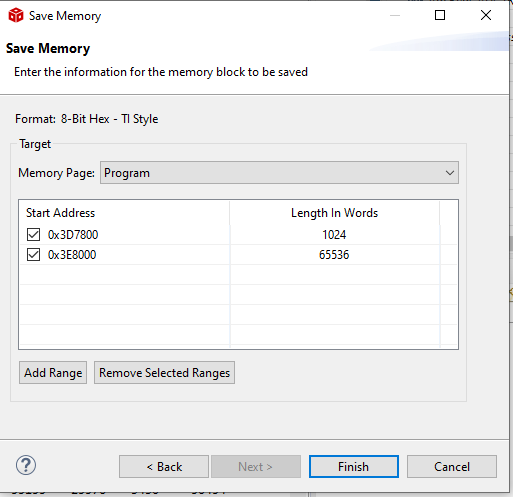
    You'll need to open a memory window(View->Memory Window).  Then click on the circled icon in the below picture and click "save memory".  This will bring up the dialogue box you see.  Then, just select save as "coff" from the drop down.  The rest should be straightforward after that, it will ask you for the memory page(pick program) and then the ranges.

    Best,

    Matthew

  • Hi: Mathhew:
    can you help me to define what is the start address and I add F2808 memory map for tomorrow discussion.
    for F2808?
    (1) Currently, I load bootload.out file to F2808 by CCSstudio
    (2) I load application.hex file to F2808 by other home made application.
    (3) after these 2 files programmed, the board is working.
    My goal is save the memory after both of these file programmed
    and save it as coff format file, call total.out file
    then ONLY use total.out file to programming the board by CCSstudio.
    (4) We lost the Engineer who design this. according to old email.

    (a) bootload.out is at sector
    0x3D7800 - 0x3d7bff (length 0x3ff), DEC. 1023
    The sector only have 1023.
    The bootload file size is 271 KB
    Is this can be done even the file size is larger than sector size?

    Look like the sector is too small for the bootload file

    (b)application.hex sector is
    0x3e8000- 0x3f7fff(length 0xffff), DEC, 65535
    The sector only have 65535
    The application file size is 395 KB
    Is this can be done even the file size is larger than sector size?

    (5) Here is F2808 memory map

    /* 0x3d7800 - 0x3d7fff OTP (Prog and Data) */
    /* 0x3e8000 - 0x3f7fff FLASH (Prog and Data) */

    look like the email said the bootload file is in OTP and application is in FLASH.

    (6) Now, after I have programmed these 2 file.
    when I try save memory, what is the start address and length of the word in CCS studio?

    /********************************************************************/
    /* F2808 Memory Map */
    /* */
    /* Note: M0M1MAP and VMAP signals tied high on F2808 core */
    /* */
    /* 0x000000 - 0x0003ff M0 SARAM (Prog and Data) */
    /* 0x000400 - 0x0007ff M1 SARAM (Prog and Data) */
    /* 0x000800 - 0x000fff Peripheral Frame0 (PF0) (Data only) */
    /* 0x006000 - 0x006fff Peripheral Frame1 (PF1) (Data only) */
    /* 0x007000 - 0x007fff Peripheral Frame2 (PF2) (Data only) */
    /* 0x008000 - 0x008fff L0 SARAM (Prog and Data) */
    /* 0x009000 - 0x009fff L1 SARAM (Prog and Data) */
    /* 0x00a000 - 0x00bfff H0 SARAM Mirror (Prog and Data) */
    /* 0x3d7800 - 0x3d7fff OTP (Prog and Data) */
    /* 0x3e8000 - 0x3f7fff FLASH (Prog and Data) */
    /* 0x3f8000 - 0x3f8fff L0 SARAM Mirror (Prog and Data) */
    /* 0x3f9000 - 0x3f9fff L1 SARAM Mirror (Prog and Data) */
    /* 0x3fa000 - 0x3fbfff H0 SARAM (Prog and Data) */
    /* 0x3ff000 - 0x3fffff BOOT ROM (Prog and Data) */
    /********************************************************************/


  • Lee,

    Thanks for the background.  One thing to keep in mind with the addresses on the C28x is that we are natively a 16-bit word based access vs a more traditional 8-bit(byte) per address like an ARM.  

    So in the first case if the code size is 271KB then it will only need 271/2 = 136 words to store this info out of the 1023 you have available.  Same for the second load.

    You can choose just to save off the sections of interest, or if it is simpler save off the entire flash/otp memory.  The flash API is "smart" in that if you feed it erased(0xFFFF) data and the array is erased it will skip that program.

    Below is a screen of the next step of saving as COFF file.  Once you have this you can load this just like a generated built COFF file.

    You can shorten the word length after you have verified this works to save time.

    Best,
    Matthew

  • Hi:

     Mattew:

      just want make sure your last picture 

    Format: 8-Bit Hex-TI style

    should change to

     COFF.

    Is this right?


  • Hi:

     (1) How do I know this new .out will replace the whole OTP and flash sector?

    (2) I did not see Erase these 2 sector first.

    Thanks

  • Hi:

     (1) Is there any way to erase all the content in OTP and FLASH from CCS studio?

    can you email me a .out  can clear the OTP and FLASH?

    (2) I can not attached any file when I replay back to you.

     How do I attached file?

    Thanks


  • Lee,

    In CCS, click Tools->On-Chip Flash.  This will bring up a dialogue and you can erase the flash in there.  I think the default setting when loading flash contents is to erase the flash as well; but since this is something already there; you'll want to manually erase per above, confirm that it is all 0xFFFF, then load your coff to make sure it matches.

    Best,
    Matthew

  • Hi:

     The  erase sector  in CCS tool is only erase flash sector, but not OTP sector.

    Is there any way to erase OTP sector?

     this is erase sector.

    sector A (0X3F4000 - 0x3F7FFF) LENGTH (3FFF)
    sector B (0x3F0000 - 0x3F3FFF) LENGTH (3FFF)
    sector C (0x3EC000 - 0x3EFFFF) LENGTH (3fff)
    sector D (0x3E8000 - 0x3EBFFF) length (3FFF)

  • Lee,

    My apologies, I forgot that we had an OTP range in your addresses.  No, this is not erasable.  In order to verify the full coff you will need to get a fresh device.

    However, since the OTP contents are identical you can still check the goodness of the main flash array data.  Since the coff is the same as the data already in the OTP the programmer will still pass.  That should give good confidence that the OTP will program correctly on a new device.

    Best,

    Matthew