This thread has been locked.

If you have a related question, please click the "Ask a related question" button in the top right corner. The newly created question will be automatically linked to this question.

TMS320F280049C: Proper way to refer to TI libraries

Part Number: TMS320F280049C
Other Parts Discussed in Thread: C2000WARE

I'm using a the VCU library c28x_vcu0_library_fpu32.lib

I've set this up as per instructions:

In Project Properties / Build / C2000 Linker / File Search Path I refer to $(VCU2_ROOT_DIR}/lib

and in Project Properties / Build / Variable I have set up

VCU2_ROOT_DIR to the correct *absolute* path.

That works but causes friction through versio control because the absolute path is not the same on my co-workers machine.

As C2000 ware is installed using TI tools I suppose the tools set up some variable I could use to refer to TI libraries and thus the variable would be correct regardless of absolute install location.

Is there a way to do that?

  • Hi,

    Can you check what your co-workers did when they installed ? what is the  "the absolute path" you are referring to ? Also which version of C2KWARE you are using ? 

    Thanks

    Aravindhan

  • They used the resource expoler whereas I installed it manually.

    Their path is:

    C:\ti\c2000\C2000Ware_MotorControl_SDK_3_00_01_00\c2000ware\libraries\dsp\VCU\c28"

    and my path is:

    /Applications/ti/c2000/C2000Ware_MotorControl_SDK_3_00_01_00/c2000ware/libraries/dsp/VCU/c28

  • Thanks. I will check this with SDK team and see if they have a way to solve this.

    Thanks

    Aravindhan

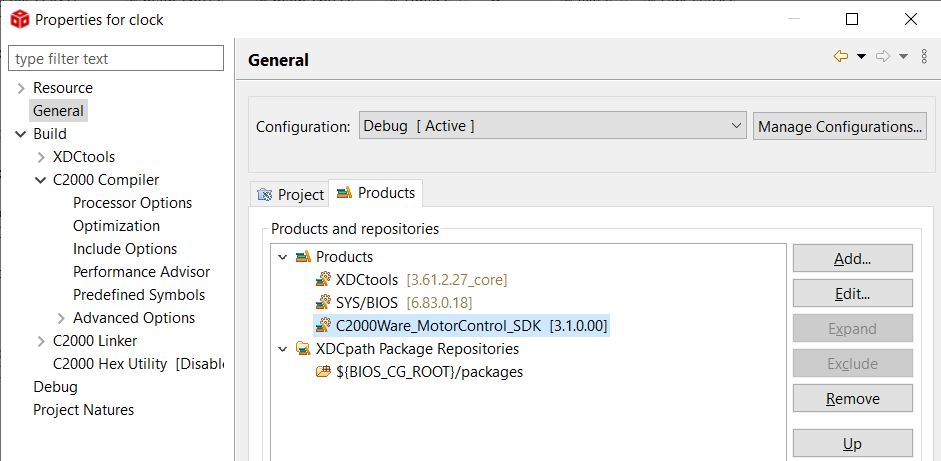
  • When you add something in the Product tab in your CCS project properties, it seems to create a variable for that product. So for example, I added the MotorControl SDK product to a project:

    And it added a variable "COM_TI_MOTOR_CONTROL_C2000WARE_SDK_SOFTWARE_PACKAGE_INSTALL_DIR" that I could use for setting up paths to things inside of the SDK. I haven't tried taking my project and importing it to another machine, but since it's using CCS's knowledge of where things are installed, I expect it to adjust to the local paths. See if that works for you?

    You can do this in projectspec too by adding a line:

    <property name="products" value="motor_control_c2000ware_sdk_software_package"/>

    Whitney

  • Thanks,

    that pointed me to the right direction.

    For posterity I added a variable as illustrated in the attached screenshot and I noticed that simply installing TI 'Product' in CCS is not enough to add the variables/symbols to your project. You will also need to 'Add' the product to the project. Seems self evident in retrospect so but so was the discovery of the Americas.

    cheers Kusti

  • Thanks. good to know this.

    Aravindhan