This thread has been locked.

If you have a related question, please click the "Ask a related question" button in the top right corner. The newly created question will be automatically linked to this question.

TMS320F28379D: PWMs only output on CPU2

Part Number: TMS320F28379D

We have our system set up for dual core with PWMs enabled and controlled on separate cores. For some reason PWMs only output on CPU2 and not CPU1. Here's a list of PWMs we are using on each core:
PWMs (CPU1):

  • EPWM2 (channel A & B)
  • EPWM3 (channel A & B) --> also used by the TI BiSS-C Position Manager Library (needed for CLB used by BiSS-C library, shouldn't conflict as far as we know)
  • EPWM4 (channel A & B) --> also used by the TI BiSS-C Position Manager Library (needs to be enabled for BiSS-C library internal clock generation, shouldn't conflict as far as we know)
  • EPWM5 (channel A & B)
  • EPWM10 (channel A & B)
  • EPWM11 (channel B)

PWMs (CPU2):

  • EPWM1 (channel A)
  • EPWM11 (channel A) --> currently disabled so CPU1 may use EPWM11 channel B
  • EPWM12 (channel A)

We used the TI examples provided for PWM initialization. All PWMs work fine on a single core (CPU1), but after the dual core split only CPU2 PWMs seem to work.

At first I thought it might be related to a GTBCLKSYNC issue, so I implemented the recommended PWM initialization flow found in the following TI post, but it doesn't seem to fix the issue:

Currently our PWM initialization flow goes like this:

On CPU1:

  1. Enable CPU1 PWM peripherals (EPWM2, EPWM3, EPWM4, EPWM5, EPWM10, EPWM11)
  2. Give access to CPU2 for any CPU2 PWM peripherals (EPWM1 and EPWM12)
  3. Set EPWM clock divider to SYSCTL_EPWMCLK_DIV_2
  4. Disable GTBCLKSYNC
  5. Initialize each CPU1 PWM (except EPWM4):
    1. set time base period
    2. set phase shift to 0
    3. set time base counter to 0
    4. set emulation mode to EPWM_EMULATION_FREE_RUN
    5. set time base counter mode to EPWM_COUNTER_MODE_UP
    6. disable phase shift load
    7. set clock prescaler to EPWM_CLOCK_DIVIDER_1 and EPWM_HSCLOCK_DIVIDER_1
    8. for each channel set counter compare value to 0 (CMPA or CMPB)
    9. for each channel set action qualifier to EPWM_AQ_OUTPUT_ON_TIMEBASE_ZERO and EPWM_AQ_OUTPUT_ON_TIMEBASE_UP_CMPA (or CMPB)
    10. set period load event to EPWM_SHADOW_LOAD_MODE_COUNTER_ZERO
  6. Initialize EPWM4 (based on BiSS-C Position Manager Library example)
    1. set TZCTL  TZA = 1
    2. set TZCTL TZB = 1
    3. set TZFRC OST = 1
  7. Kickoff CPU2 PWM init and wait for it to finish
  8. Enable GTBCLKSYNC

On CPU2:

  1. Set EPWM clock divider to SYSCTL_EPWMCLK_DIV_2
  2. Initialize each CPU2 PWM (same process as above)
  3. Let CPU1 know CPU2 PWM init is complete

The PWMs that I've checked on CPU1 that do not output anything but I see some register values changed are EPWM3 and EPWM10. The working PWM I've checked on CPU2 is EPWM1. Is there any registers I might check to ensure that at least the PWM module itself is functioning as normal on CPU1 when I go to set the duty cycle (CMPA and CMPB values)?

Also is setting the EPWM clock divider necessary on both cores?

  • Hi Nigel,

    Can you please double check that the epwm modules mapped to CPU1 are indeed connected to CPU1 within the CPUSEL0 register?

    Nigel Paine1 said:
    but I see some register values changed are EPWM3 and EPWM10

    What register values are changing for EPWM3 and EPWM10? Can you please check in the expression window to see if the content within TBCTR is changing for each of the epwm modules mapped to CPU1? Another good thing to check for is that CPU1 got the notice that CPU2 was done initializing the PWMs. Could you please set a breakpoint after enabling GTBCLKSYNC and check to see if it was indeed set?

    Nigel Paine1 said:
    Also is setting the EPWM clock divider necessary on both cores?

    Taking a look at the clocking system, it does not appear that the EPWM clock divider has to be set on both cores as it is just dividing down the PLLSYSCLK and feeding that forward. 

    Best Regards,

    Marlyn

  • Marlyn, thanks for the response. I checked CPUSEL0 and the only bits set to 1 (mapped to CPU2) are EWPM1 and EPWM12 peripherals (as expected):

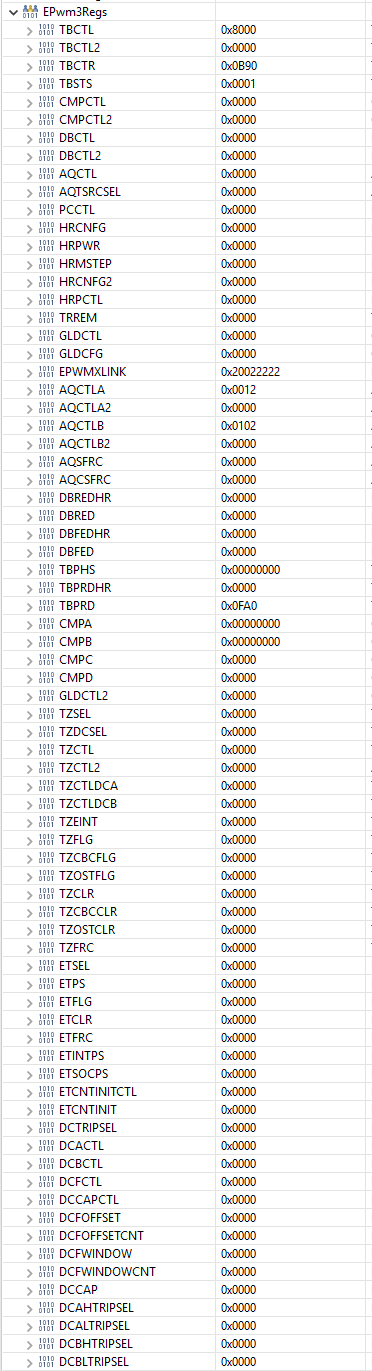
    Here's the EPwm3Regs that are set after initialization:

    EPwm10Regs have the same settings except for EPWMXLINK which is set to 0x90099999.

    I also checked to make sure the TBCTR register is incrementing for EPWM3 and EPWM10 (CPU1) and EPWM1 (CPU2), and it is indeed incrementing, so that's a good sign. GTBCLKSYNC is also set at the correct location, and I verified that the IPC flags get ACK'd in the correct locations in code so that CPU2 PWMs are initialized prior to GTBCLKSYNC being set.

    Any other ideas?

    EDIT: I also made sure that CMPA is being set after I command the PWM to full duty cycle, the EPwm3Regs window shows the same values prior to setting CMPA with the only difference being the CMPA register value changes from 0x00000000 to 0x0FA00000, so it seems to be working as expected

  • Figured out the issue.

    We were sending the C2000 PWM output through an H-bridge device, and the H-bridge was being enabled via GPIO by CPU1, but then the GPIO was immediately disabled and kept disabled by CPU2 since the GPIO was initialized to the wrong value on CPU2. This explains why we weren't getting anything from the PWM output of the H-bridge on the oscilloscope.

    So in short it turned out not to be a PWM issue but rather an H-bridge GPIO enable issue, however this investigation did uncover an important flaw in the PWM design with GTBCLKSYNC so if anything the PWM design now takes that into account.

  • Hi Nigel,

    I am glad you were able to uncover what was going on in your program, and thank you for posting your resolution. 

    May you please explain further why you think GTBCLKSYNC is an issue in your application? When this bit is set the PWM time bases of all modules start counting. Earlier you mentioned that TBCTR was counting for epwm modules corresponding to both CPUs.

    Best Regards,

    Marlyn

  • I'm not sure if it really presented any issues, but previously we had the following steps for PWM initialization:

    CPU1:

    1. disable GTBCLKSYNC
    2. setup CPU1 PWMs
    3. enable GTBCLKSYNC

    CPU2:

    1. disable GTBCLKSYNC
    2. setup CPU2 PWMs
    3. enable GTBCLKSYNC

    But I guess the better strategy is to do the following (based on the forum post aforementioned):

    CPU1:

    1. disable GTBCLKSYNC
    2. setup CPU1 PWMs
    3. wait for CPU2 to setup its PWMs
    4. enable GTBCLKSYNC

    CPU2:

    1. setup CPU2 PWMs
    2. let CPU1 know CPU2 PWMs are setup
  • Hi Nigel,

    Yes, the second method you have is the way you should be implementing the setup. I'm glad everything is good now!

    Best Regards,

    Marlyn