This thread has been locked.

If you have a related question, please click the "Ask a related question" button in the top right corner. The newly created question will be automatically linked to this question.

TMS320F28379D: How to adjust the output frequency?

Part Number: TMS320F28379D

Hi, 

Have a good day!

One customer suffer one issue when simulate through Matlab. This issue see as below:

I am using Matlab simulate DSP tms320f28379d. I gave a pulsed source to a gpio pin. the frequency was 1MHz. I also checked for 0.1MHz. Each time the output result was same almost half the frequency. I also want to know can I adjust the clocking from configuration parameters. If I can could you elaborately explain how each part like internal oscillator, prescaler, etc affects the output frequency valu.

If have any unclear about this issue pls, let me know.

Thanks and Best Regards

Jian, Sure

  • Jian,

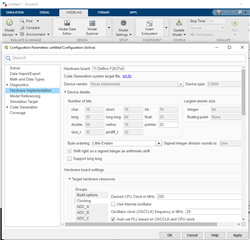
    Thanks for contacting the TI E2E.  Please have the customer look at the Configuration Parameters->Hardware Implementation under the Model Settings Menu.  I've attached a screenshot below, you have to expand the Hardware board settings, and then the Clocking menu.  From there the customer can verify the clock options including frequency and target CPU clock etc.

    If customer is using a TI eval board like LaunchPad or controlCARD, there are board configs already populated for those, otherwise they will just select the Part Number and then configure based on their own HW.

    Best,

    Matthew

  • Hi Matthew, 

    Thanks for your details feedback. I will send your recommendation to customer. If have further issue I will feedback to you. Have a good day. 

    Thanks and Best Regards

    Jian, Sure