This thread has been locked.

If you have a related question, please click the "Ask a related question" button in the top right corner. The newly created question will be automatically linked to this question.

TMDSCNCD28069MISO: SFRA GUI crash 'Auto interval error'

Part Number: TMDSCNCD28069MISO
Other Parts Discussed in Thread: SFRA, DRV8301, CONTROLSUITE

Hi there,

I have integrated SFRA library (C:\ti\controlSUITE\libs\app_libs\SFRA\v1_10_00_00) with DRV8301 motor project (C:\ti\controlSUITE\development_kits\DRV830x-HC-C2-KIT_v105\PM_Sensorless). I was using the SFRA to tune the PID controller within. It works well for iq and id controller, but when use with speed controller, the GUI crash and display the following error:
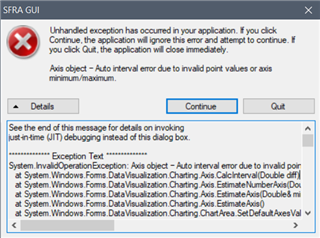
I am not sure what went wrong. 

Thanks for reading, any reply is appreciated.

  • Hi, Typically this is an error that happened in BW computation routine. 

    Unfortunately I do not have a workaround for this error to make the GUI work. It typically the loop shape that causes the BW computation to crash. 

    The GUI will save a CSV file with the SFRA data , you can import it into compensation designer to view.

    -Manish 

  • Hi Manish, 

    Thanks for the reply.

    What is BW?

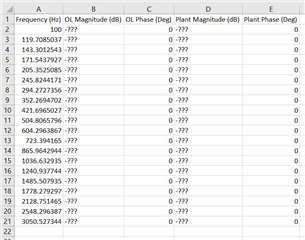
    And no, the csv produced is corrupted. They are all question mark or zero, here is an example:

    I have tried using CCS memory browser to peek into MCU's memory, the record within are also corrupted.

    Also here is the full text of the exception:

    See the end of this message for details on invoking
    just-in-time (JIT) debugging instead of this dialog box.

    ************** Exception Text **************
    System.InvalidOperationException: Axis object – Auto interval error due to invalid point values or axis minimum/maximum.
    at System.Windows.Forms.DataVisualization.Charting.Axis.CalcInterval(Double diff)
    at System.Windows.Forms.DataVisualization.Charting.Axis.EstimateNumberAxis(Double& minimumValue, Double& maximumValue, Boolean shouldStartFromZero, Int32 preferredNumberOfIntervals, Boolean autoMaximum, Boolean autoMinimum)
    at System.Windows.Forms.DataVisualization.Charting.Axis.EstimateAxis(Double& minimumValue, Double& maximumValue, Boolean autoMaximum, Boolean autoMinimum)
    at System.Windows.Forms.DataVisualization.Charting.Axis.EstimateAxis()
    at System.Windows.Forms.DataVisualization.Charting.ChartArea.SetDefaultAxesValues()
    at System.Windows.Forms.DataVisualization.Charting.ChartArea.SetData(Boolean initializeAxes, Boolean checkIndexedAligned)
    at System.Windows.Forms.DataVisualization.Charting.ChartArea.ReCalcInternal()
    at System.Windows.Forms.DataVisualization.Charting.ChartPicture.Paint(Graphics graph, Boolean paintTopLevelElementOnly)
    at System.Windows.Forms.DataVisualization.Charting.Chart.OnPaint(PaintEventArgs e)
    at System.Windows.Forms.Control.PaintWithErrorHandling(PaintEventArgs e, Int16 layer)
    at System.Windows.Forms.Control.WmPaint(Message& m)
    at System.Windows.Forms.Control.WndProc(Message& m)
    at System.Windows.Forms.NativeWindow.Callback(IntPtr hWnd, Int32 msg, IntPtr wparam, IntPtr lparam)


    ************** Loaded Assemblies **************
    mscorlib
    Assembly Version: 4.0.0.0
    Win32 Version: 4.8.4341.0 built by: NET48REL1LAST_C
    CodeBase: file:///C:/Windows/Microsoft.NET/Framework64/v4.0.30319/mscorlib.dll
    ----------------------------------------
    SFRA_GUI
    Assembly Version: 1.10.0.0
    Win32 Version: 1.10.0.0
    CodeBase: file:///C:/ti/controlSUITE/libs/app_libs/SFRA/v1_10_00_00/GUI/SFRA_GUI.exe
    ----------------------------------------
    System.Windows.Forms
    Assembly Version: 4.0.0.0
    Win32 Version: 4.8.4341.0 built by: NET48REL1LAST_C
    CodeBase: file:///C:/WINDOWS/Microsoft.Net/assembly/GAC_MSIL/System.Windows.Forms/v4.0_4.0.0.0__b77a5c561934e089/System.Windows.Forms.dll
    ----------------------------------------
    System
    Assembly Version: 4.0.0.0
    Win32 Version: 4.8.4300.0 built by: NET48REL1LAST_C
    CodeBase: file:///C:/WINDOWS/Microsoft.Net/assembly/GAC_MSIL/System/v4.0_4.0.0.0__b77a5c561934e089/System.dll
    ----------------------------------------
    System.Drawing
    Assembly Version: 4.0.0.0
    Win32 Version: 4.8.4084.0 built by: NET48REL1
    CodeBase: file:///C:/WINDOWS/Microsoft.Net/assembly/GAC_MSIL/System.Drawing/v4.0_4.0.0.0__b03f5f7f11d50a3a/System.Drawing.dll
    ----------------------------------------
    System.Windows.Forms.DataVisualization
    Assembly Version: 4.0.0.0
    Win32 Version: 4.8.4200.0
    CodeBase: file:///C:/WINDOWS/Microsoft.Net/assembly/GAC_MSIL/System.Windows.Forms.DataVisualization/v4.0_4.0.0.0__31bf3856ad364e35/System.Windows.Forms.DataVisualization.dll
    ----------------------------------------
    System.Configuration
    Assembly Version: 4.0.0.0
    Win32 Version: 4.8.4190.0 built by: NET48REL1LAST_B
    CodeBase: file:///C:/WINDOWS/Microsoft.Net/assembly/GAC_MSIL/System.Configuration/v4.0_4.0.0.0__b03f5f7f11d50a3a/System.Configuration.dll
    ----------------------------------------
    System.Core
    Assembly Version: 4.0.0.0
    Win32 Version: 4.8.4341.0 built by: NET48REL1LAST_C
    CodeBase: file:///C:/WINDOWS/Microsoft.Net/assembly/GAC_MSIL/System.Core/v4.0_4.0.0.0__b77a5c561934e089/System.Core.dll
    ----------------------------------------
    System.Xml
    Assembly Version: 4.0.0.0
    Win32 Version: 4.8.4084.0 built by: NET48REL1
    CodeBase: file:///C:/WINDOWS/Microsoft.Net/assembly/GAC_MSIL/System.Xml/v4.0_4.0.0.0__b77a5c561934e089/System.Xml.dll
    ----------------------------------------
    Accessibility
    Assembly Version: 4.0.0.0
    Win32 Version: 4.8.4084.0 built by: NET48REL1
    CodeBase: file:///C:/WINDOWS/Microsoft.Net/assembly/GAC_MSIL/Accessibility/v4.0_4.0.0.0__b03f5f7f11d50a3a/Accessibility.dll
    ----------------------------------------
    System.Data
    Assembly Version: 4.0.0.0
    Win32 Version: 4.8.4270.0 built by: NET48REL1LAST_C
    CodeBase: file:///C:/WINDOWS/Microsoft.Net/assembly/GAC_64/System.Data/v4.0_4.0.0.0__b77a5c561934e089/System.Data.dll
    ----------------------------------------

    ************** JIT Debugging **************
    To enable just-in-time (JIT) debugging, the .config file for this
    application or computer (machine.config) must have the
    jitDebugging value set in the system.windows.forms section.
    The application must also be compiled with debugging
    enabled.

    For example:

    <configuration>
    <system.windows.forms jitDebugging="true" />
    </configuration>

    When JIT debugging is enabled, any unhandled exception
    will be sent to the JIT debugger registered on the computer
    rather than be handled by this dialog box.

  • I believe there is some divide by zero etc happening, i'll suggest re-looking at how you have instanced the SFRA in the application for the speed controller and make sure that you run only one instance.

    So ensure SFRA speed is the only SFRA inject and collect in the code, the SFRA lib is non-re-entrant.