This thread has been locked.

If you have a related question, please click the "Ask a related question" button in the top right corner. The newly created question will be automatically linked to this question.

LAUNCHXL-F28379D: integrate ccs code to simulink

Part Number: LAUNCHXL-F28379D

I'm trying to transfer ccs code to simulink.

In ccs, PM_bissc_SystemTest code is running well and I can read position from encoder.

So far everything is fine.

Now, I want to import the code into simulink and read position in simulink.

I followed the steps on this topic https://e2e.ti.com/support/microcontrollers/c2000/f/c2000-microcontrollers-forum/926513/launchxl-f28379d-simulink-acquire-biss-c-encoder-data

I inserted header, source and lib files in custom code and created system initialize block and system update block.

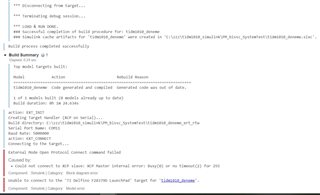
However, I got error "External Mode Open Protocol Connect command failed

Caused by: Could not connect to XCP slave:XCP Master internal error: Bussy(0) or no timeout(2) for 255 "

Also,I could not figure out how I read Biss_position value.

  • Mesud,

    Thanks for reaching out to the E2E forum.  Could you attach a screen shot of the error you see? Is this a simulink error or some error related to BiSS?

    Perhaps another thing to try in parallel is confirm that using a prebuilt Simulink example for the LaunchXL-F28379D, you can connect, load, run code from Simulink?

    Best,
    Matthew

  • I tried to run LaunchXL-F28379D for different example and it was worked successfully.

    Another issue is I don't know how I obtain and observe uint32 Biss_Position in the example,simulink. 

  • In ccs, PM_bissc_SystemTest code is running well and I can read position from encoder.
    Another issue is I don't know how I obtain and observe uint32 Biss_Position in the example,simulink. 

    Unfortunately while I've worked with BiSS I have not tried to port it into a Simulink framework.  The request would be the same flow that we have in the BiSS stand-alone example.

    From the timeout messages it sounds like the encoder interface software thinks that a request went out to the encoder but no response was given.  Monitoring the signals with a scope would help determine if any activity was sent to the encoder and what it looked like. 

    Regards

    Lori