Hello!
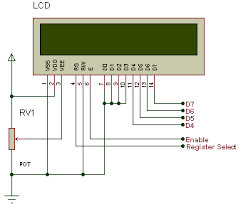
I want to connect C2000 Piccolo LAUNCHXL-F28027 and LCD 1602A. And I already found this example: embedjournal.com/.../. I downloaded the source code and connected pins as shown in the example, after that I used exactly the same code:
#define	RS	GPIO_Number_12
#define	E	GPIO_Number_19

#define	D0	GPIO_Number_0
#define	D1	GPIO_Number_1
#define	D2	GPIO_Number_2
#define	D3	GPIO_Number_3
#define	D4	GPIO_Number_4
#define	D5	GPIO_Number_5
#define	D6	GPIO_Number_16
#define	D7	GPIO_Number_17
GPIO_Handle myGpio;


/* Initializes LCD */
void InitializeLCD(void)
{

	GPIO_setHigh(myGpio, E);
	LCDDelay1600();
	LCDDelay1600();
	LCDDelay1600();
	LCDDelay1600();

	WriteCommandLCD(0x38);			//Command to select 8 bit interface
	LCDDelay1600();

	WriteCommandLCD(0x38);			//Command to select 8 bit interface
	LCDDelay();				        //Small delay

	WriteCommandLCD(0x38);			//Command to select 8 bit interface
	LCDDelay();


	WriteCommandLCD(0x08);			//Command to off cursor,display off
	WriteCommandLCD(0x01);			//Command to Clear LCD
	LCDDelay1600();
	WriteCommandLCD(0x06);			//Command for setting entry mode

	WriteCommandLCD(0x0f);			//Command to on cursor,blink cursor
	WriteCommandLCD(0x02);			//Command return the cursor to home
	LCDDelay1600();
	DisplayLCD(1, "hello");

}


/* Writes a command byte to LCD */
void WriteCommandLCD(unsigned char CommandByte)
{
	GPIO_setLow(myGpio, RS);	    //Clear RS pin to write command
	SendByte(CommandByte);
	LCDDelay();				        //Small delay
}


/* Send a byte of data to LCD */
void SendByte(unsigned char Value)
{
	unsigned char temp;


	if((Value & 0x01) == 0x01)
		GPIO_setHigh(myGpio, D0);
	else
		GPIO_setLow(myGpio, D0);


	if((Value & 0x02) == 0x02)
		GPIO_setHigh(myGpio, D1);
	else
		GPIO_setLow(myGpio, D1);


	if((Value & 0x04) == 0x04)
		GPIO_setHigh(myGpio, D2);
	else
		GPIO_setLow(myGpio, D2);

	if((Value & 0x08) == 0x08)
		GPIO_setHigh(myGpio, D3);
	else
		GPIO_setLow(myGpio, D3);

	if((Value & 0x10) == 0x10)
		GPIO_setHigh(myGpio, D4);
	else
		GPIO_setLow(myGpio, D4);


	if((Value & 0x20) == 0x20)
		GPIO_setHigh(myGpio, D5);
	else
		GPIO_setLow(myGpio, D5);


	if((Value & 0x40) == 0x40)
		GPIO_setHigh(myGpio, D6);
	else
		GPIO_setLow(myGpio, D6);


	if((Value & 0x80) == 0x80)
		GPIO_setHigh(myGpio, D7);
	else
		GPIO_setLow(myGpio, D7);


	GPIO_setHigh(myGpio, E);			//Set E pin to select LCD
	for(temp=0;temp<5; temp++);
	GPIO_setLow(myGpio, E);				//Clear E pin to deselect LCD
	LCDDelay();				            //Small delay

}

/* Writes a Data byte to LCD */
void WriteDataLCD(unsigned char DataByte)
{
	GPIO_setHigh(myGpio, RS);			//Set RS pin to 1 to write Data
	SendByte(DataByte);
	LCDDelay();				            //Small delay
}


/* Small delay */
void LCDDelay(void)
{
	DELAY_US(500);
}

/* Big delay */
void LCDDelay1600(void)
{
	DELAY_US(16000);
}


/* Makes cursor visible */
void CursorON(void)
{
	WriteCommandLCD(0x0f);			//Command to switch on cursor
}


/* Makes cursor invisible */
void CursorOFF(void)
{
	WriteCommandLCD(0x0c);			//Command to switch off cursor
}


/* Displays a message on LCD */
void DisplayLCD(char LineNumber,char *Message)
{
	int	a;
	if(LineNumber ==1)
	{	//First Line
		WriteCommandLCD(0x80);		//Select the first line
	}
	else
	{	//Second line
		WriteCommandLCD(0xc0);		//Select the second line
	}
	for(a=0;a<16;a++)
	{
		WriteDataLCD(*Message);		//Display a character
		Message++;                  //Increment pointer
	}
	return;
}

void main(){
	InitializeLCD();
}
But after execution of this code absolutely nothing has changed on the LCD - I see only a several rectangles in the first line(just like the after power up). I think that is because lm016l used in the example, but I use 1602A. Could it be? If yes then which functions I need to change and how exactly I need to change them? Please give me comprehensive information if you can, because I am a novice at this and it's very hard to understand what I exactly need.
Thanks!