This thread has been locked.

If you have a related question, please click the "Ask a related question" button in the top right corner. The newly created question will be automatically linked to this question.

CCS/LAUNCHXL-F28069M: Error connecting to target

Part Number: LAUNCHXL-F28069M
Other Parts Discussed in Thread: C2000WARE, TMS320F28069, DRV8305

Tool/software: Code Composer Studio

Hi,

Trying out the Example_2806xGpioToggle.c with a LAUNCHXL-F28069M V1.2 located in

C2000Ware_1_00_02_00\device_support\f2806x\examples\c28\gpio_toggle

with CCS Version: 8.0.0.00016, I get this error, when I try to

Run->Load->Example_2806xGpioToggle

"C28xx: Error connecting to the target: (Error -1135 @ 0x0) The debug probe reported an error. Confirm debug probe configuration and connections, reset the debug probe, and retry the operation. (Emulation package 7.0.188.0) "

AFAICS, the debug connections are on the Launchpad itself, so likely no issue in the connections. I dont see how it is possible to reset the probe either.

Any idea, why the probe seem unable to connect to the F28069 ?

Thanks,

Manu

  • Are you using Windows? If you open the Device Manager, do you see the Texas Instruments Debug Probes section when you plug in the LaunchPad?

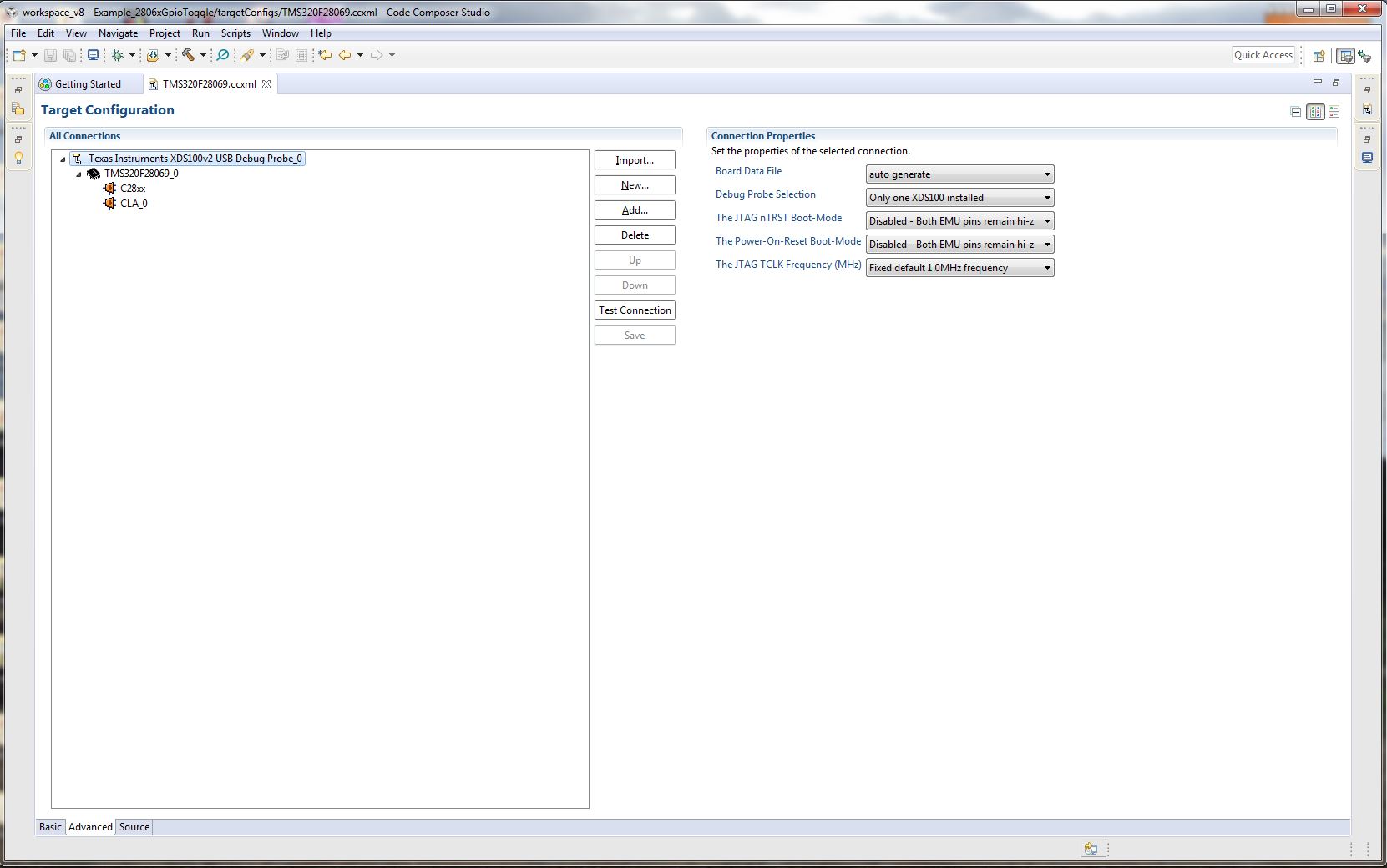
    What target config file are you using? Double check it's set up for an XDS100v2 USB Debug Probe and the TMS320F28069?

    Whitney
  • Hi,

    I am using Windows, yes.

    Attached screenshots of device Manager and the Target Configuration.

    Tried to do a test connection in there, it says:

    [Start: Texas Instruments XDS100v2 USB Debug Probe_0]

    Execute the command:

    %ccs_base%/common/uscif/dbgjtag -f %boarddatafile% -rv -o -F inform,logfile=yes -S pathlength -S integrity

    [Result]


    -----[Print the board config pathname(s)]------------------------------------

    C:\Users\Manu\AppData\Local\TEXASI~1\CCS\
        ti\1\0\BrdDat\testBoard.dat

    -----[Print the reset-command software log-file]-----------------------------

    This utility has selected a 100- or 510-class product.
    This utility will load the adapter 'jioserdesusb.dll'.
    The library build date was 'Feb  8 2018'.
    The library build time was '18:36:28'.
    The library package version is '7.0.188.0'.
    The library component version is '35.35.0.0'.
    The controller does not use a programmable FPGA.
    The controller has a version number of '4' (0x00000004).
    The controller has an insertion length of '0' (0x00000000).
    This utility will attempt to reset the controller.
    This utility has successfully reset the controller.

    -----[Print the reset-command hardware log-file]-----------------------------

    The scan-path will be reset by toggling the JTAG TRST signal.
    The controller is the FTDI FT2232 with USB interface.
    The link from controller to target is direct (without cable).
    The software is configured for FTDI FT2232 features.
    The controller cannot monitor the value on the EMU[0] pin.
    The controller cannot monitor the value on the EMU[1] pin.
    The controller cannot control the timing on output pins.
    The controller cannot control the timing on input pins.
    The scan-path link-delay has been set to exactly '0' (0x0000).

    -----[The log-file for the JTAG TCLK output generated from the PLL]----------

    There is no hardware for programming the JTAG TCLK frequency.

    -----[Measure the source and frequency of the final JTAG TCLKR input]--------

    There is no hardware for measuring the JTAG TCLK frequency.

    -----[Perform the standard path-length test on the JTAG IR and DR]-----------

    This path-length test uses blocks of 64 32-bit words.

    The test for the JTAG IR instruction path-length failed.
    The JTAG IR instruction scan-path is stuck-at-ones.

    The test for the JTAG DR bypass path-length failed.
    The JTAG DR bypass scan-path is stuck-at-ones.

    -----[Perform the Integrity scan-test on the JTAG IR]------------------------

    This test will use blocks of 64 32-bit words.
    This test will be applied just once.

    Do a test using 0xFFFFFFFF.
    Scan tests: 1, skipped: 0, failed: 0
    Do a test using 0x00000000.
    Test 2 Word 0: scanned out 0x00000000 and scanned in 0xFFFFFFFF.
    Test 2 Word 1: scanned out 0x00000000 and scanned in 0xFFFFFFFF.
    Test 2 Word 2: scanned out 0x00000000 and scanned in 0xFFFFFFFF.
    Test 2 Word 3: scanned out 0x00000000 and scanned in 0xFFFFFFFF.
    Test 2 Word 4: scanned out 0x00000000 and scanned in 0xFFFFFFFF.
    Test 2 Word 5: scanned out 0x00000000 and scanned in 0xFFFFFFFF.
    Test 2 Word 6: scanned out 0x00000000 and scanned in 0xFFFFFFFF.
    Test 2 Word 7: scanned out 0x00000000 and scanned in 0xFFFFFFFF.
    The details of the first 8 errors have been provided.
    The utility will now report only the count of failed tests.
    Scan tests: 2, skipped: 0, failed: 1
    Do a test using 0xFE03E0E2.
    Scan tests: 3, skipped: 0, failed: 2
    Do a test using 0x01FC1F1D.
    Scan tests: 4, skipped: 0, failed: 3
    Do a test using 0x5533CCAA.
    Scan tests: 5, skipped: 0, failed: 4
    Do a test using 0xAACC3355.
    Scan tests: 6, skipped: 0, failed: 5
    Some of the values were corrupted - 83.3 percent.

    The JTAG IR Integrity scan-test has failed.

    -----[Perform the Integrity scan-test on the JTAG DR]------------------------

    This test will use blocks of 64 32-bit words.
    This test will be applied just once.

    Do a test using 0xFFFFFFFF.
    Scan tests: 1, skipped: 0, failed: 0
    Do a test using 0x00000000.
    Test 2 Word 0: scanned out 0x00000000 and scanned in 0xFFFFFFFF.
    Test 2 Word 1: scanned out 0x00000000 and scanned in 0xFFFFFFFF.
    Test 2 Word 2: scanned out 0x00000000 and scanned in 0xFFFFFFFF.
    Test 2 Word 3: scanned out 0x00000000 and scanned in 0xFFFFFFFF.
    Test 2 Word 4: scanned out 0x00000000 and scanned in 0xFFFFFFFF.
    Test 2 Word 5: scanned out 0x00000000 and scanned in 0xFFFFFFFF.
    Test 2 Word 6: scanned out 0x00000000 and scanned in 0xFFFFFFFF.
    Test 2 Word 7: scanned out 0x00000000 and scanned in 0xFFFFFFFF.
    The details of the first 8 errors have been provided.
    The utility will now report only the count of failed tests.
    Scan tests: 2, skipped: 0, failed: 1
    Do a test using 0xFE03E0E2.
    Scan tests: 3, skipped: 0, failed: 2
    Do a test using 0x01FC1F1D.
    Scan tests: 4, skipped: 0, failed: 3
    Do a test using 0x5533CCAA.
    Scan tests: 5, skipped: 0, failed: 4
    Do a test using 0xAACC3355.
    Scan tests: 6, skipped: 0, failed: 5
    Some of the values were corrupted - 83.3 percent.

    The JTAG DR Integrity scan-test has failed.

    [End: Texas Instruments XDS100v2 USB Debug Probe_0]

    Does the connection properties need some tinkering, or is there something wrong ?

    Thanks,

    Manu

  • Hi,

    Fiddling around, reading the docs again, came up on this note in sprui11.pdf

    "Keep in mind that the debugger does not connect if the device is not in the emulation boot mode (TRST

    switch in the up position)."

    So,  moving S1::3 = ON, tried again.

    This time the debugger connectivity issue vanished as you can see, but still the error remains.

    "C28xx: Error connecting to the target: (Error -1041 @ 0xFFFFFF6A) The debug probe reported an error. Confirm debug probe configuration and connections, reset the debug probe, and retry the operation. (Emulation package 7.0.188.0) "

    In addition, I saw it on the wiki XDS page to set the JTAG CLK frequency to "Adaptive" (Attached screenshot)

    [Start]

    Execute the command:

    %ccs_base%/common/uscif/dbgjtag -f %boarddatafile% -rv -o -F inform,logfile=yes -S pathlength -S integrity

    [Result]

    -----[Print the board config pathname(s)]------------------------------------

    C:\Users\Manu\AppData\Local\TEXASI~1\CCS\

       ti\1\0\BrdDat\testBoard.dat

    -----[Print the reset-command software log-file]-----------------------------

    This utility has selected a 100- or 510-class product.

    This utility will load the adapter 'jioserdesusb.dll'.

    The library build date was 'Feb  8 2018'.

    The library build time was '18:36:28'.

    The library package version is '7.0.188.0'.

    The library component version is '35.35.0.0'.

    The controller does not use a programmable FPGA.

    The controller has a version number of '4' (0x00000004).

    The controller has an insertion length of '0' (0x00000000).

    This utility will attempt to reset the controller.

    This utility has successfully reset the controller.

    -----[Print the reset-command hardware log-file]-----------------------------

    The scan-path will be reset by toggling the JTAG TRST signal.

    The controller is the FTDI FT2232 with USB interface.

    The link from controller to target is direct (without cable).

    The software is configured for FTDI FT2232 features.

    The controller cannot monitor the value on the EMU[0] pin.

    The controller cannot monitor the value on the EMU[1] pin.

    The controller cannot control the timing on output pins.

    The controller cannot control the timing on input pins.

    The scan-path link-delay has been set to exactly '0' (0x0000).

    -----[The log-file for the JTAG TCLK output generated from the PLL]----------

    There is no hardware for programming the JTAG TCLK frequency.

    -----[Measure the source and frequency of the final JTAG TCLKR input]--------

    There is no hardware for measuring the JTAG TCLK frequency.

    -----[Perform the standard path-length test on the JTAG IR and DR]-----------

    This path-length test uses blocks of 64 32-bit words.

    The test for the JTAG IR instruction path-length succeeded.

    The JTAG IR instruction path-length is 38 bits.

    The test for the JTAG DR bypass path-length succeeded.

    The JTAG DR bypass path-length is 1 bits.

    -----[Perform the Integrity scan-test on the JTAG IR]------------------------

    This test will use blocks of 64 32-bit words.

    This test will be applied just once.

    Do a test using 0xFFFFFFFF.

    Scan tests: 1, skipped: 0, failed: 0

    Do a test using 0x00000000.

    Scan tests: 2, skipped: 0, failed: 0

    Do a test using 0xFE03E0E2.

    Scan tests: 3, skipped: 0, failed: 0

    Do a test using 0x01FC1F1D.

    Scan tests: 4, skipped: 0, failed: 0

    Do a test using 0x5533CCAA.

    Scan tests: 5, skipped: 0, failed: 0

    Do a test using 0xAACC3355.

    Scan tests: 6, skipped: 0, failed: 0

    All of the values were scanned correctly.

    The JTAG IR Integrity scan-test has succeeded.

    -----[Perform the Integrity scan-test on the JTAG DR]------------------------

    This test will use blocks of 64 32-bit words.

    This test will be applied just once.

    Do a test using 0xFFFFFFFF.

    Scan tests: 1, skipped: 0, failed: 0

    Do a test using 0x00000000.

    Scan tests: 2, skipped: 0, failed: 0

    Do a test using 0xFE03E0E2.

    Scan tests: 3, skipped: 0, failed: 0

    Do a test using 0x01FC1F1D.

    Scan tests: 4, skipped: 0, failed: 0

    Do a test using 0x5533CCAA.

    Scan tests: 5, skipped: 0, failed: 0

    Do a test using 0xAACC3355.

    Scan tests: 6, skipped: 0, failed: 0

    All of the values were scanned correctly.

    The JTAG DR Integrity scan-test has succeeded.

    [End]

    The error still exists, any suggestions ?

    Thanks,

    Manu

  • When you say the connectivity issue vanished, do you mean you're able to connect, load, and run now (even thought an error is still displayed) or do you mean just the connection test is passing?

    Whitney
  • Hi Whitney,

    Yes, the connection test works, that's what i meant.
    I am unable to load and run, simply that the connection test works.

    Thanks,
    Manu
  • Have you been able to try the board with a different computer or a different USB cable to confirm that it appear to be an issue with the board itself and not your CCS/drivers installation? However, this wiki page seems to indicate that this error -1041 is typically caused by some issue between the debug probe and the target. Do you have the JP1 and JP2 jumpers on the board?

    processors.wiki.ti.com/.../Debugging_JTAG_Connectivity_Problems

    Whitney
  • The same USB cable was used to program a STM32F334 to drive a DRV8305, a short while back

    Additionally, Using COM7 and Putty I can read the temperature measurement being done by the default demo application flashed on the Launchpad. Attached snap

    Since the data from the F069 can be read back, there should not be a problem with the cable and the Launchpad ?

    I have been trying to fiddle around, reinstalled CCS8 after messing it up. But have a freshly installed version now.

    But after installation, The Run->Load menu itself appears slightly different, it says no Launch history.

    Attached picture:

    If I try to do Run->Load->Select Program to Load, the menu after selecting the program to load, it says:

    Any idea, what's wrong ?

  • I forgot to write that JP1 and JP2 are connected and fine. If I remove them, the demo stops
  • I'm not familiar with that way of launching a debug session. Try a different method:

    1. Go to View->Target Configurations to open the Target Configurations window if you haven't already.
    2. Expand Projects->Example_2806xGpioToggle->targetConfigs, right click on the .ccxml file, and select Launch Selected Configuration.
    3. In the Debug window, right click on the C28xx and hit Connect Target.

    If that's successful, hopefully you'll be able to go to Run->Load->Load Program and get your project loaded and running.

    Whitney
  • Thanks!

    That did the trick.

    Thanks,
    Manu