This thread has been locked.

If you have a related question, please click the "Ask a related question" button in the top right corner. The newly created question will be automatically linked to this question.

LAUNCHXL-F280049C: Download fails after serial communication stops working at 6.25Mbps baudrate

Part Number: LAUNCHXL-F280049C
Other Parts Discussed in Thread: ENERGYTRACE

Hi all,

I am running into a strange problem.

I have successfully implemented a MATLAB/Simulink based Peak current mode control algorithm and deployed on LAUNCHXL-F280049C.

My algorithm runs at 200Khz and I can see it working properly for the given setpoint of Voltage.

I have also implemented in the model a serial block which transfers the Vout reading to a host model at 200Khz.

And in the host model the Vout plot in real-time can be seen.

So far it is all good and everything seems to be working fine.

But, the problem occurs after I stop and Run the host model multiple times.

During one such stop and run sequence, I cannot receive the data anymore from the target.

I will have to power-cycle the target, i.e remove the USB cable and insert it back, to get the host model to work again.

There is one more observation.

When I run into this communication problem, at this point, if I try to download the code to target, it can't with below error.

IcePick_C_0: Error initializing emulator: (Error -261 @ 0x0) xds110 

Only a power cycle helps in this situation also like it did with re-establishing the communication.

So here are my questions from the observation:

1. I am running the Host and Target serial link at maximum baudrate (6.25Mbps) the launchpad can support. is this causing an issue?

2. If it was a implementation bug, why does it work most of times?  Please note: once it starts to work, I can run the setup for hours and I don't see an issue.

3. It is only when I stop and re-connect from host model, this communication issue is seen. Also at this point code download fails, so is this a known issue with the XDS110 interface on the LAUNCHXL-F280049C?

Your inputs to workaround this issue could help a lot!

  • Hi Venkatesh,

    I am looping the SCI expert to help in debugging.

  • Hi Venkatesh,

    Thanks for your question! From my understanding, this issue typically occurs in such a scenario where the USB connection itself (on the host end or the transceiver end) is having a connection issue.

    In previous mentions of the issue, it has been suggested that it may have been a slowdown on the host side (due to other programs slowing down the IO).

    To help narrow down the cause, are you using the JTAG emulator and Code Composer Studio interface on the device, or a raw serial connection (directly to the SCI-RX/SCI-TX pins of the device with a transceiver)?

    1. I am running the Host and Target serial link at maximum baudrate (6.25Mbps) the launchpad can support. is this causing an issue?

    The speed could potentially be an issue. We have noted that reducing the TCLK speed to the default can help determine if the connection speed could be causing the issue, as longer cables/isolation adapters, and general slowdowns of the host could lead to the connection dropping out. Please see the "JTAG Clock speed considerations" section of the following XDS110 article regarding comm issues on previous CCS versions: https://software-dl.ti.com/ccs/esd/documents/xdsdebugprobes/emu_xds110.html#jtag-clock-speed-considerations

    2. If it was a implementation bug, why does it work most of times?  Please note: once it starts to work, I can run the setup for hours and I don't see an issue.

    This could be related to a slowdown on the host side. Potentially, when the host doesn't communicate for an extended period of time, it may "time-out" the USB connection it is using. Or if the communication is being stored in an external program, it may be possible that the buffer causes the PC to slow down and then eventually be unable to communicate at the max speed requested. These are both speculation though, as the issue is has been difficult to replicate.

    Please see the "Invalid response was received from the XDS110" section of the following page for some notes/links to what others have run into with this before: http://software-dl.ti.com/ccs/esd/documents/ccs_debugging_jtag_connectivity_issues.html. This also points out the fact that if multiple channels of the XDS110 are being used (either JTAG and UART, or JTAG and Trace, or JTAG and EnergyTrace), the issue becomes more common.

    3. It is only when I stop and re-connect from host model, this communication issue is seen. Also at this point code download fails, so is this a known issue with the XDS110 interface on the LAUNCHXL-F280049C?

    This stop and re-connect from the host may tie into the item I mentioned above. Given this, would you be able to try and send intermittent packets to/from the host and see if the issue goes away? It may be that the host system may be timing out its comms.

    To summarize, a few potential debugging steps for this are

    1. test with a slower baudrate to see if the connection itself is having issues with higher speeds

    2. Try utilizing only a single channel of the XDS110 (disable EnergyTrace/Trace/UART if using JTAG)

    3. Sending occasional packets in case the host system is timing out the communication connection

    Please let us know if you have any follow up questions on this, as it can be useful to discuss ideas when debugging these kind of issues.

    Regards,

    Vince

  • Hi,

    Thank you for the inputs:

    Few things to note:

    1. I used a short length cable and it seems to improve the situation but not solve it.

    2. I also updated the emulation drivers to latest one which did not help either.

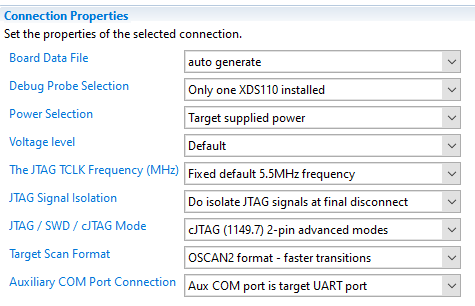
    3. Here are my configuration settings: any idea or changes here that can help?

    Conisdering the sample rate of the model 200Khz I need to run at the max baud rate.

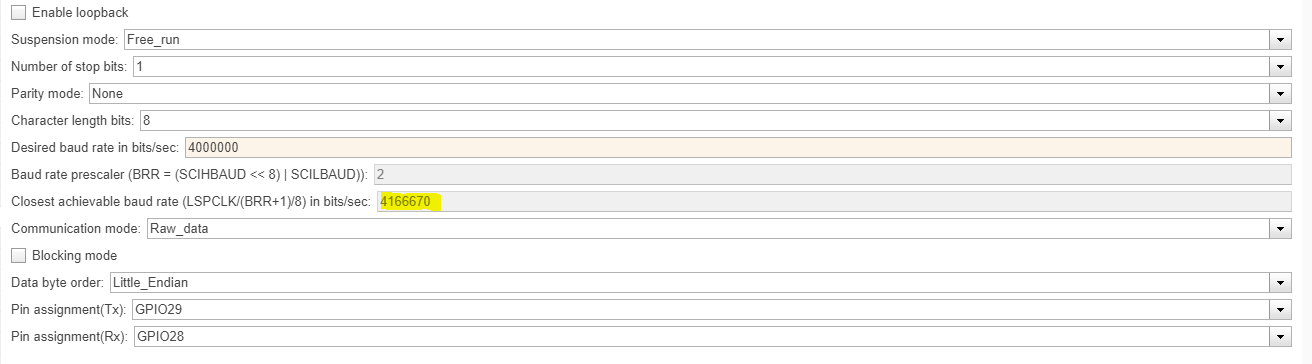
    However I tried to run at lower baud rate like 4Mbps which is still acceptable, but I cannot establish the host and target connection.

    Not sure why? It seems we cannot achieve exactly 4Mbps on the target, but I tried to program the host model to the baud rate which target is running at:

  • Venkatesh,

    I was asked to provide some additional comments, and both Vince and Santosh tips are on point to try and further debug this issue.

    The XDS110 configuration you sent is sensible and I don't see any issues with it. All things considered, I suspect the very high bps rate of the UART port is causing the instability/malfunction, thus a few additional considerations to the otherwise good points already made:

    - If you are concurrently running the UART and a Debug Session, the USB channel of the XDS110 may be getting clogged by the high traffic. I would perhaps close the Debug Session (or reduce its throughput by closing memory, graph, disassembly views, real-time update of variables, registers, etc.)

    - The LAUNCHXL-F280049C uses USB isolation devices between the board and the USB channel - that has the potential to reduce the available throughput. If you have a separate USB-Serial interface available with you (such as the TTL-232RG-VSW3V3-WE cable) and connect to the device pins directly on your board, this will offload the throughput on the XDS110. Bonus points if you connect it directly to your host and not through the same Hub the XDS110 is connected (if you are doing such configuration).

    I am not sure why the Matlab's configurations do not match an exact 4Mbps, but it may be due to the device itself and I will have to defer to the C2000 experts. At this point I don't have anything to add with regards to the tool itself.

    Hope this helps,

    Rafael