This thread has been locked.

If you have a related question, please click the "Ask a related question" button in the top right corner. The newly created question will be automatically linked to this question.

Memory verification error with USB firmware upgrade tool sample code

Other Parts Discussed in Thread: MSP430F5659, MSP430WARE, MSP430F6659

I am using your USB firmware upgrade tool version 1.3.0 together with a MSP430F5659 to make firmware upgrades using the BSL.

Whenever the size of the new firmware is equal or bigger then the previous one that is on the MSP430, the firmware upgrade works fine. If I am loading a new firmware that has a smaller size, I always run into a "memory verification error" with that usb firmware upgrade tool. Is there any problem or bug in the verification part of this sample tool?

Just for additional information, I set the correct BSL password in the firmware upgrade tool, and it works fine. So there is no mass erase anymore before loading the new firmware. It must be like this, because for example the bank 3 of the code memory is used for user data that must be available also after a firmware upgrade.  

Thanks for your help.

  • Hi,

    could you show me the log messages of the firmware upgrade software?

    Unfortunately, i don't have the access to the hardware right now, but will try to test it on our kit next week.

  • Hi

    Here are the logs:

    Starting
    Password Sent Successfully
    Sending RAM BSL v00.07.07.37
    Done RAM BSL v00.07.07.37
    Erasing memory segments
    Sending C:\Dokumente und Einstellungen\User1\Desktop\Test_FW\TestFirmware_10_02_2014.txt
    Firmware Sent
    Verifying memory
    Memory verification error


    Thanks for your help.

  • Hi,

    looking into the source code of the USB Firmware Updater and confirmed by the output log you sent, it seems that the problem is the USB Firmware Updater is not doing mass erase when downloading the new firmware, instead it is erasing only the necessary 512 bytes flash segments which explains why you get a verification error when downloading a new firmware which has smaller size.

    The quickest workaround i can think of for this problem is to use the BSL_Scripter delivered with the SLAU319 collateral files: http://www.ti.com/lit/zip/slau319, since you can use it to explicitly do mass erase before downloading the new firmware.

  • Hi

    Thanks for your answer and the given workaround.

    But it will not help in this case, because a mass erase is not allowed in our case. We have store different user datas in the upper part of the flash. And they are not allowed to be overwritten with a software update. Therefore we have set the correct password.

    Is it not possible to correct the verification part of your sample code so that this verification error will not happen anymore?

    Thanks for your help.

  • Hello

    Would it possible to get some more helpful TI support? We still need a solution and it is not solved yet.

    Thanks a lot

  • Knupp,

    as i mentioned above, please download the BSL Scripter from SLAU319 associated files:

    http://www.ti.com/lit/zip/slau319

    The BSL Scripter supports ERASE_SEGMENT command which you can use to erase only part of the memory and not all like MASS_ERASE command.

    It is even available in source code in case you need is as reference.

  • Hello Mr Hendrawan


    Thanks for your answer. If I understand it the right way, it is supposed that the preparation (erasing the right parts of the memory, etc.) is done with the BSL Scripter and the rest is done with the USB firmware upgrade tool. Or everything is done with the BSL Scripter.


    But this is a command line tool. Our final customer wants to have a tool with a useful gui. So the USB firmware upgrade tool you deliver is the best for it. We are not able to use another tool or two tools. I dont understand where the problem is. You deliver a sample code (USB firmware upgrade tool version 1.3.0) exactly for the case we are using it for, field firmware upgrades over USB. I do not understand why there is a problem in the veryfication part and you can not solve it.

    http://www.ti.com/lit/an/slaa452b/slaa452b.pdf

    Or are we doing something not the right way? We have a simple application. There are parts of the memory that we use for parameter datas. Therefore a mass erase is not allowed to occure at the beginning of the download. That is why we have set the correct password inside the USB firmware upgrade tool (part of the ISR vector table). But that way we sometimes have verification errors like I mentioned above. So i guess there is a problem inside this sample code, in particular in the verification part that needs to be solved from TI. Is that not possible?


    Regards,


    Knupp Reto

  • Hi Knupp,

    could you give the information regarding how you divide the main flash memory? address range where the application resides, and address range which the parameter resides. If you can provide an example TI-TXT files to reproduce the issue, that would be even better.

    Anyway i took a look at the source code of the BSL USB GUI, and have some suspicion of a bug in the verifying function.

  • Hi Knupp,

    i talked to the product group team, and they told me that the future plan is not to support Visual C++ based USB BSL Updater software as you are using now. The new plan is to use a python-based script which can be found in the new MSP430ware.

    After installing the current MSP430Ware 1.80.01.03, you can find the python script under <BASE_DIR>\MSP430ware_1_80_01_03\usblib430\Host_USB_Software\Python_Firmware_Upgrader

    However the current version doesn't really support verification out-of-the-box, but i guess this should be pretty easy to do considering that the script is based on the open source python-msp430-tools library which has already numerous of features.

    Would this be something to consider from your side?

  • Knupp,

    i just tried this myself. You need to install the the necessary package as described in MSP430ware_1_80_01_03/usblib430/Host_USB_Software/Python_Firmware_Upgrader/release_Notes_Example_Python_Firmware_Upgrader.html - section "Installation and Usage".

    Then in TestGUI.py, doLoad() function of class TargetGUI, add the call to verify_by_file() function right after program_file():

            self.bsl5Target.program_file(data)
            self.bsl5Target.verify_by_file()
    

    This shall enable verification after writing the new firmware. Could you try whether this would work for you?

  • Hello Mr Hendrawan

    Thank you for your answers. First I have to say that we would rather prefer the Visual C++ solution because we made already all the necessary changes on the GUI and all that. Moreover, we have no experience with python at all.

    We devided the flash into the following parts:

    Bank 3 (68000-87FFF): Log-Data (erase not allowed)

    Bank 2 (66000-67FFF): Access-Log-Data (erase not allowed)

    Bank 2 (48000-49FFF): Parameter-Data (erase not allowed)

    Bank 1 (28000-47FFF): Application

    Bank 0 (08000-27FFF): Application

    I have attached the TI-TXT-file and the list-file. I hope you can open it.

    Regards,

    Knupp Reto

    FW_Example.zip
  • Hi Knupp,

    i can only find one binary TI-TXT file in the zip file. I believe we need two files to see the issue: let's say first flash the firmware A containing old application+param data, and then try to flash firmware B which contains only new application.

    Could you please provide this?

  • Hello Mr Hendrawan

    Thanks for your answer. Ok yes. I send you now two TI-TXT files (old and new firmware). Hope you can see the memory verification error now.

    Regards,

    Knupp Reto

    Firmware.zip
  • Knupp,

    just an update from my side. Yes, i can see now the error:


    it seems it is caused by the data starting at address 0x1ADBA. Investigation is still on-going, and i will update you later if i found something.

  • Ok, here are my further investigation:

    - as can be seen in the screenshot above, the verification failed simply because the actualCrcValue is not the same as calculated CrcValuewhen trying to verify the memory content of Firmware_B_new.txt starting at address 0x1ADBA with length of 0x4B7 (1207) bytes.

    actualCrcValue (0xa59d)  is basically the return value of CRC_Check() function. This is basically the value sent back by the MSP430 device when receiving the CRC_Check(0x16) command.

    calculatedCrcValue (0x8fe) is basically the return value of Calculate_CRC() function which is basically the calculation by the PC software for expected CRC value.

    To confirm which value is the correct one, i made the following test code:

    2476.crc_test.zip

    Basically i am copying the Firmware_B_new.txt binary starting from 0x1ADBA to a new file, and try to execute the same BSL430_crcCheck() from BSL source code and examine the result as follows:

    Strangely the result value of this small test code running on MSP430F6659 (should be very similar with the MSP430F5659 you are using) is 0x8FE. This means it is the calculatedCrcValue which is the correct one, and the MSP430 BSL returns the wrong value for this one.

    I need to investigate this further why this happens, but at least we are getting closer to the actual problem.

  • Hello Mr Hendrawan

    Thanks for your information. Thats sounds good. Maybe the BSL returns the wrong CRC because it could not write the given data as expected and that is why the CRC is not the same.

    Ok, thanks for your support.

    I am looking forward to hear from you soon.

    Regards,

    Reto Knupp

  • Hello Mr Hendrawan

    I just wanted to ask if you have found out something more meanwhile? How is it going with solving the problem?

    Regards,

    Reto Knupp

  • Hi Knupp,

    sorry for the late answer due to holiday time. I will try to do something today, and let you know if i find something.

  • Hi Knupp,

    just a small update. It seems that it is BSL failure to write the data starting at memory 0x1B200. Please refer to the two TXT files:

    - ref.txt: data starting 0x1ADBA taken from your Firmware_B_new.txt - 

    @1ADBA
    43 43 00 00 08 88 01 00 3C B6 00 00 43 47 00 00
    1C 88 01 00 38 B4 00 00 43 4C 00 00 3A 88 01 00
    F8 B6 00 00 43 4E 00 00 51 88 01 00 48 B3 00 00
    43 50 00 00 6C 88 01 00 AA B5 00 00 43 53 00 00
    94 88 01 00 B2 B3 00 00 53 43 00 00 C1 88 01 00
    CC B6 00 00 53 47 00 00 D3 88 01 00 30 B5 00 00
    53 4C 00 00 EF 88 01 00 5C B7 00 00 53 4E 00 00
    04 89 01 00 A2 B3 00 00 53 50 00 00 1D 89 01 00
    2E B6 00 00 53 53 00 00 43 89 01 00 26 B4 00 00
    57 52 00 00 6E 89 01 00 EE B7 00 00 51 00 00 00
    87 89 01 00 34 26 00 00 00 00 00 00 97 89 01 00
    00 00 00 00 DE B7 00 00 00 24 00 00 74 B7 00 00
    43 46 00 00 98 89 01 00 28 B2 00 00 43 55 00 00
    C8 89 01 00 F2 B2 00 00 53 46 00 00 DA 89 01 00
    92 B2 00 00 53 50 00 00 08 8A 01 00 A0 B2 00 00
    51 00 00 00 87 89 01 00 34 26 00 00 00 00 00 00
    97 89 01 00 00 00 00 00 00 00 00 00 C0 24 00 00
    00 00 00 00 47 53 00 00 27 8A 01 00 7E B1 00 00
    53 41 00 00 40 8A 01 00 D0 AE 00 00 53 52 00 00
    55 8A 01 00 9E AF 00 00 53 56 00 00 66 8A 01 00
    16 AD 00 00 51 00 00 00 87 89 01 00 34 26 00 00
    00 00 00 00 97 89 01 00 00 00 00 00 00 00 00 00
    14 25 00 00 00 00 00 00 85 8A 01 00 A8 8A 01 00
    CB 8A 01 00 ED 8A 01 00 1A 8B 01 00 47 8B 01 00
    74 8B 01 00 A1 8B 01 00 C4 8B 01 00 ED 8B 01 00
    1B 8C 01 00 47 8C 01 00 72 8C 01 00 99 8C 01 00
    97 89 01 00 54 53 00 00 B9 8C 01 00 50 A3 00 00
    51 00 00 00 87 89 01 00 34 26 00 00 00 00 00 00
    97 89 01 00 00 00 00 00 00 00 00 00 A4 25 00 00
    00 00 00 00 43 42 00 00 C5 8C 01 00 C4 A1 00 00
    49 50 00 00 E2 8C 01 00 66 A2 00 00 52 42 00 00
    05 8D 01 00 D0 A1 00 00 52 45 00 00 23 8D 01 00
    28 A2 00 00 54 53 00 00 3F 8D 01 00 74 A2 00 00
    51 00 00 00 87 89 01 00 34 26 00 00 00 00 00 00
    97 89 01 00 00 00 00 00 00 00 00 00 D4 25 00 00
    00 00 00 00 43 4F 00 00 58 8D 01 00 B4 24 00 00
    44 45 00 00 6B 8D 01 00 08 25 00 00 50 4D 00 00
    76 8D 01 00 C8 25 00 00 53 44 00 00 86 8D 01 00
    5C 25 00 00 53 59 00 00 96 8D 01 00 28 26 00 00
    00 00 00 00 97 89 01 00 00 00 00 00 73 A8 01 00
    77 A8 01 00 7D A8 01 00 81 A8 01 00 87 A8 01 00
    8D A8 01 00 93 A8 01 00 99 A8 01 00 9F A8 01 00
    A4 A8 01 00 00 00 00 00 AA A8 01 00 AC A8 01 00
    AE A8 01 00 B0 A8 01 00 0A 00 B2 A8 01 00 B9 A8
    01 00 C5 A8 01 00 D7 A8 01 00 E5 A8 01 00 F2 A8
    01 00 01 A9 01 00 16 A9 01 00 25 A9 01 00 34 A9
    01 00 3E A9 01 00 4C A9 01 00 5B A9 01 00 6A A9
    01 00 79 A9 01 00 87 A9 01 00 B2 A8 01 00 B9 A8
    01 00 C5 A8 01 00 D7 A8 01 00 E5 A8 01 00 F2 A8
    01 00 01 A9 01 00 16 A9 01 00 25 A9 01 00 8D A9
    01 00 9D A9 01 00 AD A9 01 00 6A A9 01 00 79 A9
    01 00 87 A9 01 00 BA A9 01 00 BC A9 01 00 BE A9
    01 00 CD A9 01 00 DC A9 01 00 E5 A9 01 00 F2 A9
    01 00 F7 A9 01 00 FB A9 01 00 08 AA 01 00 15 AA
    01 00 1F AA 01 00 28 AA 01 00 30 AA 01 00 36 AA
    01 00 3C AA 01 00 4A AA 01 00 57 AA 01 00 64 AA
    01 00 6E AA 01 00 72 AA 01 00 7D AA 01 00 89 AA
    01 00 90 AA 01 00 95 AA 01 00 A0 AA 01 00 A4 AA
    01 00 B1 AA 01 00 BF AA 01 00 C3 AA 01 00 D0 AA
    01 00 DD AA 01 00 E3 AA 01 00 F0 AA 01 00 F9 AA
    01 00 00 AB 01 00 0B AB 01 00 17 AB 01 00 27 AB
    01 00 35 AB 01 00 3E AB 01 00 42 AB 01 00 4D AB
    01 00 5C AB 01 00 67 AB 01 00 73 AB 01 00 7B AB
    01 00 84 AB 01 00 8B AB 01 00 8F AB 01 00 87 A9
    01 00 94 AB 01 00 9F AB 01 00 A4 AB 01 00 B0 AB
    01 00 B8 AB 01 00 C7 AB 01 00 D1 AB 01 00 D6 AB
    01 00 E2 AB 01 00 E7 AB 01 00 F0 AB 01 00 F9 AB
    01 00 02 AC 01 00 09 AC 01 00 BA A9 01 00 BC A9
    01 00 36 AA 01 00 11 AC 01 00 A0 AA 01 00 14 AC
    01 00 18 AC 01 00 1A AC 01 00 25 AC 01 00 3A AC
    01 00 51 AC 01 00 67 AC 01 00 70 AC 01 00 78 AC
    01 00 80 AC 01 00 8C AC 01 00 80 AC 01 00 94 AC
    01 00 9A AC 01 00 A4 AC 01 00 B5 AC 01 00 BF AC
    01 00 D6 AC 01 00 E4 AC 01 00 EA AC 01 00 FB AC
    01 00 FF FF FF FF 2C AD 01 00 5D AD 01 00 5D AD
    01 00 02 7C 01 00 01 
    q
    

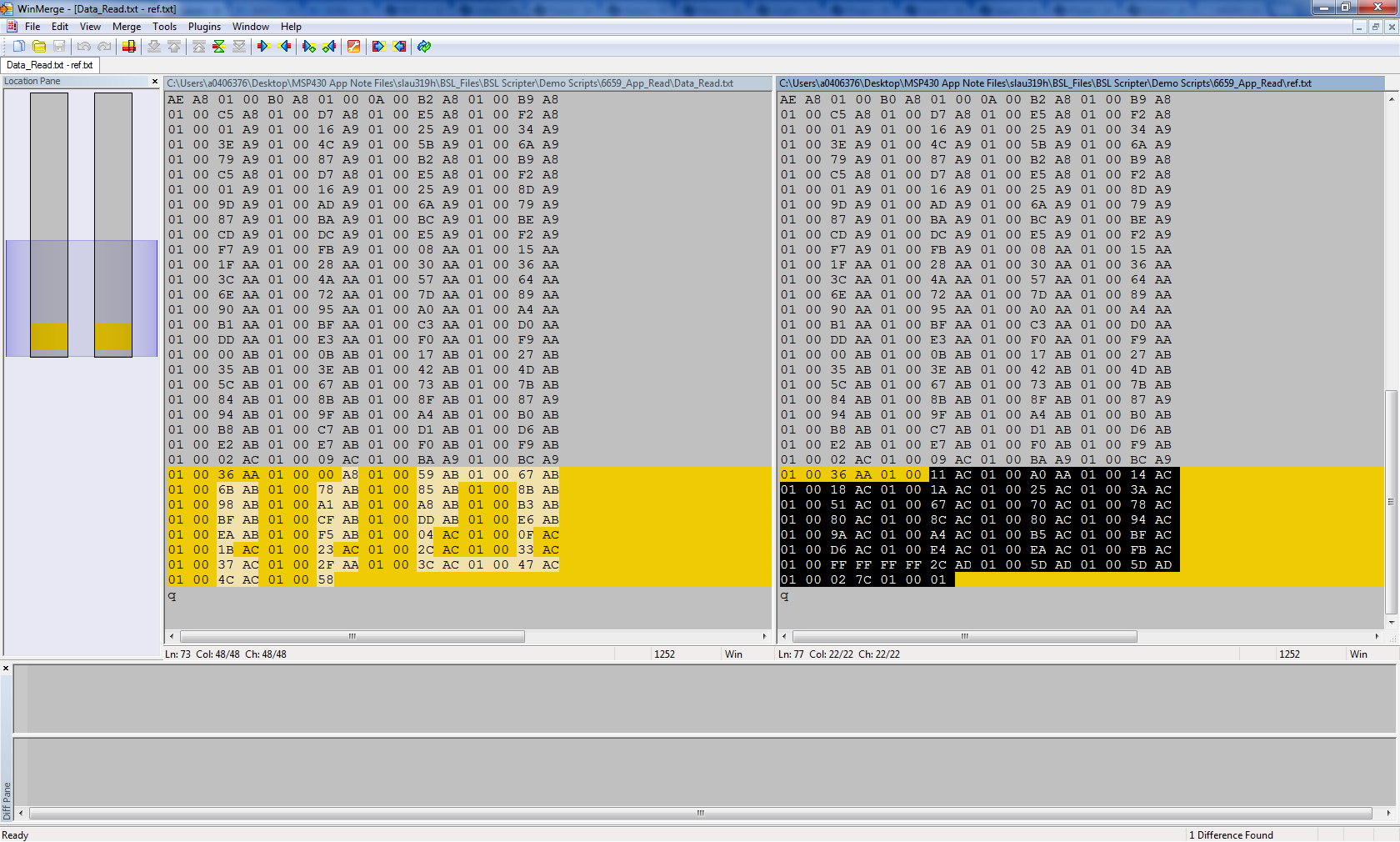
    - Data_Read.txt: data starting 0x1ADBA read from the device after trying to download the Firmware_B_new.txt with the USB Field Firmware Upgrade software: 

    @1ADBA
    43 43 00 00 08 88 01 00 3C B6 00 00 43 47 00 00
    1C 88 01 00 38 B4 00 00 43 4C 00 00 3A 88 01 00
    F8 B6 00 00 43 4E 00 00 51 88 01 00 48 B3 00 00
    43 50 00 00 6C 88 01 00 AA B5 00 00 43 53 00 00
    94 88 01 00 B2 B3 00 00 53 43 00 00 C1 88 01 00
    CC B6 00 00 53 47 00 00 D3 88 01 00 30 B5 00 00
    53 4C 00 00 EF 88 01 00 5C B7 00 00 53 4E 00 00
    04 89 01 00 A2 B3 00 00 53 50 00 00 1D 89 01 00
    2E B6 00 00 53 53 00 00 43 89 01 00 26 B4 00 00
    57 52 00 00 6E 89 01 00 EE B7 00 00 51 00 00 00
    87 89 01 00 34 26 00 00 00 00 00 00 97 89 01 00
    00 00 00 00 DE B7 00 00 00 24 00 00 74 B7 00 00
    43 46 00 00 98 89 01 00 28 B2 00 00 43 55 00 00
    C8 89 01 00 F2 B2 00 00 53 46 00 00 DA 89 01 00
    92 B2 00 00 53 50 00 00 08 8A 01 00 A0 B2 00 00
    51 00 00 00 87 89 01 00 34 26 00 00 00 00 00 00
    97 89 01 00 00 00 00 00 00 00 00 00 C0 24 00 00
    00 00 00 00 47 53 00 00 27 8A 01 00 7E B1 00 00
    53 41 00 00 40 8A 01 00 D0 AE 00 00 53 52 00 00
    55 8A 01 00 9E AF 00 00 53 56 00 00 66 8A 01 00
    16 AD 00 00 51 00 00 00 87 89 01 00 34 26 00 00
    00 00 00 00 97 89 01 00 00 00 00 00 00 00 00 00
    14 25 00 00 00 00 00 00 85 8A 01 00 A8 8A 01 00
    CB 8A 01 00 ED 8A 01 00 1A 8B 01 00 47 8B 01 00
    74 8B 01 00 A1 8B 01 00 C4 8B 01 00 ED 8B 01 00
    1B 8C 01 00 47 8C 01 00 72 8C 01 00 99 8C 01 00
    97 89 01 00 54 53 00 00 B9 8C 01 00 50 A3 00 00
    51 00 00 00 87 89 01 00 34 26 00 00 00 00 00 00
    97 89 01 00 00 00 00 00 00 00 00 00 A4 25 00 00
    00 00 00 00 43 42 00 00 C5 8C 01 00 C4 A1 00 00
    49 50 00 00 E2 8C 01 00 66 A2 00 00 52 42 00 00
    05 8D 01 00 D0 A1 00 00 52 45 00 00 23 8D 01 00
    28 A2 00 00 54 53 00 00 3F 8D 01 00 74 A2 00 00
    51 00 00 00 87 89 01 00 34 26 00 00 00 00 00 00
    97 89 01 00 00 00 00 00 00 00 00 00 D4 25 00 00
    00 00 00 00 43 4F 00 00 58 8D 01 00 B4 24 00 00
    44 45 00 00 6B 8D 01 00 08 25 00 00 50 4D 00 00
    76 8D 01 00 C8 25 00 00 53 44 00 00 86 8D 01 00
    5C 25 00 00 53 59 00 00 96 8D 01 00 28 26 00 00
    00 00 00 00 97 89 01 00 00 00 00 00 73 A8 01 00
    77 A8 01 00 7D A8 01 00 81 A8 01 00 87 A8 01 00
    8D A8 01 00 93 A8 01 00 99 A8 01 00 9F A8 01 00
    A4 A8 01 00 00 00 00 00 AA A8 01 00 AC A8 01 00
    AE A8 01 00 B0 A8 01 00 0A 00 B2 A8 01 00 B9 A8
    01 00 C5 A8 01 00 D7 A8 01 00 E5 A8 01 00 F2 A8
    01 00 01 A9 01 00 16 A9 01 00 25 A9 01 00 34 A9
    01 00 3E A9 01 00 4C A9 01 00 5B A9 01 00 6A A9
    01 00 79 A9 01 00 87 A9 01 00 B2 A8 01 00 B9 A8
    01 00 C5 A8 01 00 D7 A8 01 00 E5 A8 01 00 F2 A8
    01 00 01 A9 01 00 16 A9 01 00 25 A9 01 00 8D A9
    01 00 9D A9 01 00 AD A9 01 00 6A A9 01 00 79 A9
    01 00 87 A9 01 00 BA A9 01 00 BC A9 01 00 BE A9
    01 00 CD A9 01 00 DC A9 01 00 E5 A9 01 00 F2 A9
    01 00 F7 A9 01 00 FB A9 01 00 08 AA 01 00 15 AA
    01 00 1F AA 01 00 28 AA 01 00 30 AA 01 00 36 AA
    01 00 3C AA 01 00 4A AA 01 00 57 AA 01 00 64 AA
    01 00 6E AA 01 00 72 AA 01 00 7D AA 01 00 89 AA
    01 00 90 AA 01 00 95 AA 01 00 A0 AA 01 00 A4 AA
    01 00 B1 AA 01 00 BF AA 01 00 C3 AA 01 00 D0 AA
    01 00 DD AA 01 00 E3 AA 01 00 F0 AA 01 00 F9 AA
    01 00 00 AB 01 00 0B AB 01 00 17 AB 01 00 27 AB
    01 00 35 AB 01 00 3E AB 01 00 42 AB 01 00 4D AB
    01 00 5C AB 01 00 67 AB 01 00 73 AB 01 00 7B AB
    01 00 84 AB 01 00 8B AB 01 00 8F AB 01 00 87 A9
    01 00 94 AB 01 00 9F AB 01 00 A4 AB 01 00 B0 AB
    01 00 B8 AB 01 00 C7 AB 01 00 D1 AB 01 00 D6 AB
    01 00 E2 AB 01 00 E7 AB 01 00 F0 AB 01 00 F9 AB
    01 00 02 AC 01 00 09 AC 01 00 BA A9 01 00 BC A9
    01 00 36 AA 01 00 00 A8 01 00 59 AB 01 00 67 AB
    01 00 6B AB 01 00 78 AB 01 00 85 AB 01 00 8B AB
    01 00 98 AB 01 00 A1 AB 01 00 A8 AB 01 00 B3 AB
    01 00 BF AB 01 00 CF AB 01 00 DD AB 01 00 E6 AB
    01 00 EA AB 01 00 F5 AB 01 00 04 AC 01 00 0F AC
    01 00 1B AC 01 00 23 AC 01 00 2C AC 01 00 33 AC
    01 00 37 AC 01 00 2F AA 01 00 3C AC 01 00 47 AC
    01 00 4C AC 01 00 58
    q
    

    If you compare the two files e.g. with WinMerge, you can see the difference starts at address: 0x1ADBA + (68 x 16) + 6 =  0x1B200:

    I will try to find out more why this happening after lunch :)

  • Hello Mr Hendrawan

    Ok, fine. Thanks for your update and your help.

    Regards,

    Reto Knupp

  • Hi Knupp,

    i finally found the problem. It seems that it is not the BSL failure, rather than it is because the USB BSL Firmware Updater code which doesn't check for full segment erase. From some debugging, i can see that the issue arises in your case when trying to parse and erase the segments.

    The last "segment" read out from Firmware_B_new.txt has start address of 0x1B1BA and 183 bytes data (means end address would be 0x1B270). The code only sends erase commands with given address 0x1B1BA which basically erase address 0x1B000 - 0x1B1FF (512 bytes flash segment). This means that the data at 0x1B200- 0x1B270 is not erased and if you compare to the Data_Read.txt above with Firmware_A_old.txt, you can see that basically the Data_Read.txt contains the old data from Firmware_A_old.txt since it hasn't been erased yet.

    So the basic problem lies at UINT BSL_USB_GUI::DownloadView::EraseDataSegment_File( char * fileName ) in DownloadView.cpp. I will try to make a temporary fix, but this will come next week.

  • Hello Mr Hendrawan

    That sounds great. I am looking forward to hear from you next week.

    Regards,

    Reto Knupp

  • Hi Mr. Knupp,

    so I tried to make a fix on the code, and you can find the new DownloadView.cpp as follows:

    1464.DownloadView.cpp

    I tried at least two do the following procedure: 

    - invoke BSL

    - download Firmware_A_old.txt

    - restart BSL

    - download Firmware_B_new.txt

    it seems that the last step succeeds without memory verification error anymore:

    Anyway, there is another thing to be noticed in your case. In Firmware_B_new.txt there is a data section with starts not at the beginning of internal main flash memory segment (each segment is 512 bytes long), which starts at address 0x1ADBA. This is the main cause why the error exists, so i tried to add some "intellegence" in the BSL USB GUI code to detect unerased segments.

    I would advise to try as much as possible defining memory area which starts at the beginning of the each flash segment. The danger i see is that for example you have calibration data starting from address 0x1AC00 - 0x1AFFF. When the new firmware only defines new data starting at address 0x1ADBA, the other data in the same segment (0x1AC00- 0x1ADFF) will be basically erased.

    Let me know if the changes in the code fix the issue on your bench.

  • Hi Mr. Knupp,

    just want to ask whether you have tried the fix i provided above, and whether it works for you.

    Let me know if you have further questions.

  • Hello Mr Hendrawan

    Sorry for not answering faster. I already tried out the new DownloadView.cpp and luckily it worked fine with no verification error. I wanted to try it also on another control but did not find the time yet. But until now I can say that it works fine without any problems anymore. It seems that your fix has solved the problem.

    I have to say thank you for the great support. Thanks a lot. 

    Regards,

    Reto Knupp

  • Hello Hendrawan,

    I have the same requirement to upgrade the firmware, using Segment Erase. I am trying with Python Firmware Upgarde tool but am unable to upgrade. Can you please explain the step wise procedure for that?

    Thanks in advance,

    Deep

**Attention** This is a public forum