This thread has been locked.
If you have a related question, please click the "Ask a related question" button in the top right corner. The newly created question will be automatically linked to this question.
Replies: 8
Views: 4425
I was enjoy my new MSP-EXP432P401R launchpad. I was studing the Clock System (CS) so i tried to source the MCLK with the very low power oscillator VLO.
My code was:
CSKEY = CSKEY_VAL; CSCLKEN = VLO_EN; CSCTL1 = 0x00070001; <------ Here was the problem.... CSKEY = 0;
Now when i try to connect to the MSP i have this message:
CORTEX_M4_0: Error connecting to the target: (Error -1063 @ 0x0) Device ID is not recognized or is not supported by driver.
So i read the section 7 of "slau575b.pdf" and i run the Script to do the MSP432_Factory_Reset. But i still get the message when i try to debbug:
CORTEX_M4_0: Error connecting to the target: (Error -1063 @ 0x0) Device ID is not recognized or is not supported by driver. Confirm device and debug probe configuration is correct, or update device driver. (Emulation package 5.1.641.0)
Hi Jazzlutty
Can you try to flash or reset the board to factory default by using the CMSIS-DAP instead of XDP110 interface? I experienced a similar problem wen I unintentionally disabled JTAG support on the board. Flashing over CMSIS-DAP via IAR detected the problem and performed the reset of it recovering it to a good state.
In reply to Andre Silveira:
Hi Jazzlutty,
We are still working on this, in the meantime as a workaround, you could use an external debugger (like the XDS100) and follow the steps in www.ti.com/lit/pdf/slau575 p. 22-26 section 7.
FYI - In one board I had to run the steps a couple of times to be able to perform the Factory Reset.
Regards,
David
In reply to DavidL:
Thanks for your answer, I tried your advice with the external debugger, but i think its not the way, because i can connect with the CS_DAP and perform the Factory Reset every time, as indicated in slau575 section 7, with the integrated XDS100 from the evaluation board and with the XDS100 v2 of the external debugger.
CS_DAP_0: GEL Output: Mass erase executed. Please terminate debug session, power-cycle and restart debug session.
But in any case, i still have the same problem to connect to the target.
I want to know if this can be fix or not. Also i want to know if the problem is an evaluation board issue, or a msp432 issue, or a ARM cortex M4 issue.
Thanks and regards,
In reply to jazzlutty:
Hi jazzlutty,
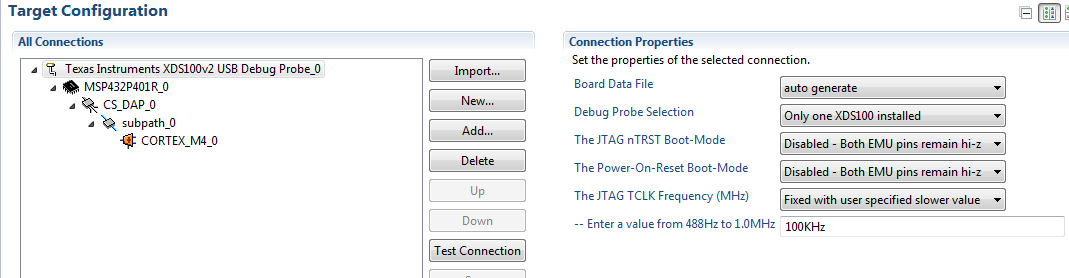
Can you try slowing down the clock with the XDS100v2?
Then attempt to do a Factory Erase, and then attempt to download a different code.
Our tools team is working on the issue. We don't have a configurable JTAG clock for the XDS110 right now but they'll see if they can add this feature, and they'll fix the factory reset script so that it checks if it was performed correctly
Luis R
In reply to Luis RC:
Thanks a lot, this solve the problem.