This thread has been locked.

If you have a related question, please click the "Ask a related question" button in the top right corner. The newly created question will be automatically linked to this question.

Performing a mass erase using the BSL script

Other Parts Discussed in Thread: MSP430FR5969, MSPBSL

I've run into the following error while debugging on a MSP430FR5969 board:

MSP430: Error connecting to the target: Security Fuse has been blown

After browsing through a number of threads I've found several suggestions stating that running a mass erase using the BSL script found here:

I couldn't find a Linux version of the script and have run it from within a virtualbox host running Windows 7 using the following script:


BSL_Scripter.exe Demo Scripts\5438_Open_JTAG\script.txt  


where script.txt contains the following:

MODE 543x_family COM1
MASS_ERASE
RX_PASSWORD
RX_DATA_BLOCK JTAG_UNLOCK.txt

and JTAG_UNLOCK.txt:
@17FC
00 00 00 00
q

The output is listed bellow:


    C:\Utils\MSP_BSL\BSL_Files\BSL Scripter>BSL_Scripter.exe "Demo Scripts\5438_Open
    _JTAG\script.txt"
     
    ------------------------------------------
    BSL Scripting application 2.01
    The local time is: 21:41 on 21.06.2015
    ------------------------------------------
    Initializing, Mode: 5438  UART 9600  COM1       DONE
    Mass Erase:                                     FAIL(0xEE)
    RX Password:                                    FAIL(0xEE)
    RX DATA BLOCK:
        Writing JTAG_UNLOCK.txt to device:

BSL_Scripter.exe stops working afterwards. How should I perform a mass erase?

  • Please read the BSL_Scripter_2.0.pdf documentation that comes with the BSL Scripter download.

    You cannot use "MODE 543x_family" with the FR5xx devices. Make sure that all your parameters to BSL Scripter are correct for the actual part you are using.

  • Thank you for your solution. I'm having some trouble in getting the USB drivers for the board(I'm developing under Linux and am using a virtual machine(Win7 x64) to run BSL_Script.exe which is throwing an error due to the fact that it can't find the COM port without the respective USB drivers). May you, please also upload, the drivers from here:

    ?

    I've used an abbreviation in my last name, and am now, apparently, unable to update my profile information and thus can't download the tools. Also, ti is morbidly slow in Germany.

  • You may also need a USB to 3V UART converter hardware interface between the PC and the MSP430.
  • I've managed to get the driver suite and now the board is recognized by windows. The reset, however, still doesn't succeed, the output being similar to the one shown in this thread:

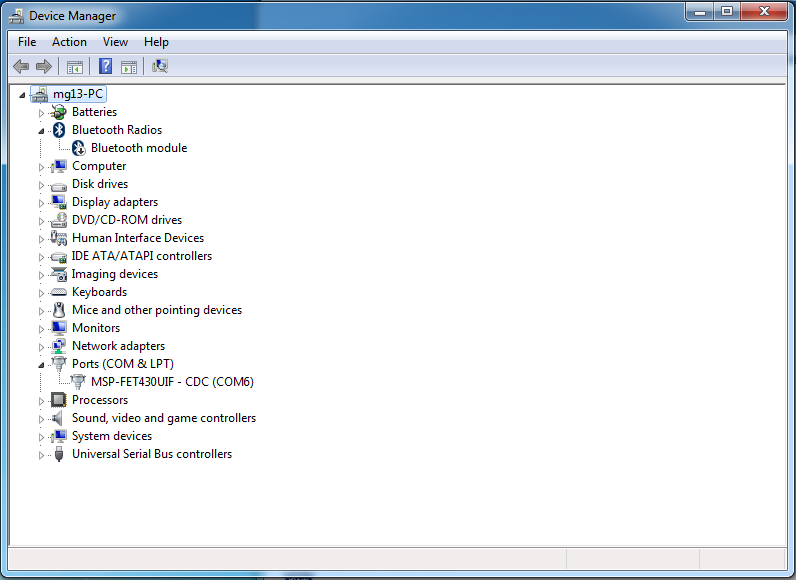
    Device Manager shows that MSP is connected through port COM6:


    I have adjusted the script which now is:

    MODE 5xx COM6
    VERBOSE
    MASS_ERASE
    RX_PASSWORD

    The raw output received in the console is:

    C:\Utils\MSP430\MSP430FR5739_BSL_Fuse>BSL_Scripter.exe script.txt
    
    ------------------------------------------
    BSL Scripting application 1.07
    The local time is: 23:48 on 22.06.2015
    ------------------------------------------
    Initializing, Mode: 5xx COM: COM6       DONE
    Verbose mode on
    Mass Erase:
    -------------------------------------------------
    [80] [01] [00] [15] [64] [a3] {ee}
    -------------------------------------------------
    FAIL(ee)
    RX Password:
    -------------------------------------------------
    [80] [21] [00] [11] [ff] [ff] [ff] [ff] [ff] [ff] [ff] [ff] [ff] [ff] [ff] [ff]
    [ff] [ff] [ff] [ff] [ff] [ff] [ff] [ff] [ff] [ff] [ff] [ff] [ff] [ff] [ff] [ff]
    [ff] [ff] [ff] [ff] [9e] [e6] {ee}
    -------------------------------------------------
    FAIL(ee)
    
    C:\Utils\MSP430\MSP430FR5739_BSL_Fuse>

    The thread mentioned earlier is currently unsolved.

**Attention** This is a public forum