This thread has been locked.

If you have a related question, please click the "Ask a related question" button in the top right corner. The newly created question will be automatically linked to this question.

MSP-FET: Device not recognized by V6.51 (or older) IAR Workbench

Part Number: MSP-FET
Other Parts Discussed in Thread: MSPDS, MSP430F5310

I have been able to work with IAR-Workbench V6.51 and older debugging hardware MSF-FET430-UIF (This is still available).

Recently TI introduced MSP-FET-Flash Emulation Tool, which is a newer version of the programming HW, and to my misfortune, I purchased this. The problem is that this hardware (MSP-FET-Flash Emulation Tool) is not recognized by IAR-Workbench 6.51. My choice is to update IAR-Workbench. However, this is expensive (as I need the full version since my code is rather large) and I would like to avoid it. 

Is there a way around? e.g. change firmware on MSP-FET-Flash Emulation Tool?

Thank you very much.

-Satyajit

  • Hi Satyajit,

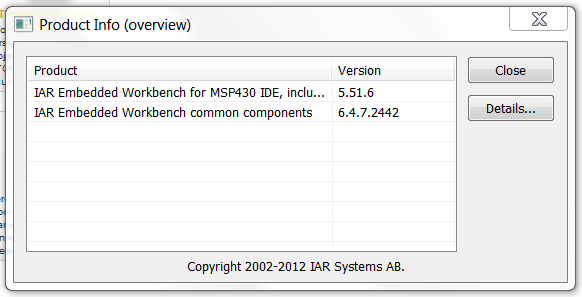
    Can you share a screenshot of your IAR Product Info (found in IAR under "Help" -> "About")? I'm assuming the version you mentioned is the version for the IAR Embedded Workbench (EW) shared components and not the version for the IAR EW for MSP430 IDE. I'm using IAR v6.50.2 (latest version seems to be v6.50.4), and you can see my Product Info below.

    Depending on your version for the IAR EW for MSP430 IDE, we can check in the release notes whether or not the MSP-FET (not the MSP-FET430-UIF) is supported.

    Regards,

    James

    MSP Customer Applications

  • James,

    Here is my version information:

  • Hi Satyajit,

    Thanks for providing this information. It's very helpful.

    Since you're using IAR v5.51.6, please take a look at this IAR Technical Note. Basically, you'll need to downgrade to the v2 version of msp430.dll and firmware. You don't want to upgrade your IAR version (Solution 1), so follow the steps for Solution 2. This should allow you to utilize the MSP-FET.

    Please let me know if you have any issues.

    Regards,

    James

    MSP Customer Applications

  • James,

    I tried the procedure in the app note, but it didn't work for me. A few points:

    - The note has some typo's and I think it refers to version 5.40 and below need V2 dll. I believe I have already been using V3 dll for a while -even with the older MSP-FET430UIF V1.4a.

    - Nevertheless, I wanted to still give it a shot and downgrade firmware on my pod (new MSP-FET). However, I get following error: "Could not find MSP-FET430UIF on specified COM port". There is no way of specifying the com port when I call the UpdateTool (which is also the tool to downgrade).

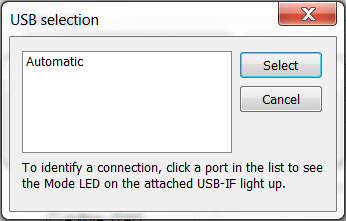
    - Not being able to find the com port is also the problem I saw when I use IAR-Workbench V5.51.6. Following is the screen shot of the window used for selecting the com port. Normally for older POD, a com port appears here. However note that in this case, there is no com port listed, indicating that IAR didn't see the device on any com port.

    - Finally, I know that the device is on com5 and com6 when I look at Win7's device manager. (Don't know why it's on two ports! But here is the screen shot of that: )

    Thank you for your reply. Please help. My older pod is resetting the target once in a while and I do want to see if the new pod fixes this problem. Thank you.

    -Satyajit

  • Hi Satyajit,

    You're absolutely right. I saw where the Technical Note says "applies to IAR Embedded Workbench for MSP430 versions 5.40.x and 5.50.x", but I completely missed the section that says "Since IAR Embedded Workbench for MSP430 version 5.51.x, it is no longer possible to use the v2 version DLL or firmware (since the firmware API has changed)".

    With this in mind, take a look at the following IAR Technical Note.


    Basically, you'll want to download the latest 'MSP430.dll' and 'hil.dll' from our MSP Debug Stack product folder (MSPDS) and copy it into your IAR's \msp430\bin folder (replacing the existing files). Make sure you keep the debuggers unplugged when you do this. After downloading and installing these files, I'd recommend power cycling your PC, opening IAR, and then plugging in the MSP-FET. Open your project, click "Download and Debug", and then you should see a window pop-up asking you if you'd like to update the firmware on your MSP-FET. If so, select "Yes" and after that's finished, you should be able to utilize the MSP-FET.

    Let me know if this fixes your issue. We may need to go through the recovery process for your MSP-FET if the firmware got corrupted, but try these recommendations first.

    Regards,

    James

    MSP Customer Applications

  • Thanks, James,

    This seems to work. The new version of MSP430.dll was the required update. Thanks. Just out of curiosity, I could not find any hil.dll in the package I got from MSPDS. Let me know what I am missing. Thanks.

    -Satyajit

  • Hi Satyajit,

    Excellent! The 'hil.dll' is related to obsolete libraries, and if the 'MSP430.dll' enables the MSP-FET to work, it's not necessary. Since you're using an older IAR version and since it was mentioned in the IAR Tech Note, I wanted to point it out. With this in mind, I spent some time looking at the MSP Debug Stack (MSPDS) v3.5.1.001 changes and learned that the 'hil.dll' was removed, which is why you couldn't find this file.

    Hopefully this helps!

    Regards,

    James

    MSP Customer Applications
  • James,

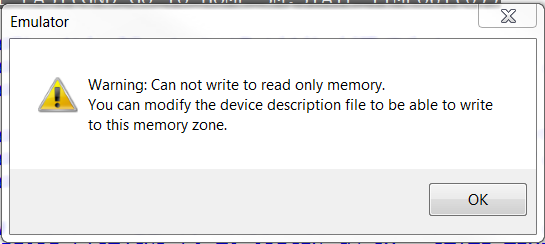
    Another problem has crept up. Just after the program is downloaded to target and before it shows me the execution location at the start of main(), I get following window:

    This used to happen with the old pod, but infrequently. However, it's persistent in the new setup. I had largely ignored this in the past because it used to only happen if I tried downloading a new code while the target is in the middle of execution. Now it seems too frequent. Let me know your thoughts. Thank you.

  • James,
    The new MSP430.dll seems to cause this. Beacuse with the new dll, my old programming POD is also showing above warning. That in itself is not super significant, but there are other issue that have crept up: such as the program hangs between two break points. Then if I stop the execution and then do an appropriate "run to cursor" command, it will resume and more-or-less behave normally. This is unsettling because I am chasing a unrelated bug in the system where the system is resetting unexpectedly only when debugger is attached. Please comment. Thanks.
  • Which specific MSP430 device are you using? Keep in mind that timings can be affected when the debugger is communicating with the device. I searched for the warning online and found the following thread that may be helpful.

    Also, make sure you're not trying to manually write to a memory address in your code that's outside the range(s) defined in your linker command file.

    Regards,

    James

    MSP Customer Applications

  • James,
    I am using MSP430F5310. I am simply compiling code using IAR's workbench. My code is standard C. I don't dorce any variables to any specific location.. All done by the compiles. i.e. No manual vaiable writing. I have read the thread you have pointed, but it does not offet any insight in this case. Thanks.

**Attention** This is a public forum