This thread has been locked.

If you have a related question, please click the "Ask a related question" button in the top right corner. The newly created question will be automatically linked to this question.

MSP-EXP430F5529LP: LP Firmware Recovery, need help

Part Number: MSP-EXP430F5529LP
Other Parts Discussed in Thread: MSP-FET, MSP430-FLASHER, MSP-FLASHER, CC2650, CC3200, CC-DEBUGGER, MSP430F5528,

I am not sure why but after my recent re-install of CCS (v7.2.0.00013) I was asked to update my Launchpad firmware when I connected it to the PC. It just hangs during the update, and I have to then cancel out eventually. See attached for the screen it hangs on.

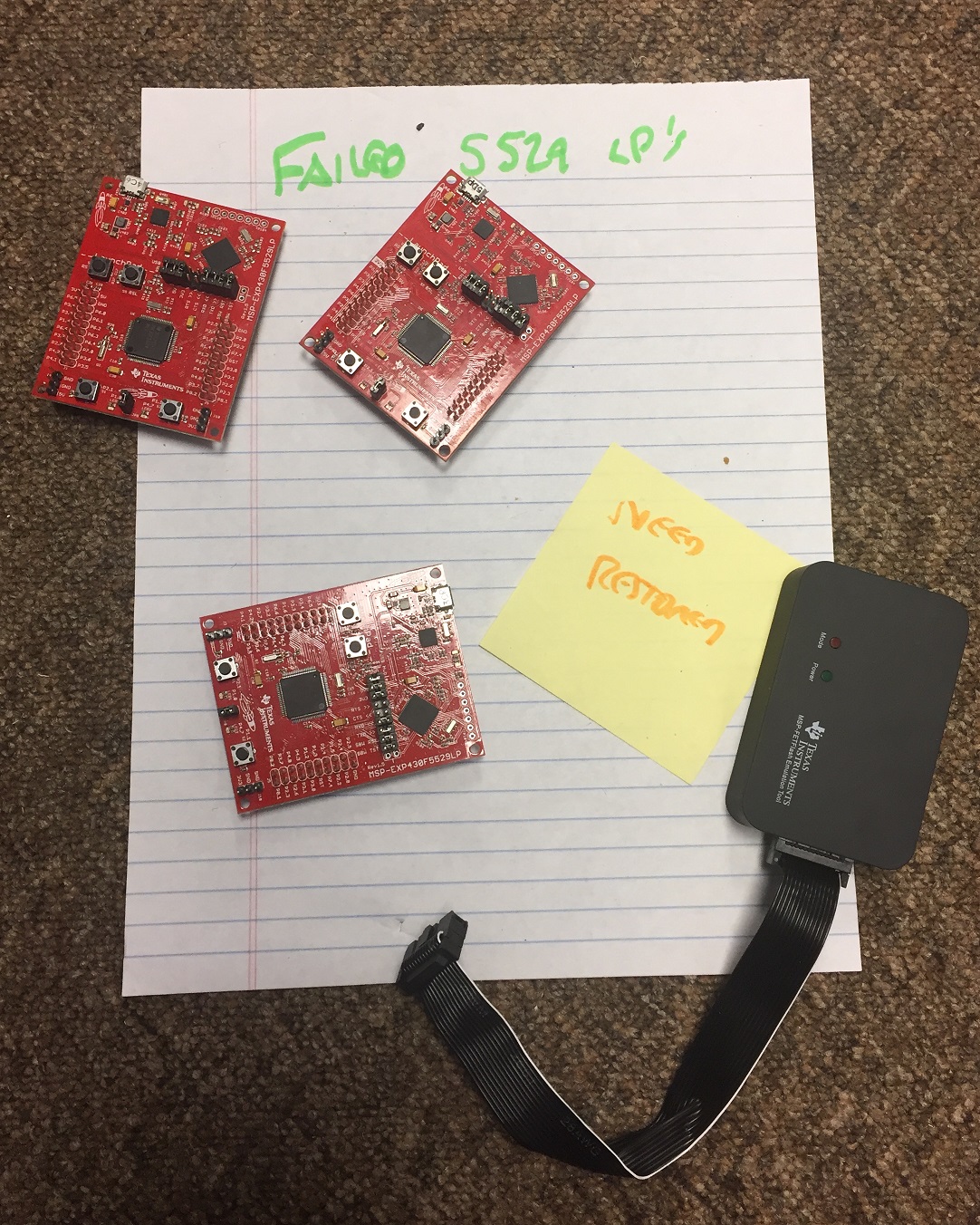
I have multiple 5529 LP's, it asks for updates on all of them as I just tried this morning, and now all are bricked! How to correct, how to get my 5529 LP's updated & running again?
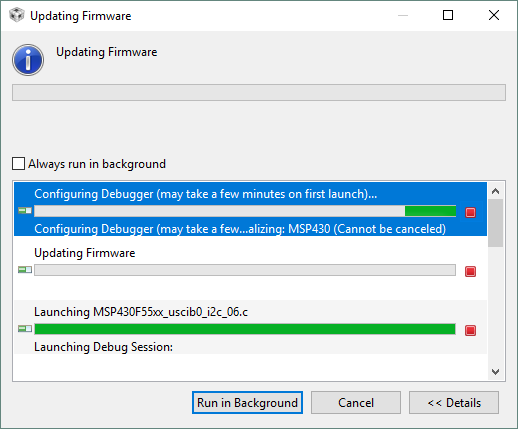
  • I also tried using my MSP-FET and it tried to upgrade and freezed as well. See attached, yikes! What to do? :(

    *My MSP-FET430UIF works fine though, using now...!

  • Hello Justin,

    Thank you for your post. We're looking into your issue and may have some follow-up questions to help nail down the cause of this issue.

    Regards,

    James

    MSP Customer Applications
  • Thanks James, appreciated! I have also observed that Grace has disappeared now. Quite strange, not sure why!

  • Hi Justin,

    You mentioned that now the Launchpads and MSP-FET are "bricked". Can  you elaborate on what happens when  you try to use them now?

    1. Are you given any error message? Please copy/paste or screenshot what it says exactly (this could provide a clue)
    2. If you open up the Device Manager in Windows, do you see the Launchpad or MSP-FET enumerating under COM ports anymore? If so what does it say (again a picture might be helpful here if possible)
    3. When you plug the MSP-FET into the PC, what do the LEDs do - what is the sequence of blinking/on/off of the red & green LEDs?
    4. Are you able to use latest version of MSP430-Flasher with the same affected tools and does it show a similar issue, or work?

    These are all questions to try to better understand the exact status of the MSP-FET and the Launchpads. That will hopefully provide a clue to what happened and how to resolve the issue.

    Regards,

    Katie

  • Hey Katie,

     Thanks for the help, I ran through your questions this morning -

    1. No error messages!
    2. None of the devices with failed update attempts appear in Device Manager
      1. See attached (connection results.txt) for details on all devices
      2. All failed devices do appear, sniffed them out using USBDeview (see attached)

    3. Just a single Green LED on!
    4. Can you use MSP-Flasher with the Launchpads?

    Let me know your thoughts here, I can run any tests or ideas needed. Also to note, I have the TM4C, CC2650 & CC3200 LP's and the CC-Debugger also if needed.

    ---

    @brief 		Device Inspection on connection to PC
    @auth		Justin
    @date 		8/8/17
    
    
    @section 	Procedure (using USBDeview & Dev Mgr)
    	- Unplug all TI HW from PC (e.g. Launchpads & FETs)
    	- Cold PC Boot
    	- Open Device Manager & USBDeview
    
    
    @section 	Results
    	//Working Devices (no update attempted) - Device Manager
    	- MSP-FET430UIF
    		Ports->MSP-FET430UIF - CDC (COM19)
    	- 55299-LP #4
    		Ports->MSP Application UART1 (COM50)
    		Ports->MSP Debug Interface (COM49)
    	- CC2650 LP
    		Ports->XDS110 Class Appl/Usr UART (COM7)
    		Ports->XDS110 Class Aux Data Port (COM6)
    
    	(bricked devices) - USBDeview
    	- MSP-FET
    		Port_#0002.Hub_#0008	
    		USB Input Device	
    		HID (Human Interface Device)	
    	- 55299-LP #1
    		Port_#0002.Hub_#0011	
    		USB Input Device	
    		HID (Human Interface Device)
    	- 55299-LP #2
    		Port_#0002.Hub_#0011	
    		USB Input Device	
    		HID (Human Interface Device)
    	- 55299-LP #3
    		Port_#0002.Hub_#0011	
    		USB Input Device	
    		HID (Human Interface Device)	
    

  • Hi Justin,

    1. When you try to program using the bricked MSP-FET or Launchpads you don't get any message at all in CCS? What specifically happens when you try to use them? There's nothing in the console in CCS?
    4. You should be able to use MSP430-Flasher command line software with launchpads. However, now that you mentioned that the devices are not even enumerating correctly, I am unsure if MSP430-Flasher will recognize them or not. I would still make the attempt though, because looking at your attachment I suspect that the HID device that enumerates is the MSP430 device inside of the MSP-FET coming up in bootloader mode so that it could be recovered.

    I will consult with our tools team about the device enumeration and how to recover.

    Regards,
    Katie
  • Nope, they don't show up when connected or attempted for use!
  • Any updates? These units have been sitting on the floor next to my desk for several days now, quite sad to look at! :(


  • Hi Justin,

    Did you try using the latest version of MSP430-Flasher? The tools team indicated that because your tools are enumerating as HID, they should be detected by the flasher as tools that need an update and it should force an update. Hopefully that would recover your tools. Please share the result and a shot of the console window output from flasher so we can see the version involved, or if there are any issues, etc. https://e2e.ti.com/support/microcontrollers/msp430/f/166/p/604566/2232679#2232679

    Regards,

    Katie

  • Justin,

    Thanks for the 'heads up' - I will not update my 5529s via CCS.

    QUESTION    >>>   what are the 5529LP board revision numbers, please ??   <<<

    Thank you.

  • The are r1.5 & r1.6:

    board 1 - r1.6 #3971528013796
    board 2 - r1.5 #3971426004943
    board 3 - r1.5 #1312005260

  • thank you !
  • Hi Katie,

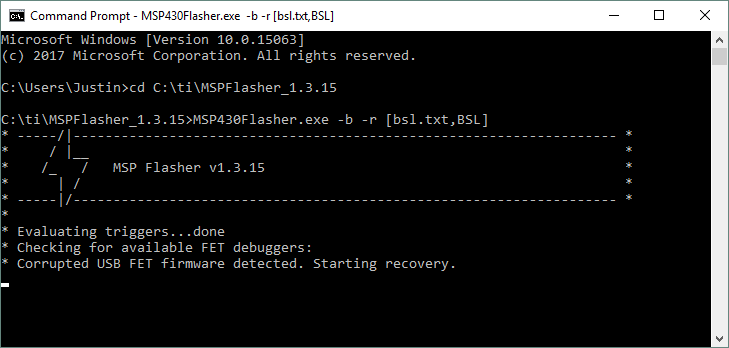
    I just tried your MSP430-Flasher recommendation and used the following procedure:

    1. Re-download & install MSPFlasher (v1.3.15)
    2. Plug in MSP-FET to USB
    3. open Command Prompt
    4. 'MSP430Flasher.exe –b –r [bsl.txt,BSL]'

    Response


    It just hangs here, I have tried this multiple times (3 times). One of the hang attempts took over an hour, thoughts?

  • Here's an idea that might work.
    Thereis a tool I use which, among other things, checks for firmware revision and updates TI tools as needed.
    TOOL --- Lite FET-Pro430 Elprotronic LITE = the free version. - You'll have to search / download / run it, plug your 5529LP; and 'hope' it upgrades your EZfet firmware. Since your 3 LPs are bricked, it would be worth it to try, starting with the rev1.5 LP.

    Good luck,
  • Hi Justin,

    Thanks for your patience here. Since the automatic firmware recovery was not working from Flasher or other tools for you, I have now obtained information on how you could use the MSP-FET to program new firmware into the eZ-FET on the Launchpad.

    See these test points on the MSP-EXP430F5529LP? These are connected to the debug connections on the eZ-FET for programming the MSP430F5528 on the eZ-FET itself.

    Looking at the schematic in the MSP-EXP430F5529LP User's guide www.ti.com/lit/pdf/slau533 go to the page showing the eZ-FET lite emulator schematic and you can find TP110 through TP104. This shows you the labels for what JTAG signals these test points are connected to on the eZ-FET.

    The back of your MSP-FET has a diagram showing which pins on the MSP-FET connector correspond to which signal, so you can then connect the appropriate pins to these test points. It would be like this:

    JTAG Signal MSP-FET pin eZ-FET Test Point
    Vcc 2*** eZ-FET side of JP2 +3V3
    GND 9 TP104
    TEST 8 TP105
    TDO 1 TP106
    TDI 3 TP107
    TMS 5 TP108
    TCK 7 TP109
    RST 11 TP110

    ****If you use the MSP-FET pin 2, then power to the F5528 device on the eZ-FET will be supplied by the MSP-FET for programming. In this case you MUST NOT connect the USB of the Launchpad to avoid voltage conflicts.

    After you have made the connections, use software like Elprotronic Fet-Pro430 Lite software to download this code image into the device:

    @1000
    09 3C 45 3C FF 3F FF 3F FF 3F FF 3F FF 3F AB AA
    54 07 88 40 31 40 00 34 B0 13 BC 17 0C 93 00 24
    B0 13 7C 17 FF 3F 06 00 FF 09 01 A1 01 85 3F 95
    3F 75 08 25 01 15 01 09 01 81 02 85 3F 95 3F 75
    08 25 01 15 01 09 01 91 02 C0 09 02 29 00 01 01
    00 80 32 09 04 00 00 02 03 00 00 00 09 21 01 01
    00 01 22 24 00 07 05 81 03 40 00 01 07 05 01 03
    40 00 01 FF FF FF FF FF FF FF FF FF 12 01 00 02
    00 00 00 08 47 20 03 02 08 01 00 00 00 01 3D 90
    AD DE 04 20 3E 90 EF BE 01 20 03 3C 0C 43 0D 43
    10 01 3C 41 3D 41 10 01 0C 43 B2 D0 03 80 82 01
    B2 40 28 96 00 09 B2 D0 00 01 04 09 A2 B2 02 09
    0A 20 B2 93 FE FF 08 20 3B 40 2C 01 1B 83 FE 23
    B2 B2 08 09 01 24 2C D3 B2 C0 00 01 04 09 82 43
    00 09 10 01 F2 B0 0F 00 84 23 09 20 C2 93 84 23
    03 34 5E 42 20 09 0B 3C 5E 42 22 09 08 3C C2 93
    84 23 03 34 5E 42 C8 23 02 3C 5E 42 88 23 7E F2
    C2 4E 60 24 5E 42 60 24 42 19 4E 10 C2 4E 60 24
    B0 13 D4 17 3C 40 60 24 80 00 5A 17 F2 43 02 24
    C2 43 10 24 C2 43 21 09 10 01 C2 93 82 23 11 20
    5E 42 84 23 7E F0 0F 00 0A 24 5E 93 0E 20 C2 93
    84 23 03 34 F2 D2 C8 23 02 3C F2 D2 88 23 80 00
    2C 11 F2 D2 20 09 F2 D2 22 09 10 01 C2 93 80 23
    04 34 1F 43 D2 D3 3C 09 03 3C 0F 43 D2 C3 3C 09
    5E 42 80 23 7E B0 60 00 8F 20 5D 42 81 23 4D 83
    80 24 5D 83 6B 24 6D 83 67 24 6D 83 45 24 5D 83
    09 24 6D 83 52 24 5D 83 46 24 5D 83 33 24 5D 83
    54 24 7A 3C 1F B3 78 28 5E 42 83 23 5E 83 08 24
    5E 83 0F 24 7E 80 1F 00 1C 24 5E 83 13 24 6C 3C
    C2 43 23 09 F2 40 12 00 02 24 3C 40 7C 10 80 00
    5A 17 C2 43 23 09 F2 40 29 00 02 24 3C 40 4A 10
    80 00 5A 17 F2 40 24 00 02 24 3C 40 26 10 80 00
    5A 17 C2 43 23 09 F2 40 09 00 02 24 3C 40 5C 10
    80 00 5A 17 1F B3 48 28 B0 13 D4 17 C2 43 60 24
    D2 42 01 24 61 24 3A 3C F2 D2 22 09 D2 42 82 23
    3F 09 80 00 2C 11 F2 D2 22 09 D2 42 82 23 00 24
    B0 13 2C 11 D2 43 12 24 10 01 C2 43 23 09 D2 43
    02 24 3C 40 00 24 80 00 5A 17 F2 D2 22 09 D2 42
    84 23 01 24 80 00 2C 11 80 00 3A 11 5E 42 84 23
    7E F0 0F 00 0C 24 5E 93 1B 20 C2 93 84 23 04 34
    F2 F0 D7 00 C8 23 03 3C F2 F0 D7 00 88 23 80 00
    2C 11 7E 90 80 00 03 20 B0 13 D4 17 43 3F 7E 90
    82 00 02 20 80 00 E4 10 F2 D2 20 09 F2 D2 22 09
    10 01 21 83 81 43 00 00 32 C2 03 43 F2 D2 04 02
    E2 D2 04 02 F2 C2 02 02 E2 C2 02 02 B2 40 02 1C
    5A 24 B2 40 1B 24 5C 24 F2 40 A5 00 21 01 5E 42
    20 01 3E F0 03 00 0F 4E 3F D0 00 44 82 4F 24 01
    B0 13 AC 17 4F 4E 8F 10 82 DF 24 01 B0 13 AC 17
    C2 4E 20 01 0F DE 3F D0 00 44 82 4F 26 01 92 B3
    2C 01 FD 2B 92 C3 2C 01 1E 53 2E 92 E4 2B C2 43
    21 01 F2 D0 0C 00 4A 02 92 D3 6C 01 B2 F0 FF 3E
    6C 01 05 3C B2 F0 F6 FF 6E 01 A2 C3 02 01 1E 42
    6E 01 7E B0 09 00 08 24 2F 41 0E 4F 1E 53 81 4E
    00 00 3F 90 E8 03 EE 2B B1 90 E8 03 00 00 07 28
    F2 E2 02 02 E2 E2 02 02 B0 13 9C 17 F5 3F B2 40
    20 00 66 01 B2 40 53 02 68 01 B2 40 00 02 6A 01
    B0 13 9C 17 B2 40 17 01 14 24 82 43 60 01 B2 40
    F3 10 64 01 B2 40 40 00 62 01 B2 40 44 02 68 01
    C2 43 0E 24 C2 43 11 24 B2 40 28 96 00 09 82 43
    08 09 03 43 B2 40 40 18 08 09 B2 40 80 00 04 09
    B0 13 CA 17 C2 43 12 24 B2 B2 08 09 06 28 B0 13
    7A 16 B0 13 7A 14 A2 D3 02 09 21 53 10 01 5E 42
    3E 09 2E B2 02 28 80 00 BC 16 A2 B3 08 09 0C 28
    B0 13 CA 17 B0 13 7A 16 B0 13 7A 14 B2 F0 F9 FF
    08 09 A2 D3 02 09 10 01 A2 B2 08 09 06 28 B0 13
    CA 17 B2 40 04 A5 20 01 10 01 D2 B3 30 09 10 28
    F2 D0 10 00 3C 09 C2 43 23 09 D2 93 10 24 03 20
    B0 13 CA 15 02 3C F2 D2 20 09 D2 C3 30 09 10 01
    4E 93 02 34 80 00 7A 14 3E B0 40 00 0B 28 D2 43
    11 24 F2 D0 10 00 3C 09 F2 C0 40 00 3E 09 82 43
    10 09 10 01 3E B0 20 00 07 28 B0 13 7A 16 F2 F0
    9F 00 3E 09 C2 43 11 24 10 01 C2 43 12 24 C2 43
    11 24 C2 43 00 24 C2 43 01 24 C2 43 3C 09 F2 43
    02 24 F2 43 04 24 C2 43 10 24 7E 40 80 00 C2 4E
    21 09 C2 4E 23 09 F2 40 8C 00 20 09 F2 40 8C 00
    22 09 F2 40 03 00 2F 09 F2 40 03 00 2E 09 C2 4E
    C8 23 F2 40 10 00 C9 23 C2 4E CA 23 C2 4E CE 23
    F2 40 40 00 CF 23 C2 4E 88 23 C2 43 89 23 C2 43
    8A 23 F2 40 40 00 8F 23 F2 40 40 00 3C 09 C2 43
    3E 09 C2 CE 3E 09 10 01 82 43 5E 24 C2 43 8A 23
    B0 13 DE 13 D2 93 12 24 0F 20 F2 D2 02 02 C2 93
    11 24 0A 20 4F 43 C2 93 8A 23 04 34 5F 42 8A 23
    7F F0 7F 00 82 4F 5E 24 82 93 5E 24 E9 27 E2 E2
    02 02 5F 42 01 1C 82 4F 5E 24 1F 42 5A 24 FF 90
    53 00 00 00 0F 20 B2 40 28 96 00 09 82 43 08 09
    82 43 02 09 B2 D0 00 01 6C 01 B2 40 04 A5 20 01
    4C 43 10 01 5C 43 10 01 1B 15 1F 42 5A 24 5B 4F
    03 00 0A 43 5E 4F 01 00 5C 4F 02 00 8C 10 0C DE
    0D 4B 6E 4F 7E 80 11 00 0C 24 7E 80 06 00 0D 24
    6E 82 15 20 2F 52 1E 42 5E 24 2E 82 B0 13 28 16
    12 3C B2 40 A5 A5 16 24 06 3C B2 90 A5 A5 16 24
    04 20 B0 13 DE 17 4C 43 04 3C 6C 42 02 3C 7C 40
    07 00 B0 13 36 17 1A 17 10 01 5E 42 02 24 7E 93
    28 24 7E 90 09 00 03 28 7F 42 7E 82 09 3C 7E 92
    02 2C 4F 4E 07 3C 7F 42 D2 93 0E 24 03 20 4E 43
    5D 43 02 3C 7E 43 4D 43 C2 4D 10 24 C2 4E 02 24
    4F 93 0C 24 3E 40 78 23 4D 4F 1C 42 06 24 EE 4C
    00 00 92 53 06 24 1E 53 7D 53 F7 23 C2 4F 21 09
    10 01 C2 43 10 24 10 01 5B 15 0A 4F 4B 43 08 4C
    09 4D 08 5E 09 63 0D 99 03 28 1C 20 0C 98 1A 2C
    6E 4A B2 90 A5 A5 16 24 0C 20 4B 43 1D 15 0F 16
    CF 4E 00 00 1D 15 0F 16 66 4F 4E 96 03 24 5B 43
    01 3C 6B 42 1A 53 1C 53 0D 63 0D 99 E9 2B 02 20
    0C 98 E6 2B 4C 4B 56 17 10 01 21 83 81 43 00 00
    B2 40 28 96 00 09 92 42 14 24 12 09 B2 40 00 03
    10 09 82 43 14 09 3F 40 4C 01 3F 53 FE 2F 2F 41
    0E 4F 1E 53 81 4E 00 00 3F 90 E9 03 05 2C 82 93
    14 09 EF 23 92 D3 02 09 21 53 10 01 F2 D0 10 00
    3C 09 F2 40 80 00 23 09 03 3C F2 F0 FA 00 3E 09
    C2 43 10 24 82 43 60 24 B0 13 6C 11 34 40 80 00
    82 C4 20 09 82 C4 22 09 E2 C2 3E 09 82 D4 20 09
    82 D4 22 09 D2 B3 3E 09 E8 2F 10 01 7E 40 3F 00
    C2 93 CA 23 15 34 C2 4E 80 1C 3F 40 81 1C 0D 4C
    0D 5E FF 4C 00 00 1F 53 FF 4C 00 00 1F 53 FF 4C
    00 00 1F 53 0C 9D F5 23 F2 40 40 00 CA 23 01 3C
    4E 43 4C 4E 10 01 1F 42 5C 24 FF 40 3B 00 00 00
    1F 42 5C 24 CF 4C 01 00 E2 43 1A 24 3C 40 1A 24
    B0 13 FC 16 4C 93 FA 27 10 01 82 4C 06 24 1E 42
    86 23 5F 42 02 24 0F 9E 04 28 C2 4E 02 24 4E 43
    01 3C 5E 43 C2 4E 0E 24 80 00 CA 15 B2 40 A5 A5
    16 24 B2 40 00 A5 18 24 B0 13 B2 12 B0 13 F8 14
    5C B3 FC 2B B0 13 68 15 F9 3F 03 43 3F 40 3E 0D
    3E 40 03 00 3F 53 3E 63 FD 2F 10 01 B2 B0 10 00
    2C 01 FC 2B B2 C0 10 00 2C 01 10 01 B2 40 80 5A
    5C 01 32 C2 03 43 0C 43 10 01 3F 40 DF 2E 3F 53
    FE 2F 10 01 C2 43 23 09 E2 43 02 24 10 01 1D 15
    10 01 FF FF FF FF FF FF FF FF FF FF FF FF FF FF
    @17F0
    FF FF A8 10 A5 3C 5A C3 FF FF 00 10 
    @17FC
    FF FF FF FF 
    q
    

    You will need to make sure you set the memory options on the Elprotronic software to allow access to the BSL area of the memory. This code image will reprogram the BSL area of the device.

    After this you theoretically should be able to recover using the normal method with the Flasher or CCS or IAR that you had already attempted by entering a debug/programming session and allowing the software to update/recover.

    Please let me know if you run into problems.

    Regards,

    Katie

**Attention** This is a public forum