This thread has been locked.

If you have a related question, please click the "Ask a related question" button in the top right corner. The newly created question will be automatically linked to this question.

CCS/MSP430FR2633: captivate bswp ROM functions not linking correctly

Part Number: MSP430FR2633
Other Parts Discussed in Thread: CAPTIVATE-FR2633, CAPTIVATE-BSWP, , MSP430WARE

Tool/software: Code Composer Studio

Hi,

I have a question about the captivate ROM firmware of a fr2633.

I am trying to get a TI example to work on a captivate-fr2633 board

with a captivate-bswp attached. I am using Linux 64 bit ccs 10.

The software compiles without error's but when run it locks up at

address 0x37ffe. Strangely enough the jump there is from a call

to addres 0x40e2 :

CAPT_calibrateSensor():
150A                PUSHM.W #1,R10
0CCA                MOVA    R12,R10
C3EA 001C           BIC.B   #2,0x001c(R10)
403D 248B           MOV.W   #0x248b,R13
434E                CLR.B   R14
1292 40E0           CALL    &0x40e0 -> komt op adres 0x7ffe terecht
0ACC                MOVA    R10,R12
403D 248B           MOV.W   #0x248b,R13
434E                CLR.B   R14
1292 40E2           CALL    &0x40e2
170A                POPM.W  #1,R10
4130                RET     

When I import the software into the ccs-cloud ide it compiles correctly

and the firmware will run as expected on the fr2633.

I have been searching but unable to find an answer. All the information

I found does not describe how to use the ROM functions, apparently an

assumption is made it should work out of the box.

The code calls the MAP_CAPT_stopTimer function for instance which is

in ROM because in rom_map_captivate.h the following define is selected :

#define MAP_CAPT_stopTimer ROM_CAPT_stopTimer

That should call the function in ROM, right ?

If I understand the define rom_captivate_apitable, in rom_captivate_msp430fr2633_family.h,

the address in ROM is 0x4000 and on.

So at address 0x40e0, to where the original call is made, is code :

0x40e0 7FFF 0000           SUBC.B  @R15+,0x0000(R15)
0x40e4 8000                SUB.W   PC,PC
0x40e6 7FFF 0000           SUBC.B  @R15+,0x0000

Where can I find usefull information about how to setup the calls to ROM ?

Or to even troubleshoot this ?

Roelof

  • Hi Roelof,

    The team member most knowledgeable with the Captivate firmware is out of office this week, but will be back in on Monday, 12/7/20. I will forward the thread to him to help you with the issue. 

  • Hi Roelof,

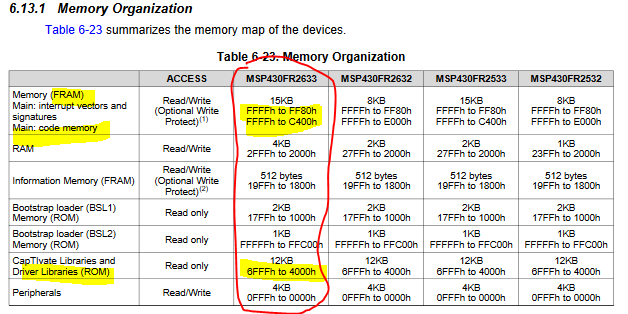
    On the MSP430FR2633, ROM is located from 0x4000 - 0x6FFF, main FRAM is located from 0xC400 - 0xFFFF as shown here.

     0x37FFE would be some where in non-existent memory.

     When the code gets locked up there, can you do a disassembly view to see what the instructions are, else you can open the memory browser in CCS and type in that address.  When I do it on my FR2633 its nothing but 3FFF's.

    You say it works on the cloud version.  Can you create a .txt output from the linker on your Linux machine, then from the cloud version and use something like "beyond compare" to compare the contents and see if there are any differences?

  • Hi Dennis,

    Here is a part of the assembly, I tried to copy with addresses but eventually had to fill in some by hand :

    CAPT_calibrateUI():
    0xd7d2  151A                PUSHM.W #2,R10
    0xd7d4  0CC9                MOVA    R12,R9
        for(ui8SensorID = 0; ui8SensorID < pApp->ui8NrOfSensors; ui8SensorID++)
    0xd7d6  434A                CLR.B   R10
    0xd7d8  3C07                JMP     ($C$L12)
            CAPT_MANAGER_CALIBRATE_SENSOR(pApp->pSensorList[ui8SensorID]);
    $C$L11:
      4A4F                MOV.B   R10,R15
      025F                RLAM.W  #1,R15
      592F                ADD.W   @R9,R15
      4F2C                MOV.W   @R15,R12
      12B0 D76C           CALL    #CAPT_calibrateSensor
        for(ui8SensorID = 0; ui8SensorID < pApp->ui8NrOfSensors; ui8SensorID++)
      535A                INC.B   R10
    $C$L12:
      995A 0009           CMP.B   0x0009(R9),R10
      2BF6                JLO     ($C$L11)
      1719                POPM.W  #2,R10
      4130                RET     


    CAPT_calibrateSensor():
    0xd76c  150A                PUSHM.W #1,R10
    0xd76e  0CCA                MOVA    R12,R10
      C3EA 001C           BIC.B   #2,0x001c(R10)
      403D 248B           MOV.W   #0x248b,R13
      434E                CLR.B   R14
    0xd77a  1292 40E0           CALL    &0x40e0
      0ACC                MOVA    R10,R12
      403D 248B           MOV.W   #0x248b,R13
      434E                CLR.B   R14
      1292 40E2           CALL    &0x40e2
      170A                POPM.W  #1,R10
      4130                RET     


    0x7ffa  3FFF                JMP     (0x7ffa)
    0x7ffc  3FFF                JMP     (0x7ffc)
    0x7ffe  3FFF                JMP     (0x7ffe)
    0x8000  3FFF                JMP     (0x8000)
    0x8002  3FFF                JMP     (0x8002)

    I stepped through the above assembly code with the ctrl-shft-F5 (green arrow) and at address 0xd77a it jumped to 0x7ffe.

    It is not possible to change to compile/linker options in ccs cloud so no text file there. The text file from ccs desktop is lengthy. If you would like to see it let me know.

    I am thinking it is something simple I am missing.

    Roelof

  • Hi Roelof,

    Here is what I would suggest.  Generate an output file that is standard TI .txt format and do a diff on the contents to see if there is a difference between your local CCS output and the cloud.

    Something like this:

  • Hi Dennis,

    I tried your suggestion and found no difference between the two files.

    I also imported a blinky example into he cloud and desktop ide, both debug sessions worked without problems.

    Roelof

  • Ok, so in summary the blinky files work on both platforms (cloud vs desktop) and the Captivate output files are exactly the same.  The Captivate code runs on the cloud version but not on your desktop (Linux 64-bit CCS 10).

    Just to rule out another possibility, remind me, does the code run on your desktop without the debugger?

    This is looking like a may be a difference in the MSP-DEBUG DLL that is used by the cloud vs the CCS desktop.  Let me look into this.

  • Hi Dennis,

    I tried ccs 9.3.0.0012 with a fresh import of the same captivate source from msp430ware-3-80-03-07 and that works. It also runs stand alone without ccs debug.

    Below part is compiled with 9.3.0 and compared to the code from ccs 10 the CALLs do work :

    CAPT_calibrateSensor():
      150A                PUSHM.W #1,R10
      0CCA                MOVA    R12,R10
      C3EA 001C           BIC.B   #2,0x001c(R10)
      403D 248B           MOV.W   #0x248b,R13
      434E                CLR.B   R14
      12B0 C5A2           CALL    #CAPT_calibrateGain
      0ACC                MOVA    R10,R12
      403D 248B           MOV.W   #0x248b,R13
      434E                CLR.B   R14
      12B0 C76A           CALL    #CAPT_calibrateOffset
      170A                POPM.W  #1,R10
      4130                RET     

    Roelof

  • Hi Roelof,

    I had you compare the .txt files generated on both the cloud version of CCS and your local Linux installation and you indicated the output was same.

    Can you try same on version of CCS that causes the issue and the the older 9.3.0.012 to see if any differences?

  • Hi Dennis,

    The two debug text files differ in size, the number of lines, the v9 file is 431 lines long and the v10 file is 376 lines long. The two release text files are v9 431 lines long and v10 349 lines long. And ofcourse there are chunks of hexadecimal data that differ between the two files.

    ccs 9.3.0.00012

    msp430 compiler 18.12.4.tls

    ccs 10.1.0.00010

    msp430 compiler 20.2.1.lts

    I did a file compare and that shows large chunks that are different. If you want the text files please let me know.

    Roelof

  • Hi Roelof,

    Thanks for the extra effort to get this information.  Now that we know what direction to go in, I'll dig deeper and get some help from our compiler team.

    It's the holidays so it may time a little extra time to get you a response.

  • Hi Dennis,

    Did you find anything while digging deeper ?

    Roelof

  • roelof't Hooft said:
    1292 40E0           CALL    &0x40e0 -> komt op adres 0x7ffe terecht

    That uses absolute addressing mode, which means that the 16-bit value at ROM location 0x40e0 in contains the *address* of the function to call, not that the function is at 0x40e0. I.e. ROM location 0x40e0 contains a function-pointer.

    Looking at msp430ware_3_80_07_00/captivate/DeviceConfig/SourceTemplates/MSP430FR26xx_25xx/captivate/BASE/rom_headers/rom_captivate_msp430fr2633_family.h shows:

    //*****************************************************************************
    //
    // CapTIvate ROM API Definitions
    //  - ROM_CAPTIVATE_APITABLE defines the beginning of the ROM section.
    //  - ROM_CAPTIVATETABLE is the ROM defined indirect address of the jump table.
    //  - ROM_CAPTIVATE_FXNTABLE is the direct address of the jump table.
    //  - ROM_CAPTIVATE_JUMPTABLE is the table address to use, and should be 
    //    selected as ROM_CAPTIVATETABLE or ROM_CAPTIVATE_FXNTABLE.
    //
    //*****************************************************************************
    #define ROM_CAPTIVATE_APITABLE  ((uint16_t *)0x4000)
    #define ROM_CAPTIVATE_VERSIONL  (ROM_CAPTIVATE_APITABLE[0])
    #define ROM_CAPTIVATE_VERSIONH  (ROM_CAPTIVATE_APITABLE[1])
    #define ROM_CAPTIVATETABLE      ((uint16_t *)(ROM_CAPTIVATE_APITABLE[2]))
    #define ROM_CAPTIVATE_FXNTABLE  ((uint16_t *)0x4006)
    #define ROM_CAPTIVATE_JUMPTABLE (ROM_CAPTIVATE_FXNTABLE)
    
    <snip>
    
    // ROM Function Definition: CAPT_stopTimer
    #define ROM_CAPT_stopTimer                                                    \
            ((void (*)(void))ROM_CAPTIVATE_JUMPTABLE[19])
    

    From which I expect the function pointer address for ROM_CAPT_stopTimer is at address 0x402C.

    And the highest entry in ROM_CAPTIVATE_JUMPTABLE is for ROM_CAPT_computeIIRFilter in ROM_CAPTIVATE_JUMPTABLE[101] which is a function pointer at address 0x40D0.

    roelof't Hooft said:
    Or to even troubleshoot this ?

    Can you post the Preprocessed source file and other information How to Submit a Compiler Test Case for the source file which has CAPT_calibrateSensor().

    Also, which TI example are you seeing the problem with, and is the example unchanged?

  • Chester Gillon said:

    That uses absolute addressing mode, which means that the 16-bit value at ROM location 0x40e0 in contains the *address* of the function to call, not that the function is at 0x40e0. I.e. ROM location 0x40e0 contains a function-pointer.

    At the time I searched the documentation for information on the assembly instructions and found that it indeed is absolute addressing.

    Chester Gillon said:

    Can you post the Preprocessed source file and other information How to Submit a Compiler Test Case for the source file which has CAPT_calibrateSensor().

    I have put the file on my webserver :

    www.qrp.nl/captivate_bswp_demo-main.pp

    Chester Gillon said:

    Also, which TI example are you seeing the problem with, and is the example unchanged?

    It is the captivate-bwsp-demo from

    rth@castle:~$ ll /media/data/tek/firmware/ti/msp430/msp430ware_3_80_03_07/captivate/example_projects/captivatedesigncenterworkspace/captivate-bswp/demo_src/ccs/
    total 4
    -rwxrwxr-x+ 1 rth domainuser 1906 Nov 25 00:19 captivate-bswp-demo.projectspec

    Roelof

  • roelof't Hooft said:

    I have put the file on my webserver :

    www.qrp.nl/captivate_bswp_demo-main.pp

    I had a look, but it doesn't reveal the source of the problem since is only the pre-processed output for the main.c source file in the CAPTIVATE-BSWP-Demo, which doesn't make any calls to ROM functions.

    I don't have msp430ware_3_80_03_07 installed at the moment, but looking at the later msp430ware_3_80_13_03 the CAPT_calibrateSensor function is calling other functions in FRAM, not ROM. The CAPT_calibrateSensor appears to be supplied only as a pre-compiled object and I just disassembled captivate_fr2633_family.lib to look at what the function was doing.

    Are you able to attach your complete non-working project?

  • Hi Roelof,

    I'm not making any progress on this issue.  Are you still having problems or have discovered anything since our last conversation?

  • Hello,

     figured out how to resolve this issue in the following thread.

    MSP430FR2633: ROM lib

    Regards,

    James

  • Hi James,

    Ok, sounds like you are moving forward.

**Attention** This is a public forum