A related question is a question created from another question. When the related question is created, it will be automatically linked to the original question.
If you have a related question, please click the "Ask a related question" button in the top right corner. The newly created question will be automatically linked to this question.
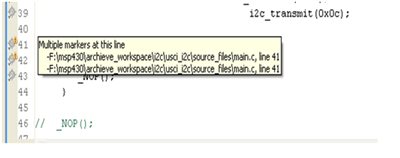
It tells you that there are multiple errors/warnings/things basically markers at this line. For a more detailed report of what's going wrong at that line have a look at the "Problems" Tab in your Eclipse view, or if it isn't there activate it in the Window menu.
The editor (basicall an all-purpose editor) tells you that two external modules of the IDE have told it to set a marker on this line. Unfortunately, these modules didn't include information about what this marker means. The editor is just telling you that 'someone' has instructed it to place a marker on this line.
Possible sources are:
Compiler and compiler errors/warnings global search results global bookmarks/breakpoints/whatever.
The yellow exclamation mark seems to indicate a compiler warning, while the other icon seems to indicate a (verified) breakpoint. Hence two markers. (this info doesn't pop up if there is only one marker, but with more than one marker/icon, you might be unable to see and interpret them all)
Hmm, the markers are then probably generated by a module which gives no good indication of what's happening. For example a set breakpoint shows up like in your screenshot, it tells you the file and the line but not that there is actually a breakpoint.
If you add something like: // TODO: change something to the end of a line with a breakpoint, the you will get multiple markers and the tooltip will show you the TODO marker and the breakpoint marker (cryptic one).
As you only have two times this cryptic Filename + Line number, I actually can't tell you whats happening there.
I think I'll report this in the Code Composer Studio forum and maybe I can convince them to change the generated markers to be more informative (like telling Breakpoint in: ...).
Actually I forgot the Markers view, go to Window -> Show View -> Others... and then select the Markers view. This should tell you all the markers and is sorted by categories.
maybe I can convince them to change the generated markers to be more informative
Indeed. Filename and line number are not only not tellign you what this marker is, they are also superfluous, as you see this tooltip only in exactly this file on exactly this line. It's like a writing on the wall that reads 'you are here' without the map with the big red dot.