This thread has been locked.

If you have a related question, please click the "Ask a related question" button in the top right corner. The newly created question will be automatically linked to this question.

How to set PWM signal

Other Parts Discussed in Thread: MSP430G2553

Hello,

Im a new to this MCU

i got a question,

can i get PWM signal when i just applied MCU voltage?

Im try this but my output just going low voltage,

can anyone help me?

  • Hugo,

    welcome to the MSP family!

    You should at least write the type of processor you are working with. TI provides lots of code examples you can start with. Here are the code examples for the popular MSP430G2553 which is inlcuded in the MSP-EXP430G2 LaunchPad:

    Look at the examples for the timer module. This one is a suitable candidate for you:

    • msp430g2xx3_ta_19.c                        Timer_A, PWM TA1, Up/Down Mode, DCO SMCLK

    Here is the source code that is shown in the above mentioned axample:

    //******************************************************************************
    //  MSP430G2xx3 Demo - Timer_A, PWM TA1-2, Up Mode, DCO SMCLK
    //
    //  Description: This program generates one PWM output on P1.2 using
    //  Timer_A configured for up mode. The value in CCR0, 512-1, defines the PWM
    //  period and the value in CCR1 the PWM duty cycles.
    //  A 75% duty cycle on P1.2.
    //  ACLK = na, SMCLK = MCLK = TACLK = default DCO
    //
    //               MSP430G2xx3
    //            -----------------
    //        /|\|              XIN|-
    //         | |                 |
    //         --|RST          XOUT|-
    //           |                 |
    //           |         P1.2/TA1|--> CCR1 - 75% PWM
    //
    //  D. Dang
    //  Texas Instruments, Inc
    //  December 2010
    //   Built with CCS Version 4.2.0 and IAR Embedded Workbench Version: 5.10
    //******************************************************************************
    
    #include <msp430.h>
    
    int main(void)
    {
      WDTCTL = WDTPW + WDTHOLD;                 // Stop WDT
      P1DIR |= 0x0C;                            // P1.2 and P1.3 output
      P1SEL |= 0x0C;                            // P1.2 and P1.3 TA1/2 options
      CCR0 = 512-1;                             // PWM Period
      CCTL1 = OUTMOD_7;                         // CCR1 reset/set
      CCR1 = 384;                               // CCR1 PWM duty cycle
      TACTL = TASSEL_2 + MC_1;                  // SMCLK, up mode
    
      __bis_SR_register(CPUOFF);                // Enter LPM0
    }

    Not much code at all. And you will get a nice hardware PWM from it.

    Dennis

  • Hi, Dennis,

    Thanks for your reply,
    How do you know that Im use MSP430G2553?, LOL
    I still have 2 questions,

    First,
    P1DIR |= 0x0C; // P1.2 and P1.3 output
    P1SEL |= 0x0C; // P1.2 and P1.3 TA1/2 options
    This means the PWM signals out from P1.2 & P1.3 ,right?

    Second,
    Do I need pull high resistor to measure this signal?Bcz i use probe to measure P1.2 and P1.3
    only get some noise around 50~100mV,

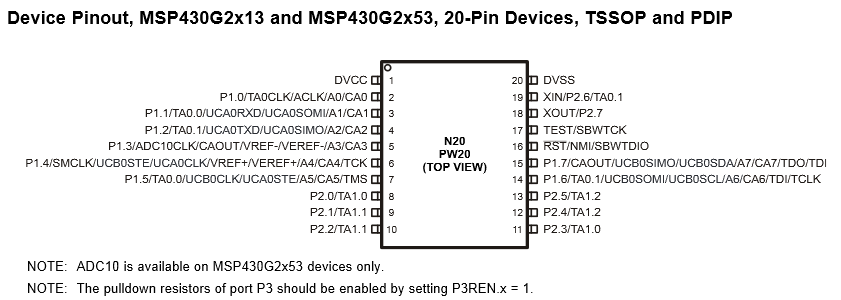
    BTW, where can i find guide of pinout define?
  • Hi, Dennis,

    Thanks for your reply,
    How do you know that Im use MSP430G2553?, LOL
    I still have 2 questions,

    First,
    P1DIR |= 0x0C; // P1.2 and P1.3 output
    P1SEL |= 0x0C; // P1.2 and P1.3 TA1/2 options
    This means the PWM signals out from P1.2 & P1.3 ,right?

    Second,
    Do I need pull high resistor to measure this signal?Bcz i use probe to measure P1.2 and P1.3
    only get some noise around 50~100mV,

    BTW, where can i find guide of pinout define?
  • This was just a guess since it is true in most cases when someone starts with the MSP430 controllers.

    The pinout is given in the datasheet which can be found on the product page of the MSP430G2553:

    The datasheet can be found here:

    On page 3 there is the pinout:

    Why the example uses P1.2 and P1.3 I don't know - only P1.2 is needed, so

    P1DIR |= 0x04; // P1.2 output
    P1SEL |= 0x04; // P1.2 special function: timer

    would be enough. The PWM is then measured at pin 4 of the MSP. This pin has push-pull-function, so no need for a resistor, no. Do you have your noise without having loaded a program onto the device? If yes, then this is normal because the pins are high impedance inputs after startup. In this case you measure the the electromagnetical crap that is surrounding you. These are random numbers. Once the pin is configured to output the PWM, it will have defined potentials.

    Dennis

  • Hugo:

    You should also check out http://processors.wiki.ti.com/index.php/Getting_Started_with_the_MSP430_LaunchPad_Workshop, which is an excellent intro to the 430s on the Launchpads.

  • Finally, i get PWM signal,

    BTW, the operation frequency is as far as i think
    i think about PWM frequency is

    Internal Frequencies up to 16 MHz -- depend on SPEC
    16Mhz / 16000 = 1kHz,
    16000 is where i defined at CCR0 = 16000;
    Am I Right?


    BCZ i want output voltage can meet 1.001V~2.001V,
    Each scale I hope is 0.0005V
    This why I want high resolution for PWM signal
    thanks for your reply! :D
  • For getting an analogue output voltage from the PWM it needs an external low pass filter. How did you derive the 0.0005V? Or is it the value you wish to have?
  • I want to get 1.0005V ,1.001V, 1.0015V by changing PWM signal,
    BTW, i use 10K , 0.68UF and 1K as filter now

    PWM -> R 10K - R 1K
    C 0.68UF
  • You can roughly calculate the output voltage by dividing DVcc of the microcontroller by your CCR0 value multiplied by your CCR1 value. That means:

    1.001V = x * (3.300V / 16.000)
    x = (1.001V * 16.000) / 3.300V
    
    x = 4853(.3333333333)

    If you re-insert this value:

    output_voltage = (3.300V * 4853) / 16.000
    output_voltage = 1.00093125V

    The next step would be 4854:

    output_voltage = (3.300V * 4854) / 16.000
    output_voltage = 1.0011375

    Which is a delta of

    resolution = 1.0011375V - 1.00093125V
    resolution = 0.00020625V

    So adding two to your CCR1 value will rise your output voltage by ~0.4125mV

    Don't take these numbers for granted - just a brief example for calculations on this. It is not that easy to generate precise absolute output voltages (without calibration) when using the PWM out of the controllers supply voltage. This rarely is exactly 3.300V, for example.

    Dennis

  • thanks for your comment,
    i got it,
    but i have some problem about set PWM operation frequency,
    BCZ I think is 16MHz to divine the value I set up to CCR0,
    but after I mesured,
    The PWM operation frequency is 960kHz / CCR0 value,
    Why? and I can not find any value about 960Khz in SPEC.
  • Please post your complete code!

    Dennis
  • #include <msp430.h>
    
    int main(void)
    {
    WDTCTL = WDTPW + WDTHOLD; // Stop WDT
    P1DIR |= 0x04;       // P1.2
    P1SEL |= 0x04;      // P1.2 special function: timer
    CCR0 = 9600-1;     // PWM Period
    CCTL1 = OUTMOD_7;   // CCR1 reset/set
    CCR1 = 5689;                  // CCR1 PWM duty cycle
    TACTL = TASSEL_2 + MC_1;   // SMCLK, up mode
    
    __bis_SR_register(CPUOFF);   // Enter LPM0
    }

    Based on this code,

    My PWM Signal is 100Hz and 59.3% Duty

  • Hugo,

    if you do not set the processor's clock frequency, then it will run at about 1MHz. Imagine it is 960kHz, then setting CCR0 to 9600 will result in 100Hz, so this behaviour is correct. And CCR0's task is not to "divide" the clock frequency - it sets the period of your PWM. For dividing the input frequency of the timer you have the ID-bits in TACTL.

    To set the operating frequency to one of the factory calibrated ones, you have to add two more lines (this is for 1MHz):

    #include "msp430g2553.h"
    
    void main( void )
    {
      WDTCTL   = WDTPW | WDTHOLD;  // Stop WDT
    
      BCSCTL1  = CALBC1_1MHZ;      // Set range to 1MHz
      DCOCTL   = CALDCO_1MHZ;      // Set DCO step and modulation to 1MHz
    
      P1DIR   |= 0x04;             // P1.2
      P1SEL   |= 0x04;             // P1.2 special function: timer
    
      CCR0     = 9600-1;           // PWM Period
      CCTL1    = OUTMOD_7;         // CCR1 reset/set
      CCR1     = 5689;             // CCR1 PWM duty cycle
      TACTL    = TASSEL_2 | MC_1;  // SMCLK, up mode
    
      __bis_SR_register( CPUOFF ); // Enter LPM0
    }

    Fuerthermore there are calibrated values for 8, 12 and 16MHz. To use them simply write:

    BCSCTL1 = CALBC1_8MHZ; // Set range to 8MHz
    DCOCTL  = CALDCO_8MHZ; // Set DCO step and modulation to 8MHz
    
    // OR
    
    BCSCTL1 = CALBC1_12MHZ; // Set range to 12MHz
    DCOCTL  = CALDCO_12MHZ; // Set DCO step and modulation to 12MHz
    
    // OR
    
    BCSCTL1 = CALBC1_16MHZ; // Set range to 16MHz
    DCOCTL  = CALDCO_16MHZ; // Set DCO step and modulation to 16MHz
    

    Here is another example of your program:

    #include "msp430g2553.h"
    
    void main( void )
    {
      WDTCTL   = WDTPW | WDTHOLD;        // Stop WDT
    
      BCSCTL1  = CALBC1_16MHZ;           // Set range to 16MHz
      DCOCTL   = CALDCO_16MHZ;           // Set DCO step and modulation to 16MHz
    
      P1DIR   |= 0x04;                   // P1.2
      P1SEL   |= 0x04;                   // P1.2 special function: timer
    
      CCR0     = 8000 - 1;               // PWM Period
      CCTL1    = OUTMOD_7;               // CCR1 reset/set
      CCR1     = 4800;                   // CCR1 PWM duty cycle
      TACTL    = TASSEL_2 | ID_1 | MC_1; // SMCLK, divide clock by 2, up mode
    
      __bis_SR_register( CPUOFF );       // Enter LPM0
    }

    This will result in a period of 1ms (1kHz) with a duty cycle of 60%, so your output is 600µs high and 400µs low.

    Dennis

  • I got it , thanks a lot!!
  • The higher your CCR0 value (period) the higher is your possible resolution for a PWM. But a rising period time also means a lower frequency which results in the need of a low pass filter with a higher time constant. This means slow response to PWM changes. So there is no perfect solution for every scenario - it always depends on your specific requirements for a given task. Since you want a high CCR0 value for a high resolution, but also want a short period time you should source your timer with a high input clock.
  • yes,

    but i find out that if more lower frequency, you will need more stage RC filter,

    for example ,

    PWM operation at 300Hz,

    If i use one stage RC filter ,

    the output ripple is very high,almost 60mV,

    after use two stage RC filter

    the output voltage ripple become smaller, 

    And it's what the value I want,

    thanks for your help, :D 

**Attention** This is a public forum