This thread has been locked.

If you have a related question, please click the "Ask a related question" button in the top right corner. The newly created question will be automatically linked to this question.

MSP 432 ADC to UART Problems

Other Parts Discussed in Thread: ENERGIA

I have a project where I am trying to take a 5-10 kHz signal, sample it with decent resolution in order to digitally recreate this signal within labview. 

I briefly ran a few of the energia examples and through the com port noticed that I am getting pretty bad data I am assuming because of the 8 bit UART cable and it's slow speed.

How do I overcome this? Is SPI an option? How exactly does that work or can I save this to memory and offload via UART all at once?

I appreciate your help. 

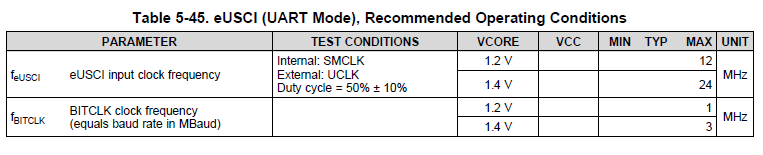
  • Well, when sampling a 10 kHz signal, you will need to sample it with 20 kHz+ samples, so when using the 14 bit ADC of the MSP432, you will have two bytes for each sample. That means, when using the UART with 8N1 format, you have 10 bits per byte, resulting in 20 bits per ADC sample. With a sampling rate of 20 kHz you will need a transmission with 400,000 bits/s. This is possible, but not with the standard RS232 port. The FT232 (UART->USB converter) can handle up to 3 MBaud, for example. Then LaunchPad's application UART will not be sufficient for that.

    Of course you can first collect the values and then output them in total over the UART at a lower baudrate, but do a calculation of the needed memory size. For one second of "recording", you will already need 40,000 bytes.

    SPI is more for transmitting data between ICs on a board, not for a connection to the PC. Furthermore you would need some sort of SPI PC interface.

    Dennis

  • The MSP432 supports 3 MBaud as well:

    But you will need a precise clock source for the UART. The DCO might be too bad for that, so the crystal should be preferred.

  • Dennis,

    Thanks for the response. In reality I am going to need something like 100kHz sampling rate. This would mean roughly 2 million bits/second. Do you think this is possible. I think the way to do this like you say is to save to memory and then transfer to the PC via UART at a lower Baud Rate. I am fairly new to launchpads and am having trouble finding literature on this topic. Do you have any recommendations?

    Thanks
  • That might be a problem since you will have to store 100,000 samples with 2 bytes each, resulting in 200,000 bytes for one second. That is quite much data...

    One information is missing: If you want to record the data, how long do you want to sample it?
  • It does not have to be nearly as long as a second. That is a relativley long time. Is this something you think I can handle with an Energia Sketch?

    This isn't my final piece of code but I wrote this last night. What is your opinion? This would take some time to output as you can see

    /*Sampling for 10kHz Signal

    Save Data to Array and Output via UART*/
    int adc[80];
    int y = 0; //Initialize Array Counter
    int voltage;

    void setup()
    {
    Serial.begin(9600); //Set Baud Rate for UART
    }

    void loop()
    {
    for(int x = 0; x<80; x++)
    {
    int sensorValue = analogRead(A3);
    adc[y] = sensorValue;
    y++;
    }

    y = 0; //Reset Array Counter

    for(int z = 0; z<80; z++)
    {
    voltage = adc[y];
    Serial.println(voltage);
    delay(50);
    y++;
    }

    }
  • Will,

    to be honest: I have no idea about those functions like Serial.begin( ... ) or analogRead( ... ), so I do not know if they, for example, wait to finish the ADC measurement or if they just start it. Or I do not know what the function Serial.println( ... ) expects as input, but just a few basic comments on your code - I will re-insert it using the syntax-highlighter:

    void loop( void )
    {
      for( int x = 0; x < 80; x++ )
      {
        int sensorValue = analogRead( A3 );
        adc[y] = sensorValue;
        y++;
      }
    
      y = 0; // Reset Array Counter
    
      for( int z = 0; z < 80; z++ )
      {
        voltage = adc[y];
        Serial.println( voltage );
        delay( 50 );
        y++;
      }
    }

    There are just a few unnecessary things in it, but this will not change anything regarding it's functionality:

    void loop( void )
    {
      int x;
      int adc[80];
    
      for( x = 0; x < 80; x++ )
      {
        adc[x] = analogRead( A3 );
      }
    
      for( x = 0; x < 80; x++ )
      {
        Serial.println( adc[x] );
        delay( 50 ); // Necessary because Serial.println( ... ) does not wait for finishing printing?
      }
    }

    Dennis

**Attention** This is a public forum