This thread has been locked.

If you have a related question, please click the "Ask a related question" button in the top right corner. The newly created question will be automatically linked to this question.

MSP430F2418: Programming processor over UART port

Part Number: MSP430F2418
Other Parts Discussed in Thread: MSP-FET, MSP430F2619, UNIFLASH, MSP-EXP430G2ET, MSP430G2231, MSP430F2132, MSP-TS430PW28,

I am trying to load firmware onto a MSP430F2418T over a UART port. I have the BSL Rocket and I have loaded a group of script examples for different MSP430 and MSP432 processors to be used with the BSL Rocket.

I can't seem to find any that are compatible with the 2xx_uart. I have successfully loaded firmware on to a MSP432P401R but this has a provided script for it. 

Are there any examples or workable scripts that function with the MSP430F2418T?

  • Hi, Al,

    From the BSL-Sripter User Guide, it seems there is no MSP430F2x supported. I will double check with tools team to confirm this. 

    Regards, 

    Lixin 

  • You need to use BSLDEMO, not BSL-Scripter.
  • Hi, Al,

    Hug is correct. In the Bootloader (BSL) for MSP low-power microcontrollers, there is one document BSL-Scripter User Guide. In page 3, it is mentioned that "The BSL Scripter does not support the BSL of the MSP430 1xx, 2xx, and 4xx device families. To communicate with these devices, use the BSLDEMO2.exe command line tool found in the Deprecated folder." 

    You can find BSLDEMO2.exe in the folder C:\ti\DEPRECATED after installing the latest BSL scripter BSL-SCRIPTER. You can also find the older version scripter installation file in the link. 

    Hope this can answer your questions. 

    Regards, 

    Lixin 

  • I have taken these step and setup the board according to 

    I still can't get it to function. The board has all the appropriate lights on (Solid Red and Solid Green)

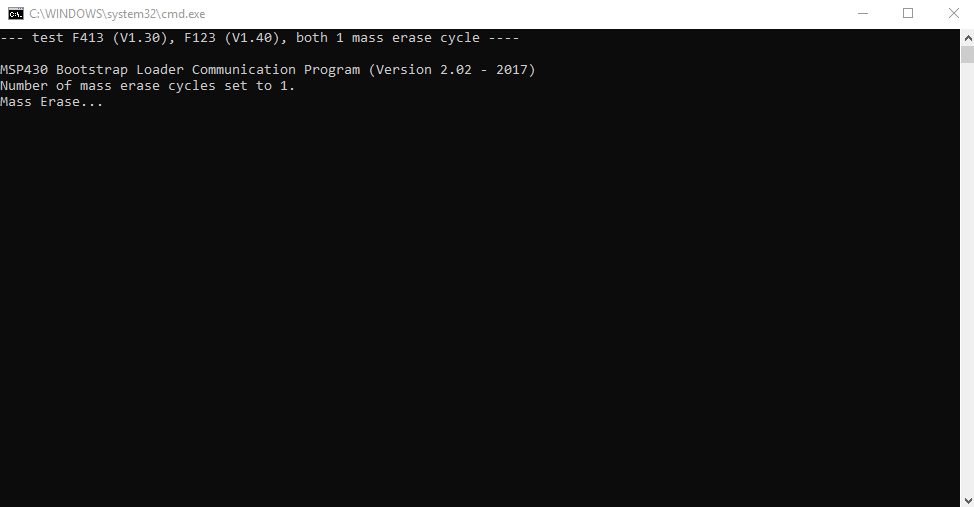
    But it gets stuck at the attached photo. I also can't seem to get anything to transmit over the TX pins when looking at the scope.

    Should I be sticking with the BSL Rocket? Or trying with the MSP-EXO430G2 launch pad. 

    I am also using the BSLDEMO2

  • The source of your setup guide did not display in your post.

    I have never used a Rocket, so I hope Lixin Chen1 will correct any bad advice I may give. But I believe the Rocket is the correct device to use for BSL with the F2418 and BSLDEMO2. In fact I believe it is the only approved device for that purpose. I don't believe a Launchpad can be used for BSL, but you may be able to flash via JTAG with a Launchpad, if the Launchpad will do 4-wire JTAG.

    It appears the F2418 has dedicated JTAG pins, so I think that means you should use the Rocket's TCK line, not the TEST line. And of course make sure your data lines aren't connected backward.

    I believe your scope should show that the TCK and RST pins of the Rocket reproduce Figure 3 of slau319v.pdf.
  • I may be completely wrong about the Rocket.  I always thought it worked with both BSLDEMO and BSL-Scripter.  But I'm no longer sure that's true.  If you do not see some version of the invoke sequence on Reset and TEST or TCK when using BSLDEMO, then the Rocket may not be compatible with BSLDEMO.  If anyone reading this has successfully flashed anything using the combination of BSLDEMO and the Rocket, please let me know.

    If the Rocket doesn't work, you can use a generic USB-to-Serial adapter such as an FT232, CP2102 or CH430, but you will need to use a revised version of BSLDEMO, such as the one found in my Github repo on this subject - look for BSLDEMO-2.01C.exe.

    https://github.com/gbhug5a/MSP430-BSL

    Another option is the kludge described in slaa535a.pdf and the related ZIP file.  I have tested that with a G2553, and it worked.

  • Indeed I was wrong about the Rocket and BSLDEMO for the older parts. The new versions of slau319 and slau550 show the checkmarks for the Rocket under that column have been removed. So that appears to be TI saying that combination doesn't work, at least for invoking by hardware. Presumably you could still use that combination if your firmware invokes BSL.

    And I assume it's possible the MSP-FET checkmark for the older parts will also be removed.
  • Hi, Al,
    I checked the document of MSP430 flash devices bootloader (www.ti.com/.../slau319w.pdf). In the table 1, it shows F1x, F2x, F4x, and G2x are not supported by Rocket. You can try MSP-FET + BSLDEMO. I think it should work for the F2418 programming.

    Regards,
    Lixin
  • Hi, Al,

    I tried the MSP-FET + BSLDEMO to program the MSP430F2619 but failed. I confirmed with tools team both Rocket board and MSP-FET cannot work with BSLDEMO for the F2x devices programming. I have reported to Tools team. They will check how to fix this problem. But this needs time. 

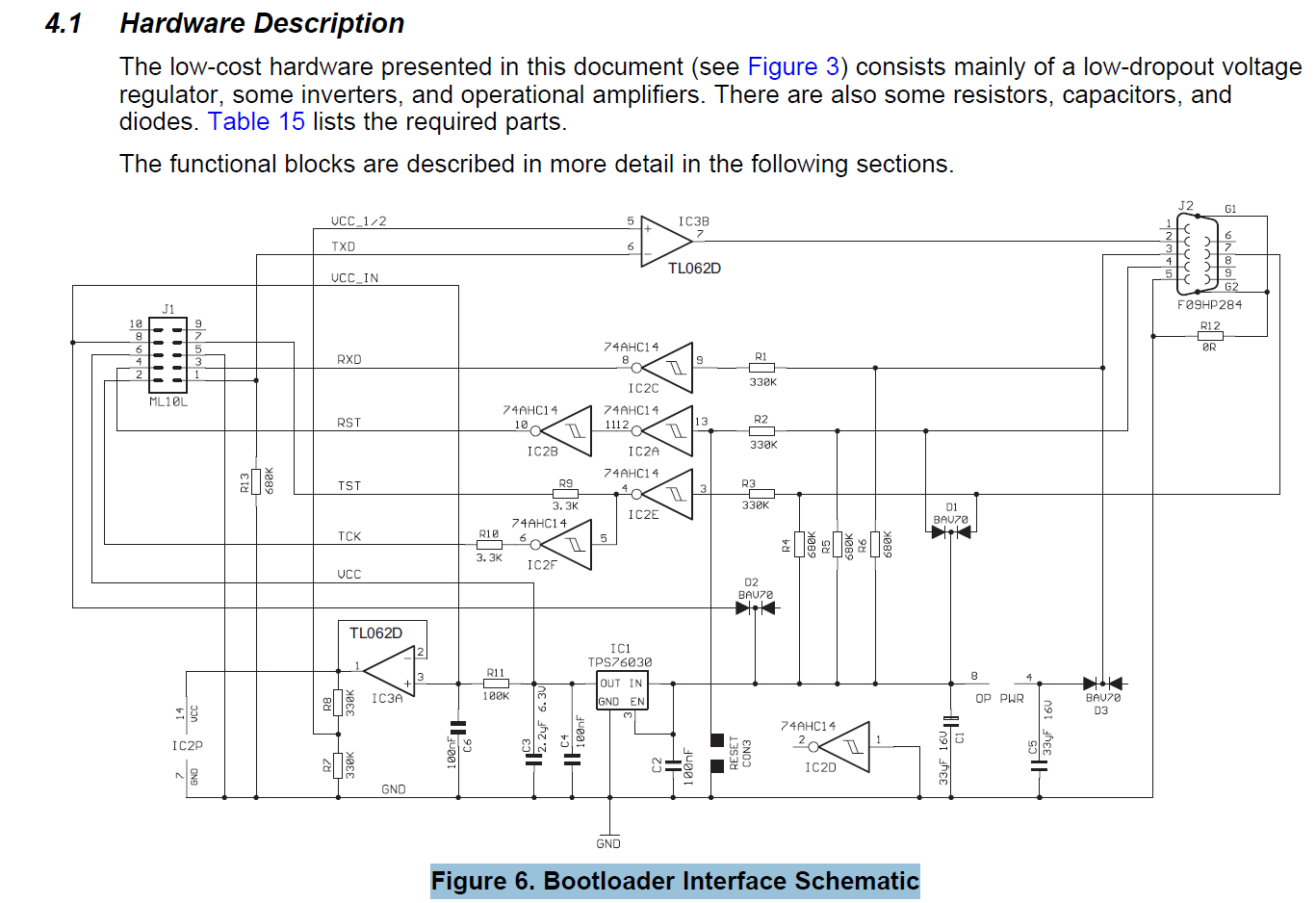
    I got help from another team that he is programming F2x devices with a tool "MSP430 universal BSL interface tool" + BSLDEMO. You can find the "MSP430 universal BSL interface tool" on website http://www.gessler-electronic.de/v2/bsl_eng_c.htm. The tool is mainly based on the HW description inside the BSL users guide and the main purpose is level shifting. You can find the reference schematic for this tool in MSP430 flash devices bootloader (www.ti.com/.../slau319w.pdf) - Figure 6 (Bootloader Interface Schematic) in section 4.1. 

    Hope this information can help you to resolve the programming problem. 

    Regards, 

    Lixin 

  • Since neither the Rocket nor the MSP-FET work with BSLDEMO, it appears there are now two options for programming the older parts using UART BSL other than the Gessler Electronics device, which costs well over 100 Euros..

    The first is the setup described in slaa535a, including the related ZIP file.  It uses the MSP-EXP430G2 Launchpad populated with an MSP430G2231 or similar processor which has been programmed with a file from the ZIP.  The G2231 would need to be programmed with the Flasher or Uniflash software using JTAG.  After connecting everything, the G2231 generates the invoke sequence when you push a button, then you run BSLDEMO.  The G2231 also converts 8N1 to the 8E1 needed by the target chip.  I have tested this with a G2553, and it works. But I don't know if it also works with the new MSP-EXP430G2ET, which has now replaced the older Launchpad.  Perhaps someone from TI could confirm that the new Launchpad works.

    The second option is described in my Github repo:

    https://github.com/gbhug5a/MSP430-BSL

    You would use a generic USB-to-serial adapter, such as the CP2102, FT232 or CH340, which provides DTR, RTS, RxD, TxD, 3.3V and Ground.  And you would need to use my modified version of BSLDEMO, included in the repo as BSLDEMO-2.01C.exe.  The modifications are needed to correct the polarity of DTR and RTS as generated by BSLDEMO.  The -i option should be included for all parts, and the -j option as well for parts with dedicated JTAG pins (parts with TCK pins).  The COM port should be set to 8E1.

    Here are adapter modules using the CP2102 and FT232 which would work, both less than $2.00.  I don't know of one using the CH340 which brings out RTS.

    https://www.ebay.com/itm/182603235304

    https://www.ebay.com/itm/192696691387

  • Hi, Hug,
    Thanks for the help.

    Hi, Al,
    Do you have any other questions about it?

    Regards,
    Lixin
  • Hi, Al,
    Since you have no other questions for this, I would like to close this thread now. You can reply to this thread or have another post if you have more questions.

    Regards,
    Lixin
  • Yes I am still not able to get this to function using the first method you described. All your examples are using Gxx processors the processor I intend to use is a F2418T. The LP has a G2231 and it's showing the same solid green and red lights. I have ordered the serial converters and they should be in soon.
  • Hi, Al,
    Thanks for the update. If you have any progress, please let me know.
    Regards,
    Lixin
  • Hi Al, Hi Lixin,

    Although the BSLDEMO is not supported by the Rocket board, there might be a workaround.

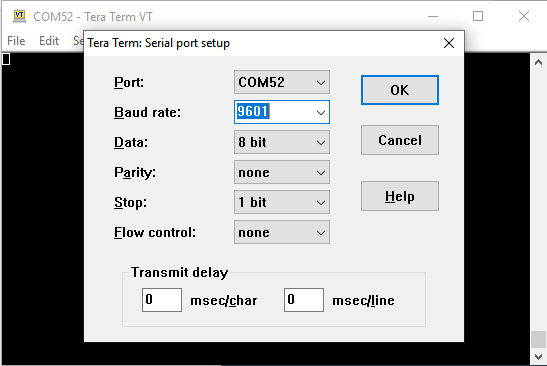
    The Rocket board generates a BSL entry sequence when it gets a baudrate of 9601bps as described here .

    So, if you try to use BSLDEMO without forcing the device to BSL mode, you'll get the following error:

    Now, you can use something like TeraTerm to force BSL. If you have an application running (such as an LED blinking), you should see that it stops running after the baudrate change.

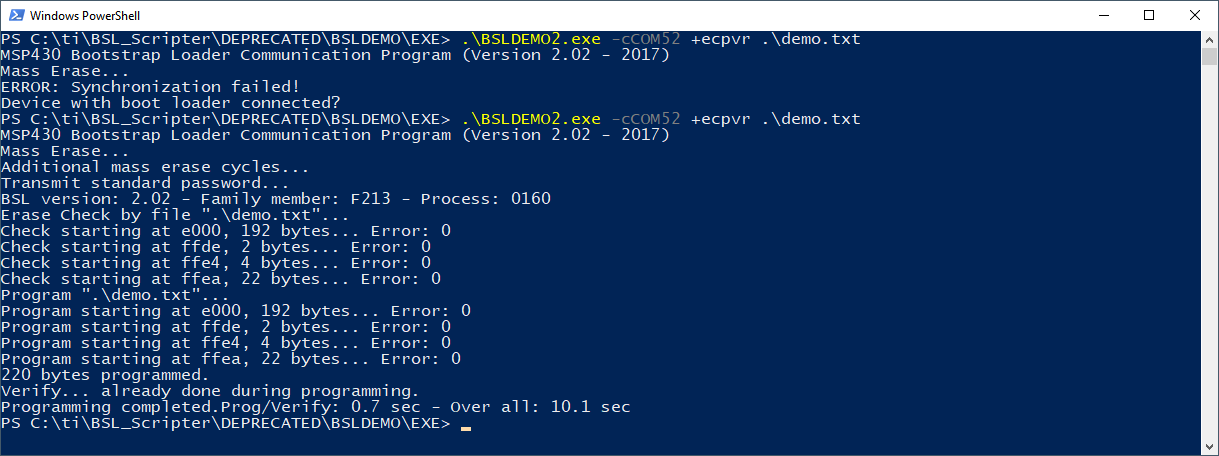
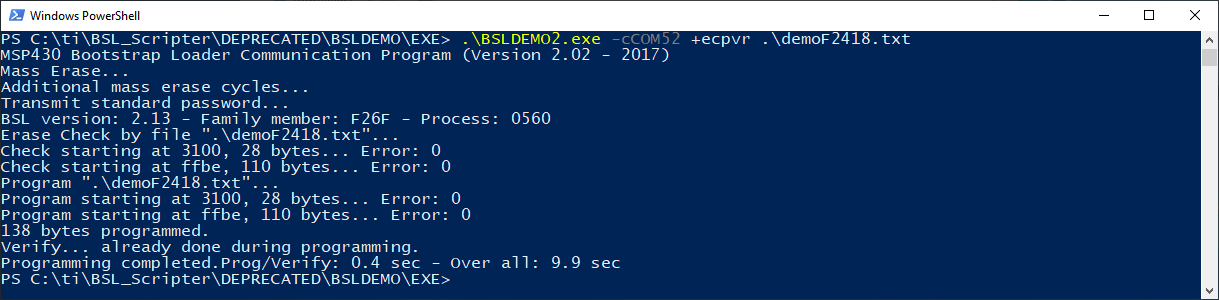
    Disconnect from TeraTerm (otherwise BSLDEMO will fail), and then retry BSLDEMO:

    This procedure worked on my MSP430F2132 using MSP-TS430PW28 with the rocket connected to the BOOTST connector.

    Regards,

    Luis R

  • I also tried it on MSP430F2418 using MSP-TS430PM64 and it worked on my side too.

    Note that the Rocket uses different pins (TCK instead of TEST) to generate the entry sequence. I used the BOOTST connector with R6 and R7 on.

    Regards,

    Luis R

**Attention** This is a public forum